Recommended resources
The freely available resources this lesson will direct you to.
Hello! In our last lesson, we focused on enhancing performance by fine-tuning server-side caching. We saw how Cache-Control, ETag, and Vary: HX-Request work together to reduce redundant data transfer and server load. Today, we'll continue our exploration of performance and user experience by examining a powerful, yet debated, feature of HTMX: hx-boost.
Your learning outcome for this lesson is to use hx-boost to convert standard links into AJAX-driven navigation, and identify scenarios where it should be disabled.
While caching optimizes the transfer of individual fragments, hx-boost addresses the feel of navigating between whole pages. It aims to deliver the smoothness of a Single-Page Application (SPA) without the complexity of a client-side routing library. For someone with your background in React, this will feel like familiar territory, but the underlying hypermedia philosophy makes it a distinct approach with its own set of rules and trade-offs. We'll explore not just how to use it, but also the critical perspectives on when—and if—you should.
What is hx-boost?
At its core, hx-boost is a feature of progressive enhancement. It takes standard, functioning HTML anchors (<a>) and forms (<form>) and "boosts" them into asynchronous, AJAX-powered interactions.
When an element is boosted:
- HTMX intercepts the standard navigation event (a link click or form submission).
- It performs an AJAX request to the URL specified in the
hreforactionattribute. - It receives the full HTML response from the server.
- It then intelligently extracts the content of the
<body>tag from the response and swaps it into the current page's<body>. - Finally, it updates the browser's URL using the History API, so the user's back button and address bar behave as expected.
The primary benefit is speed, both real and perceived. Because the browser doesn't have to re-parse assets in the <head> (like CSS and JavaScript files), navigation feels much faster. This also eliminates the "Flash Of Unstyled Content" (FOUC) that can sometimes occur during a full page load.
The book Htmx Patterns provides an excellent introduction to this concept.
This resource clearly explains the "magic" of hx-boost and its benefits for both links and forms.
Please read the following sections: Start with AJAX-ifying Our Application, which introduces the core idea. Continue with Boosted Links to understand how it works for anchors. Finally, read Boosted Forms to see how the same principle applies to form submissions.
Implementing hx-boost and Selectively Disabling It
One of the most powerful aspects of hx-boost is its implementation through attribute inheritance, a concept similar to how CSS rules cascade. While you can apply hx-boost="true" to a single link, it's far more common to apply it to a parent element, like the <body> tag. This "boosts" every link and form on your entire site by default.
This global approach is convenient, but it immediately raises a critical question: what about links you don't want to boost? Common examples include:
- Links that download a file (e.g., a PDF or CSV).
- Links to external websites.
- Form submissions that shouldn't change the URL (like adding an item to a list on the same page).
The solution is simple: you can override the inherited behavior by adding hx-boost="false" to the specific element.
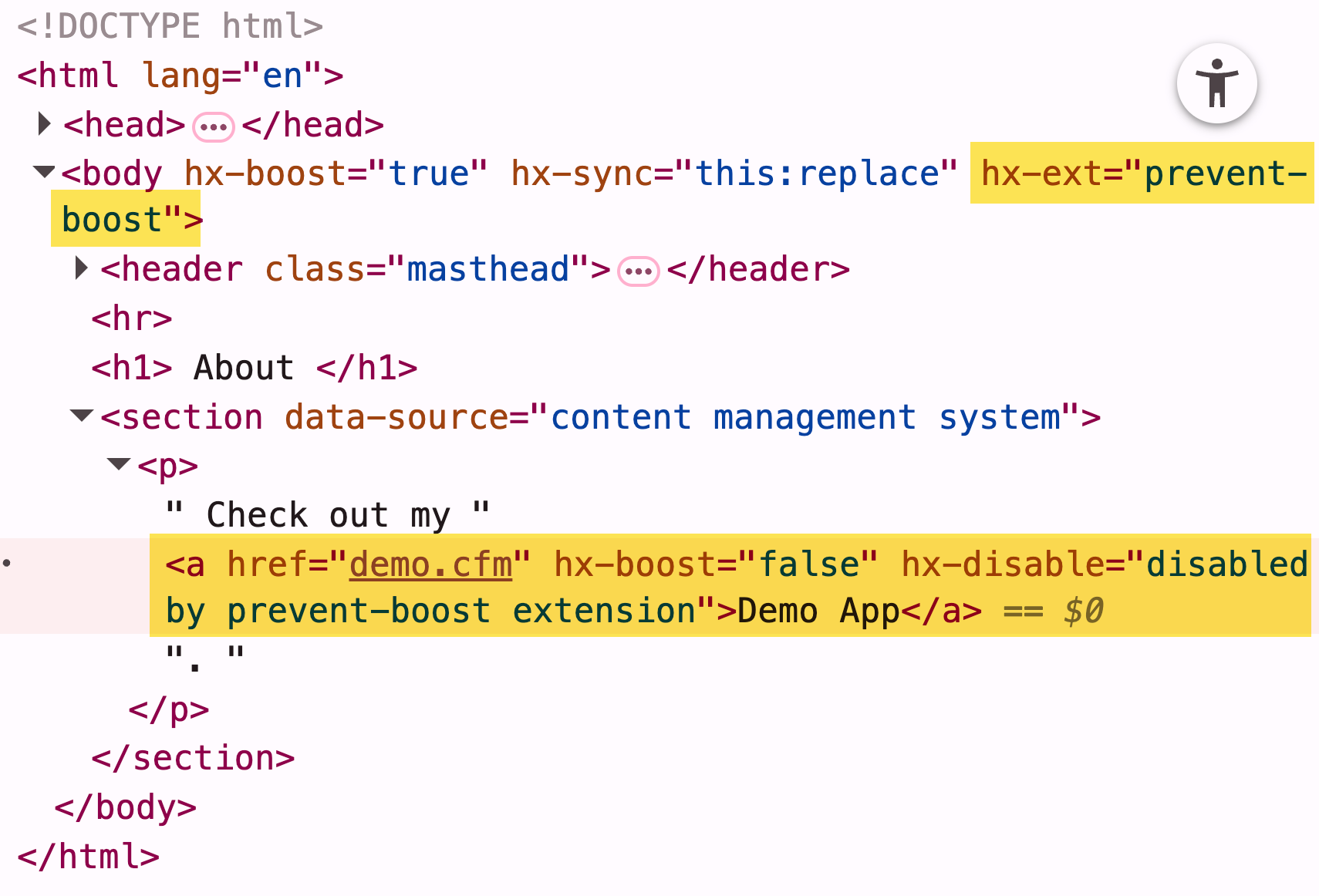
The following reading continues from the previous one and demonstrates this pattern of inheritance and overriding.
This part of the book covers the practical application of hx-boost on a larger scale and how to manage exceptions.
Please read these sections: Begin with Attribute Inheritance to see how hoisting the attribute to a parent works. Continue to the end of the section, paying close attention to the example of disabling boosting for a file download link. Finally, read Adding “hx-boost” to Contact.app, which shows the common pattern of applying the attribute to the body tag.
For a video walkthrough of implementing hx-boost, these two short tutorials from Net Ninja are very clear. The first covers links, and the second covers forms, including the crucial detail of how to prevent a form submission from changing the URL.
Build an "SPA" with HTMX #4 - Using hx-boost for Links
This video, "Build an 'SPA' with HTMX #4 - Using hx-boost for Links," shows how to refactor an application to use hx-boost globally and demonstrates the progressive enhancement aspect.
Watch from the beginning to see how hx-boost simplifies navigation by replacing several specific HTMX attributes. Then, watch the segment from where the presenter disables JavaScript to show that the site remains perfectly functional, falling back to standard navigation.
Build an "SPA" with HTMX #5 - Using hx-boost (for Forms)
The next video in the series, "...Using hx-boost (for Forms)," explains how boosting applies to forms and how to manage the side effects.
The most important part is the discussion on how hx-boost automatically pushes the form's action URL to the browser history. Watch from this explanation of the default behavior. Immediately following that, watch the solution from where hx-push-url="false" is used to override this behavior, a common requirement for forms that update a portion of the current page.
The Critical Perspective: Should You Use hx-boost?
So far, hx-boost seems like a fantastic, almost magical, feature. However, in software engineering, "magic" often comes with hidden costs. For a senior developer, it's essential to understand these trade-offs deeply. Using hx-boost effectively means knowing when not to use it.
The blog post "Less htmx is More" presents a strong, well-reasoned argument against the widespread use of hx-boost. It contends that the problems hx-boost solves are often better addressed by native browser features, and that hx-boost itself introduces the kind of state management complexity that hypermedia applications aim to avoid.
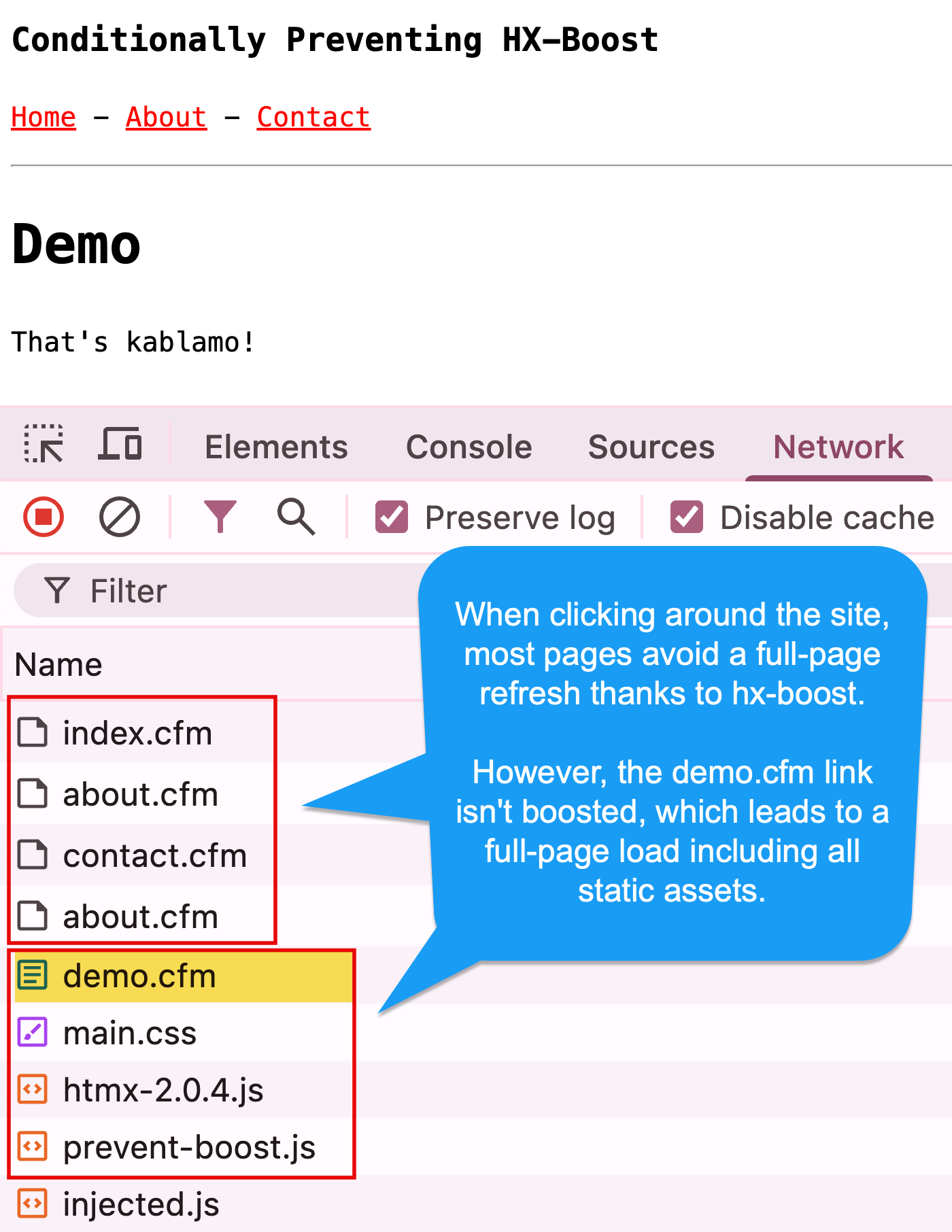
The author's core arguments are:
- History API is Fragile:
hx-boostrelies on the JavaScript History API to create an SPA-like feel. This API is notoriously difficult to manage correctly and can lead to a "long-lived JavaScript environment that is likely to eventually enter a bad state". This is the exact problem that React and other SPA frameworks spend enormous effort trying to solve. - Bypassing Page Lifecycle: A full page load provides a clean slate. Scripts are re-initialized and DOM events like
DOMContentLoadedfire predictably.hx-boostbypasses this, which can cause issues with third-party scripts, analytics, or any custom JS that relies on these lifecycle events. - The Alternatives Are Better: Many of
hx-boost's benefits can be achieved more robustly.- Asset Reloading: Proper cache headers (as we discussed in the last lesson) largely solve the problem of re-downloading CSS and JS.
- Flicker-Free Navigation: Modern browsers have a feature called "paint holding," which automatically prevents the white flash on same-origin navigations.
This perspective is crucial as you migrate your thinking from the React world. You're familiar with the challenges of client-side routing and state. hx-boost can, in some cases, re-introduce a milder form of those same challenges.
This article offers a vital counterpoint to the enthusiastic adoption of hx-boost, arguing for a more deliberate, targeted use of HTMX.
Please read the following sections to understand this critical perspective: First, read the definition to set the stage. Next, read the core critique in What’s wrong with hx-boost?. Then, jump to the section What about the benefits?. This part directly connects to our previous lesson on caching and introduces browser paint holding. Finally, read the section Is there ever a time...? It provides an excellent example of a legitimate, advanced use case (a persistent music player) that justifies the trade-offs.
Conclusion: A Balanced Recommendation
So, where does this leave us? Is hx-boost a useful tool or a footgun? The answer, as is often the case, is that it depends on the context.
hx-boost is an excellent example of a "sharp tool." It provides a lot of power with very little code, but it requires a deep understanding of its implications.
Here is a balanced heuristic for your projects:
-
Default to Targeted Updates: For most CRUD applications, start by using specific HTMX attributes (
hx-get,hx-target,hx-swap) on the elements that need to be dynamic. This approach is more explicit, robust, and easier to debug. It fully embraces the hypermedia model without trying to emulate an SPA. -
Consider
hx-boostfor a Pervasive "App-like" Feel: If your project's primary goal is to feel like a seamless, native-style application where full page reloads are unacceptable,hx-boostis a viable option. Be prepared to rigorously test navigation, back/forward button behavior, and interactions with any other client-side scripts. -
Use
hx-boost="false"Liberally: If you do adopt global boosting, be proactive about identifying and annotating every link and form that should behave normally. This isn't an exception; it's a necessary part of using the feature correctly. -
Recognize Legitimate Advanced Use Cases: The music player example is perfect. If you have a component outside the main content area that needs to persist its state across navigations,
hx-boostis one of the cleanest ways to achieve this within the HTMX paradigm.
Key Takeaways:
hx-boostconverts standard links and forms into AJAX requests, swapping the<body>content to simulate SPA-like navigation.- It offers performance benefits by preventing the re-processing of
<head>assets and eliminating FOUC. - It is a tool of progressive enhancement; the site remains functional with JavaScript disabled.
- It can be applied globally (e.g., on the
<body>tag) and selectively disabled withhx-boost="false". - Crucially,
hx-boosthas significant trade-offs related to History API fragility and bypassing page lifecycle events. Many of its benefits can be achieved with robust caching and modern browser features. - The decision to use
hx-boostshould be a conscious one, weighing the desired UX against the added complexity and potential for subtle bugs.
In our next and final lesson of this module, we will put everything together as we discuss how to deploy the migrated Express + HTMX application to a production-like hosting environment.