Recommended resources
The freely available resources this lesson will direct you to.
Hello. In the previous lesson, you configured Ruff to keep formatting and linting consistent across the incident project. Ruff can spot an unused import or a mutable default, but it does not establish whether a function receives the kind of value it expects. This lesson adds mypy, a static type checker, to that quality gate.
You will run mypy against the installable incident_api package, interpret two realistic errors, and fix the underlying code rather than make the diagnostics disappear. Allow about 40 minutes, including the implementation checkpoint.
What a type-checker result means
Python still checks types at runtime. Adding annotations does not make input() return an integer, nor does mypy execute your incident code. Instead, mypy examines annotated code before it runs and reports operations that may violate the contracts you have declared.
Watch this short demonstration of running mypy, then its introduction to strict checking:
Static type checking with Mypy — Perfect Python
In “Static type checking with Mypy — Perfect Python,” Carberra demonstrates the command-line feedback loop and shows how a project can require annotated functions.
Watch the first run for the difference between checking unannotated and annotated code. Then watch strict configuration, focusing on the pyproject.toml setting and the newly reported missing annotation. We will use the project’s isolated environment rather than install mypy globally.
A successful check is useful only if mypy can see enough types to reason about your code. An unannotated function may conceal a mistake; a value of type Any can conceal one too. Any effectively tells the checker to permit operations whose safety it cannot establish. That makes it different from object, which requires you to inspect or narrow a value before using it in a type-specific way.
The mypy documentation explains these limitations directly:
Common issues and solutions - mypy 1.20.0 documentation
Read the mypy documentation to learn why “no errors” does not always mean “well checked,” and why ignoring a diagnostic has a cost.
In “No errors reported for obviously wrong code,” start with untyped functions. Continue through the example where an untyped parameter introduces Any, stopping after the paragraph about imprecise library stubs. Then, in “Spurious errors and locally silencing the checker,” read from the first # type: ignore example through the note recommending error-specific ignores; that note explains why a blanket ignore is risky. Stop before “Another option is to explicitly annotate values.”
The goal is not to obtain a green check by removing annotations. It is to make the check meaningful and green by aligning annotations, runtime values, and intended behavior.
Make mypy part of the project
Install mypy as a locked development dependency, just as you did with Ruff. If this project uses uv:
uv add --dev mypy
Keep its policy in the existing pyproject.toml. For a project whose oldest supported Python is 3.11, a useful starting point is:
[tool.mypy]
python_version = "3.11"
strict = true
Use your project’s actual minimum supported version if it differs; it should agree with project.requires-python and the Python version targeted by Ruff. strict = true enables a collection of checks, including checks for missing function annotations. It does not prove that every value is precisely typed or that your incident rules are correct.
From the repository root, check the installed package:
uv run mypy -p incident_api
Here, -p asks mypy to check the package and its submodules, not just the package’s __init__.py. This assumes the src-layout project is installed in the environment managed by uv, as established earlier in the course. If you use an activated virtual environment instead, run python -m mypy -p incident_api from that environment.
For more detail on choosing the check target, read the official guidance:
Running mypy and managing imports - mypy 1.19.1 documentation
The mypy documentation distinguishes checking a file, a module, and an entire package. It also explains why an unresolved import weakens checks beyond the import line itself.
In “Specifying code to be checked,” read files versus packages, focusing on what -p includes. In “Missing imports,” read the import warning. Then go to “Missing library stubs or py.typed marker” and read the first remedies: obtaining library-provided hints, installing compatible stubs, or supplying a focused stub. Finally, skim the first troubleshooting steps under “Cannot find implementation or library stub,” ending before “How imports are found.”
That last distinction matters in a CI pipeline. If mypy cannot find your project package or an installed dependency, first check the environment, the import spelling, and how the package was installed. A global ignore_missing_imports = true can make the pipeline green while turning imported values into Any.
Correct the program, not the diagnostic
Consider a small internal incident model. An unresolved incident has no resolution duration yet:
from dataclasses import dataclass


@dataclass(frozen=True)
class Incident:
    resolution_minutes: int | None


def exceeded_slo(incident: Incident, limit_minutes: int) -> bool:
    return incident.resolution_minutes > limit_minutes


def main() -> None:
    limit_minutes = input("SLO minutes: ")
    incident = Incident(resolution_minutes=75)
    print(exceeded_slo(incident, limit_minutes))


if __name__ == "__main__":
    main()
Mypy has two good reasons to object:
resolution_minutesmight beNone, which cannot be compared with an integer.input()returnsstr, even if the operator types digits.exceeded_slo()requires anint.
The supplied diagnostic image illustrates that second problem in another form: a checker traces a string from input() to a value declared as int | None.
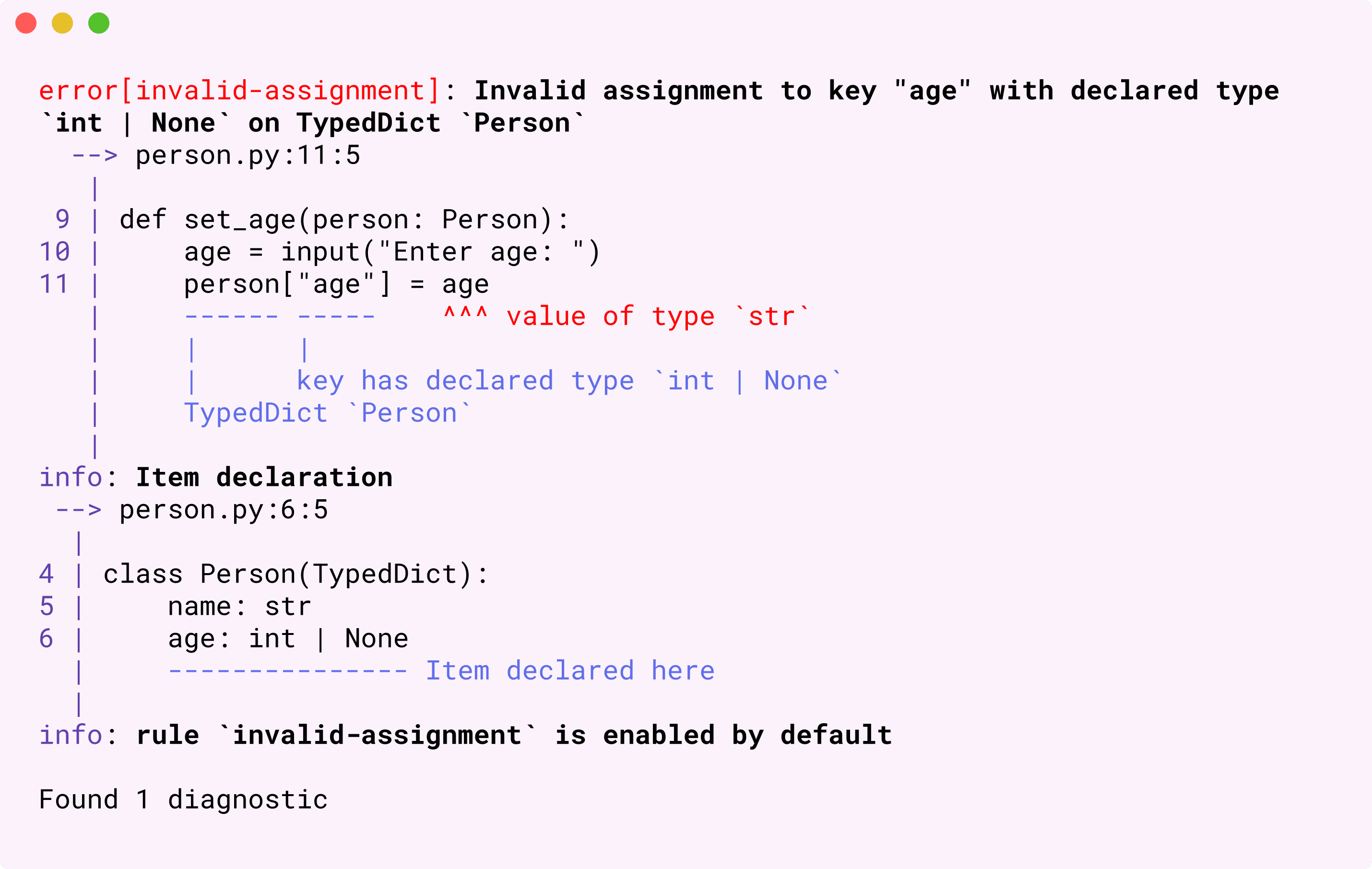
Neither warning should be suppressed. The first asks for an explicit decision about unresolved incidents. The second asks for conversion and validation at the input boundary. Here is one defensible policy: evaluating a resolution SLO for an unresolved incident is invalid, and a non-integer limit is rejected.
from dataclasses import dataclass


@dataclass(frozen=True)
class Incident:
    resolution_minutes: int | None


def exceeded_slo(incident: Incident, limit_minutes: int) -> bool:
    if incident.resolution_minutes is None:
        raise ValueError("Cannot evaluate a resolution SLO for an unresolved incident")
    return incident.resolution_minutes > limit_minutes


def main() -> None:
    raw_limit = input("SLO minutes: ")
    try:
        limit_minutes = int(raw_limit)
    except ValueError as exc:
        raise ValueError("SLO minutes must be an integer") from exc

    incident = Incident(resolution_minutes=75)
    print(exceeded_slo(incident, limit_minutes))


if __name__ == "__main__":
    main()
After the None check, mypy can narrow incident.resolution_minutes to int. After int(raw_limit) succeeds, limit_minutes is an integer. The conversion can fail at runtime, which is why the boundary handles ValueError; static checking does not replace runtime validation.
Another domain policy might return False for an unresolved incident. The checker cannot choose between those policies. Its contribution is to force the case into view so that you choose deliberately. Assigning a made-up duration of zero merely to satisfy mypy would change the meaning of the data.
Investigate surprising errors without hiding them
When a diagnostic seems wrong, first ask what type mypy believes an expression has. A temporary reveal_type() call prints its inferred type during a mypy run:
raw_limit = input("SLO minutes: ")
reveal_type(raw_limit)  # mypy reports str

limit_minutes = int(raw_limit)
reveal_type(limit_minutes)  # mypy reports int
Watch a brief demonstration:
debugging mypy types (beginner - intermediate) anthony explains #299
In “debugging mypy types (beginner - intermediate),” anthonywritescode demonstrates reveal_type() as a way to inspect the checker’s reasoning instead of guessing at an annotation.
Watch type revelation for where the reported type appears during a mypy run. Treat an unimported reveal_type() call as a temporary debugging aid: remove it before running or committing application code.
When resolving a finding, work through the cause in this order:
- Is the runtime value wrong for the intended contract? Convert and validate it, as with
input(). - Can the declared type represent a real state you have not handled? Narrow it with
is Noneorisinstance, then handle that state meaningfully. - Is the annotation itself inaccurate? Correct the annotation only if the broader type truly is the function’s contract; do not widen it to conceal a bug.
- Did an imported value become
Any? Fix package discovery or look for usable library type information before considering a narrow exception.
Avoid cast() as a substitute for validation. For example, casting the string returned by input() to int changes mypy’s belief, not the string at runtime. Likewise, a broad # type: ignore can silence a legitimate None case. If a library limitation eventually requires an exception, keep it local, name the specific mypy error code, and document why the operation is safe despite what the checker can establish.
Implementation checkpoint and key takeaways
Apply the workflow to your incident package:
- Add mypy as a locked development dependency and configure its supported Python version in
pyproject.toml. - Run
uv run mypy -p incident_api. - For each finding, identify the declared type, the inferred type, and the runtime behavior you intend. Fix the code or an inaccurate annotation; do not begin with a suppression.
- Rerun mypy, then run
ruff check .andruff format --check .. Add the non-modifying mypy command to the same CI quality stage.
A type checker is most useful when its coverage remains visible: annotated functions, discoverable imports, and few unexplained Any values. The aim is not silence at any cost, but early, actionable feedback about real mismatches. With formatting, linting, and type checking in place, the next module turns to pytest: you will verify incident behavior with executable tests, starting with a focused unit test.