Recommended resources
The freely available resources this lesson will direct you to.
Hello. An architecture can contain many descriptions of the same enterprise: who performs work, which applications support it, what data those applications use, and what technology runs them. Those descriptions become more useful when everyone means the same thing by each term—and when the connections between them can be followed.
This lesson explains how the TOGAF Content Metamodel provides that structure. The key distinction is between an architecture work product, the things it describes, and the rules for describing those things consistently. That distinction is useful for understanding TOGAF now and for recognizing its terminology in the Foundation exam.
The content framework and the metamodel
Suppose an architecture team produces a document containing an application inventory and several diagrams. The document is a work product; the inventory and diagrams present information; the applications, processes, and data depicted are parts of the architecture being described. These are related, but they are not interchangeable.
The Architecture Content Framework organizes architecture work products and their content. Within it, the Content Metamodel defines the kinds of architectural things that can be described and how those things can relate. Think of the framework as addressing how architecture content is organized for use, and the metamodel as addressing what the descriptions mean and how they fit together.
Read the short passages below before following the worked example.
TOGAF ADM and Architecture Content Framework
Visual Paradigm’s “TOGAF ADM and Architecture Content Framework” introduces the wider content framework and then explains the particular job of the content metamodel.
Under “TOGAF ADM and Content Framework,” begin with the paragraph opening “Architects executing the Architecture Development Method (ADM)” and read the work-products passage. Notice why consistent structure matters when architects produce different outputs. Then go to “TOGAF Content Metamodel.” Read the metamodel explanation, from its opening definition through the example of actors and business services. Focus on the difference between identifying a type of thing and identifying a possible relationship between things.
The metamodel is not itself a finished architecture. It supplies a shared structure that an architecture team can use when creating one.
What the metamodel structures
A useful way to understand a metamodel is through types, properties, and relationships.
An entity type says what kind of thing may be recorded. “Application Component,” “Data Entity,” and “Business Service” are examples. A particular customer portal is not an entity type; it is a particular application component recorded in an architecture. The type makes it possible to describe that portal consistently alongside other applications.
An attribute records a property of an entity. A team might record an application component’s name, description, owner, or lifecycle status. The choice of useful attributes depends on the architecture work being done; these examples are not a claim that every architecture must maintain an identical set of fields.
A relationship records a meaningful connection between entities. For example, an actor may consume a business service. An application may support a business process, and a data entity may be handled by an application. The relationship is more informative than placing those names together on a page: it says how they are connected.
The architecture domains help organize the kinds of entities under discussion:
| Domain | Example of something described |
|---|---|
| Business | A business service used by a support team |
| Data | An order record needed to answer a customer query |
| Application | A portal used to retrieve order information |
| Technology | An infrastructure service on which the portal depends |
The important point is not to memorize this miniature inventory. It is that the metamodel can connect content within and across domains. If a portal is replaced, the architecture should help people identify which processes it supports, which data it handles, and which technology dependencies must be considered.
This is why a metamodel is more than a glossary. A glossary can define “application” and “business service” separately. A metamodel also provides a disciplined way to record particular applications and services, their relevant properties, and their connections.
From structured content to readable work products
Now consider an architecture team documenting customer call handling. It records a customer services representative, a baseline call-handling process, and a proposed target process. It then creates process-flow and use-case diagrams to explain the change. Those diagrams may describe the same representative while showing different aspects of the work.
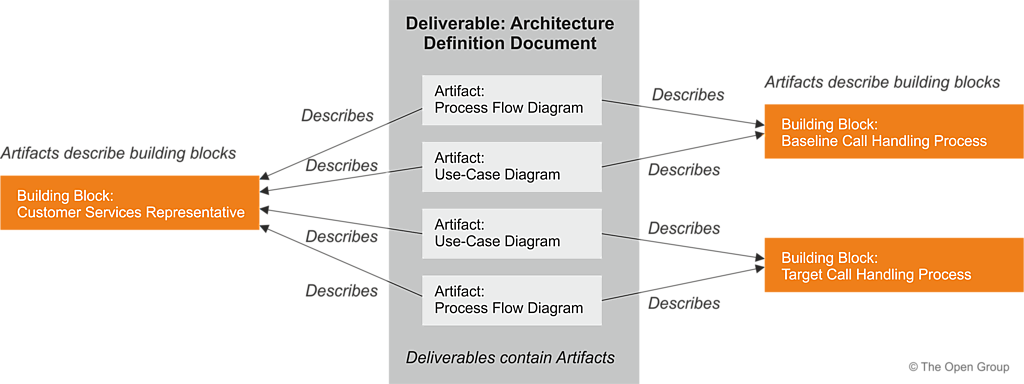
The diagram makes an important separation visible:
- The deliverable is the work product provided for review or use: here, an Architecture Definition Document.
- The artifacts are the representations inside it: here, process-flow and use-case diagrams.
- The building blocks are the architectural elements those artifacts describe.
The Content Metamodel helps keep the descriptions of those elements coherent. If two artifacts refer to the same representative or process, the team should be able to recognize that shared subject rather than treating each drawing as an unrelated invention. It should also be clear whether an element is a process, an application component, a data entity, or something else.
Notice what the metamodel does not imply: a building block is not a diagram simply because a diagram depicts it. Nor does drawing a connection automatically make it a well-defined architectural relationship. The architecture team must be clear about what each element represents and what its connections mean.
Why the structure matters in practice
Consider a small architecture description for checking an order’s status. The team records a support team as an actor, an order-status service as a business service, a status-check process, a customer portal as an application component, and an order record as a data entity. It also records the technology service needed to run the portal.
A diagram might show the whole arrangement, while an inventory might give each component’s owner and current status. These are different presentations of related content. Because the underlying elements have defined types and recorded relationships, the team can ask a precise question: If the customer portal changes, what business activity and data could be affected? The answer can be traced through the recorded connections rather than guessed from a collection of disconnected pictures.
This does not mean that TOGAF supplies a complete, ready-made description of every organization. The metamodel provides a structure to use and adapt; architects still decide what is relevant to record and must keep the content accurate. Its value is consistency and traceability, not automatic correctness.
For Foundation-level understanding, retain this distinction: the Content Framework organizes architecture content and work products; the Content Metamodel gives structure to the architectural elements represented in that content—their types, properties, and relationships.
Key takeaways
The TOGAF Content Metamodel helps architects describe an enterprise using consistently defined kinds of elements and meaningful connections among them. That structure lets different artifacts describe the same architecture coherently and helps people trace the effects of a proposed change across business, data, application, and technology concerns.
Next, you will look more closely at the forms architecture artifacts can take—catalogs, matrices, and diagrams—and what each form is suited to showing.