Recommended resources
The freely available resources this lesson will direct you to.
Hello! Welcome to your first lesson in the "Learn SQL for Product Designers" course.
I'm excited to get started. Given your extensive background in product design and strategy, you're already skilled at thinking about users, their actions, and the features they interact with. This lesson is all about bridging that knowledge with the world of data.
Lesson 1: From Product Concepts to Database Tables
Today's Goal: By the end of this 60-minute lesson, you will be able to map familiar product concepts like 'users' and 'events' to their underlying structure in a database: tables, columns, and rows. This is the foundational step before you can ask meaningful questions with SQL.
We'll cover:
- What a database is and why it's relevant to your work.
- The core components: tables, columns, and rows.
- How these components represent real-world product concepts.
- How different pieces of information are linked together.
Let's begin.
1. What is a Database?
At its core, a database is simply an organized collection of data, stored electronically. For a product designer, it's the source of truth for everything happening in your product: who your users are, what they are clicking, what they are buying, and when they are active.
Most modern applications use a relational database. The "relational" part just means the data is stored in a structured way across multiple tables that are linked to one another. Think of it like a highly organized and interconnected set of spreadsheets.
To get a feel for why this matters in a product role, let's watch a short introductory video.
This video from Kevin Stratvert's YouTube channel provides a great overview of why someone in a product role would learn SQL and introduces the basic concept of a database using a simple, real-world example.
Please watch the introductory section. Pay attention to the example of using data to make a product decision (like moving a button) and the analogy of a cookie company tracking its customers and orders.
As the video mentions, being able to access this data directly allows you to move beyond assumptions and gain concrete insights into user behavior, which is invaluable for informing your design decisions.
2. The Building Blocks: Tables, Columns, and Rows
Now, let's break down the structure of a relational database. Data is organized into three main components:
-
Tables (or Entities): A table represents a single, distinct subject. If you were designing a new e-commerce feature, you would likely have a
userstable, aproductstable, and anorderstable. Each table holds information about one specific type of thing. -
Columns (or Attributes/Fields): Columns are the properties or characteristics of the subject of the table. For a
userstable, the columns would define what information you store about each user, such asuser_id,email_address,signup_date, andcountry. -
Rows (or Records): A row represents a single, individual entry in a table. Each row in the
userstable would correspond to one specific user, with their specificuser_id,email_address, etc., filled in.
This image provides a simple visual of how these concepts fit together.
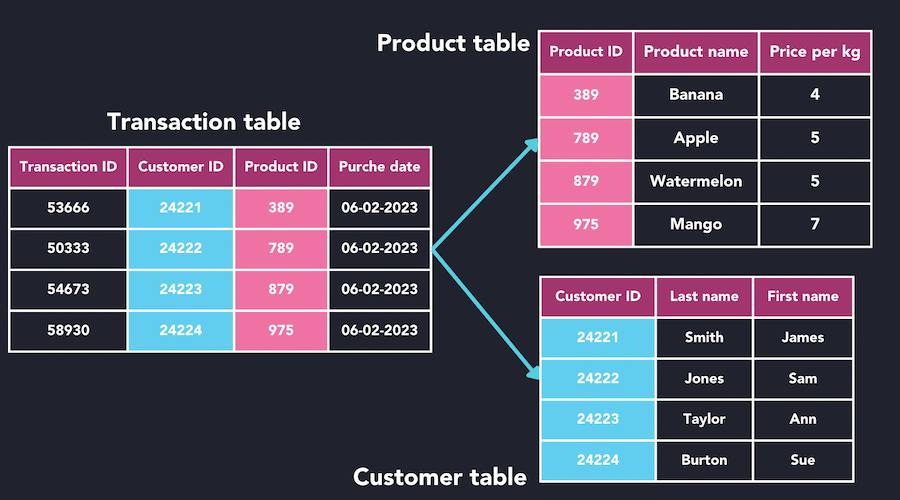
The following video segment provides a more detailed walkthrough of this structure and explains an important principle called "normalization"—the practice of splitting data into separate tables to avoid repetition and keep the data clean and efficient.
Let's return to the 'SQL Tutorial for Beginners' video. This part clearly explains the concepts of tables, columns (fields), and rows (records) and why data is broken up into separate tables.
Watch the database normalization. Focus on how the single, messy file is broken down into Customers, Orders, and Products tables to make the data more manageable.
3. Connecting the Dots: Primary and Foreign Keys
You might be wondering: if we split all our data into separate tables, how do we know which order belongs to which customer? This is where relationships come in, managed by keys.
-
Primary Key (PK): A primary key is a column (or set of columns) that contains a unique identifier for each row in a table. For example, in a
userstable, theuser_idwould be the primary key. No two users can have the sameuser_id. This ensures we can always identify a specific user precisely. -
Foreign Key (FK): A foreign key is a column in one table that refers to the primary key in another table. This is what creates the link or relationship. For example, an
orderstable would have anorder_idas its primary key, but it would also have acustomer_idcolumn. Thiscustomer_idis a foreign key that points to thecustomer_idin thecustomerstable, linking each order to the customer who made it.
This concept is fundamental to how relational databases work. Let's watch one more clip that explains this relationship between tables.
Databases for PMs - Part 1 | Product Management | PM School
This video from PM School by NextLeap is specifically for product managers and clearly explains the role of primary and foreign keys in connecting data across tables.
Starting just past the two-minute mark, watch the section on database keys. Focus on the example of finding all orders placed by a customer named 'John' to understand why these keys are essential for retrieving related information.
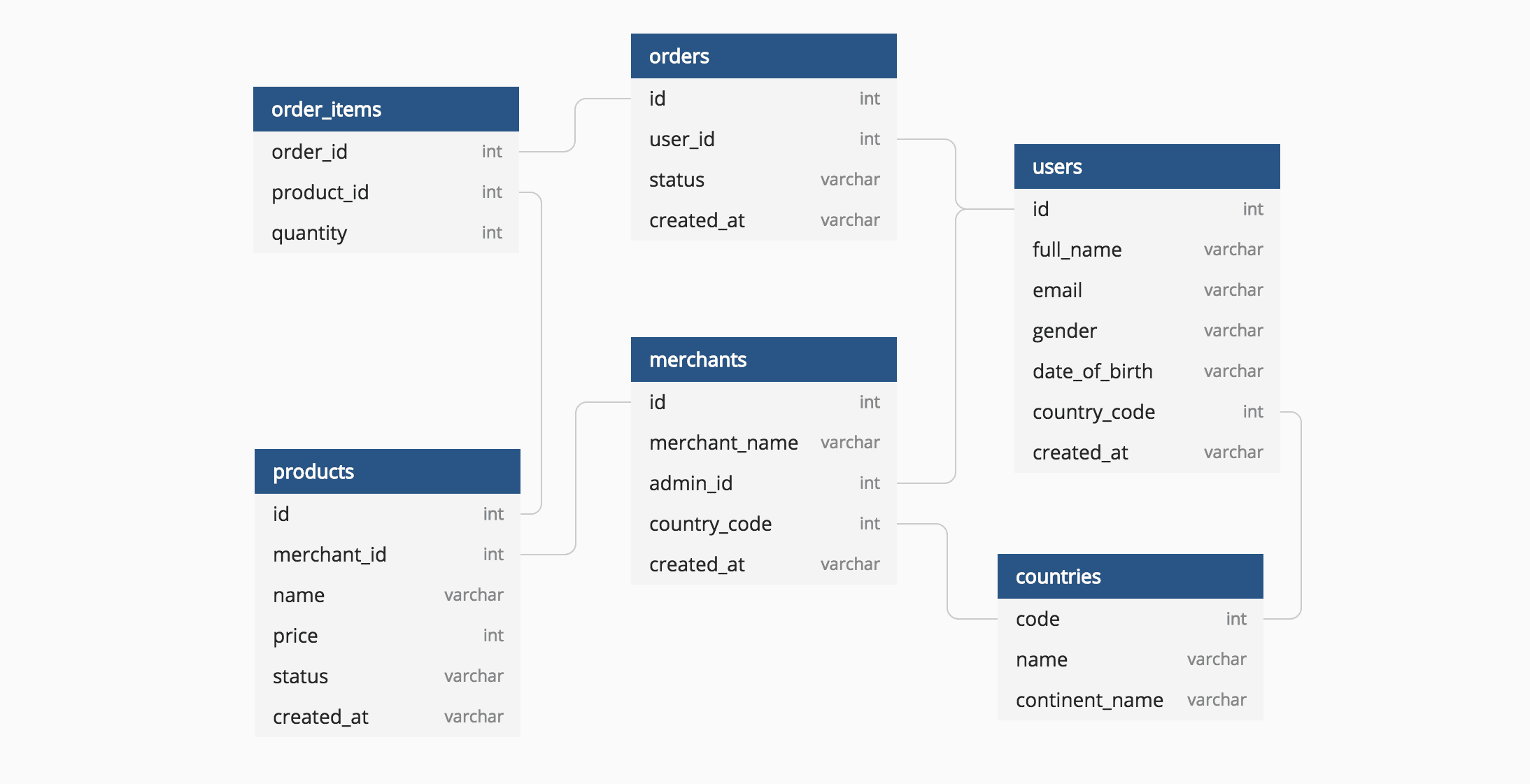
To visualize a more complex, real-world example, product teams often use Entity-Relationship Diagrams (ERDs). These are like blueprints for the database.
4. A Practical Example: Event Management
Let's solidify this by looking at how you might structure a database for an "event management" product. This is a great example of breaking down a complex domain into logical tables.
How to Design a Database for Event Management
This article from GeeksforGeeks, 'How to Design a Database for Event Management', provides a clear, practical breakdown of mapping a concept to its database structure. We will focus on how they define the tables and columns.
Please read the sections 'Entities and Attributes of the Event Management' and the numbered list that follows (from '1. Event table' to '7. Budget table') detailing the database entities. Don't worry about the SQL code or ER Diagram for now. Focus on how concepts like 'Attendee' and 'Schedule' become tables, and what attributes (columns) are chosen to describe them.
As you can see from that example, the process involves:
- Identifying the core subjects (entities): Event, Attendee, Venue, etc. These become your tables.
- Defining their properties (attributes):
EVENT_NAME,ATTENDEE_ID,VENUE_NAME, etc. These become your columns. - Establishing relationships: Noticing that an attendee belongs to an event, so the
Attendeetable needs anEVENT_IDforeign key to link back to theEventtable.
This way of thinking is the first and most critical skill in learning to work with data.
Conclusion
Great work today! We've laid the essential groundwork for the rest of this course.
Key Takeaways:
- Product concepts like users, products, and events are stored in a database.
- A database is organized into tables, where each table represents a single subject (e.g.,
users). - Each table has columns that define its properties (e.g.,
email) and rows that represent individual records (e.g., one specific user). - Tables are linked using primary keys (unique IDs) and foreign keys (references to other tables).
- Understanding this structure is the first step to asking the right questions of your data.
Next Lesson:
In our next session, we'll get hands-on and write our very first SQL query! We'll use the SELECT statement to start retrieving specific columns of data from a single table. Now that you know how the data is organized, you'll learn how to start exploring it.