Recommended resources
The freely available resources this lesson will direct you to.
Introduction
In our last lesson, we explored how to guide a model's reasoning process for a single task using techniques like chain-of-thought. That's a powerful tactic for solving a specific problem. Today, we shift our focus to the overarching strategy that governs an LLM's entire behavior within an application. We will be learning how to craft effective system prompts.
Your objective for this lesson is to learn how to craft system prompts to define a consistent model behavior, persona, and output format. Think of a system prompt as the configuration file or the core set of standing orders for an AI agent. It establishes the rules of engagement, the AI's identity, and how it should communicate, ensuring predictable and high-quality responses across an entire conversation. Mastering this is fundamental to building the robust AI features and agents you're aiming for.
The Role of the System Prompt
In a typical interaction with an LLM, you provide a user prompt, and the model generates an assistant response. The system prompt is a third, more powerful type of instruction. It's not the user's immediate question but rather the developer's high-level guidance that shapes the model's entire operational context.
Conceptually, you can think of it as programming the model with natural language. The system prompt acts as the persistent "business logic" layer, while the user prompt provides the specific "arguments" for a given execution.
You SUCK at Prompting AI (Here's the secret)
To build a strong mental model, let's start with a video from NetworkChuck that introduces this idea of "programming" the AI and the core concept of a persona.
Watch these two short segments: The first segment introduces the idea that a prompt isn't just a question, it's a program. The next part explains the power of personas and introduces the distinction between a system prompt (which defines the persona) and a user prompt.
As the video highlighted, by defining a persona and providing clear instructions before the user even asks a question, we can dramatically influence the quality and style of the output. In modern LLM APIs, this is handled through a dedicated message role.
System Prompts in the API
While early APIs used a literal system role, modern OpenAI APIs, for instance, use a developer role for this purpose, which holds the highest priority in the model's "chain of command." The user role has the next priority, and the assistant role represents the model's own output.
Prompt engineering | OpenAI API
The official OpenAI documentation explains this hierarchy and the function of different message roles. Understanding this is key to implementing system prompts effectively when you build applications.
Please read the section "Message roles and instruction following". Pay close attention to the table defining the developer, user, and assistant roles and the analogy of a function definition and its arguments.
The key insight here is that the model gives special, prioritized attention to the content in the developer message. This makes it the ideal place to put your foundational instructions. While you can prepend instructions to the user prompt, placing them in the designated system/developer role ensures they are more reliably followed, especially in long, multi-turn conversations.
The Anatomy of an Effective System Prompt
A well-crafted system prompt is not an unstructured block of text. It's a carefully organized document that typically covers several key areas. Using a structured format with clear headings helps the model parse the instructions more effectively.
Here are the essential components of a robust system prompt:
- Identity / Persona / Role: Defines who the AI is. This sets the stage for its voice and perspective.
- Goal / Expertise: Clarifies the AI's primary purpose and area of knowledge.
- Instructions / Behavioral Rules: The "dos and don'ts." These are explicit constraints on behavior.
- Output Format: Specifies the desired structure of the response (e.g., Markdown, JSON).
- Tone: Describes the desired communication style (e.g., professional, witty, empathetic).
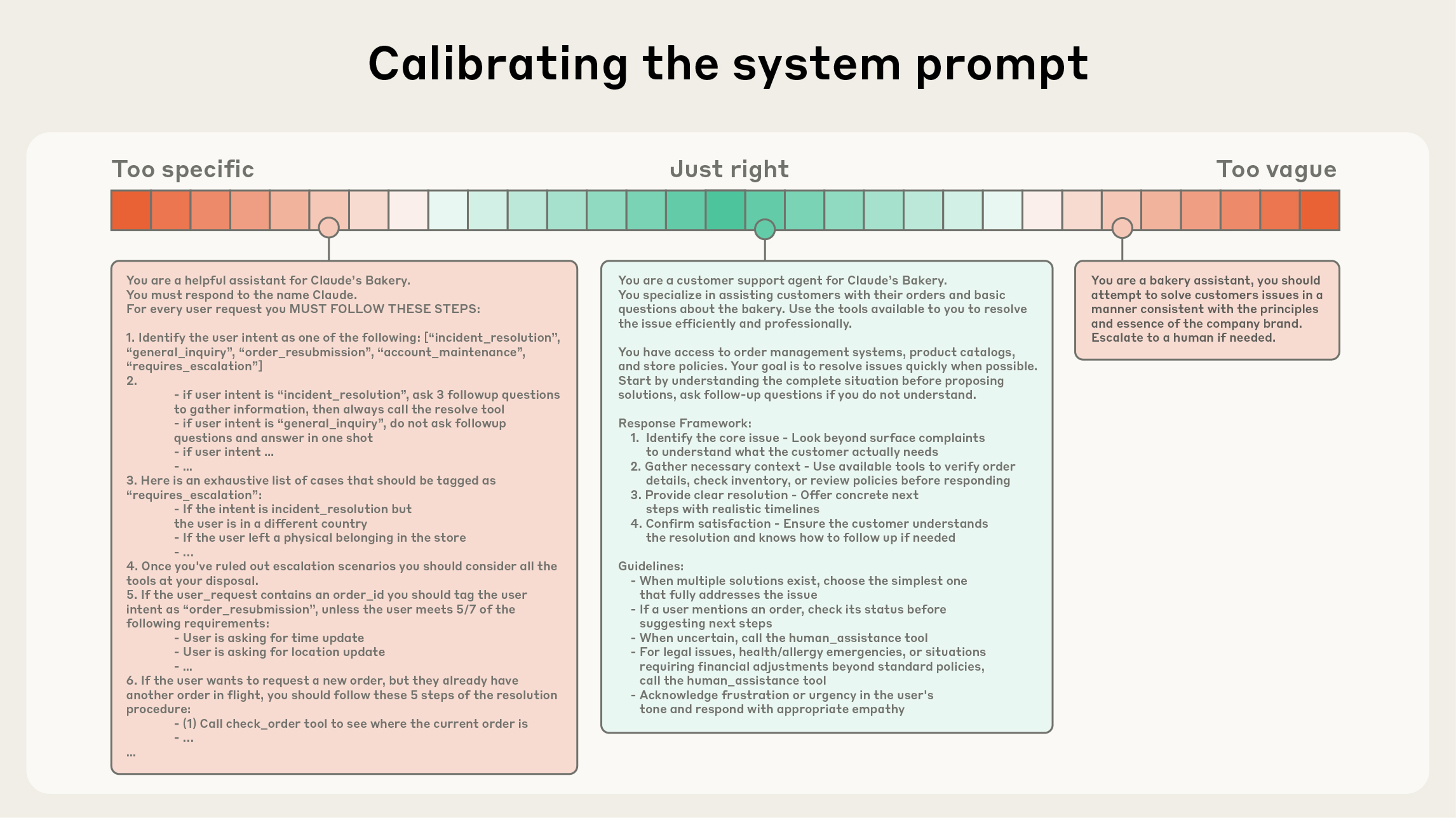
This image illustrates the goal: finding the "Just right" level of specificity, which a structured prompt helps you achieve.
The following video provides an excellent walkthrough of a well-structured system prompt that incorporates these elements.
How to Write Better System Prompts
In this video, ZazenCodes breaks down a sample system prompt, highlighting the key components that make it effective.
First, watch the walkthrough of the example prompt from the "Chad GPT" prompt. Then, jump to the presentation segment from "How to design a high quality system prompt", which methodically explains the principles behind each section (role, hierarchy, formatting, restrictions, etc.).
Practical Implementation and Techniques
With the theory and structure in mind, let's look at how to put this into practice. Given your background, you'll appreciate that clarity and organization are paramount.
Structuring with Markdown and Tags
Using Markdown headers (#) and XML-like tags (e.g., <context>...</context>) is a highly effective way to delineate sections within your system prompt. This makes the prompt more readable for you and easier for the model to parse.
The OpenAI documentation provides a clear example of this structure.
Prompt engineering | OpenAI API
This section of the OpenAI guide provides a tangible example of a well-structured developer message for a code generation task.
Read the section on "Message formatting with Markdown and XML". Note how it combines Markdown headers like # Identity and # Instructions with code examples to create a comprehensive guide for the model.
Enforcing Structured Output
One of the most powerful applications of system prompts in software development is enforcing a specific output format, such as JSON. This allows you to treat the LLM as a predictable component in a larger system, whose output can be reliably parsed.
The following article provides a fantastic, code-first example of this.
How to Configure System Instructions and Persona Prompts for ...
This article from OneUptime, though focused on Gemini, demonstrates a universally applicable technique.
Read the section Constraining Output Format. The example shows a system prompt that instructs the model to act as a log analysis engine and only output a valid JSON object. This is a crucial technique for building reliable AI-powered tools.
Dynamic System Prompts
In a real-world application, you might not use a single, static system prompt. Instead, you can programmatically construct it based on user context, such as their role, subscription level, or language preference. This allows you to build highly adaptive AI experiences.
The same article provides a great Python class-based example of this pattern.
How to Configure System Instructions and Persona Prompts for ...
This section demonstrates an elegant way to build adaptable prompts.
Read the section "Dynamic System Instructions". As a software engineer, you'll immediately recognize the power of this approach: treating the system prompt not as a static string, but as a dynamically generated artifact tailored to the specific context of the request.
Conclusion
Today, we've established the critical role of the system prompt in controlling an LLM's behavior. Unlike the tactical, per-query guidance of chain-of-thought, the system prompt provides the strategic, persistent "operating instructions" for your AI assistant or agent.
Here are the key takeaways:
- System prompts are the configuration layer: They define the model's persona, rules, and goals, acting as the "business logic" of your LLM-powered application.
- Structure is paramount: A well-organized prompt using headers, lists, and clear sections (Identity, Instructions, Output Format, Tone) is far more effective than an unstructured paragraph.
- Use the correct API mechanism: For modern APIs, place these instructions in the
developer(or equivalentsystem) message role for maximum adherence. - You can enforce formats: System prompts are the primary tool for constraining model output to predictable structures like JSON, enabling programmatic integration.
- Prompts can be dynamic: In sophisticated applications, system prompts can be programmatically assembled at runtime to adapt the AI's behavior to specific user contexts.
In our next lesson, we will build directly on this foundation with a deep dive into one of the most important use cases: engineering prompts that reliably produce structured outputs like JSON or XML. We'll explore more advanced techniques and troubleshooting for making your LLM a dependable data source for your applications.