Recommended resources
The freely available resources this lesson will direct you to.
- Design HashMap from Scratch in JAVA | Hashing, Collision Handling, Load Factor & Code Walkthroughwww.youtube.com
- Hashing, Video 6 Hash Table Performance and Resizingwww.youtube.com
- Load Factor and Rehashing - GeeksforGeekswww.geeksforgeeks.org
- CS 312 Lecture 17 Hash tables and amortized analysiswww.cs.cornell.edu
Hello! Welcome back to our module on implementing core data structures.
In the last lesson, we built a functional hash map from scratch using separate chaining. While it works, it has a significant limitation: its capacity is fixed. As we add more items, the chains in each bucket grow longer, and the performance of our get, set, and delete operations degrades from the ideal towards a much slower .
Today, we'll address this by tackling the learning outcome: Extend the hash map to support dynamic resizing based on a load factor, analyzing performance trade-offs.
This is a critical feature for any production-ready hash map. We'll introduce the concept of a load factor to decide when to resize and a process called rehashing to perform the resizing. A key part of this lesson will be analyzing the performance implications, which introduces the important concept of amortized time complexity. Understanding this is vital for building performant systems, much like the QoS and capacity management you've engineered in systems like Rudi at AWS.
1. Why and When to Resize: The Load Factor
A hash table's efficiency comes from keeping the chains in each bucket short. If we have items and buckets, the average chain length is . As grows while stays fixed, this ratio increases, and our operations slow down.
To formalize this, we define the load factor, typically denoted by the Greek letter alpha ():
The load factor is a measure of how "full" the hash table is. To maintain good performance, we resize the table whenever the load factor exceeds a predefined threshold.
Let's watch a short video that introduces this idea and shows why a fixed number of buckets becomes a performance bottleneck.
Hashing, Video 6 Hash Table Performance and Resizing
This video from Josh Hug clearly explains why a fixed number of buckets leads to poor performance as more items are added and introduces the load factor as the key metric for deciding when to resize.
Please watch the first two sections of the video: (00:00 - 02:28): This part explains how, with a fixed number of buckets, the length of the longest list grows linearly with the number of items, making operations slow. (02:28 - 03:40): This segment introduces the solution: increasing the number of buckets over time, using the load factor (N/M) as the trigger.
The strategy is simple: after every insertion, we check if the load factor has surpassed our threshold. A common threshold value, used by languages like Java and Python, is 0.75. If (N / M) > 0.75, we initiate a resize.
2. How to Resize: The Rehashing Process
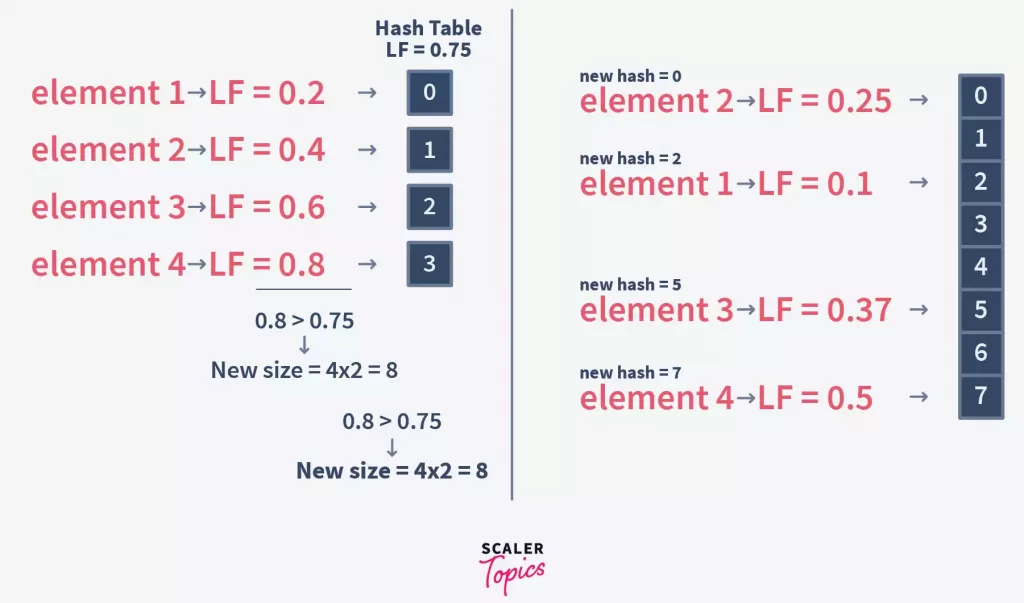
When a resize is triggered, we can't just create a bigger array and copy the old buckets over. Remember that our bucket index calculation depends on the capacity: hash(key) % capacity. If the capacity changes, the bucket index for a key will likely change too.
Therefore, we must perform a rehash:
- Create a new, larger array of buckets. The standard practice is to double the capacity.
- Iterate through every single key-value pair in the old hash table.
- For each pair, calculate its new bucket index using the new, larger capacity.
- Insert the pair into the correct bucket in the new array.
- Once all pairs are moved, the old array is discarded, and the new, larger array becomes our hash table's primary storage.
This image clearly illustrates the process:
The following video provides a detailed walk-through of this rehashing mechanism and introduces the trade-offs of choosing a load factor, which we will explore in depth later.
Design HashMap from Scratch in JAVA | Hashing, Collision Handling, Load Factor & Code Walkthrough
This video by Shubh Patel gives a clear, step-by-step explanation of the rehashing process and why a specific load factor like 0.75 is chosen.
Please watch the segment from 15:54 to 20:33. It explains how the load factor triggers a rehash, the process of doubling the array size, and how elements are redistributed into the new, larger map. This directly visualizes the algorithm we are about to implement.
3. Extending Our Hash Table in Python
Now, let's modify the HashTable class from our previous lesson to incorporate dynamic resizing.
First, we need to track the number of items. We'll add a _size attribute to our __init__ method and a load_factor_threshold. We also need to modify __setitem__ and __delitem__ to update this count.
The core of our change will be a new _resize method and a check within __setitem__.
Here is the complete, updated code.
from collections import deque
from typing import NamedTuple, Any

class Pair(NamedTuple):
    key: Any
    value: Any

class HashTable:
    def __init__(self, capacity: int = 8, load_factor_threshold: float = 0.75):
        if capacity < 1:
            raise ValueError("Capacity must be a positive number")
        self._capacity = capacity
        self._buckets = [deque() for _ in range(capacity)]
        self._size = 0  # Track the number of items
        self.load_factor_threshold = load_factor_threshold

    @property
    def _load_factor(self) -> float:
        """Calculates the current load factor."""
        return self._size / self._capacity

    def _get_bucket_index(self, key: Any) -> int:
        """Calculates the bucket index for a given key."""
        return hash(key) % self._capacity

    def _resize(self):
        """Doubles the capacity and rehashes all items."""
        print(f"Resizing: Load factor {self._load_factor:.2f} > {self.load_factor_threshold}. Doubling capacity to {self._capacity * 2}.")


        # Store old buckets and create a new, larger set of buckets
        old_buckets = self._buckets
        self._capacity *= 2
        self._buckets = [deque() for _ in range(self._capacity)]
        self._size = 0 # Size will be restored as we re-insert


        # Rehash: Iterate through all items in the old buckets and re-insert them
        for bucket in old_buckets:
            for pair in bucket:


                # Use __setitem__ to re-insert, which handles size increment and hashing
                self.__setitem__(pair.key, pair.value)

    def __setitem__(self, key: Any, value: Any):
        """Inserts a key-value pair or updates the value of an existing key."""
        bucket_index = self._get_bucket_index(key)
        bucket = self._buckets[bucket_index]


        # Check if the key already exists to avoid incrementing size on update
        is_update = False
        for i, pair in enumerate(bucket):
            if pair.key == key:
                bucket[i] = Pair(key, value)
                is_update = True
                break

        if not is_update:
            bucket.append(Pair(key, value))
            self._size += 1


            # Check if resizing is needed AFTER a new item is added
            if self._load_factor > self.load_factor_threshold:
                self._resize()

    def __getitem__(self, key: Any) -> Any:
        bucket_index = self._get_bucket_index(key)
        bucket = self._buckets[bucket_index]
        for pair in bucket:
            if pair.key == key:
                return pair.value
        raise KeyError(key)

    def __delitem__(self, key: Any):
        """Removes a key-value pair from the hash table."""
        bucket_index = self._get_bucket_index(key)
        bucket = self._buckets[bucket_index]
        for i, pair in enumerate(bucket):
            if pair.key == key:
                del bucket[i]
                self._size -= 1
                return
        raise KeyError(key)

    def __str__(self):
        pairs = []
        for i, bucket in enumerate(self._buckets):
            if bucket:
                for pair in bucket:
                    pairs.append(f"{repr(pair.key)}: {repr(pair.value)} @ bucket {i}")
        return "{" + ", ".join(pairs) + f"}}, size={self._size}, capacity={self._capacity}"
Key changes in the code:
- We added
_sizeto track the number of elements. __setitem__now increments_sizeonly for new keys. After adding a new key, it checks if_load_factorexceeds theload_factor_threshold.- The new
_resizemethod doubles the capacity, creates a new list of buckets, and importantly, iterates through all pairs in theold_bucketsto re-insert them into the new structure. - Notice in
_resize, we re-use__setitem__. This is a clean way to handle the re-insertion logic, but it has a subtle bug:__setitem__itself might trigger a resize! In our current implementation, this is safe because we just reset_sizeto 0, so the load factor will be low during re-insertion. A more robust implementation might have a separate, internal insert function that doesn't check the load factor.
4. Performance Analysis and Trade-offs
This is the most critical section. In an interview, you'll be expected to justify these design choices with a clear analysis of their performance impact.
Amortized O(1) Time Complexity
A resize operation is expensive. It takes time, where is the number of items and is the old capacity (we iterate through old buckets and re-insert items). Since we keep the load factor constant, is proportional to , so we can simplify this to .
If a single add operation can take time, how can we claim that hash tables have insertion? The answer lies in amortized analysis. The expensive resizes happen so infrequently that their cost, when averaged over all insertion operations, becomes constant.
To understand this intuitively, let's study a clear explanation using a monetary analogy.
CS 312 Lecture 17 Hash tables and amortized analysis
The following text from a Cornell University lecture provides one of the best explanations of amortized analysis for hash table resizing.
Please read the section titled Resizable hash tables and amortized analysis. Focus on two key ideas: The calculation showing that for N insertions, the total number of hashing operations is a sum like N + N/2 + N/4 + ... which equals 2N. The total work is 3N, making the average work per insertion O(1). The monetary analogy: think of each O(1) insertion as costing $3. You pay $1 for the immediate hash and 'bank' $2. When a resize is needed for N elements, there's enough 'banked' money to pay for the O(N) rehash.
Trade-off: Geometric vs. Arithmetic Growth
Why did we double the capacity ()? This is geometric growth. What if we just added a fixed number of slots, say 100, at each resize? This is arithmetic growth.
The choice is critical:
- Geometric Growth (Doubling): Ensures amortized time. As we saw, the total work for insertions is .
- Arithmetic Growth (Fixed Increment): Leads to disastrous total time for insertions. As the table gets larger, the resizes become more and more frequent relative to the size increase, and the costs add up.
You must be able to explain this trade-off. The same resource has an excellent, concise paragraph on this.
CS 312 Lecture 17 Hash tables and amortized analysis
Let's revisit the Cornell lecture notes for a moment to understand why geometric growth is so important.
Read the first paragraph of the document, starting with 'Notice that it was crucial that the array size grows geometrically...'. It directly contrasts the O(N) total time of geometric growth with the O(N^2) time of arithmetic growth.
Trade-off: Choosing the Load Factor Threshold
- High Threshold (e.g., 1.5): You save on memory and perform fewer resizes. However, the chains get longer on average, so the time for every operation (
get,set,del) degrades. You trade average-case speed for memory. - Low Threshold (e.g., 0.4): The chains are very short, and operations are extremely fast. However, you resize very frequently, which is a waste of computation, and the hash table uses more memory than necessary (many empty buckets). You trade memory and resize-cost for average-case speed.
The standard value of 0.75 is a time-tested compromise between memory usage and operation speed.
Conclusion
You have now extended your hash map to support dynamic resizing, a feature that is essential for real-world use. This brings it much closer to a production-grade implementation.
Key Takeaways:
- The load factor () is the key metric used to trigger a resize, preventing performance degradation from long chains.
- Rehashing is the O(N) process of moving all items to a new, larger array of buckets when a resize is triggered.
- Despite occasional expensive O(N) resizes, the amortized time complexity of insertion is thanks to geometric growth (doubling the capacity).
- The choice of a load factor threshold (e.g., 0.75) is a critical trade-off between time complexity and memory efficiency.
Next Lesson Preview
In our next lesson, we will step away from hash maps to implement another fundamental data structure: "Implement a doubly linked list supporting efficient insertion, deletion, and move-to-end operations." While it might seem like a step back, mastering the doubly linked list is the final prerequisite for our ultimate goal in this module: building a production-quality, thread-safe LRU Cache from scratch, which combines a hash map and a doubly linked list.