Recommended resources
The freely available resources this lesson will direct you to.
Welcome! In our recent lessons, we've focused on the standard way apps communicate: the client sends a request, and the server sends a response. You learned how to make these requests with Postman and how to interpret the response, especially when things go wrong with error codes like 404 or 401. This request-response model is like sending a letter and waiting for a reply; it's the foundation of the web.
But what about features that need to be "live"? Think of a chat app where messages appear instantly, or a collaborative design tool like Figma where you can see your teammate's cursor moving in real-time. The request-response model is not efficient for this. It would be like sending a new letter every second just to ask, "Anything new yet?".
This lesson introduces the solution to that problem: WebSockets. You will learn what WebSockets are and, crucially, when they are used for the real-time features you often see in modern applications. This will help you understand why your LLM assistant might generate a different kind of communication code when you ask it to build something like a live chat.
The Problem: Constantly Asking for Updates
Imagine you're at a restaurant. With the standard API model (HTTP), you'd have to call the waiter over every minute and ask, "Is my food ready yet?". Most of the time, the answer would be "No," and the exchange would be a waste of time for both of you. This process of repeatedly asking for updates is called polling, and it's highly inefficient.
The following article offers a perfect analogy to kick off our discussion.
Understanding WebSocket: Real-Time Communication Made Easy - DEV Community
This short analogy from a DEV Community article clearly illustrates the difference between the "polling" method and a more direct, real-time approach.
Read the brief section under the heading "A Simple Analogy". It compares the traditional HTTP method to constantly waving down a waiter, and WebSockets to being given a pager that buzzes when your order is ready.
This "pager" concept is the key idea. Instead of the client constantly asking the server for new information, the server can "push" information to the client the moment it becomes available.
Let's visualize this. There are a few ways to create a "live" feel, but as you'll see, they are not all created equal. The image below compares the inefficient polling methods with the direct connection of a WebSocket.
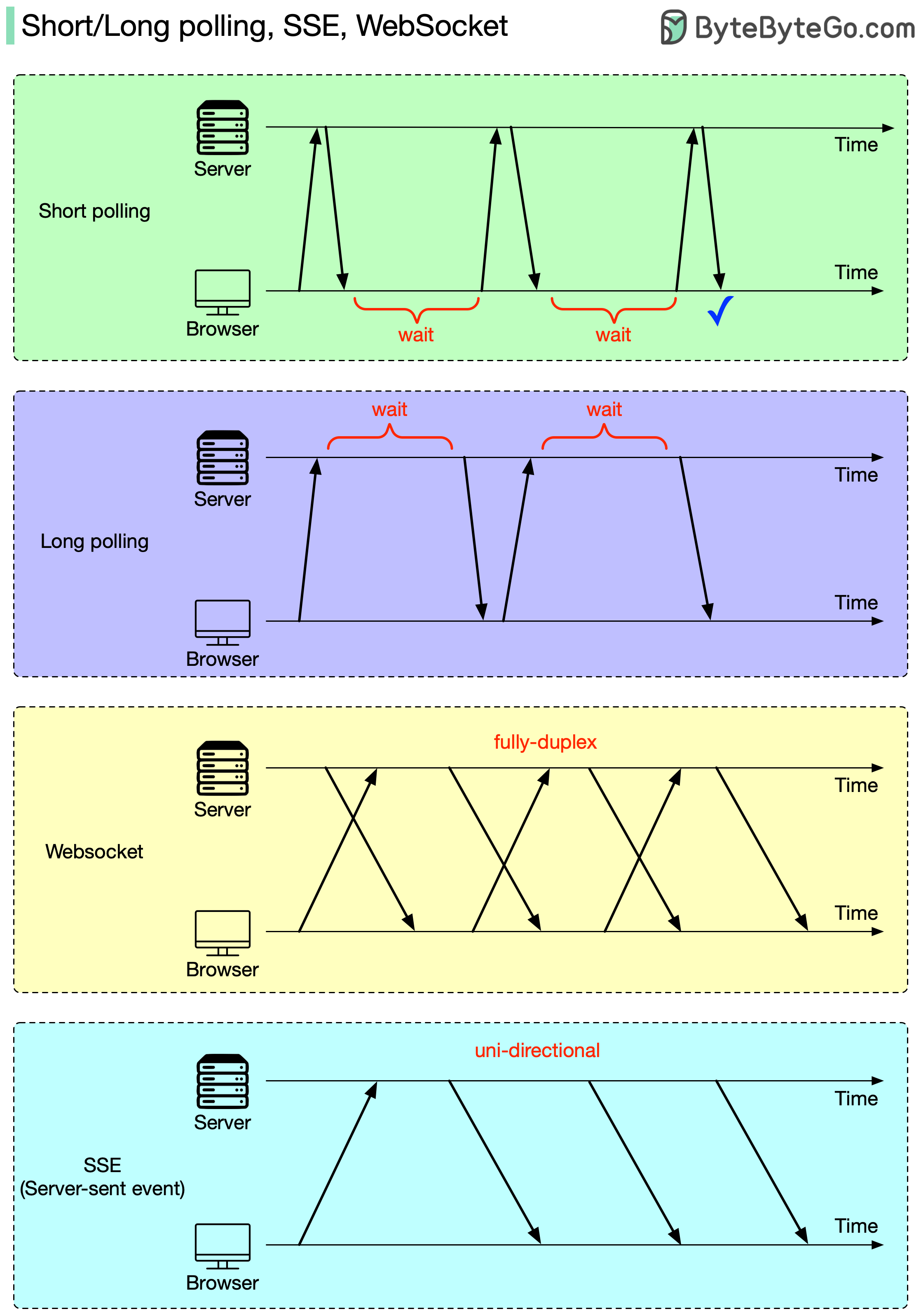
In the diagram, you can see:
- Short Polling: The browser constantly sends requests and gets immediate responses, even if there's no new data. This is the "Is it ready yet? Is it ready yet?" approach.
- Long Polling: The browser sends a request, and the server holds the connection open until it has something to send back. This is more efficient than short polling but still involves repeatedly setting up new connections.
- WebSocket: A single connection is established, and it stays open. Both the browser and the server can send data at any time. This is a true two-way conversation.
What is a WebSocket? The Open Phone Line
So, what exactly is a WebSocket? It's a technology that creates a persistent, two-way communication channel between a client (like your browser) and a server.
A great way to think about this comes from another excellent guide.
The Complete Guide to WebSockets, Socket.IO & Real-Time ...
This guide uses fantastic analogies to explain the core concepts. We'll focus on the one that contrasts the one-off nature of HTTP with the continuous nature of WebSockets.
Read the section titled "The Restaurant Analogy". It compares HTTP to visiting a restaurant, ordering, eating, and leaving, forcing you to start all over for dessert. A WebSocket, in contrast, is like renting the restaurant for the day, with the chef at your table, ready for any order instantly.
This "open phone line" stays active, allowing for instant, low-overhead communication in both directions—a concept known as full-duplex.
How is this connection established? It cleverly starts as a standard HTTP request, but the client includes a special "Upgrade" header, basically asking, "Can we switch from a one-off conversation to a persistent phone call?". If the server agrees, the protocol switches to WebSocket, and the connection remains open for business.

When to Use WebSockets
You now understand what a WebSocket is, but the most important question for your vibe coding journey is when to use it. Your LLM assistant will choose WebSockets when you ask for features that require instant, real-time interaction.
Common use cases include:
- Chat Applications: Think of Slack, Discord, or iMessage. When someone sends a message, it appears on everyone else's screen instantly without needing to refresh the page.
- Collaborative Tools: This is a perfect example from your world as a designer. In Figma or Miro, you can see your colleagues' cursors moving, objects being resized, and comments being added in real-time. This is powered by WebSockets.
- Live Notifications: When you get a "like" on Instagram or a new friend request on Facebook, a notification often pops up immediately. The server "pushes" this event to your browser or phone via a WebSocket.
- Real-time Data Dashboards: Stock tickers, live sports scores, or analytics dashboards that update instantly.
- Multiplayer Online Games: Fast-paced games require near-instantaneous communication of player movements and actions.
A Practical Walkthrough
Seeing the code in action is the best way to solidify your understanding. The following video provides one of the clearest explanations available, walking you through the problem, the solution, and a simple but powerful code example of a real-time messaging app.
Why Every Developer Needs to Understand WebSockets
This fantastic video from Nova Designs explains not just the 'what' but the 'why' and 'how' of WebSockets, ending with a practical demo that brings all the concepts together.
Please watch the entire video. It's structured perfectly to build your understanding step-by-step: The Problem: The video starts by explaining why standard HTTP and polling are inefficient for a chat app. The Solution: It introduces WebSockets using the email vs. phone call analogy and explains the "upgrade" handshake. Client-Side Code: This is a crucial section. You'll see how JavaScript in the browser creates a connection (new WebSocket) and listens for events like onopen, onmessage, and onclose. Server-Side Code: It then shows the corresponding server code (using a library called ws in Node.js) that listens for new client connections and incoming messages. Mini-Messaging App: This is where it all comes together. The video demonstrates how the server can receive a message from one client and immediately broadcast it to all other connected clients, which is the fundamental pattern of a chat room.
One Last Thing: WebSockets vs. Socket.IO
When you ask an LLM to build a chat app, you will very likely see the term Socket.IO in the generated code. It's important to know that Socket.IO is not WebSocket.
Socket.IO is a library built on top of WebSockets. Think of it as a set of power tools that make working with WebSockets easier and much more reliable.
The Complete Guide to WebSockets, Socket.IO & Real-Time ...
This guide provides the best analogy for understanding the relationship between WebSocket and Socket.IO.
Read the sections titled "What Socket.IO Actually Is" and "Key Features Socket.IO Adds". Pay close attention to the Swiss Army Knife analogy: WebSocket is the basic, sharp knife blade. It does one thing very well: provide a two-way communication channel. Socket.IO is the full Swiss Army Knife. It includes the WebSocket blade but also adds tools for automatic reconnection, falling back to long-polling if WebSockets are blocked, and managing groups of users in "rooms." For most real-world applications like chat, developers use a library like Socket.IO because it handles many tricky edge cases automatically, letting them build features faster.
Conclusion
You now have a solid mental model for a different, powerful way that apps can communicate. While the request-response cycle of standard APIs handles most data-fetching needs, WebSockets provide the open, two-way channel required for the "live" features that make modern apps feel so interactive.
Key Takeaways:
- Standard APIs use a request-response model (like sending a letter), which is inefficient for real-time updates.
- WebSockets create a persistent, two-way connection (like an open phone call) between the client and server.
- The server can push data to the client at any time, eliminating the need for constant polling.
- WebSockets are essential for features like chat, collaborative design tools (like Figma), and live notifications.
- Socket.IO is a popular library that makes WebSockets more robust and easier to use by adding features like automatic reconnection and chat "rooms."
In our next lesson, we will shift our focus from communication to storage. Now that your app can talk to a server, where does it save all its information? We'll explore Firebase and Supabase, two popular services that provide the databases your vibe-coded apps will need to store user data, content, and more.