Recommended resources
The freely available resources this lesson will direct you to.
Introduction
In our previous lesson, we established the SOLID principles as the philosophical bedrock for sound object-oriented design. You learned how these five principles guide you in breaking down tightly-coupled code into modular, maintainable components. This is the "why" of good architecture. Today, we transition from principles to practice by exploring Design Patterns.
If SOLID principles are the rules of grammar, design patterns are the proven rhetorical devices—the well-structured sentences and paragraphs that solve common problems with elegance and efficiency. This lesson will introduce you to four foundational patterns: two creational (Singleton and Factory) and two structural (Adapter and Facade). Mastering these will provide you with a concrete toolkit for implementing the SOLID principles you've learned, enabling you to refactor legacy systems and design new ones with the foresight and clarity expected of a senior developer.
1. The Language of Design Patterns
Before we dive into specific patterns, it's important to understand what they are. Design patterns are not algorithms or specific pieces of code you can copy and paste. They are high-level, reusable solutions to commonly occurring problems in software design. They provide a shared vocabulary that allows developers to communicate complex design ideas efficiently.
The concept was popularized by the book Design Patterns: Elements of Reusable Object-Oriented Software, written by four authors often called the "Gang of Four." They categorized patterns into three groups: Creational, Structural, and Behavioral. We'll be covering the first two today.
This chapter from Software Engineering: A Modern Approach provides a formal introduction to design patterns, their origins, and their purpose. It sets the stage for why they are a critical part of a developer's vocabulary.
Please read the Introduction section. Pay close attention to the definition of a pattern as a solution to a recurring problem in a specific context. Also, note the discussion on "design for change," which directly connects to our goal of building flexible, evolvable systems.
For a rapid, high-level overview of several patterns, the following video offers a quick tour.
10 Design Patterns Explained in 10 Minutes
This video from Fireship provides a fast-paced summary of what design patterns are and why they matter.
Watch the brief introductory segment from the beginning to understand the three main categories of patterns. We will explore some of these in detail.
2. Creational Patterns: Managing Object Creation
Creational patterns provide mechanisms for object creation that increase flexibility and reuse of existing code. Instead of calling new directly, you delegate the creation process to special objects or methods. This is a direct application of the Dependency Inversion and Open/Closed principles, as your client code no longer depends on concrete implementations.
The Singleton Pattern
Problem: You need to ensure that a class has only one instance and provide a single, global point of access to it. This is common for resources like configuration managers, loggers, or database connection pools where multiple instances would cause conflicts or be inefficient.
Solution: The Singleton pattern restricts the instantiation of a class to a single object. This is typically achieved by making the constructor private and providing a static method that returns the sole instance.
Java Design Patterns Explained with Real-World Examples
This article from Djamware gives a straightforward Java implementation of the Singleton pattern.
Read the section on the Singleton pattern. The AppConfig example is a classic use case. Notice how the private constructor and the static getInstance() method work together to enforce the single-instance rule.
While simple, the Singleton is one of the most debated patterns because it can introduce global state, making code harder to test and potentially violating the Dependency Inversion Principle if not used carefully. A good rule of thumb is to use it only for resources that are conceptually singular.
This section offers a more nuanced view on the Singleton pattern, discussing its pros and cons.
Read the section on the Singleton pattern. Pay attention to the discussion on how it can be a "controversial" pattern and the advice on when its use is justified.
The Factory Pattern
Problem: Your code needs to create objects, but you want to decouple it from the specific classes being instantiated. Imagine a service that needs to generate different types of reports (PDF, CSV, Excel). Hardcoding new PDFReport() or new CSVReport() would violate the Open/Closed Principle; every new report type would require changing the service's code.
Solution: The Factory pattern provides an interface for creating objects in a superclass but lets subclasses alter the type of objects that will be created. This decouples the client (who asks for an object) from the process of creating that object.
The following video provides an excellent, detailed walkthrough of how you might evolve from a simple, tightly-coupled implementation to using the Factory Method pattern.
The Factory Method Pattern Explained and Implemented in Java | Creational Design Patterns | Geekific
This Geekific video explains the Factory Method pattern by refactoring a burger delivery application, which is a great analogy for any system that produces different variations of a core product.
Watch these key segments: The Problem: This shows the initial code with if/else statements, which violates OCP. Simple Factory: This is the first step of refactoring, where creation logic is moved to a separate class. Factory Method: This shows the full pattern, using inheritance to let subclasses decide which object to create. This is a powerful technique for loose coupling. When to Use: This part gives practical advice on when to apply the pattern.
The UML diagram below shows how Singleton and Factory patterns can be combined. A single StatementFactory instance (Singleton) is used to create different types of StatementType objects (Factory).

3. Structural Patterns: Organizing Classes and Objects
Structural patterns are concerned with how classes and objects are composed to form larger structures. They help ensure that if one part of a system changes, the entire system doesn't need to change with it.
The Adapter Pattern
Problem: You need to make two classes with incompatible interfaces work together. This is a very common scenario when working with legacy code or integrating third-party libraries that you cannot modify.
Solution: The Adapter (or Wrapper) pattern acts as a bridge between two incompatible interfaces. It involves a single class that joins functionalities of independent or incompatible interfaces.
Given your goal of refactoring legacy systems, this pattern is an indispensable tool. It allows you to introduce new, clean interfaces while still leveraging existing business logic.
Java Design Patterns Explained with Real-World Examples
This article provides a very practical example of an Adapter.
Read the section on the Adapter pattern. The PayPalAdapter example is excellent; it shows how to make an old PayPal class with a makePayment method conform to a new PaymentProcessor interface that expects a pay method.
The Facade Pattern
Problem: You have a complex subsystem with many interacting components (e.g., a video processing library, a complex data access layer). Exposing this complexity to client code makes it difficult to use, hard to understand, and tightly couples the client to the subsystem's internal logic.
Solution: The Facade pattern provides a simplified, unified interface to a set of interfaces in a subsystem. It defines a higher-level interface that makes the subsystem easier to use.
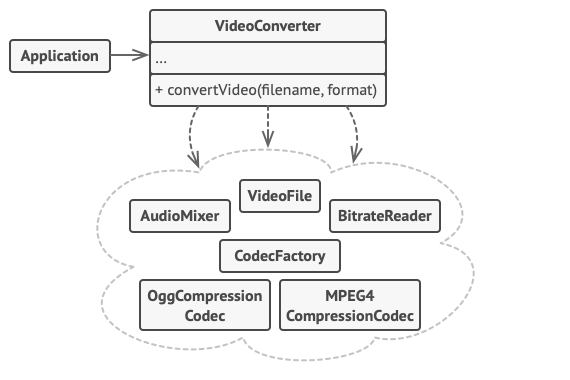
The VideoConverter diagram above illustrates this perfectly. The client only needs to call convertVideo(), and the facade handles the complex orchestration of the AudioMixer, CodecFactory, and other components.
Java Design Patterns Explained with Real-World Examples
This resource provides a clear Facade example.
Read the section on the Facade pattern. The EmailServiceFacade example demonstrates how a single method call can hide the steps of connecting to an SMTP server, building the email, and sending it. This is a prime example of simplifying a multi-step process for a client.
4. A Word of Caution: Avoiding "Patternitis"
As you learn these powerful tools, it's tempting to see every problem as an opportunity to use a design pattern. This can lead to over-engineering—a condition sometimes called "patternitis," where the complexity introduced by the patterns outweighs their benefits. A senior developer knows not just how to use patterns, but when and why. Always start with the simplest solution and introduce a pattern only when you have a clear reason related to flexibility or maintainability.
This final section provides critical advice on the appropriate use of design patterns.
Read the section When Not to Use Design Patterns?. This is a crucial read for developing the judgment required for a senior role. It will help you weigh the costs and benefits of applying a pattern versus choosing a simpler implementation.
5. Practical Application: Refine Your Refactoring Plan
In the last lesson, you created a refactoring plan for a piece of code in your project that exhibited "code smells." Now, let's refine that plan using the patterns we've discussed today.
- Revisit Your Plan: Open your personal knowledge base (Notion/Obsidian) and review the refactoring plan you created.
- Identify Pattern Opportunities: Analyze the problem you identified.
- Does your refactoring involve creating different types of objects based on some input? The Factory pattern might be a perfect fit.
- Are you trying to integrate a component with a mismatched interface? The Adapter pattern is your solution.
- Does a client interact with many different parts of a subsystem in a complex way? You could simplify this interaction with a Facade.
- Do you have a component that must absolutely be one-of-a-kind in the application? Consider if the Singleton pattern is justified.
- Update Your Plan: Enhance your refactoring plan by explicitly stating which design pattern(s) you will use and why. Describe the new classes/interfaces you would create (e.g.,
ReportFactory,LegacyApiAdapter,OrderProcessingFacade). - Document Your Rationale: In your notes, justify your choice. For example: "I will use the Factory pattern to create different
Notificationobjects (Email, SMS, Push) because it decouples theOrderServicefrom the concrete notification implementations, adhering to the Open/Closed Principle."
This exercise will help you connect abstract patterns to the concrete code you work with daily, turning theoretical knowledge into a practical engineering skill.
Conclusion
Today, we've armed you with four fundamental design patterns that serve as proven solutions to common design challenges. You've learned how creational and structural patterns are not just academic concepts, but practical implementations of the SOLID principles that lead to cleaner, more flexible, and more maintainable code.
Key Takeaways:
- Singleton: Guarantees one, and only one, instance of a class. Use with caution.
- Factory: Decouples a client from the concrete classes it needs to create, promoting the Open/Closed Principle.
- Adapter: Allows classes with incompatible interfaces to work together, crucial for integrating legacy or third-party code.
- Facade: Provides a simple, unified interface to a complex subsystem, reducing coupling and simplifying client code.
These patterns are a significant part of the vocabulary and toolkit of a senior developer. Recognizing where to apply them is a key step in the "Senior Developer Leap" from merely writing code to architecting robust solutions.
In our next lesson, we will explore Behavioral Design Patterns, such as Strategy and Observer. While today's patterns focused on how objects are created and structured, behavioral patterns focus on how they communicate and assign responsibilities.