Recommended resources
The freely available resources this lesson will direct you to.
- Unlocking Smarter AI Agents with Unstructured Data, RAG & Vector Databaseswww.youtube.com
- Prompt Management 101 - Full Guide for AI Engineerswww.youtube.com
- Building an Agentic AI App with Proper Versioning (Code, Prompts ...medium.com
- Operational Documentation for RAG Systems - ApX Machine Learningapxml.com
Introduction
In the previous lesson, you learned how to translate the technical evidence from your Proof-of-Concept into a compelling business narrative for non-technical decision-makers. A successful presentation naturally leads to the next crucial phase: formalizing the system for handover, maintenance, and future development. This is where robust technical documentation becomes indispensable.
This lesson addresses the learning outcome: Create technical documentation for an agentic workflow covering architecture, prompt versioning, and knowledge base maintenance. Unlike traditional software where documentation often follows the code, in agentic systems, many of the core "source files"—prompts, configurations, and knowledge artifacts—are the documentation.
We will focus on three pillars of effective documentation for an agentic service:
- Architecture Documentation: Capturing the system's structure, components, and data flows.
- Prompt Versioning: Implementing a systematic approach to manage and track the evolution of prompts, the primary drivers of agent behavior.
- Knowledge Base Maintenance: Documenting the RAG system's data sources, ingestion processes, and governance protocols to ensure its long-term reliability.
1. The Core Principle: Documenting Behavior, Not Just Code
In your computer science experience, versioning code is a solved problem. In agentic systems, however, the code that executes tool calls or manages state is often the least volatile part of the application. The agent's behavior is primarily dictated by artifacts that live outside the traditional codebase.
Building an Agentic AI App with Proper Versioning
To understand this fundamental shift, let's start with an article that clearly articulates what needs to be versioned in an agentic system and why.
Read the introduction and the 'High-Level Architecture' sections. Focus on the core argument: anything that can change the model's behavior must be versioned. Pay attention to the list of non-code artifacts like prompts, RAG configurations, and agent definitions.
As the article highlights, an unmanaged change to a prompt, a RAG parameter, or orchestration logic can have a more profound impact on the system's output than a major code refactor. Therefore, your technical documentation must be designed around this principle, treating these configuration artifacts as first-class citizens that require rigorous versioning, just like source code.
This approach provides three key benefits crucial for delivering AI as a service:
- Reproducibility: You can recreate the exact behavior of the system at any given version.
- Auditability: When a failure occurs, you can trace it back to a specific change, whether in a prompt, a RAG config, or the code.
- Safe Experimentation: You can test new behaviors (e.g., a new prompt version) in isolation and roll back cleanly if they cause regressions.
2. Documenting the Agentic Architecture
Architectural documentation provides a map of your system. For a client's technical team or your own SREs, this map is essential for understanding, operating, and extending the workflow.
2.1. High-Level Diagrams
A visual representation is the most effective way to communicate the overall structure. This shouldn't just be a box-and-arrow diagram but should illustrate the dynamic interactions and data flow between components.

Your architectural diagram should clearly identify:
- Agents and their roles: e.g., "Router Agent," "Data Extraction Agent," "Report Writing Agent."
- The Orchestrator: The component that manages the state and flow of the workflow.
- Tools/APIs: External services or internal functions the agents can call.
- Data Sources: The RAG knowledge base, databases, or user inputs.
- Key data flows: How information is passed between agents and components.
2.2. Configuration-as-Documentation
The most effective documentation is the one that cannot become stale. By defining your architecture in structured configuration files, the configuration itself becomes the primary source of truth.
The article LINK proposes a clear and scalable folder structure and file format for this.
Building an Agentic AI App with Proper Versioning
Let's revisit the article on versioning to see a practical implementation of configuration-as-documentation.
Review the sections 'Choosing YAML vs JSON', 'Folder Structure', 'Agent Versioning', 'Orchestrator Versioning', 'Environment Separation', and the Python example. Note the following: The deliberate choice of YAML for human-readable definitions (agents, prompts) and JSON for precise machine parameters (RAG configs). The folder structure that organizes artifacts by type and version. How an agent's definition file acts as a 'behavioral contract,' linking specific versions of prompts, tools, and RAG configurations.
By adopting this structure, your configs/ directory becomes a rich, version-controlled documentation hub. An agent.yaml file, for example, explicitly documents an agent's role, the tools it can use, and the exact versions of the prompt and RAG configuration it depends on. This is far more powerful than a separate, manually maintained text document.
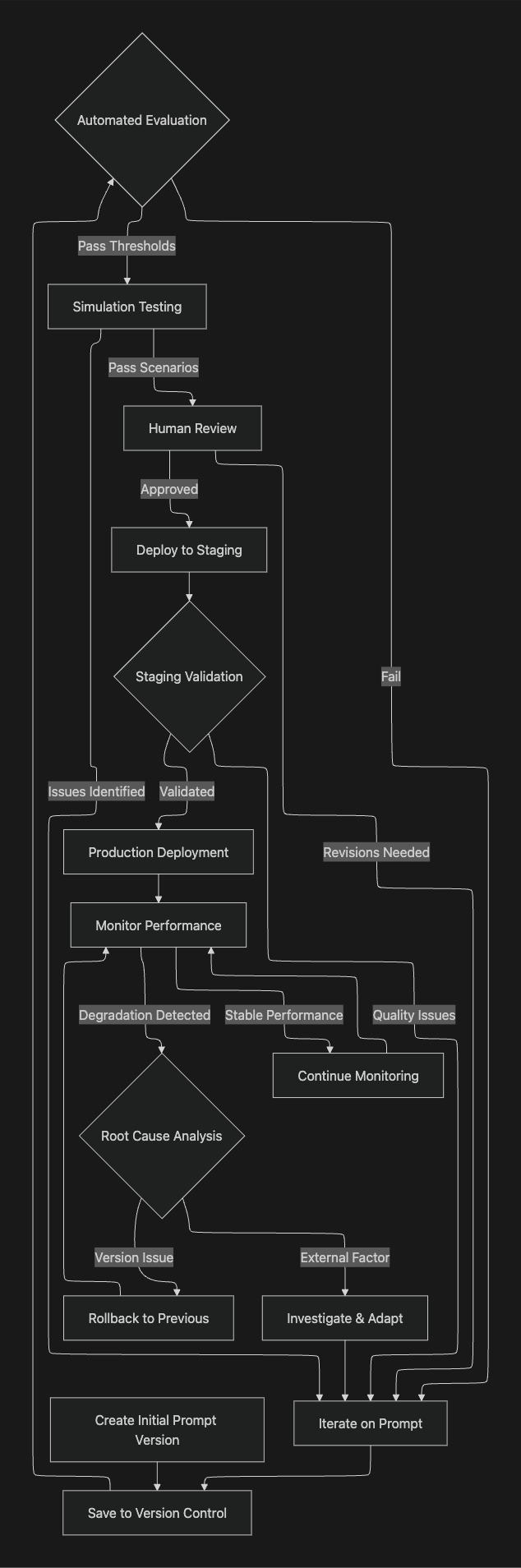
3. Prompt Versioning and Management
As we've established, prompts are a critical source of behavior. Managing them systematically is non-negotiable for a production system. Let's explore the 'why' and 'how' of professional prompt management.
Prompt Management 101 - Full Guide for AI Engineers
The video 'Prompt Management 101' by Dave Ebbelaar provides an excellent overview of the challenges and solutions in managing prompts at scale.
Watch from 01:16 to 17:37. This covers: Why prompt management matters: The argument that prompts are often more important than code for application utility. Common mistakes: Such as scattered prompts and lack of version control. Five levels of prompt management maturity: From simple inline prompts to dedicated external tools. Pay close attention to 'Level 3: Structured Centralized Storage' as a practical and powerful approach for most projects.
The video outlines a maturity model for prompt management. While a simple project might start with inline prompts (Level 1), a professional service offering demands a more robust approach. Level 3 (Structured Centralized Storage) or higher is your target.
Here’s a practical strategy combining insights from the video and the LINK article:
-
Centralize Prompts: Store all prompts in a dedicated, version-controlled directory (e.g.,
configs/prompts/), as suggested in both resources. -
Use a Templating Engine: A templating engine like Jinja2 is superior to simple f-strings. As explained in the video (LINK, section starting at 17:37), it allows for conditional logic, metadata (front matter), and input validation within your prompts. This enables you to create dynamic, context-aware prompts that reduce redundancy.
-
Adopt a Versioning Schema: Use a clear versioning system (e.g.,
v1,v2) in your folder structure or filenames. The YAML files from LINK show a great example:name: support_agent version: v2 system_prompt: | You are a senior customer support assistant. Always explain the reason behind your answer. Ask clarifying questions if required. -
Implement Version Control Best Practices: Use Git for versioning. As suggested in LINK, use behavior-aware git tags (e.g.,
git tag prompt-support-v2) to mark specific prompt versions, allowing you to roll back behavior independently of code.
4. Documenting Knowledge Base (RAG) Maintenance
For most business use cases, an agent's value is directly tied to the quality and currency of its knowledge base. Documenting the RAG system is therefore critical for long-term maintenance and reliability.
Operational Documentation for RAG Systems
For this section, we will rely on 'Operational Documentation for RAG Systems,' a comprehensive guide that treats the RAG system with the rigor of a production service.
Read the introduction ('Audiences and Their Needs') and the 'Essential Components' section. This is a dense but extremely valuable checklist. As you read, think about creating a template for your own projects based on these components.
Based on this resource, your RAG documentation should be a living document, often maintained in a wiki or a version-controlled repository, that covers these critical areas:
A. System Configuration & Architecture
- Component Breakdown: Specify the embedding model (
text-embedding-3-large), vector database (Pinecone), chunking strategy (RecursiveCharacterTextSplitter), and key parameters (chunk_size: 800,top_k: 5). This is where the versionedrag/v2.jsonfile from LINK comes into play. - Dependencies: List the external dependencies, such as the document source (e.g., SharePoint API) and the embedding model API provider.
B. Data Lifecycle and Governance
- Knowledge Base Sources: What documents are included? Where do they come from? (e.g., "All
.docxfiles from the 'Policies' folder in the company SharePoint"). - Ingestion Pipeline: Diagram or describe the steps: document fetching, cleaning, chunking, embedding, and indexing.
- Update Cadence: How often is the knowledge base refreshed? Is it a full re-index or incremental? (e.g., "Nightly job runs at 2 AM UTC to process new and modified documents from the last 24 hours").
- Data Retention & PII: Define policies for how long data is stored and the procedures for identifying and masking sensitive information. The IBM video LINK provides a good overview of the importance of this governance layer in an enterprise context.
C. Maintenance Runbooks (SOPs)
This section is the most practical for a handover. Create step-by-step guides for common operational tasks:
- Adding a New Document Source: How to configure the pipeline to ingest from a new location.
- Forcing a Re-index: The procedure for completely rebuilding the vector index.
- Troubleshooting Low Relevance: A diagnostic guide that checks for common issues like outdated content, incorrect chunking, or embedding model drift.
- Backup and Restore: Procedures for backing up and restoring the vector index.
By documenting these aspects, you provide the client not just with a system, but with a maintainable and governable asset.
Conclusion
Creating technical documentation for an agentic workflow is an act of system design. It forces you to think systematically about behavior, reproducibility, and maintainability. It is the bridge between a working PoC and a reliable, production-ready service that you can confidently hand over to a client.
Key Takeaways:
- Document Behavior, Not Just Code: Anything that changes agent behavior—prompts, RAG configurations, agent roles, orchestrator logic—must be versioned and documented as a first-class artifact.
- Use Configuration-as-Documentation: Define your system architecture, agents, and prompts in structured, version-controlled files (e.g., YAML, JSON). This makes the configuration the single source of truth.
- Implement a Mature Prompt Management Strategy: Centralize your prompts, use a templating engine like Jinja2 for dynamic capabilities, and apply rigorous version control with meaningful tags.
- Create Comprehensive RAG Maintenance Docs: Your RAG documentation should be an operational manual covering architecture, data lifecycle and governance, and step-by-step maintenance procedures (runbooks).
In our next and final lesson, we will build directly on this foundation. You will learn how to develop Standard Operating Procedures (SOPs) for a client to operate, monitor, and handle escalations from the agentic workflow you've built and documented.