Recommended resources
The freely available resources this lesson will direct you to.
- Quick Select Algorithm Visualized (and how it compares to Quick Sort!)www.youtube.com
- Kth Largest Element in an Array - Quick Select - Leetcode 215 - Pythonwww.youtube.com
- Quickselect in TS: Kth Largest Element in an Array | John Kavanaghjohnkavanagh.co.uk
- 215. Kth Largest Element in an Array - In-Depth Explanationalgo.monster
Welcome to the first lesson of our module on "High-Value Advanced Interview Patterns." We're kicking things off with a powerful algorithm that's a favorite in technical interviews for its clever efficiency.
In this lesson, you'll learn how to use the Quickselect algorithm to find a specific ranked element—like the 5th largest or the median—in an array. This is formally known as finding an order statistic. The main goal is to do this much faster than by fully sorting the array, which is often overkill. We will explore the logic behind Quickselect, see how it relates to the famous Quicksort algorithm, analyze its performance, and walk through a practical TypeScript implementation.
The Problem: Finding the k-th Element
Imagine you have a large, unsorted array of numbers, and you need to find the 3rd largest value. The most straightforward approach is to sort the array in descending order and pick the element at index 2. This works, but sorting takes time. If the array has millions of entries, sorting the entire thing just to find one element seems wasteful. Can we do better?
The answer is yes. If we only care about the final position of a single element, not all of them, we can use an algorithm that achieves an average time complexity of . This is where Quickselect comes in.
From Quick Sort to Quick Select
Quickselect is a close relative of the Quicksort algorithm. Both rely on a core operation called partitioning. Let's start by visualizing how partitioning works and how Quickselect cleverly adapts it.
Quick Select Algorithm Visualized (and how it compares to Quick Sort!)
Watch the first part of the video "Quick Select Algorithm Visualized" from the AlgosWithMichael channel. It provides a clear, visual introduction to the concept.
Focus on these two segments: The introduction, which defines what a selection algorithm is. The explanation of Quicksort, which details the crucial partitioning step. Pay close attention to how an element (the "pivot") is used to divide the array into two parts: elements smaller than the pivot and elements larger than it.
As you saw, the key outcome of partitioning is that the chosen pivot element ends up in its final, sorted position. Quicksort then recursively sorts both partitions. Quickselect's insight is that we don't need to do that.
After partitioning, we can check the pivot's final index. If that's the index of the element we're looking for, we're done! If not, we know whether our target element is in the left partition or the right one. So, we only need to continue our search in one of the two partitions, discarding the other entirely.
This "partition and discard" strategy is what makes Quickselect so efficient.

The Quickselect Algorithm: A Step-by-Step Guide
Let's break down the algorithm into three main steps. We'll use the common interview problem "Find the k-th largest element" as our example.
1. Transform 'k' into a Target Index
Most partitioning schemes are designed to work with ascending order. It's easier to reason about finding the element that would be at index i if the array were sorted from smallest to largest.
A common and crucial first step is to convert the "k-th largest" problem into a "target index" problem.
If an array has n elements, the largest element is at index n - 1 in a sorted array, the 2nd largest is at n - 2, and so on. Therefore, the k-th largest element is at index n - k.
For example, in an array of 10 elements (n=10), the 3rd largest element (k=3) is at index 10 - 3 = 7.
This simple transformation allows us to use a standard ascending-order partition logic and search for a single targetIndex.
2. Partition the Array
This is the workhorse of the algorithm. The goal of the partition function is to take a subarray (defined by left and right boundaries), choose a pivot element within it, and rearrange the subarray so that:
- The pivot element is moved to its final sorted position, let's call this
pivotIndex. - All elements to the left of
pivotIndexare less than or equal to the pivot's value. - All elements to the right of
pivotIndexare greater than or equal to the pivot's value.
The choice of pivot matters for performance. While picking the last element is simple, a random pivot is generally preferred to avoid the worst-case scenario on already-sorted or reverse-sorted arrays.
3. Select the Next Subarray
After partitioning, we get back the pivotIndex. Now we compare it to our targetIndex from Step 1:
- If
pivotIndex === targetIndex, we've found our element! The value atworkingArray[pivotIndex]is the k-th largest element. - If
pivotIndex < targetIndex, our target must be in the right partition. We can ignore everything to the left of the pivot and repeat the process on the subarray to the right. - If
pivotIndex > targetIndex, our target must be in the left partition. We ignore the right side and repeat the process on the subarray to the left.
We continue this process, narrowing the search window until the pivotIndex matches our targetIndex.
Let's see this in action.
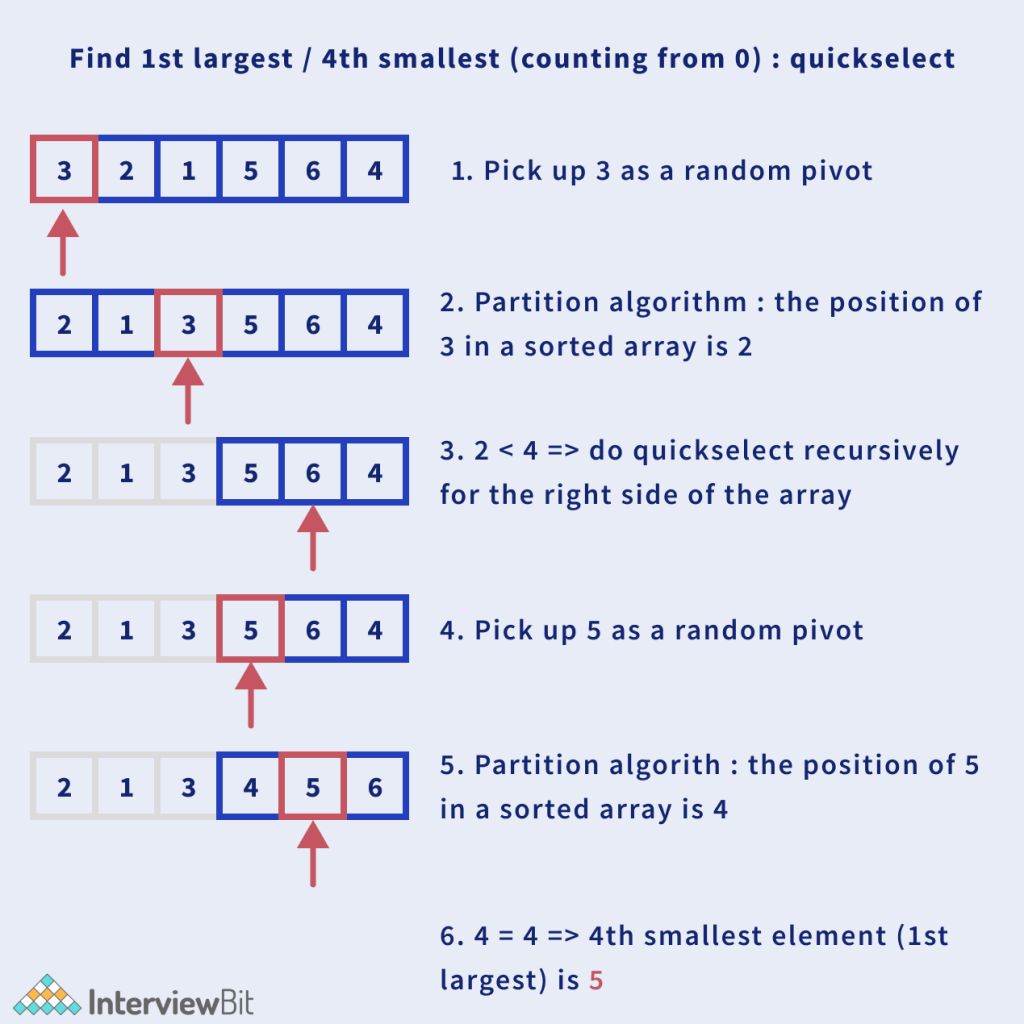
*This diagram illustrates finding the 4th smallest element (k=4). The target index is 3 (since we count from 0).
- The first pivot (3) lands at index 2. Since 2 < 3, we know our target is in the right partition.
- We repeat the process only on the right side. The new pivot (5) lands at index 4. The example says it's the 1st largest, which corresponds to the 4th smallest, but the index is 4. The diagram seems to have a slight off-by-one error in its reasoning for the example, but the process is correct. If we are looking for the 4th smallest (index 3), and our pivot lands at 2, we search right. If our next pivot lands at 4, we would search left. If it lands at 3, we are done. Let's trace it for our target of index 3: after the second partition, the pivot 5 lands at index 4. Since 4 > 3, we would then recursively search in the subarray to the left of 5, which is just
[4]. The pivot in that single-element array would be 4 at index 3. Now pivot index 3 matches target index 3, and we return 4.*
A Practical Implementation
Now that you understand the theory, let's look at a concrete implementation. Since you're experienced with TypeScript, the following code should be quite readable. It uses an iterative approach with a while loop instead of recursion, which avoids potential stack overflow issues in JavaScript for very large arrays.
Quickselect in TS: Kth Largest Element in an Array | John Kavanagh
This article by John Kavanagh provides a concise and practical guide to implementing Quickselect in TypeScript. It includes the code and clear explanations for the key implementation details.
Please read the following sections: "Why Quickselect is the Right Idea": This gives a quick summary of the logic. "A Practical TypeScript Implementation": Study the full code. Notice how it uses a while loop to narrow the left and right boundaries. "Why the target index is length - k": This reinforces the index transformation we discussed. "What the Partition Step Guarantees": This explains the core logic of deciding which way to go next.
Complexity Analysis and When to Use Quickselect
Why go to all this trouble? The performance gains are significant.
Kth Largest Element in an Array - Quick Select - Leetcode 215 - Python
The NeetCode video "Kth Largest Element in an Array" provides one of the best intuitive explanations for Quickselect's time complexity.
Please watch the segment from the introduction of the O(n) solution, followed by the complexity analysis from the explanation. The presenter does a great job of breaking down the math.
As the video explains:
-
Time Complexity:
- Average Case: . On each step, we partition the current subarray (an operation for a subarray of size ) and then, on average, cut the problem size in half. This leads to a total number of operations proportional to , which converges to . Therefore, the average complexity is linear.
- Worst Case: . This happens if we consistently pick the worst possible pivot (the smallest or largest element), which reduces the problem size by only one element at each step. Using a random pivot makes this scenario extremely unlikely in practice.
-
Space Complexity:
- Iterative version: auxiliary space if you perform the partitioning in-place on the original array. The implementation from the article you read creates a copy (
[...values]), so it uses space for the copy, but the algorithm itself only needs a constant amount of extra space for pointers. - Recursive version: on average for the recursion call stack. In the worst case, this can be .
- Iterative version: auxiliary space if you perform the partitioning in-place on the original array. The implementation from the article you read creates a copy (
When to Choose Quickselect
Let's refer back to the infographic. Section 6, "Heap vs Quick Select," gives a great summary.
- Sorting (): Best if you need to answer many queries about order statistics (e.g., finding the median, 10th percentile, and 90th percentile from the same data). Sort once, then lookup is .
- Heap (Min/Max) (): Excellent for finding the top-k elements from a stream of data, where you don't have the full dataset at once. You'll learn more about heaps later in the course.
- Quickselect ( average): The most efficient choice when you have the entire dataset and need to find just one specific order statistic.
Common Pitfalls
Implementing Quickselect can be tricky, with several subtle places for bugs. Being aware of them is half the battle.
215. Kth Largest Element in an Array - In-Depth Explanation
The "Common Pitfalls" section of this AlgoMonster article is an excellent checklist of what can go wrong.
Read through the section titled "Common Pitfalls". Pay special attention to: Off-by-One Error in Index Transformation: Forgetting that the k-th largest is at n - k, not n - k + 1. Incorrect Recursion Boundary: Using the wrong pointer to define the next search space. Choosing a Poor Pivot: The risk of O(n^2) performance.
Conclusion
In this lesson, we've unpacked the Quickselect algorithm, a highly efficient method for finding order statistics. You've learned that it's a powerful tool for a specific but common problem in interviews and applications.
Here are the key takeaways:
- The Goal: Find the k-th smallest or largest element in an array without the overhead of a full sort.
- The Core Idea: Adapt the partitioning logic from Quicksort. After partitioning, the pivot is in its final sorted place. This allows us to discard the half of the array that cannot contain our target element.
- The Process:
- Transform "k-th largest" to a 0-based
targetIndex(n - k). - Partition the current search window around a pivot.
- Compare the pivot's final index to
targetIndexand recursively (or iteratively) search in the left part, the right part, or stop if you've found it.
- Transform "k-th largest" to a 0-based
- The Performance: Quickselect offers an outstanding average time complexity, making it the optimal choice for finding a single order statistic in an in-memory array.
In our next lesson, we will explore another advanced pattern: how to merge multiple sorted sequences efficiently using a heap. This will build on concepts you've seen before and introduce a new way to solve problems involving ordered data from multiple sources.