Recommended resources
The freely available resources this lesson will direct you to.
Hello again! In our last lesson, we pulled back the curtain on Node.js, understanding it as the essential "engine" that allows modern development tools to run on your computer, free from the confines of a web browser. You learned that Node.js powers everything from local servers to the build tools that prepare your app for the world.
This lesson focuses on the inseparable companion to Node.js: npm (Node Package Manager). We'll demystify what npm is and, most importantly, explore exactly what's happening under the hood when your LLM assistant instructs you to run the npm install command. By the end, you'll see npm not as a cryptic command, but as your personal logistics manager for code.
The Problem: Building from Scratch is Hard
Imagine you're building a complex drone. You could, in theory, mine the metal, mill the screws, design and etch the circuit boards, and wind the motors yourself. But you wouldn't. You'd buy pre-made motors, propellers, a flight controller, and sensors, and then assemble them. This lets you focus on the unique aspects of your drone's design and function, not on reinventing the wheel (or the propeller).
Software development is no different. Modern applications are rarely built entirely from scratch. They are assembled from reusable pieces of code called packages or libraries. This is where npm comes in.
This short video from the Coder Coder channel uses a great car-building analogy to introduce this core idea.
What is NPM, and why do we need it? | Tutorial for beginners
This video explains the fundamental "why" behind package managers like npm. It will help you frame the concept in a way that relates to your experience with building physical objects.
Watch the segment from the beginning to this point. Focus on the analogy of assembling a car from pre-built parts versus making every single component yourself. This is the central value proposition of npm.
What is npm? Your Project's Fulfillment Center
As you just saw, npm saves developers from reinventing the wheel. But what is it, exactly? The name stands for Node Package Manager, and it's best understood as a system with three main parts.
An excellent article from the design tool company UXPin, "What Is npm?", explains these components clearly.
What Is npm? Node Package Manager Explained (2026 Guide) - by UXPin
This article breaks down npm's structure and purpose. Since it's from a design-focused company, it also provides context that is particularly relevant to your work.
Please read the following sections: Start at the heading "What Is npm?". This part introduces the three core components. Continue to the next section, "What Is a Package Manager?", which explains the problem that npm solves. Finally, scroll down to the "Frequently Asked Questions" and read the answer to the question comparing npm and Node.js. This reinforces what we learned last lesson.
To summarize and build on those points:
- The npm Registry: This is a massive, public online warehouse (or "App Store") containing millions of free code packages. When you need an animation library like Framer Motion or an icon set like Lucide, the code for it lives here.
- The npm CLI (Command Line Interface): This is the
npmtool you use in your terminal. It’s your personal assistant that communicates with the registry to fetch, install, and manage these packages for you. - The npm Website (npmjs.com): This is the online catalog for the registry. You can use it to search for packages, read their documentation, and see how popular they are.
The diagram below provides a simple visual of this ecosystem. A developer (the package publisher) uploads code to the registry using npm publish. You (the package user) download that code into your project using npm install.

The npm install Command: Unpacking Your Order
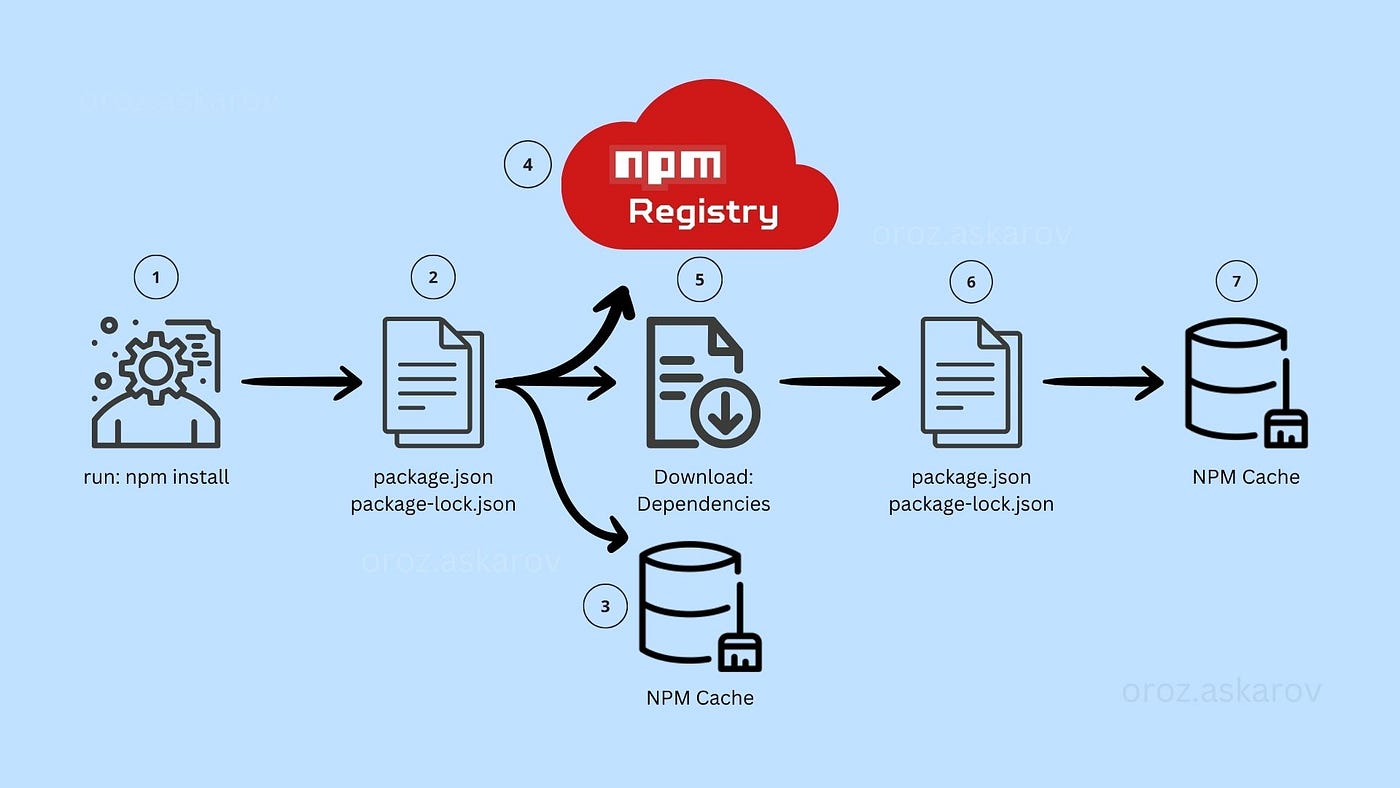
Now for the central question: what actually happens when Claude tells you to run npm install? This single command is doing several important things for you, automating a process that would be incredibly tedious to do manually.
Let's break it down.
-
Reading the "Shopping List" (
package.json): Every modern JavaScript project has a file namedpackage.json. Think of this as your project's manifest or a detailed shopping list. It lists all the packages your project depends on to work correctly. When you runnpm installin a project folder, the very first thing npm does is read this list. -
Checking the Local Cache: npm is smart. Before downloading anything from the internet, it checks a local cache on your computer to see if you've downloaded that specific version of the package before. This saves time and bandwidth.
-
Downloading from the Registry: If a required package isn't in the cache, npm goes to the registry (the online warehouse) and downloads it.
-
Populating the
node_modulesFolder: All the downloaded code is placed into a single folder in your project callednode_modules. This is your project's local parts bin. It contains not only the packages you asked for, but also all the packages they depend on. This is why thenode_modulesfolder can become very large; a single package might rely on dozens of others.
The following video demonstrates this process. It shows how running npm install creates the node_modules folder and explains this concept of nested dependencies.
What is NPM, and why do we need it? | Tutorial for beginners
This section of the Coder Coder video gives a visual walkthrough of what happens when you install a package.
Watch the segment from this timestamp. Pay attention to how the package.json file is updated and how the node_modules folder appears with not just the requested package (chalk), but all of its dependencies as well.
Two Flavors of npm install
You'll see Claude ask you to run this command in two main ways:
-
npm install framer-motion: When you add a specific package name, you're telling npm to add a new item to your project. npm will downloadframer-motion, place it innode_modules, and automatically add it as a dependency to yourpackage.jsonshopping list. -
npm install: When you run the command without a package name, you're telling npm: "Read the existingpackage.jsonshopping list and download everything this project needs." This is the command you'll always run after downloading a project from GitHub, because thenode_modulesfolder itself is almost never shared. You get the list, andnpm installfetches all the parts for you.
Why This Matters for You as a Designer
Understanding npm is especially powerful from a design perspective. Modern design systems and UI component libraries are distributed as npm packages.
When Claude tells you to install shadcn/ui or lucide-react, you aren't just downloading code; you're importing a production-ready, fully-interactive set of UI components or icons directly into your project. This workflow bridges the gap between static design mockups and the final, living product. You get to build with the exact same components the developers use, ensuring consistency and speeding up your creative process.
Conclusion
You've now demystified one of the most common commands in modern development. npm is not magic; it's a highly efficient logistics system for code. It allows you to tap into a global ecosystem of open-source tools, letting you build sophisticated applications by assembling high-quality, pre-made parts.
Key Takeaways:
- npm is the Node Package Manager, an ecosystem for sharing and using reusable JavaScript code.
- It consists of the Registry (the online warehouse), the CLI (your command-line tool), and the Website (the browsable catalog).
- The
package.jsonfile acts as your project's "shopping list," defining all its dependencies. npm install <package-name>adds a new package to your project.npm install(on its own) downloads all the packages listed inpackage.json, populating thenode_modulesfolder.- For designers, npm is the pipeline for bringing powerful animation libraries, icon sets, and entire UI component systems directly into your projects.
In the next lesson, we'll use another npm command that you'll see constantly: npm run dev. This is the command that finally brings your project to life by starting a local development server, allowing you to see and interact with your creation in a web browser.