Recommended resources
The freely available resources this lesson will direct you to.
Hello! Welcome to the next lesson in our journey to build a secure and anonymous computing environment.
In the previous lesson, we analyzed the inherent limitations of the Tor network, such as its vulnerability to traffic correlation attacks and the risks posed by malicious exit nodes. This highlighted a crucial point: while Tor is a powerful anonymity tool, relying on it alone can leave you exposed to certain threats, especially those originating from the applications you use.
Today's lesson addresses the learning outcome: Define the role of Whonix and explain how its Gateway-Workstation architecture isolates network traffic and prevents IP address leaks.
We will explore Whonix, a desktop operating system designed as a direct and robust solution to many of the application-level risks we discussed. Its entire design philosophy is built around the principle of "security by isolation," a concept that provides a much stronger guarantee against IP address and DNS leaks than simply using the Tor Browser on a standard OS.
1. What is Whonix?
At its core, Whonix is a Debian Linux-based operating system specifically engineered for advanced security and anonymity. Unlike a simple application, it is a complete environment that enforces all network communication through the Tor network.
To get a foundational understanding, let's start with the official overview from the Whonix project.
The official Whonix documentation provides a clear, high-level introduction to its purpose and design. This reading will cover the basic definition and introduce the two-part structure.
Please read the initial sections of the page. Start from the top ('Whonix is an anonymous operating system...') and continue through the 'Innovative Architecture' and the more detailed introduction that follows, stopping before the 'Whonix Architecture' heading.
As you've just read, the key innovation is not a new anonymity protocol but a novel system architecture. Whonix splits its functionality across two separate virtual machines (VMs): the Whonix-Gateway and the Whonix-Workstation. This is not an arbitrary choice; it is the foundation of its security model.
2. The Gateway-Workstation Architecture: Security by Isolation
The concept of "security by isolation" is central to Whonix. In your experience designing complex software systems, you've likely dealt with the principle of "separation of concerns," where distinct functionalities are modularized to improve robustness and maintainability. Whonix applies a similar, but much stricter, principle at the operating system level, enforced by a hypervisor (in our case, the Xen hypervisor managed by Qubes OS).
The two VMs have distinct and non-overlapping roles:
- Whonix-Gateway™: This VM acts as a dedicated, isolated router. Its sole purpose is to run the Tor process and manage network connections. It has two virtual network interfaces: one connected to the physical network hardware (to reach the internet) and another connected exclusively to the Whonix-Workstation via a private, internal virtual network.
- Whonix-Workstation™: This is the environment where you perform your tasks—browsing, editing documents, etc. Crucially, it has only one virtual network interface, which connects only to the Whonix-Gateway. It has no knowledge of, or access to, your computer's physical network hardware or your real, external IP address.
This architecture is designed to be "fail-closed." If the Tor process on the Gateway stops or the Gateway VM is shut down, the Workstation simply loses its only path to the internet. It cannot "fail open" by accidentally reverting to a direct, non-Tor connection, because no such connection path exists.
The following diagram illustrates this separation:
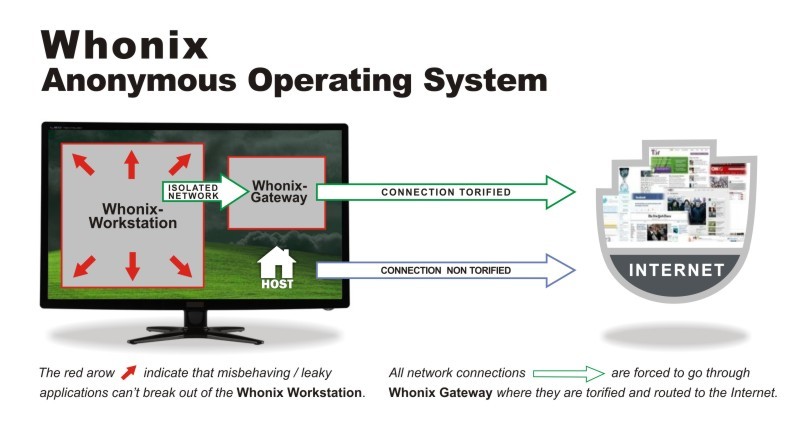
3. How the Architecture Prevents Leaks
The true strength of this design becomes apparent when we consider what happens if an application inside the Workstation is buggy or malicious. Let's explore how the architecture systematically defeats common leaks.
Now, let's dive into the technical details of how this isolation works. The 'Technical Introduction' on the Whonix wiki provides a more in-depth look at the design and its security guarantees.
Please read the following sections: Start with 'Essentials', which outlines the core assumption that all applications are untrustworthy. Continue to 'Design', which details the roles of the hypervisor, Gateway, and Workstation. Finish with 'With more technical terms', which summarizes the security philosophy.
As the reading explains, the fundamental assumption is that applications are untrustworthy. An exploit in your web browser or a malicious script in a document should not be able to compromise your anonymity. Here’s how the Gateway-Workstation model ensures this:
-
IP Address Leaks are Impossible: Imagine a zero-day exploit infects your browser running in the Workstation, giving an attacker full control over the VM. The attacker's malware might try to "phone home" to reveal your real IP address. However, it is fundamentally impossible for it to do so. The Workstation VM is not aware of your external IP. The only network route available to it leads to the Gateway, which will force the connection through Tor. The malware can't bypass the Gateway because the hypervisor enforces the network topology.
-
DNS Leaks are Impossible: A common vector for de-anonymization is when an application bypasses the proxy settings and makes a direct DNS request to a server like
8.8.8.8. In Whonix, this request would originate from the Workstation. It would travel to its only possible destination—the Gateway. The Gateway's firewall rules intercept all DNS traffic and redirect it to Tor's DNS resolver, which sends it over the Tor network. The direct request to8.8.8.8never reaches the clearnet.
The Whonix project is very confident in this design. Let's read their direct assertion on this matter and the list of technical measures that back it up.
The documentation explicitly enumerates the technical controls that enforce this leak-proof design and directly answers the question of whether any activity in the Workstation can cause a leak.
Please read the two final sections for this lesson: The numbered list under 'With more technical terms' (starting with 'IP-forwarding is disabled.'). This gives a concise list of the technical enforcement mechanisms. The section titled 'Can Certain Activities Leak DNS and/or the Real External IP Address / Location?'.
The key takeaway from this is the distinction Whonix makes between IP/location anonymity and identity anonymity. Whonix's architecture provides extremely strong guarantees for the former. No software bug or misconfiguration inside the Workstation can reveal your IP address. However, as the documentation notes, your own behavior (e.g., logging into your personal Google account inside a Whonix VM) can still compromise your identity. This is an Operational Security (OpSec) issue, which we will cover in a later module.
Conclusion
In this lesson, we have defined the role of Whonix and dissected its core architectural principle. By physically and logically separating the user's workspace from the network gateway, Whonix provides a powerful defense against the very application-level leaks that can undermine Tor's protections.
Key Takeaways:
- Whonix is a desktop OS designed for anonymity, built on a two-VM architecture: the Whonix-Gateway and Whonix-Workstation.
- The Whonix-Gateway acts as an isolated Tor router, handling all external network traffic.
- The Whonix-Workstation runs user applications in a completely isolated network environment, with no direct access to the internet or knowledge of the host's real IP address.
- This "security by isolation" model, enforced by a hypervisor, makes IP address, DNS, and other protocol leaks from the Workstation virtually impossible, even if applications within it are compromised.
Preview of the Next Lesson:
Now that we understand the theory behind Whonix's design, our next step will be to put it into practice. In the next lesson, we will install the Whonix Gateway and Workstation templates within our Qubes OS environment. This will lay the groundwork for creating our first truly isolated and anonymized AppVM.