Recommended resources
The freely available resources this lesson will direct you to.
Hello! Last lesson, you made a Python package that can be installed in a fresh environment. Now you can give that package a useful job: accepting a nested JSON payload, rejecting invalid data, and transforming valid data into a simpler representation.
This is a common boundary in AI and data applications. An API response or indexing job may provide JSON, but the rest of your program should not have to repeatedly ask whether files is present or whether a symbol’s line number is valid. Plan on about 45–50 minutes, including the videos and implementation.
Treat incoming JSON as untrusted data
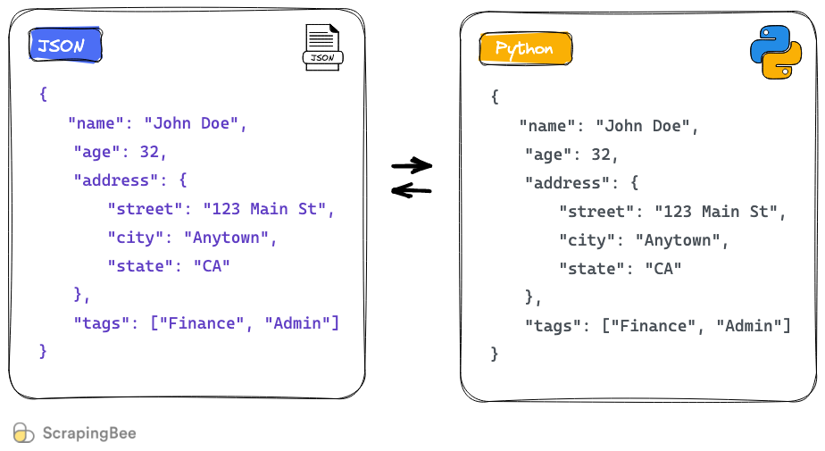
JSON is a text format. A JSON object becomes a Python dictionary when parsed; nested objects become nested dictionaries, and arrays become lists. The illustration shows that structural correspondence:
For this lesson, imagine receiving a repository inventory containing files and the functions or classes found in them. Your application requires a file path, a nonnegative line count, and a list of symbols. Each symbol needs a name, an allowed kind, and a line number. A dictionary can hold all of that, but a type annotation on a dictionary does not validate incoming values at runtime.
Pydantic provides a way to define the expected shape and check data when it enters your program. Watch the selected parts of Corey Schafer’s Python Pydantic Tutorial: Complete Data Validation Course (Used by FastAPI). Concentrate on the difference between declaring a field’s type and successfully validating an actual value.
Python Pydantic Tutorial: Complete Data Validation Course (Used by FastAPI)
Corey Schafer demonstrates Pydantic models, accessing their fields, converting them back to data, and interpreting validation failures. These are the operations you will use in your package.
Watch model basics for annotated fields and required values, model output for attribute access and serialization, and validation errors for coercion and failure messages.
The key distinction is that name: str describes a requirement, while validating incoming data checks that requirement. Pydantic can sometimes convert values—for example, a numeric string into an integer. Whether that is acceptable is an application decision, not something to leave unnoticed.
Define the nested input contract
First, add Pydantic to the project created in the previous lesson. In the dependencies list of pyproject.toml, retain httpx==0.28.1 and add "pydantic>=2,<3". Then, using your project’s virtual environment from the project root, run:
python -m pip install -e .
python -m pip check
python -m pip freeze --exclude-editable > requirements.lock
This adds the new direct requirement to your manifest and updates the installed-version snapshot. The examples below use Pydantic version 2 methods.
A nested JSON structure calls for nested models: one for a symbol, one for a file, and one for the whole inventory. Watch the later segment of the same tutorial to see why a model can be used as the type of a field inside another model.
Python Pydantic Tutorial: Complete Data Validation Course (Used by FastAPI)
In the nested-model segment of Corey Schafer’s tutorial, notice that validating the outer model also validates the objects inside its lists and nested fields.
Watch nested models. Focus on where the nested model types are declared; you do not need to write a separate parsing loop for every JSON level.
Create src/repo_assistant/inventory.py with the following code:
from typing import Literal, Self

from pydantic import BaseModel, ConfigDict, Field, model_validator


class InputModel(BaseModel):
    model_config = ConfigDict(extra="forbid", strict=True)


class Symbol(InputModel):
    name: str = Field(min_length=1)
    kind: Literal["function", "class"]
    line: int = Field(ge=1)


class SourceFile(InputModel):
    path: str = Field(min_length=1)
    lines: int = Field(ge=0)
    symbols: list[Symbol]

    @model_validator(mode="after")
    def check_symbol_lines(self) -> Self:
        for symbol in self.symbols:
            if symbol.line > self.lines:
                raise ValueError(
                    f"symbol {symbol.name!r} is beyond the end of {self.path!r}"
                )
        return self


class RepositoryPayload(InputModel):
    repository: str = Field(min_length=1)
    files: list[SourceFile]
Read these declarations from the inside out. A Symbol can only have a kind of "function" or "class", and its line must be at least 1. A SourceFile has a list of validated Symbol objects, not merely an unexamined list of dictionaries. RepositoryPayload likewise contains validated files.
The fields without defaults are required. In particular, "files": [] represents a known, empty inventory; omitting files is a validation error. Field(min_length=1) rejects an empty name or path, though it does not reject a string containing only spaces.
InputModel applies two deliberate policies to every incoming model:
extra="forbid"rejects unexpected keys rather than silently ignoring them.strict=Truerejects type substitutions such as"42"wherelinesrequires an integer.
Finally, the SourceFile validator checks a rule that field types alone cannot express: a symbol cannot start beyond its file’s line count. It runs after the fields have been validated, so self.symbols contains Symbol objects. Raising ValueError causes Pydantic to report a validation failure; returning self preserves the validated file.
Write typed boundary and transformation functions
Your public parsing function should accept JSON text and return a validated RepositoryPayload. The official Pydantic documentation distinguishes validating a Python dictionary from validating a JSON string or bytes. Read that distinction before choosing the method.
The Pydantic documentation explains which validation method belongs at each kind of input boundary.
In the “Validating data” subsection, begin with the validation methods. Read through the Python-mode and JSON-mode bullets. Focus on model_validate() for an already parsed dictionary and model_validate_json() for JSON text or bytes; stop before the code example.
Append this code to inventory.py, beneath the input models:
class SymbolRow(BaseModel):
    path: str
    name: str
    kind: Literal["function", "class"]
    line: int


class InventorySummary(BaseModel):
    repository: str
    file_count: int
    symbol_count: int
    symbols: list[SymbolRow]


def parse_inventory(raw: str | bytes) -> RepositoryPayload:
    return RepositoryPayload.model_validate_json(raw)


def summarize_inventory(
    inventory: RepositoryPayload,
) -> InventorySummary:
    rows: list[SymbolRow] = []

    for source in inventory.files:
        for symbol in source.symbols:
            rows.append(
                SymbolRow(
                    path=source.path,
                    name=symbol.name,
                    kind=symbol.kind,
                    line=symbol.line,
                )
            )

    return InventorySummary(
        repository=inventory.repository,
        file_count=len(inventory.files),
        symbol_count=len(rows),
        symbols=rows,
    )
These functions have separate responsibilities. parse_inventory() is the input boundary: malformed JSON or data that breaks the contract raises a Pydantic ValidationError. summarize_inventory() accepts validated input and transforms its nested symbols into rows that each carry their source path. It also derives counts rather than trusting counts supplied by an external payload.
Notice the return annotations. A caller can see that parsing produces a RepositoryPayload, while summarizing produces an InventorySummary. Those annotations help readers and type-checking tools; the Pydantic validation call is what enforces the input contract at runtime.
For data that is already a Python dictionary, use RepositoryPayload.model_validate(data) instead. Do not call model_validate_json() on a dictionary, and do not parse JSON into a dictionary first merely to pass it to model_validate().
Run the complete path and inspect a failure
Create try_inventory.py at the project root. This script supplies JSON text directly, so it exercises the functions without introducing file-reading concerns yet.
from pydantic import ValidationError

from repo_assistant.inventory import parse_inventory, summarize_inventory


raw = """
{
  "repository": "demo",
  "files": [
    {
      "path": "src/math_ops.py",
      "lines": 42,
      "symbols": [
        {"name": "mean", "kind": "function", "line": 5},
        {"name": "Accumulator", "kind": "class", "line": 20}
      ]
    },
    {
      "path": "README.md",
      "lines": 12,
      "symbols": []
    }
  ]
}
"""

inventory = parse_inventory(raw)
summary = summarize_inventory(inventory)

print(summary.model_dump())
print(summary.model_dump_json())

bad_raw = """
{
  "repository": "demo",
  "files": [
    {
      "path": "src/math_ops.py",
      "lines": 42,
      "symbols": [
        {"name": "mean", "kind": "variable", "line": 5}
      ]
    }
  ]
}
"""

try:
    parse_inventory(bad_raw)
except ValidationError as exc:
    for issue in exc.errors(include_input=False, include_url=False):
        print(issue["loc"], issue["msg"])
Run it with your installed environment:
python try_inventory.py
The first print produces a Python dictionary; the second produces a JSON string. In both, the summary should report two files and two symbols. Each flattened symbol row includes its file path, which was only available on the containing file in the input.
The invalid payload uses "variable" where the contract permits only "function" or "class". Its error location identifies files, the first file, symbols, the first symbol, and kind. That location is more useful than a generic “invalid JSON” message: the JSON is syntactically valid, but its data violates your contract. The example prints locations and messages without echoing rejected input values, which may be sensitive in a real application.
Other failures have different meanings. A missing path violates a required field; "lines": "42" violates the strict integer policy; a symbol on line 50 of a 42-line file violates your cross-field rule. A broken JSON string fails before those model rules can be checked. By keeping validation at one boundary, the transformation function does not need to handle each of these cases again.
What you have built
Your package now has typed functions that accept nested JSON, validate its structure and application rules, and produce a flattened, counted summary. The important separation is between untrusted JSON text, validated Python objects, and transformed output. That separation will be useful when data arrives from APIs or feeds later parts of an AI application.
Next, you will use pathlib to traverse, read, and write files. That will give this parser a way to receive JSON from disk while handling missing paths and encoding errors explicitly.