Recommended resources
The freely available resources this lesson will direct you to.
Hello! Last time, you gave the inventory parser a filesystem boundary: it can read UTF-8 JSON from a path and write a summary to another path. You still had to edit a Python script to choose those paths. This lesson turns that workflow into a command you can run from the terminal.
You’ll build a small interface that accepts an input file and an output path, validates them, calls your existing application functions, and reports failures clearly. Allow about 40 minutes, including the resources and implementation. Work from the project root with the virtual environment used in previous lessons.
Where command-line arguments go
Consider a command such as:
python -B main.py --verbose data/incoming/demo.json
The -B option belongs to the Python interpreter. The arguments after main.py belong to the program. Your CLI needs to interpret those program arguments—not Python’s own options.
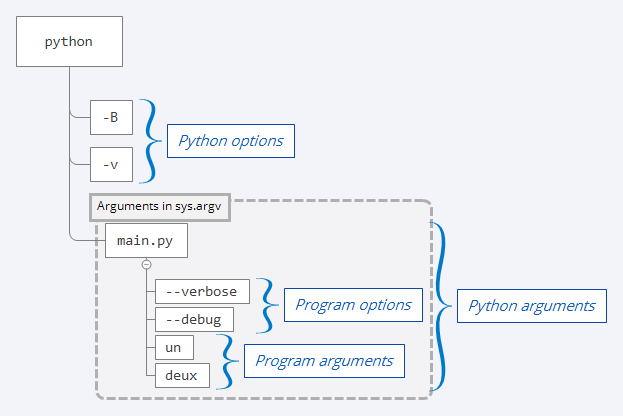
You could inspect sys.argv yourself. But then you would also need to detect missing values, reject unknown options, and write help text. Python’s standard-library argparse module does that work and gives you the parsed values in a Namespace.
Watch selected parts of Jake Callahan’s Understanding Python: Argparse CLI. Its example uses pizza orders; focus on the argument-handling mechanism rather than the application itself.
Understanding Python: Argparse CLI
Watch Understanding Python: Argparse CLI by Jake Callahan to see how a parser turns terminal input into values application code can use.
Start with positional arguments for add_argument(), type, and choices. Continue through parsing and help to see why parse_args() matters. In options and flags, distinguish an option that takes a value from a Boolean flag. Finally, watch calling application logic for the point where parsed values are used.
For your inventory command, the input file will be a positional argument: it is required and identified by its place in the command. The destination will be a required --output option: naming it makes the potentially overwritten path explicit. An optional --verbose flag will request a progress message.
Validate at the right boundary
argparse can reject a missing positional argument or an unknown option without your help. Its type parameter can also convert a supplied string into a Path. But conversion is not the same as validation: Path("absent.json") succeeds even when no such file exists.
Our CLI will perform three kinds of checks:
- Check each argument on its own: the source must currently be a file, and the output name must end in
.json. - Check the arguments together: source and output must not refer to the same path. Otherwise, writing the summary could overwrite the input.
- Let the application handle work-time failures: a file can disappear after the initial check, and an existing file may contain invalid UTF-8 or invalid inventory data.
These checks have different owners. A small argparse converter is appropriate for a bad argument value. Your existing load_inventory() and save_summary() remain responsible for reading and writing; the CLI should not reimplement them. Nor should the CLI confuse “this is a JSON-named file” with “this file contains a valid inventory.”
Connect the command to your package
Create src/repo_assistant/cli.py. The imports below use the functions and summary model from the previous lessons:
import argparse
import sys
from pathlib import Path

from repo_assistant.file_io import load_inventory, save_summary
from repo_assistant.inventory import summarize_inventory


def existing_file(text: str) -> Path:
    path = Path(text)
    if not path.is_file():
        raise argparse.ArgumentTypeError(
            f"expected an existing file: {path}"
        )
    return path


def json_destination(text: str) -> Path:
    path = Path(text)
    if path.suffix.lower() != ".json":
        raise argparse.ArgumentTypeError(
            "output path must end in .json"
        )
    return path


def main(argv: list[str] | None = None) -> int:
    parser = argparse.ArgumentParser(
        description="Summarize a repository inventory JSON file."
    )
    parser.add_argument(
        "source",
        type=existing_file,
        help="path to an existing inventory JSON file",
    )
    parser.add_argument(
        "--output",
        required=True,
        type=json_destination,
        metavar="PATH",
        help="destination for the JSON summary (overwritten if it exists)",
    )
    parser.add_argument(
        "--verbose",
        action="store_true",
        help="show progress on standard error",
    )

    args = parser.parse_args(argv)

    if args.source.resolve() == args.output.resolve():
        parser.error("source and output must be different files")

    try:
        if args.verbose:
            print(f"Reading {args.source}", file=sys.stderr)

        inventory = load_inventory(args.source)
        summary = summarize_inventory(inventory)
        save_summary(summary, args.output)
    except (OSError, ValueError) as exc:
        parser.exit(status=1, message=f"error: {exc}\n")

    print(
        f"Saved {args.output}: "
        f"{summary.file_count} files, "
        f"{summary.symbol_count} symbols"
    )
    return 0
The converters receive strings from the command line and return Path objects. If a converter raises ArgumentTypeError, argparse displays an argument error instead of calling the inventory logic. --verbose is different: action="store_true" gives args.verbose a Boolean value without requiring a value after the flag.
main() accepts an optional argv list. With its default of None, parse_args() reads the real command line. Passing a list later will let you invoke the CLI with controlled arguments without changing its application functions.
The comparison using resolve() catches different spellings of the same source and destination path. It is a protective check, not a guarantee against every possible filesystem change between checking and writing. As in the previous lesson, save_summary() overwrites an existing output file, so the help text says so explicitly.
Now create src/repo_assistant/__main__.py:
from repo_assistant.cli import main


if __name__ == "__main__":
    raise SystemExit(main())
This thin entry point lets python -m repo_assistant run the CLI. Keeping parsing inside main() also means that merely importing repo_assistant.cli does not try to parse the importing program’s arguments.
Make failures useful to callers
A terminal command communicates through both its messages and its exit status. A successful run returns 0; a nonzero status signals failure. Read the section “Handling How Your CLI App’s Execution Terminates” in Real Python’s Build Command-Line Interfaces With Python’s argparse for the distinction between parser errors and other execution failures.
Build Command-Line Interfaces With Python's argparse
Read Real Python’s discussion of CLI termination to understand why the command distinguishes invalid arguments from failures while processing a file.
In “Handling How Your CLI App’s Execution Terminates,” begin at the paragraph starting “Typically, if a command exits with a zero code.” Read exit behavior through the explanation of ArgumentParser.exit() and ArgumentParser.error(). Focus on which failures return status 2, which return status 1, and why error messages go to standard error.
In your implementation, argparse handles malformed commands, while parser.error() handles the invalid source/output combination. Those are argument errors, reported with status 2. A command that parses successfully but fails while reading, validating inventory data, or writing reports uses parser.exit(status=1, ...). The success message goes to standard output; progress and errors go to standard error. That separation matters when another program captures the command’s output.
The exception handler deliberately does not turn invalid inventory data into an “invalid command-line argument.” A source path may be a perfectly valid argument even when the file’s contents are not a valid inventory.
Run it end to end
Use the sample created in the previous lesson. From the project root, run:
python -m repo_assistant --help
python -m repo_assistant data/incoming/demo.json --output data/reports/demo-cli-summary.json --verbose
The first command should show the description, the required source and --output arguments, and the optional --verbose flag. The second should print a reading message on standard error, save a JSON summary, and report one file and one symbol on standard output. Open data/reports/demo-cli-summary.json to confirm that the application—not just the parser—ran.
Try these failure commands as quick checks:
python -m repo_assistant data/incoming/demo.json
python -m repo_assistant data/incoming/absent.json --output data/reports/result.json
python -m repo_assistant data/incoming/demo.json --output data/reports/result.txt
python -m repo_assistant data/incoming/demo.json --output data/incoming/demo.json
They should respectively report a missing required option, a nonexistent source file, an output name without the required suffix, and a source/output collision. None should write a report. If python -m repo_assistant cannot find the package, first activate the project environment and use the editable installation established for the src-layout project.
Where this leaves the application
You now have a CLI boundary that converts and checks arguments, invokes the inventory functions you already built, and distinguishes command errors from processing failures. The key separation is worth preserving: argparse establishes what the user asked for; load_inventory(), summarize_inventory(), and save_summary() perform the work.
Next, you’ll use a traceback and an interactive debugger to investigate a Python failure rather than guessing at its cause.