Recommended resources
The freely available resources this lesson will direct you to.
- Deploy AKS Cluster Using Terraform | AKS Infrastructure as Code (2026 Guide)www.youtube.com
- Deploy AKS & ACR with Permissions using Terraformwww.youtube.com
- Integrate Azure Container Registry with Azure Kubernetes Service (AKS) - Azure Kubernetes Service | Microsoft Learnlearn.microsoft.com
- Deploy an Azure Kubernetes Service (AKS) cluster using ...learn.microsoft.com
Hello. In the previous lesson, you used Azure Container Apps to release immutable backend revisions with explicit health checks and controlled traffic. AKS is the second deployment model in this course: Kubernetes remains responsible for workload scheduling and desired state, while Azure operates the Kubernetes control plane.
This module begins with a deliberately small AKS environment. You will provision one worker node, reuse the private Azure Container Registry (ACR) created earlier, and grant AKS permission to pull images without registry passwords or Kubernetes imagePullSecrets. The cluster will be suitable for the next lessons, where you will deploy the FastAPI backend and React frontend as Kubernetes workloads.
Because AKS keeps virtual machines running, it is materially more expensive than a scale-to-zero Container Apps lab. Treat this cluster as a short-lived learning environment, not background infrastructure.
What Azure manages, what you pay for, and what you operate
AKS separates the Kubernetes control plane from the node pool that runs your pods.
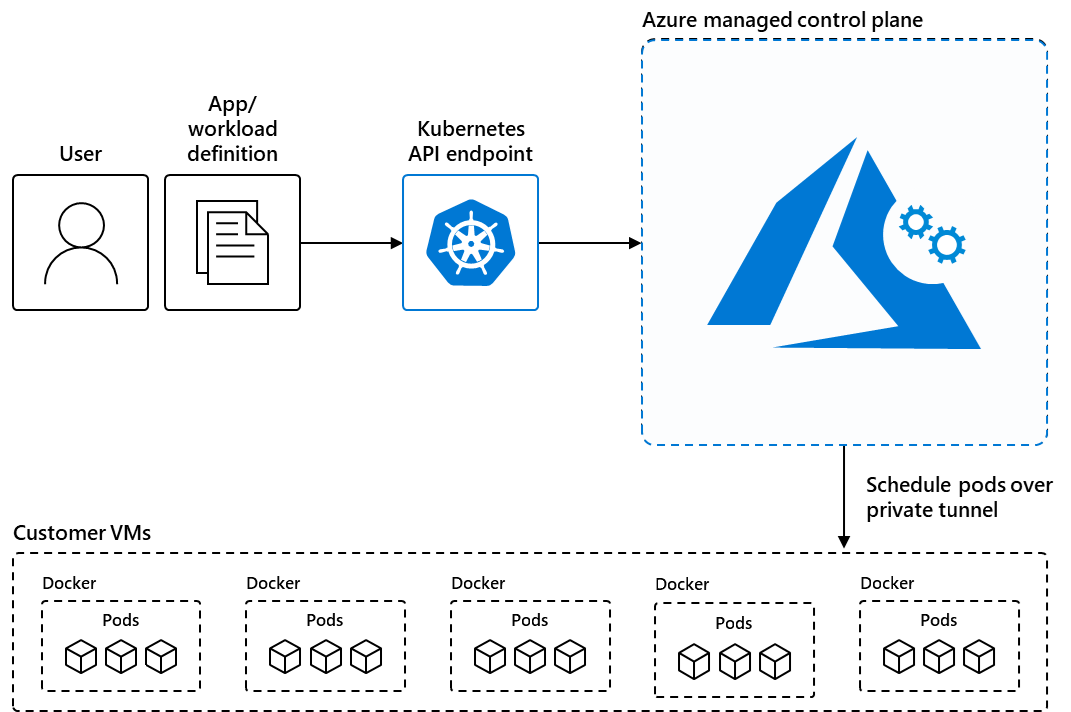
The diagram conveys an important operational boundary:
- The managed control plane exposes the Kubernetes API and operates services such as scheduling and cluster state management. For a Free-tier AKS cluster, Azure does not charge a separate management fee, but there is no financially backed SLA.
- The agent nodes are Azure virtual machines in a node pool. They run system components and, later, your frontend and backend pods. Their compute, disks, networking, and associated public-IP or load-balancer usage are billable.
- AKS automatically creates a separate node resource group, conventionally named with an
MC_prefix. It contains Azure-managed infrastructure such as the virtual machine scale set, network interfaces, managed disks, and load-balancer resources. Do not manage individual resources there with Terraform or delete them independently.
For this lab, one Standard_B2s node is a reasonable starting point: two virtual CPUs and 4 GiB of memory, subject to regional availability and quota. It is adequate for learning but not resilient: a node failure makes all workloads unavailable, and scheduled maintenance can interrupt them.
Cost guardrail
The AKS Free tier does not mean a free cluster. The principal recurring cost is the worker node.
| Cost source | Lab choice | Budget implication |
|---|---|---|
| AKS control-plane management | Free SKU |
No separate control-plane charge; no SLA |
| Worker node | One Standard_B2s node |
Main cost; often roughly USD 0.04–0.08 per hour, depending on region and pricing |
| OS disk | 30 GiB managed disk | Small recurring cost while the node exists |
| Standard load balancer / public IP | Created as part of normal AKS networking | Usually small, but not zero |
| Existing Basic ACR | Reused from earlier modules | Continues its existing monthly registry and image-storage cost |
The hourly VM range is an orientation, not a quote. Check the Azure portal’s pricing information for your chosen region before applying. At that range, a three-hour lab session is typically well below one USD in VM compute; leaving the node running all month can consume much of a USD 50 budget once disk and networking charges are included.
Cost of the preparation action below: zero. It only reads subscription state, creates local Terraform files, and may register Azure resource providers.
Plan the identity relationship before creating the cluster
A private registry needs authentication. A common Kubernetes approach is to create a registry username/password secret and reference it with imagePullSecrets. That works for external registries, but it creates a credential lifecycle inside the cluster.
For AKS and ACR in the same Microsoft Entra tenant, use Azure identities instead:
- AKS creates a kubelet identity associated with its node pool.
- Azure grants that identity the
AcrPullrole at the scope of your ACR. - When a node needs an image, its kubelet obtains an Azure token and ACR authorizes the pull.
- Kubernetes pods can refer directly to image names such as
myregistry.azurecr.io/backend:git-a1b2c3d, with no ACR password stored in the manifest.
The AKS resource itself uses a system-assigned managed identity in this lesson. However, the important identity for image pulling is the automatically managed kubelet identity, exposed by Terraform as kubelet_identity[0].object_id. It is that identity, not your interactive Azure CLI account and not a pod identity, that needs registry-reader permissions.
Read the conceptual explanation first.
Read Microsoft Learn’s overview of AKS–ACR integration. It explains why AcrPull is granted to the managed identity associated with the AKS agent pool.
In the opening overview, read the AKS–ACR authentication explanation. Focus on the distinction between an Azure RBAC role assignment and a Kubernetes image-pull secret. Also note the warning that an ACR configured for ABAC repository permissions needs a different role model.
This lesson assumes the ACR created earlier uses the normal Azure RBAC permission model. If you explicitly enabled the ACR setting RBAC Registry + ABAC Repository Permissions, do not apply the AcrPull configuration below unchanged. Microsoft’s documentation notes that those registries require the Container Registry Repository Reader role instead.
A small Terraform configuration for AKS
Keep this configuration in its own directory or module, for example infra/aks. You may retain the remote-state backend established earlier in the course; the examples below intentionally focus on AKS resources rather than prescribing a second state-backend design.
First, confirm that Terraform will authenticate through your Azure CLI session and that the intended subscription is selected:
az login
az account show --output table

export AZURE_SUBSCRIPTION_ID="<your-subscription-id>"
az account set --subscription "$AZURE_SUBSCRIPTION_ID"

az provider register --namespace Microsoft.ContainerService
az provider register --namespace Microsoft.ContainerRegistry
Provider registration can take a few minutes on a subscription where AKS has never been used. It does not provision billable resources.
The official AKS Terraform quickstart uses the same basic workflow: authenticate through Azure CLI, review a plan, then apply exactly the reviewed plan.
Deploy an Azure Kubernetes Service (AKS) cluster using ...
Use this Microsoft Learn quickstart as a reference for the Azure CLI authentication requirement and the normal Terraform init, plan, and apply workflow. Its cluster example is larger than this budget-focused lab, so do not copy its node count or VM size unchanged.
Read the “Login to your Azure account” introduction, especially the authentication requirement. Then, in “Initialize Terraform” and “Create a Terraform execution plan,” review the plan workflow, including the saved-plan rationale. The key habit is to inspect the intended infrastructure before Azure creates anything.
Inputs
Create variables.tf:
variable "location" {
  type        = string
  description = "Azure region for the AKS resource group."
  default     = "westeurope"
}

variable "aks_resource_group_name" {
  type        = string
  description = "Dedicated resource group for the short-lived AKS lab."
}

variable "aks_name" {
  type        = string
  description = "AKS cluster name and DNS prefix."
}

variable "acr_name" {
  type        = string
  description = "Name of the existing private ACR."
}

variable "acr_resource_group_name" {
  type        = string
  description = "Resource group containing the existing ACR."
}

variable "node_vm_size" {
  type        = string
  description = "Small VM size for the one-node learning cluster."
  default     = "Standard_B2s"
}

variable "ssh_public_key_path" {
  type        = string
  description = "Local public SSH key path for node-level break-glass access."
  default     = "~/.ssh/id_ed25519.pub"
}
AKS does not require routine SSH access to nodes; Kubernetes and Azure diagnostics should be your normal operational interfaces. The SSH key is simply a recovery-oriented baseline accepted by AKS. Create a local key only if you do not already have one:
test -f ~/.ssh/id_ed25519.pub || \
  ssh-keygen -t ed25519 -f ~/.ssh/id_ed25519 -C "aks-lab"
Create terraform.tfvars. ACR names are globally unique and must be the actual registry name you created earlier.
location                = "westeurope"
aks_resource_group_name = "rg-aks-lab-weu"
aks_name                = "aks-lab-youralias"

acr_name                = "your-existing-acr-name"
acr_resource_group_name = "your-existing-acr-resource-group"
Do not put registry credentials, client secrets, or kubeconfig contents in this file. This configuration needs only names, not secrets.
Resources and the ACR role assignment
Create main.tf:
terraform {
  required_version = ">= 1.6.0"

  required_providers {
    azurerm = {
      source  = "hashicorp/azurerm"
      version = "~> 4.0"
    }
  }
}

provider "azurerm" {
  features {}
}

locals {
  tags = {
    project     = "azure-devops-lab"
    environment = "learning"
    owner       = "personal"
    cleanup     = "destroy-after-aks-module"
  }
}

data "azurerm_container_registry" "app" {
  name                = var.acr_name
  resource_group_name = var.acr_resource_group_name
}

resource "azurerm_resource_group" "aks" {
  name     = var.aks_resource_group_name
  location = var.location
  tags     = local.tags
}

resource "azurerm_kubernetes_cluster" "lab" {
  name                = var.aks_name
  location            = azurerm_resource_group.aks.location
  resource_group_name = azurerm_resource_group.aks.name
  dns_prefix          = var.aks_name

  sku_tier = "Free"

  identity {
    type = "SystemAssigned"
  }

  default_node_pool {
    name                 = "system"
    vm_size              = var.node_vm_size
    node_count           = 1
    auto_scaling_enabled = false
    os_disk_size_gb      = 30
  }

  linux_profile {
    admin_username = "azureuser"

    ssh_key {
      key_data = file(pathexpand(var.ssh_public_key_path))
    }
  }

  tags = local.tags
}

resource "azurerm_role_assignment" "aks_acr_pull" {
  scope                = data.azurerm_container_registry.app.id
  role_definition_name = "AcrPull"
  principal_id         = azurerm_kubernetes_cluster.lab.kubelet_identity[0].object_id
}
Create outputs.tf:
output "aks_resource_group_name" {
  value = azurerm_resource_group.aks.name
}

output "aks_name" {
  value = azurerm_kubernetes_cluster.lab.name
}

output "acr_login_server" {
  value = data.azurerm_container_registry.app.login_server
}

output "kubelet_identity_object_id" {
  value = azurerm_kubernetes_cluster.lab.kubelet_identity[0].object_id
}
A few design choices matter here:
data "azurerm_container_registry"reads the existing ACR rather than creating a second registry. Therefore, destroying this AKS configuration will not delete the registry that also supports your Container Apps deployment.node_count = 1and disabled autoscaling cap the cluster at one worker node. This lowers cost, but leaves no spare capacity and no high availability.sku_tier = "Free"avoids the paid AKS management tier. It does not avoid VM, disk, load balancer, IP, or data-transfer costs.- The role assignment is scoped to one registry, not to the whole subscription or resource group. This is a least-privilege boundary: the nodes may pull images from the application registry, but receive no broader Azure permissions.
- The cluster declaration depends on no container image and deploys no application yet. That separation makes infrastructure failure easier to diagnose before Kubernetes manifests enter the picture.
Read the Terraform-specific part of the ACR integration guide before applying.
Read the Terraform role-assignment example in Microsoft Learn’s AKS–ACR integration guide. It is the direct basis for the azurerm_role_assignment in this lab.
In “Create a new AKS cluster and integrate with an existing ACR,” begin at the authorization transition. Then inspect the Terraform azurerm_role_assignment immediately below it. Compare its ACR scope and kubelet principal_id with your configuration.
Apply only after reviewing cost and scope
Run Terraform’s normal validation sequence:
terraform init
terraform fmt -recursive
terraform validate
terraform plan -out aks.tfplan
The plan should show:
- one AKS lab resource group;
- one AKS cluster;
- one
AcrPullrole assignment at the ACR scope; - one read of the existing ACR data source.
Terraform cannot list every Azure-managed component that AKS will create in its MC_ node resource group. That is normal. The AKS resource is the parent resource in the Terraform plan, but Azure will provision the worker-node VM scale set, managed disk, networking interfaces, and load-balancer dependencies behind it.
Apply only the saved plan you reviewed:
terraform apply aks.tfplan
AKS creation commonly takes several minutes. If the cluster is created but the role assignment temporarily fails with an identity-not-found or propagation-style error, wait a few minutes and run a fresh terraform plan followed by terraform apply. Managed identity propagation can be eventually consistent immediately after a cluster is created.
Cost of provisioning: from the moment AKS creates the node pool, the node VM and its supporting resources are billable. For a one-node Standard_B2s cluster, a focused two-to-three-hour session should generally cost a small fraction of the monthly budget, but leaving it active continuously can approach or exceed the intended budget after all regional charges. No application pods or ingress controller are created in this lesson, so there is no extra application compute cost yet.
Verify the cluster and its private-registry authorization
Retrieve Kubernetes credentials through Azure CLI:
export AKS_RG="$(terraform output -raw aks_resource_group_name)"
export AKS_NAME="$(terraform output -raw aks_name)"
export ACR_LOGIN_SERVER="$(terraform output -raw acr_login_server)"

az aks get-credentials \
  --resource-group "$AKS_RG" \
  --name "$AKS_NAME" \
  --overwrite-existing

kubectl config current-context
kubectl get nodes -o wide
You should see one node in Ready state. At this point, no application is scheduled, but Kubernetes system pods occupy part of the node’s resources.
Now verify that the ACR permission exists and that AKS can use it:
export KUBELET_OBJECT_ID="$(terraform output -raw kubelet_identity_object_id)"

az role assignment list \
  --scope "$(az acr show \
    --name "$ACR_LOGIN_SERVER" \
    --query id \
    --output tsv)" \
  --output table

az aks check-acr \
  --name "$AKS_NAME" \
  --resource-group "$AKS_RG" \
  --acr "$ACR_LOGIN_SERVER"
In the role-assignment listing, find an assignment with:
- role:
AcrPull - principal ID: the value in
KUBELET_OBJECT_ID
The az aks check-acr command tests the intended AKS-to-ACR relationship. A successful result means the next lesson can reference private images directly in a Kubernetes Deployment; it will not need an ACR username/password secret.
If the command reports an authorization failure:
- Confirm you used the correct ACR name and resource group in
terraform.tfvars. - Confirm the role assignment is scoped to the ACR ID, not another registry.
- Wait briefly for Azure RBAC propagation, then run the command again.
- Run
terraform planto check whether the role assignment is absent or drifting.
Cost of verification: retrieving kubeconfig, listing nodes, inspecting role assignments, and running az aks check-acr do not create new billable resources. The already-running worker node remains the ongoing cost.
Treat destruction as part of the deployment workflow
The cluster is required for the next AKS lessons, so keep it only if you intend to continue soon. If you are pausing the course for more than a short period, destroy it now and recreate it from Terraform when needed.
Before ending the AKS module, use a reviewed destroy plan:
terraform plan -destroy -out aks.destroy.tfplan
terraform apply aks.destroy.tfplan
This removes the AKS cluster and the dedicated AKS resource group. Azure should also remove the associated MC_... node resource group as part of cluster deletion. Cleanup can take several minutes after Terraform reports completion.
Do not manually delete resources in the MC_ group while the AKS cluster exists. If cleanup ever fails or state has been lost, delete the AKS parent resource group rather than selectively deleting its managed child resources.
Your existing ACR remains because this configuration only read it as a data source. That is intentional: it is still used by the Container Apps environment and will be used again when you recreate AKS.
Cost of cleanup: applying the destroy plan stops future AKS node, disk, load-balancer, and public-IP charges once Azure completes deletion. The existing ACR continues to incur its separate registry and image-storage charges until you intentionally remove it in the final course cleanup.
Key takeaways
A cost-controlled AKS lab is primarily an exercise in scope and lifecycle discipline:
- AKS manages the Kubernetes control plane, while your node pool runs the pods and drives most of the ongoing cost.
- A single
Standard_B2snode with a 30 GiB OS disk is a constrained but useful temporary environment; it is not highly available. - The AKS Free tier avoids a separate control-plane charge, not the cost of worker infrastructure.
- AKS uses a kubelet managed identity to pull images. Granting that identity
AcrPullat the ACR scope avoids storing registry credentials in Kubernetes. - Terraform should own both the cluster and the Azure RBAC role assignment, making the setup reproducible and auditable.
- The AKS-managed
MC_node resource group is Azure-owned infrastructure; manage the parent AKS cluster rather than its individual resources. - A reviewed
terraform plan -destroyis the budget control that matters most when pausing this part of the course.
Next, you will represent non-secret application settings and credentials as Kubernetes ConfigMaps and Secrets, while ensuring secret values do not appear in manifests, Git history, or terminal output.