Recommended resources
The freely available resources this lesson will direct you to.
- All You Need to Know in 12 Minutes: Pods' Requests and Limits in Kuberneteswww.youtube.com
- Kubernetes YAML File Explained - Deployment and Service | Kubernetes Tutorial 19www.youtube.com
- Deployments | Kuberneteskubernetes.io
- Deployment and cluster reliability best practices for Azure ... - Microsoftlearn.microsoft.com
Hello. Last lesson, you created backend-config and backend-credentials in the app-lab namespace. Those objects hold the backend’s settings, but nothing consumes them yet. Your AKS cluster also has permission to pull images from your private Azure Container Registry; that permission is separate from the application Secret.
In this lesson, you will run your FastAPI image with a Deployment, give it an internal Service, and configure resource requests, limits, and distinct liveness and readiness probes. You will test it from your own computer without creating a public endpoint. Allow about 40 minutes, including the readings and hands-on checks.
Budget check: this lesson does not require a new AKS cluster, public load balancer, or database. The existing AKS node, disk, registry, and any database you have left running continue to incur their usual charges. If you destroyed the cluster after the last lesson, review your earlier cost estimate before recreating it.
What the Deployment and Service each do
A Deployment declares how many copies of a Pod should exist and supplies the template for those Pods. Kubernetes works to maintain that desired state: if a Pod disappears, the Deployment’s controller arranges a replacement. A Service solves a different problem. It provides a stable, internal name and port for reaching ready Pods, even as individual Pods are replaced.
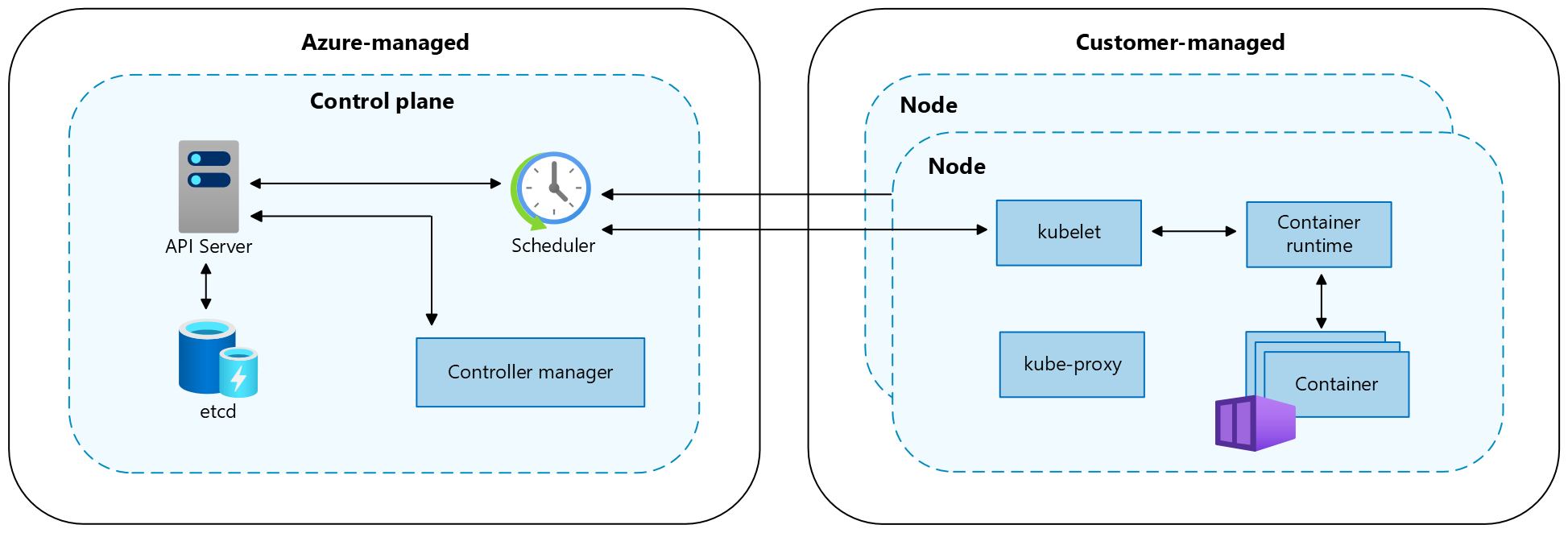
The AKS architecture image places the scheduler in the Azure-managed control plane and the kubelet on a customer-managed node. The scheduler decides where a Pod can run; the kubelet on that node starts its container and performs its health checks.
Read the Kubernetes Deployment documentation for the relationship between the Deployment, its Pod template, and its labels.
Read the Kubernetes documentation’s Deployment example to see how a declared replica count becomes running Pods. Then check the rule that connects the Deployment selector to the Pod labels.
In “Creating a Deployment,” read the example and checks, from the introductory sentence through the explanation of ReplicaSet and Pod names. Focus on replicas, selector.matchLabels, template.metadata.labels, and kubectl rollout status; use the nginx manifest to understand the structure, not as a file to apply to your cluster. Then, in “Writing a Deployment Spec” → “Selector,” read the selector rule about explicitly matching labels. The paragraph immediately after it notes that a Deployment’s selector cannot be changed after creation.
Our Deployment will label its Pods app: grasp-backend. Its selector must match that Pod label. The Service will independently select Pods with the same label; it does not route traffic to the Deployment object itself. Keeping those relationships explicit makes a missing endpoint much easier to diagnose.
Give the Pod a resource budget and meaningful health checks
On a small lab node, a Pod competes for capacity with Kubernetes system components and any other workloads. A container’s request is the amount used when Kubernetes decides whether it fits on a node. A limit bounds what it may use while running. For an initial lab setting, we will request 100m CPU (one tenth of a CPU) and 128Mi memory, with limits of 500m CPU and 512Mi memory. These are starting values, not measurements of your application: adjust them if observations show that the backend needs more or the node cannot accommodate it. CPU use above its limit can be throttled; exceeding a memory limit can result in the container being killed.
A running process is not necessarily able to serve requests. The liveness probe should answer a narrow question: is this FastAPI process functioning well enough that restarting it might help? The readiness probe asks whether it should receive traffic now. If the backend requires PostgreSQL to handle normal requests, a readiness check may include that dependency; the liveness check generally should not restart every backend container merely because the database is temporarily unavailable.
Deployment and cluster reliability best practices for Azure ... - Microsoft
Read Microsoft’s AKS guidance to connect resource settings and probes to node and application behavior. The lesson’s YAML below turns these ideas into a single-backend lab configuration.
In “Pod CPU and memory limits,” read the resource guidance, including the example resources configuration just below it. In “Readiness, liveness, and startup probes,” read the “Readiness probes” subsection’s traffic explanation and the “Liveness probes” subsection’s restart explanation. Notice the HTTP GET liveness example later in that subsection. “Startup probes” are useful for applications with long startup times; the two probes used here are sufficient for an initial lab.
The manifest below uses /health/live and /health/ready as example paths. Before applying it, match them to the distinct endpoints you implemented in the earlier FastAPI lesson. There are no built-in FastAPI health paths. Both endpoints must be reachable on the container’s listening port; a successful probe should return an HTTP success response. If your readiness endpoint checks a database that is stopped, an unready Pod is the expected result—not a reason to weaken the liveness check.
Write the backend manifests
First, verify that you are targeting the intended cluster and that the configuration objects still exist:
kubectl config current-context
kubectl get nodes
kubectl -n app-lab get configmap backend-config
kubectl -n app-lab get secret backend-credentials
Confirm three application-specific facts before editing YAML:
- The exact versioned image name and tag you pushed to ACR. The placeholder below is not an image you can pull.
- The port on which the container listens. The example uses
8000; its server must listen on0.0.0.0, not only on localhost inside the container. - Your actual liveness and readiness paths. If readiness requires PostgreSQL, use a working database credential and the prepared schema rather than last lesson’s disposable Secret value.
Create k8s/backend-deployment.yaml:
apiVersion: apps/v1
kind: Deployment
metadata:
  name: backend
  namespace: app-lab
spec:
  replicas: 1
  selector:
    matchLabels:
      app: grasp-backend
  template:
    metadata:
      labels:
        app: grasp-backend
    spec:
      containers:
        - name: backend
          image: yourregistry.azurecr.io/backend:your-version
          ports:
            - name: http
              containerPort: 8000
          env:
            - name: APP_ENV
              valueFrom:
                configMapKeyRef:
                  name: backend-config
                  key: APP_ENV
            - name: LOG_LEVEL
              valueFrom:
                configMapKeyRef:
                  name: backend-config
                  key: LOG_LEVEL
            - name: DATABASE_URL
              valueFrom:
                secretKeyRef:
                  name: backend-credentials
                  key: DATABASE_URL
          resources:
            requests:
              cpu: 100m
              memory: 128Mi
            limits:
              cpu: 500m
              memory: 512Mi
          livenessProbe:
            httpGet:
              path: /health/live
              port: http
            initialDelaySeconds: 10
            periodSeconds: 10
            timeoutSeconds: 2
            failureThreshold: 3
          readinessProbe:
            httpGet:
              path: /health/ready
              port: http
            initialDelaySeconds: 5
            periodSeconds: 5
            timeoutSeconds: 2
            failureThreshold: 3
Change the image, port, paths, and environment-variable names wherever your actual application differs. The named http port lets both probes refer to the same container port without repeating its number. The timings give the example application a short startup allowance; increase them if normal startup consistently takes longer. Do not compensate for an incorrect path by simply increasing the delay.
The manifest contains references to the Secret, not its value. The ConfigMap, Secret, and Deployment must all be in app-lab. Also notice that one replica is deliberate for this budget-conscious lab. It does not provide high availability if its node fails.
Now create k8s/backend-service.yaml:
apiVersion: v1
kind: Service
metadata:
  name: backend
  namespace: app-lab
spec:
  type: ClusterIP
  selector:
    app: grasp-backend
  ports:
    - name: http
      port: 8000
      targetPort: http
port is the port clients use on the Service; targetPort identifies the named container port. A ClusterIP Service is internal to the cluster: it does not allocate a public Azure load balancer or public IP. A later frontend component can use this internal Service name, while browser-facing access will need its own routing design.
Cost of preparation: checking objects and writing these files creates no new Azure resources. Existing AKS, ACR, and any running PostgreSQL charges continue.
Apply, verify, and diagnose
Apply the Deployment first, then its Service:
kubectl apply -f k8s/backend-deployment.yaml
kubectl apply -f k8s/backend-service.yaml

kubectl -n app-lab rollout status deployment/backend --timeout=120s
kubectl -n app-lab get deployment backend
kubectl -n app-lab get pods -l app=grasp-backend -o wide
kubectl -n app-lab get service backend
You want the Deployment to show 1/1 ready. A successful apply only means Kubernetes accepted the declarations; it does not establish that the image was pulled, the application started, or the readiness probe succeeded. The Service should show type ClusterIP, not LoadBalancer.
To inspect whether the Service has a ready destination, use:
kubectl -n app-lab get endpointslice \
  -l kubernetes.io/service-name=backend
When the Pod is ready, test through the Service without publishing it. In one terminal, run:
kubectl -n app-lab port-forward service/backend 18000:8000
Keep it running. In another terminal, use your actual health paths:
curl -i http://127.0.0.1:18000/health/live
curl -i http://127.0.0.1:18000/health/ready
The left-hand port, 18000, is on your computer; 8000 is the Service port. Stop port-forwarding with Ctrl+C afterward. This confirms a route through the internal Service from your local machine; it does not test a public ingress.
If the rollout does not become ready, inspect the Pod and its events before changing anything:
kubectl -n app-lab describe pods -l app=grasp-backend
kubectl -n app-lab describe deployment backend
An image-pull error points toward the image name, tag, or ACR authorization. A missing ConfigMap or Secret key prevents the container from starting. A probe failure calls for checking the path, listening port, startup time, and—for readiness only, if your endpoint requires it—database availability. A Pending Pod with insufficient CPU or memory calls for comparing its requests with the node’s available capacity. Application logs can help, but inspect them carefully if your code might accidentally log configuration or credentials; do not print the Secret to debug it.
Cost of deployment and testing: this workload uses capacity on your existing billable node. A ClusterIP Service and local port-forward do not provision a public load balancer. They also do not stop node, disk, ACR, or database charges. Using the earlier illustrative node range of roughly USD 0.04–0.08 per hour, a 40-minute session represents roughly USD 0.03–0.06 of node time, plus disk, registry, database, and any other applicable charges. Actual rates depend on your region and resources; leaving even that example node running for a month would cost roughly USD 29–58 in node time alone, potentially exceeding your USD 50 budget once other services are included.
Leave a useful handoff—or stop the billable infrastructure
If you will deploy the frontend soon, keep the Deployment, Service, ConfigMap, and Secret in place. Keep the manifests in version control only after confirming they contain no credentials. A later change to the image or Pod template can trigger a new rollout; remember that an environment-variable Secret or ConfigMap change alone will not update values inside an existing container.
If you are pausing, remove the workload and Service:
kubectl -n app-lab delete service backend
kubectl -n app-lab delete deployment backend
These commands free workload capacity but do not stop AKS node charges. To stop those charges, use the reviewed Terraform destroy workflow for your AKS cluster and verify that Azure has completed deletion. Treat the database and ACR as separately managed, potentially billable resources. You can retain the non-secret YAML files for the next lab; recreate the imperative Kubernetes Secret securely if you later recreate the cluster.
Key takeaways: the Deployment maintains Pods, while the Service selects ready Pods by label and offers an internal address. Requests help Kubernetes place the Pod; limits constrain its runtime use. Liveness decides when a restart may help, whereas readiness decides when the backend should receive traffic. Next, you will deploy the React frontend and arrange working REST and WebSocket routes to this backend.