Recommended resources
The freely available resources this lesson will direct you to.
Hello again. In the previous lesson, you separated the JDK (development tools), a runtime image (the environment an application needs), and the JVM (the execution engine). Now we follow one Java program through that runtime: from a .java file, through a .class file, to verified bytecode that is interpreted and eventually optimized into native machine code.
For interview purposes, the crucial distinction is this: javac compiles Java source before execution; the JVM executes bytecode at runtime; JIT compilation is a later runtime optimization, not another source-code compilation step.
The program’s journey: a useful but non-literal pipeline
A typical Java program passes through these stages:
| Stage | Main actor | What happens |
|---|---|---|
| Source compilation | javac from the JDK |
Java source is checked and compiled into class files containing bytecode. |
| JVM startup | java launcher and JVM |
The runtime starts a JVM process and identifies the application’s main class. |
| Class loading | Class loader and JVM | The JVM locates class-file bytes, defines the class, and creates a corresponding Class object. |
| Linking | JVM | The JVM verifies bytecode, prepares class runtime state, and resolves symbolic references as needed. |
| Initialization | JVM | Static field initializers and static blocks execute on the class’s first active use. |
| Execution | Interpreter and JIT compiler | Bytecode begins executing; frequently used code may later be compiled into optimized native machine code. |
This is a conceptual trace, not a rule that every class completes every stage at application startup. Java loads and links many classes lazily, when they are actually needed. Similarly, a method may be interpreted briefly, compiled quickly, or never be JIT-compiled at all.
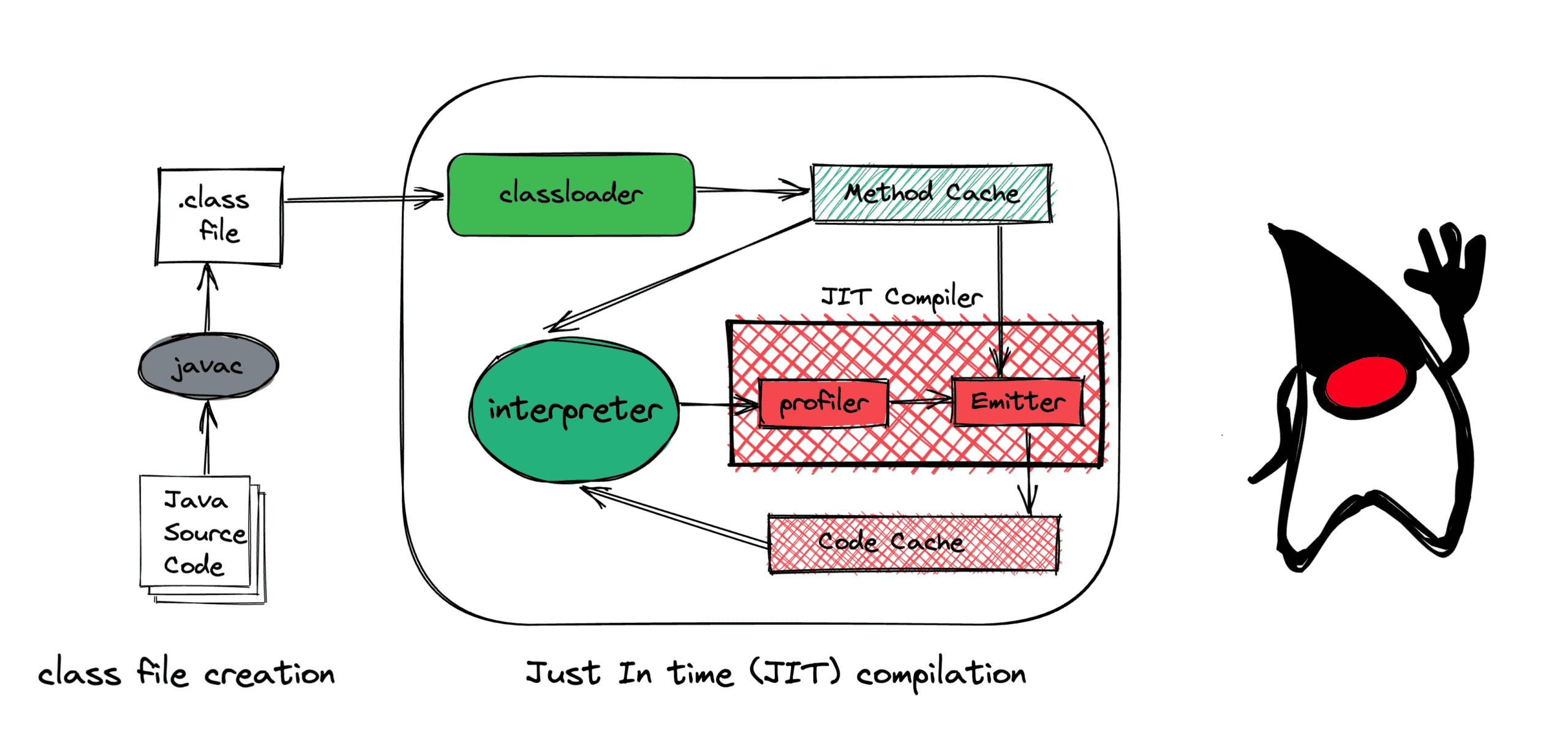
Start with the source-to-bytecode boundary. This is the responsibility of the JDK compiler, not the JVM.
Javac - the Compiler - Dev.java
Read Dev.java’s short introduction to javac to anchor the build-time part of the execution story: Java source files are compiled into bytecode class files, and one source file can lead to more than one class file.
In the opening “Description” section, read the opening description and example. Focus on the naming convention of .java source files and .class bytecode files; note that nested classes may produce additional class files.
1. Compilation: from Java source to class files
Suppose you write this file:
public class Launch {
    static {
        System.out.println("Initializing Launch");
    }

    public static void main(String[] args) {
        System.out.println(score(21));
    }

    private static int score(int value) {
        return value * 2;
    }
}
When you run:
javac Launch.java
the compiler performs work such as parsing the source, checking names and types, checking access rules, resolving overloads, and generating bytecode. If compilation succeeds, it produces Launch.class.
A .class file is not native CPU machine code. It is a structured binary format containing, among other things:
- class name, superclass, interfaces, fields, and methods;
- access modifiers and metadata;
- a constant pool containing constants and symbolic references to classes, methods, and fields;
- bytecode instructions for executable methods;
- attributes such as debugging information and annotations.
For example, the score method will be represented by instructions that load the value parameter, load the constant 2, multiply, and return the result. Bytecode is designed for the JVM’s virtual instruction set, not directly for an x86, ARM, Linux, or Windows CPU.
Two interview details matter here:
javacdoes not create the final optimized machine code that the CPU will execute in a normal JVM run. It creates bytecode.- One source file does not necessarily produce exactly one class file. Nested classes commonly result in files such as
Outer.classandOuter$Inner.class.
A JAR file adds another packaging layer. It is usually a ZIP-based archive containing many .class files and resources. A JAR itself is not “the bytecode”; it is a container that holds bytecode and related application files.
2. Starting the JVM and loading classes
When you run:
java Launch
the Java launcher starts a JVM and asks it to run the named main class. The JVM must first make Launch available as a runtime type before it can invoke main.
The class-loading process involves both class loaders and the JVM:
- A class loader locates the binary representation of a class. Depending on configuration, that may come from the runtime image, a directory, a JAR file, or application-specific generated bytes.
- The JVM defines the class and creates its runtime representation, including a corresponding
java.lang.Classobject. - The JVM also needs superclass and superinterface information before a class can be fully usable.
Do not say, “The JVM loads all classes in the application at startup.” That is usually false. If your service has a class for an infrequent administrative endpoint, it may not load until the first request reaches that code path.
The more accurate statement is:
Java generally loads classes on demand. A class may be loaded because it is the main class, because another loaded class needs it, because reflection asks for it, or because application code explicitly requests it.
Loading, linking, and initialization are distinct
Interviewers often use “class loading” broadly to mean the entire process. Technically, Java distinguishes loading, linking, and initialization.
| Phase | Core purpose | Does ordinary Java code run? |
|---|---|---|
| Loading | Find class-file bytes, define the class, create its runtime Class representation |
No |
| Verification | Check that bytecode obeys JVM safety and type rules | No |
| Preparation | Create runtime state for static fields and internal method structures | No arbitrary application code |
| Resolution | Turn symbolic references into usable runtime references, often lazily | Usually no application logic |
| Initialization | Run static field initializers and static blocks | Yes |
The next reading gives the precise HotSpot terminology. It is implementation documentation, so focus on the general JVM concepts rather than older implementation-specific loader names or internal data-structure details.
HotSpot Runtime Overview - OpenJDK
Read the selected parts of OpenJDK’s HotSpot Runtime Overview for the precise distinction between class loading, linking, bytecode verification, initialization, and adaptive JIT optimization.
Under “VM Class Loading,” find the subsection “Class Loading Phases.” Read the phase description. Pay particular attention to the difference between preparation and initialization: static initializer code has not run during preparation. Then find “Bytecode Verifier and Format Checker.” In its first paragraphs, read the verification discussion. Focus on why a JVM must validate class files even though ordinary Java compilers normally produce valid bytecode. Finally, in the “Interpreter” section, locate the paragraph beginning “The HotSpot interpreter is also a critical part.” Read adaptive optimization explanation. This provides the rationale for interpreting first and concentrating JIT work on hot code.
3. Verification: why successful compilation is not the final safety check
It may seem redundant to verify code that javac already compiled. But a JVM cannot assume every class file was produced by a trusted Java compiler.
Class files can come from:
- another Java compiler or language targeting the JVM;
- bytecode-generation libraries;
- instrumentation agents;
- build tools that transform classes;
- downloaded or otherwise untrusted artifacts;
- corrupted files.
During linking, the JVM’s verifier checks that bytecode follows the JVM’s structural and type-safety rules. At a conceptual level, it checks things such as:
- bytecode instructions are valid for the class-file format;
- an instruction receives the required kinds of operands;
- operand-stack use is consistent across control-flow branches;
- local variables and method invocations obey expected types;
- the code cannot forge arbitrary references or violate core JVM safety assumptions.
This is not the same as “checking whether your business logic is correct.” The verifier does not know whether a payment total is valid. It ensures the bytecode does not break the execution model’s type and stack rules.
If verification fails, the JVM can throw a VerifyError. This is an Error, not a normal checked exception that application code should routinely catch and recover from.
Preparation versus initialization: a frequent interview trap
Consider this class:
public class Settings {
    static int timeout = readTimeout();
    static {
        System.out.println("Settings initialized");
    }

    static int readTimeout() {
        return 30;
    }
}
During preparation, the JVM allocates state for static fields. It does not call readTimeout() and does not print the message. Arbitrary static initializer logic runs later, during initialization.
During initialization, the JVM effectively executes the static field initializers and static blocks in their source order. That is why initialization can have visible behavior, throw an exception, access the environment, or invoke methods.
For Launch, class initialization occurs before the JVM can invoke its static main method. The static block prints:
Initializing Launch
before main prints the result.
Initialization is usually triggered by the first active use of a class, such as:
- creating an instance with
new; - invoking a static method;
- reading or writing certain static fields;
- reflective use that requests initialization.
The exact edge cases are detailed in the language specification, but the interview-level principle is clear: loading a class does not necessarily mean its static initialization has already executed.
4. Executing bytecode: interpretation first, optimization where it pays off
After the main class is loaded, linked, and initialized, its bytecode can execute. A JVM implementation such as HotSpot has more than one way to execute it.
The JVM can use an interpreter, which executes bytecode instructions according to their defined semantics. This is not literally “running Java one source line at a time.” Source lines are mostly a debugging concept; execution works with bytecode instructions, local variables, operand stacks, method calls, branches, and returns.
Interpreting bytecode has important advantages:
- execution can begin quickly;
- the JVM can collect real runtime information;
- the JVM avoids compiling code that runs only once;
- dynamic behavior, such as commonly observed receiver types at a call site, can inform later optimization.
However, repeatedly interpreting a heavily used method creates overhead. Backend services commonly have a small number of hot paths: request parsing, serialization, validation, data mapping, caching, and selected database-access code. Repeatedly executed code is where JIT compilation becomes valuable.
Watch JetBrains’ “JVM Anatomy 101” for a visual treatment of class-file structure, verification, initialization, interpretation, and the trade-offs behind JIT compilation.
Begin with class-file anatomy to see what bytecode and the operand stack represent. Then skip to loading and verification for the distinction among parsing a class file, linking, verification, and static initialization. Finish with execution and JIT; focus on why runtime profiling identifies hot code and why a fast compiler and an aggressively optimizing compiler involve different trade-offs.
What the JIT compiler actually does
JIT means just-in-time compilation. The JVM observes execution, identifies code that has become hot, and compiles selected bytecode into native machine instructions suitable for the current CPU and operating system.
That native code is held in memory, commonly called the code cache. Future executions can use the native version instead of repeatedly interpreting the same bytecodes.
For a frequently called method, the conceptual lifecycle is:
- The JVM begins executing bytecode, often through the interpreter.
- Runtime profiling records that a method or loop is frequently executed.
- A JIT compiler compiles selected hot code into native machine code.
- Later executions use the generated native code when appropriate.
The exact thresholds and decisions are implementation details. A JVM is free to use different compilation tiers and strategies, so do not claim that every method is always interpreted a fixed number of times before compilation.
JIT compilation is selective because compilation itself costs CPU time and memory. Compiling an error-reporting method that executes once at startup would usually waste resources. Compiling a method executed millions of times can substantially reduce total runtime.
A sophisticated JIT can apply optimizations such as:
- method inlining, replacing a small method call with the method body;
- removal of repeated checks when runtime facts make them unnecessary;
- specialized code based on frequently observed types;
- improved register allocation and instruction scheduling.
For the earlier score method, HotSpot might eventually compile a caller and inline score into it rather than compiling score as a separate standalone native method. The important interview point is not the particular decision; it is that the JIT uses runtime behavior to decide where optimization is worthwhile.
JIT compilation is not javac
This distinction should be immediate in an interview:
| Question | javac |
JIT compiler |
|---|---|---|
| When does it run? | Before application execution, during build or development | During application execution |
| Input | Java source code | JVM bytecode and runtime profiling data |
| Output | .class files containing bytecode |
Native machine code in memory |
| Main goal | Correct translation from source to JVM instructions | Faster execution of hot code |
| Output normally persisted as application artifact? | Yes, class files are packaged and deployed | No, generated code is normally process-specific and temporary |
Modern JavaScript engines also apply runtime optimization, so the general idea of a runtime adapting to real execution behavior should be familiar from Node.js and V8. The Java-specific interview distinction is that Java’s standard build artifact is explicit JVM bytecode in .class files, with a JVM-defined loading and verification lifecycle before execution.
5. A complete trace of Launch
You should now be able to narrate the example accurately:
javac Launch.javaparses, type-checks, and compilesLaunch.java, producingLaunch.classwith JVM bytecode and metadata.java Launchstarts the Java runtime and JVM, then identifiesLaunchas the main class.- A class loader locates the bytes for
Launch.class; the JVM definesLaunchand creates its runtime class representation. - During linking, the JVM verifies the class file, prepares class state, and resolves references when necessary.
- Before
mainruns,Launchis initialized. Its static block executes and printsInitializing Launch. - The JVM invokes
main; bytecode formainandscoreexecutes. - If comparable code executes frequently in a long-running process, HotSpot can collect profiling information and compile selected hot code into optimized native instructions.
- The generated native code is specific to the running JVM and host platform. The original
.classfile remains the portable deployed artifact.
Interview Q&A: concise answers worth rehearsing
Q: Walk me through what happens when I compile and run a Java program.
Answer:javac compiles .java source files into .class files containing JVM bytecode. When I run the program with java, the launcher starts a JVM and loads the main class. The JVM links the class by verifying the bytecode, preparing runtime structures, and resolving symbolic references as needed. Before active use, it initializes the class by running static field initializers and static blocks. The JVM then executes bytecode, initially often through interpretation. It profiles execution and may JIT-compile frequently executed code into optimized native machine code.
Q: If Java is compiled, why does it need an interpreter and a JIT compiler?
Answer:
Java source is compiled by javac, but the output is portable bytecode rather than CPU-specific machine code. The JVM can interpret that bytecode immediately, which supports quick startup and runtime profiling. For code that becomes hot, the JIT compiles bytecode into native machine code for the current machine, reducing repeated interpretation overhead.
Q: Does the JVM compile Java source code?
Answer:
No. javac, which is a JDK tool, compiles Java source into bytecode. The JVM executes bytecode. Its JIT compiler may compile bytecode into native machine code at runtime, but that is distinct from source compilation.
Q: Why does the JVM verify bytecode if the code was already compiled?
Answer:
The JVM cannot assume that every class file came from a trusted Java compiler. Class files can be generated, transformed, downloaded, or corrupted. Verification checks that bytecode obeys JVM format, type, control-flow, and operand-stack rules before execution, helping preserve type safety and runtime integrity.
Q: Does class loading run static blocks?
Answer:
Not by itself. Loading finds and defines the class, while linking verifies and prepares it. Static blocks and static field initializer code run during class initialization, usually on the class’s first active use, such as a static method call or object creation.
Q: Is every method JIT-compiled?
Answer:
No. JIT compilation is selective. The JVM typically focuses on code that profiling identifies as frequently executed, because compiling rarely used code would consume CPU time and memory without much benefit.
The key takeaway is that Java has two different compilation moments: javac turns source into portable bytecode before deployment, while the JVM may later use JIT compilation to turn hot bytecode into native instructions during execution. Between them, class loading, linking, verification, and initialization ensure that the JVM has a valid, usable runtime representation of each class.
Next, we will refine the portability claim behind this design: which parts of Java are platform-independent, and where operating-system, CPU, native-library, and runtime-image dependencies still matter.