Recommended resources
The freely available resources this lesson will direct you to.
Welcome back. In the previous lesson, you separated authentication—verifying an identity—from authorization—deciding what that identity may do. There is another question to answer before a gateway sends building telemetry to a cloud service: is it communicating with the intended service, and can anyone on the network read or alter the data along the way?
This lesson explains how TLS and TLS certificates help answer that question. We will follow an illustrative gateway connection, distinguish the certificate from the encryption it helps establish, and identify what TLS does not protect. Allow about 35–40 minutes, including a short video and reading.
Why a reachable endpoint is not enough
Imagine a gateway sending North Tower temperature readings to a cloud endpoint. DNS helps it find an address, and a firewall rule may allow the connection. Neither establishes that the machine answering at that address is the intended service. Nor does network reachability prevent someone with access to an intermediate network from trying to observe or change traffic.
Transport Layer Security (TLS) protects a connection across such an untrusted network in three related ways:
- Confidentiality: someone observing the traffic should not be able to read the protected messages.
- Integrity: an alteration in transit should be detected rather than silently accepted.
- Authentication: the connecting client can verify the identity of the server it intended to reach.
You may still hear SSL certificate or SSL/TLS. SSL is the older name; TLS is the protocol to discuss when describing a modern connection. When TLS secures HTTP traffic, the result is HTTPS.
The certificate’s most important job is not to act as a container for encrypted telemetry. It helps the client decide whose public key it can trust. The two parties then establish temporary keys for protecting the messages they exchange.
What the certificate establishes
Watch TLS / SSL – The complete sequence, from Practical Networking. Concentrate on the three participants—the certificate authority (CA), server, and client—rather than memorizing every cryptographic operation. A CA is an organization or system whose signing key the client is configured to trust for this purpose.
TLS / SSL - The complete sequence - Practical TLS
Practical Networking’s “TLS / SSL – The complete sequence” shows how a CA-issued certificate helps a client check the server’s identity before the parties establish keys for their connection.
Watch certificate issuance to see why the CA signs a certificate containing the server’s public key. Continue through client verification: focus on the client checking the CA’s signature, the server demonstrating possession of its private key, and the eventual use of session keys.
A public key may be shared. Its matching private key must be kept secret by the server. The certificate associates the public key with an identity and bears a CA’s digital signature. A client that trusts the issuing CA can verify that signature; during the handshake, the server must also demonstrate that it possesses the corresponding private key. Merely copying another server’s publicly available certificate would not be enough to impersonate it.
For the North Tower gateway, one more check is essential: does the certificate identify the endpoint the gateway meant to contact? A valid certificate for an unrelated hostname is not a valid answer to that question. The client also checks validity requirements such as whether the certificate is within its valid dates and chains to an issuer it trusts. An expired, mismatched, or untrusted certificate should cause the connection to fail rather than be ignored as a nuisance.
Read Mozilla’s Transport Layer Security (TLS) for a compact account of the protections, handshake, and server certificate. Its web-browser examples also apply conceptually to a gateway acting as a TLS client, although a particular gateway may have a different set of trusted CAs.
Transport Layer Security (TLS) - MDN Web Docs - Mozilla
Mozilla’s “Transport Layer Security (TLS)” gives precise names to the protections discussed here and explains how server authentication fits into the handshake.
Near the top, read the three bullets beginning “TLS secures a network connection in three ways”: the protections. In the “TLS handshake” subsection, read from “When a client connects to a server using TLS” through the final sentence about HTTP headers and bodies: the handshake. Then skip past “Configuring TLS” to its “Server authentication” subsection. Read the paragraph beginning “To support server authentication” and ending with the example domain: the certificate. Focus on the distinction between proving the server’s identity and encrypting the subsequent messages.
From a verified server to protected telemetry
A TLS handshake takes place before the application sends its protected telemetry. The client and server negotiate how to secure the connection. The client checks the server’s certificate and identity, and the parties establish shared session keys. They use those keys to protect subsequent traffic. TLS provides encryption and integrity checks for the messages; the certificate itself is not repeatedly encrypting each temperature reading.
The diagram below places a TCP connection before an illustrative TLS exchange. It is useful for locating the certificate in the conversation, but its ClientKeyExchange and ChangeCipherSpec messages depict an older handshake pattern. Modern TLS handshakes can differ, and the times printed on the diagram are not general performance estimates.
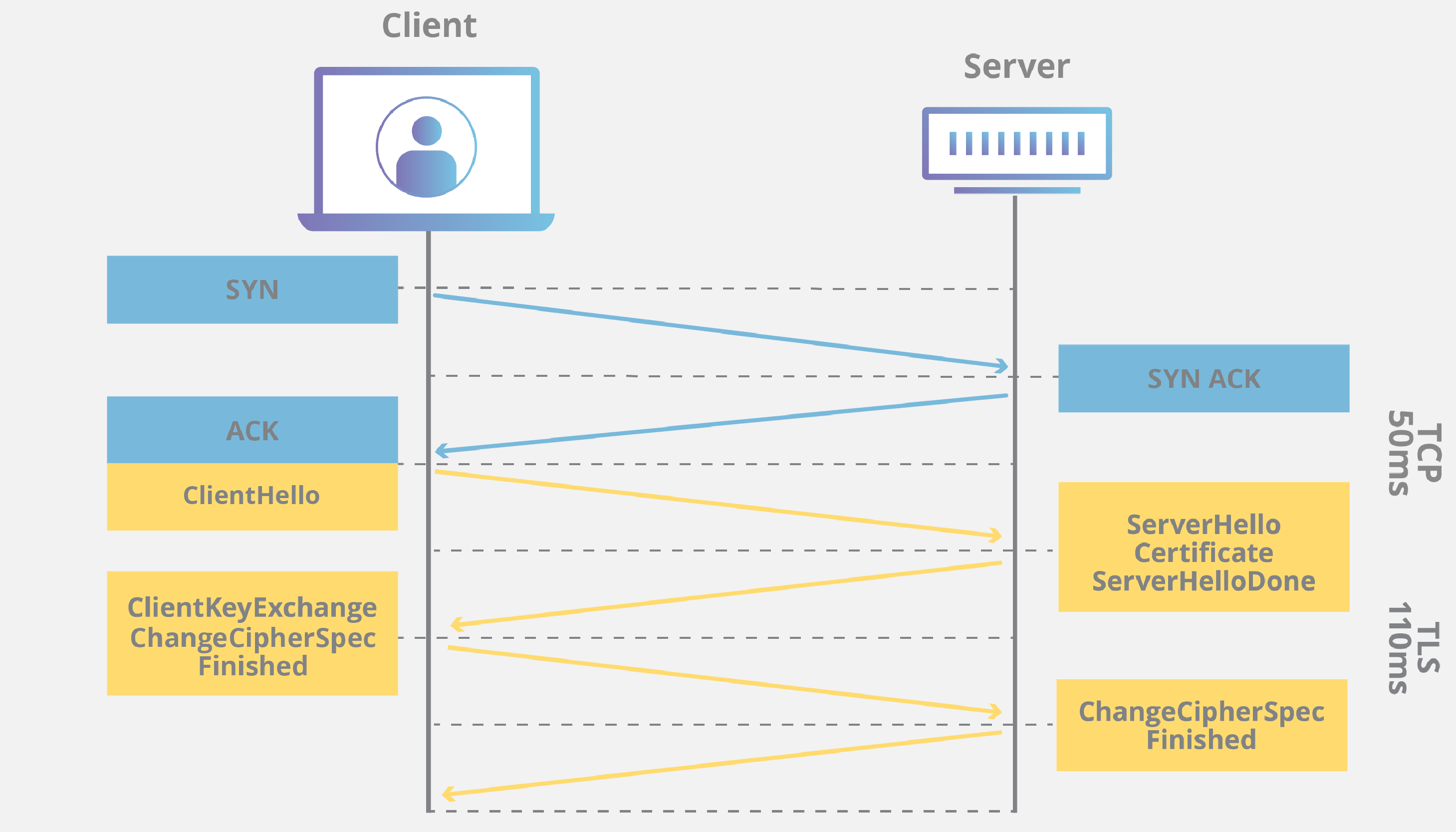
Return to the gateway example. If the gateway verifies the server’s certificate and the handshake succeeds, an observer on the network should not be able to read or silently change the telemetry sent over that TLS connection. That protection matters for operational values such as equipment status and temperatures, as well as for sensitive requests sent to a platform.
It matters just as much in the other direction. A gateway receiving information from a service needs assurance that the response came across its protected connection to the intended endpoint. TLS protects the exchange between the connection’s endpoints; it does not decide whether a reported temperature is physically plausible or whether a requested command is operationally wise.
Where TLS stops—and how to recognize a failure
Suppose the gateway authenticates to an application API using a credential, as in the previous lesson. Server-certificate validation and application access checks answer different questions. The certificate helps the gateway establish a protected connection to the intended server. The application can then verify the gateway’s identity and decide whether it may submit telemetry for North Tower. A secure channel does not grant permission to another tenant or prove that the payload contains correct measurements.
Some deployments also use mutual TLS (mTLS): the client presents its own certificate so the server can authenticate that client at the TLS layer. This is an option, not an assumption about Building X connections. Even if a gateway authenticates with a client certificate, its permitted actions and scope still require an authorization decision.
The phrase “in transit” deserves attention when tracing a building data path. TLS protects a particular connection between its endpoints. If data travels from a controller to a gateway, and then from the gateway to a cloud service, TLS on the second connection does not automatically protect the first. Likewise, a component that terminates TLS can see the data there; a separate onward connection needs its own protection. TLS does not, by itself, secure data stored at either endpoint.
These distinctions make failure reports more useful:
| Observation | More precise interpretation |
|---|---|
| The gateway reports a certificate-name mismatch or an untrusted issuer. | It reached a server, but could not establish sufficient trust that this is the intended TLS endpoint. Check the configured endpoint name and certificate trust configuration; do not simply disable validation. |
| The TLS connection succeeds, but the API rejects a telemetry upload. | Investigate the gateway’s application identity, permissions, requested resource, and tenant scope. A working TLS connection is not proof of authorization. |
| The upload is accepted, but a temperature value is wrong. | Investigate the source point and data handling. TLS protects the value against undetected alteration on that connection; it cannot correct a faulty source value. |
For a real deployment, verify the product’s current connection and certificate requirements rather than assuming a particular CA, authentication method, or TLS configuration. Never treat “turn off certificate checking” as a routine connectivity fix: it removes the check that helps prevent a gateway from trusting an impostor.
Key takeaways
A TLS certificate helps a client verify the server it is connecting to by binding an identity to a public key under a trusted signature. After a successful handshake, session keys protect data on that connection against reading and undetected modification in transit. Certificate validation, application authentication, authorization, and telemetry quality remain separate checks.
This completes the IT foundations module. Next, you will move closer to the source of the data by classifying common building systems and the operational purposes they serve.