Recommended resources
The freely available resources this lesson will direct you to.
- How to Build an AI Crypto Trading Bot PROPERLY - Full Python Guidewww.youtube.com
- Build a Python Trading Bot for Algorithmic Trading Using AI | Full Tutorialwww.youtube.com
- How to Write the Perfect System Prompt for Your Trading Style (3 Battle-Tested Templates) - My Trading - 24 September 2025 - Traders' Blogswww.mql5.com
- Writing an Algorithmic Trading Bot | by Sven Hans Knechtwire.insiderfinance.io
Introduction
In our last lesson, you successfully created an "orchestrator" script, main.py, that connects your data fetching and strategy analysis modules. Your bot can now look at market data and generate a 'BUY', 'SELL', or 'HOLD' signal. However, it currently has no memory; it generates a new, independent signal on every run without knowing if it's already in a trade.
This lesson focuses on giving your bot that crucial memory. We will refine your strategy module by adding "state management." This will allow the bot to track its current position (e.g., holding a long position, being flat) and make intelligent actions based on both the new signal and its current state. By the end, your bot won't just be a signal generator; it will be a decision-maker, ready to act in the market.
The Concept of Trade State Management
A stateless bot is like a driver who only looks at the traffic light right now. If it's green, they think "Go," even if the car is already moving. A stateful bot knows if the car is moving, stopped, or in reverse. It combines the traffic light signal with its current state to make a smarter decision.
For a trading bot, "state" simply refers to its current market position:
- FLAT: No open position.
- LONG: Holding a long position (bought an asset).
- SHORT: Holding a short position (sold an asset).
The goal of state management is to process a new trading signal within the context of the current state. This is visualized perfectly by the feedback loop in the trading bot architecture.
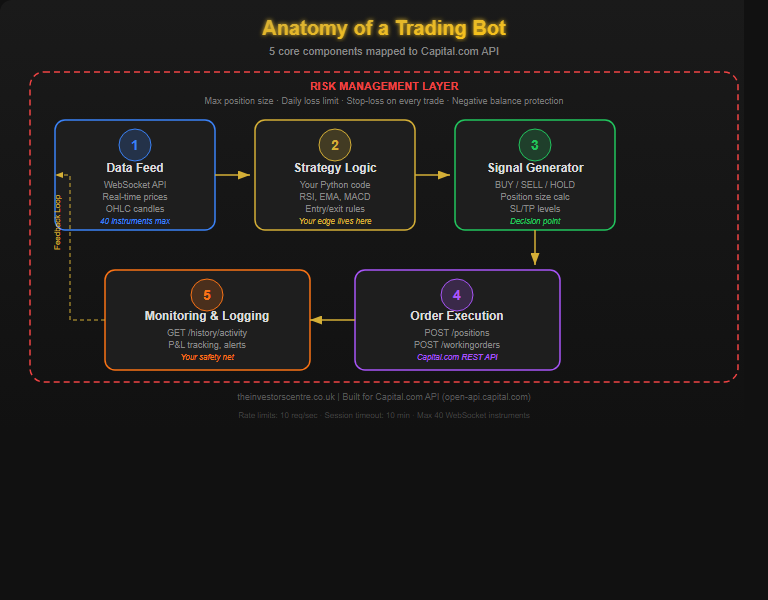
This means our logic must answer questions like:
- If the signal is 'BUY' and we are FLAT, the action should be to
OPEN_LONG. - If the signal is 'BUY' and we are already LONG, the action should be to
DO_NOTHING. - If the signal is 'SELL' and we are LONG, the action should be to
CLOSE_LONG.
Designing the State Machine
This logic forms a "state machine"—a set of rules that define how to transition from one state to another. Let's define the rules for our moving average crossover bot:
| Current State | Signal Received | Action to Take | New State |
|---|---|---|---|
FLAT |
BUY |
OPEN_LONG |
LONG |
FLAT |
SELL |
OPEN_SHORT |
SHORT |
LONG |
SELL |
CLOSE_LONG |
FLAT |
SHORT |
BUY |
CLOSE_SHORT |
FLAT |
| Any other combination | DO_NOTHING |
Unchanged |
Notice that we only act on signals that represent a change. If we are LONG and get another BUY signal, we do nothing. This prevents the bot from opening multiple positions based on the same ongoing trend.
The following video explains this exact concept. The presenter details how the bot's logic takes an AI's interpretation ('bullish', 'bearish', 'neutral') and combines it with the current position state to decide on a trading action.
How to Build an AI Crypto Trading Bot PROPERLY - Full Python Guide
This video from Robot Traders explains the logic of converting an AI signal into a concrete trading action based on the bot's current position.
Watch the segment from where the presenter discusses the interaction between the AI's interpretation and the current position state. Pay close attention to the different cases: what happens if the AI is bullish and there's no position, versus when there's already a short or long position open. This is the core logic we will implement.
Prompting for a StrategyManager Class
To implement this state machine cleanly, we'll ask our AI assistant to create a StrategyManager class within your strategy.py file. This class will encapsulate the state and the decision-making logic.
Your Task: Generate the StrategyManager
Use the following prompt with your AI assistant to generate the new class. This prompt clearly defines the role, inputs, internal state, and the precise logic of the state machine.
Prompt: Create StrategyManager Class
"You are an expert Python developer building an algorithmic trading bot. I need you to create a Python class named
StrategyManagerto be added to mystrategy.pyfile.This class will manage the trading state of the bot. It must track whether the bot is currently 'FLAT' (no position), 'LONG', or 'SHORT'.
Class Requirements:
- The
__init__method should initialize a state variable, for example,self.position = 'FLAT'.- It needs a method called
decide_action(self, signal: str) -> str. This method will take a signal ('BUY', 'SELL', or 'HOLD') and return a string representing the desired action.- The
decide_actionmethod must implement the following state machine logic:
- If
self.positionis 'FLAT' and thesignalis 'BUY', it should changeself.positionto 'LONG' and return the action 'OPEN_LONG'.- If
self.positionis 'FLAT' and thesignalis 'SELL', it should changeself.positionto 'SHORT' and return the action 'OPEN_SHORT'.- If
self.positionis 'LONG' and thesignalis 'SELL', it should changeself.positionto 'FLAT' and return the action 'CLOSE_LONG'.- If
self.positionis 'SHORT' and thesignalis 'BUY', it should changeself.positionto 'FLAT' and return the action 'CLOSE_SHORT'.- In all other cases, it should do nothing to the state and return the action 'DO_NOTHING'.
Please generate the complete Python code for the
StrategyManagerclass, including docstrings explaining what it does."
Your AI should generate a class that looks something like this:
class StrategyManager:
    """
    Manages the trading state and decides actions based on signals.
    """
    def __init__(self):
        """Initializes the StrategyManager with no open position."""
        self.position = 'FLAT'
        print(f"StrategyManager initialized. Current state: {self.position}")

    def decide_action(self, signal: str) -> str:
        """
        Decides the next trading action based on the signal and current position.

        Args:
            signal (str): The trading signal ('BUY', 'SELL', 'HOLD').

        Returns:
            str: The action to take ('OPEN_LONG', 'OPEN_SHORT', 'CLOSE_LONG', 'CLOSE_SHORT', 'DO_NOTHING').
        """
        action = 'DO_NOTHING'

        if self.position == 'FLAT':
            if signal == 'BUY':
                action = 'OPEN_LONG'
                self.position = 'LONG'
            elif signal == 'SELL':
                action = 'OPEN_SHORT'
                self.position = 'SHORT'
        elif self.position == 'LONG':
            if signal == 'SELL':
                action = 'CLOSE_LONG'
                self.position = 'FLAT'
        elif self.position == 'SHORT':
            if signal == 'BUY':
                action = 'CLOSE_SHORT'
                self.position = 'FLAT'

        print(f"Signal: {signal}, Position: {self.position}, Action: {action}")
        return action
Add this class to your strategy.py file.
Integrating the StrategyManager into main.py
Now, you need to update main.py to use your new stateful StrategyManager. The key is to create an instance of the manager outside your main processing loop, so its state persists between each run. We'll modify the run_bot function to simulate a bot that checks for signals periodically.
Your Task: Refactor main.py
Use this prompt to have your AI assistant refactor your main script.
Prompt: Refactor main.py for State Management
"You are an expert Python developer. I have a
main.pyscript for my trading bot. I need you to refactor it to use the newStrategyManagerclass and to run in a continuous loop.Current Context:
main.pycallsfetch_forex_datafromdata_connector.pyandget_ma_crossover_signalfromstrategy.py.strategy.pynow also contains aStrategyManagerclass.Refactoring Requirements:
- Import
timeand the newStrategyManagerclass fromstrategy.- In the
run_botfunction, create a single instance ofStrategyManagerbefore the main loop begins. This is critical for preserving state.- Create an infinite
while True:loop to simulate a continuously running bot.- Inside the loop:
a. Perform the existing steps: fetch data, validate it, and get the signal fromget_ma_crossover_signal.
b. Instead of just printing the signal, pass it to thestrategy_manager.decide_action()method to get the final action.
c. Print the current state from the manager and the decided action in a clear format.
d. Usetime.sleep(10)at the end of the loop to pause for 10 seconds before the next run.- Wrap the loop in a
try...except KeyboardInterruptblock so the user can stop the bot gracefully with Ctrl+C.Please generate the complete, refactored code for
main.py."
After this prompt, your main.py should be transformed into a stateful, continuously running application. When you run it, you will see it fetch data, generate a signal, and then—most importantly—decide on an action based on its memory of past actions.
Conclusion
Excellent work. Your trading bot is no longer a simple signal generator; it's a decision-making engine with memory. By adding the StrategyManager class, you've implemented a state machine that can translate raw signals into intelligent, context-aware actions. This is a fundamental step in building a bot that can operate autonomously.
Key Takeaways:
- State Management is Essential: A trading bot must track its current position (state) to make logical decisions and avoid redundant or conflicting trades.
- State Machines Provide Clarity: Defining your logic as a state machine (rules for transitioning between
FLAT,LONG, andSHORT) makes your strategy clear and robust. - Encapsulation is Good Practice: The
StrategyManagerclass neatly encapsulates all state-related logic, keeping your code organized and easy to maintain.
Your bot can now "see" the market, "think" about what it sees, and "decide" on an action. In the next lesson, we will finally teach it how to act on those decisions by building the Order Execution Engine, which will connect to a broker's API to place and manage real trades.