Recommended resources
The freely available resources this lesson will direct you to.
Hello! We’ll begin with a foundation that will recur throughout computer systems: the same non-negative integer can be written in decimal, binary, or hexadecimal. This lesson will give you a reliable way to convert in every direction. Later in the module, these notations will help you reason about integer limits, bit operations, and the contents of memory.
One value, different place values
The digits 25 mean two tens and five ones because decimal is base 10. In any positional number system, a digit’s value depends on both the digit and its position. Counting from the right, the positions are powers of the base:
Here, is the base. Decimal uses digits 0–9 and powers of 10; binary uses 0–1 and powers of 2; hexadecimal uses 0–9 and A–F and powers of 16. The principle is identical in all three.
Watch the first part of Number Systems - Converting Decimal, Binary and Hexadecimal from Programming and Math Tutorials. It moves from familiar decimal positions to binary positions, then demonstrates both directions of decimal–binary conversion.
Number Systems - Converting Decimal, Binary and Hexadecimal
Watch the decimal and binary portion of the video to connect place values with practical conversion methods.
Begin with decimal positions, then watch binary positions. Follow binary to decimal by adding the positions containing a 1. In decimal to binary, notice how subtracting the largest available power of 2 leaves a smaller amount to represent.
For example, reading binary 101101 from right to left gives positions worth 1, 2, 4, 8, 16, and 32. Only the positions containing a 1 contribute:
A zero is not an empty position you can discard from the middle: it records that its particular power of 2 contributes nothing.
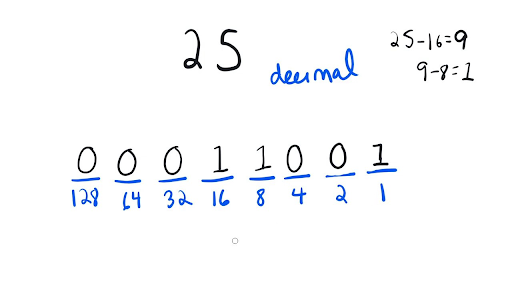
The image also shows why leading zeros do not change the value. Both 11001 and 00011001 are binary representations of 25. The latter specifies eight digit positions, which can be useful when displaying a byte.
Converting decimal to binary
To construct a binary representation, you can reverse the place-value calculation. For 25, take the largest power of 2 that fits: 16. The amount left is 9; take 8, leaving 1. Thus the 16, 8, and 1 positions contain 1, while the intervening positions contain 0:
This largest-power-first method is intuitive when you can see the relevant powers of 2. A second method works systematically even for larger numbers: divide repeatedly by 2. Each remainder gives the rightmost digit not yet found.
For 25, the quotient-and-remainder calculations are:
| Division | Remainder |
|---|---|
| 1 | |
| 0 | |
| 0 | |
| 1 | |
| 1 |
Read the remainders from bottom to top: 11001. Why reverse them? The first division determines the ones position; the next determines the twos position; subsequent divisions move progressively left.
Both methods work for any non-negative integer. For zero, the representation is simply 0—you do not need to perform a division. When checking a result, expand its nonzero positions and make sure they add back to the original decimal value.
Hexadecimal: four bits at a time
Binary is precise but becomes cumbersome to read in long strings. Hexadecimal, or hex, is base 16. Its single-digit values are 0 through 9, followed by A, B, C, D, E, and F for decimal values 10 through 15. Consequently, the hex number 10 means one sixteen and zero ones, not decimal ten.
Four binary positions can represent every value from 0 through 15. That gives a direct correspondence: one hex digit matches exactly four binary digits. It is the reason hex is convenient when inspecting bytes: eight bits can be written as two hex digits.
Continue the video for the hex conversions. Pay particular attention to when the presenter treats a hex digit as a value—for example, A as ten—and when they treat it as a four-bit group.
Number Systems - Converting Decimal, Binary and Hexadecimal
Continue the video to see hexadecimal place values and the three practical routes involving hex: grouping bits, evaluating place values, and dividing by 16.
Watch hex basics for digits A–F and powers of 16. In hex to binary, track the four-bit group for each hex digit. Then watch hex to decimal and decimal to hex. Finish with base notation so you can distinguish the bases in written examples.
Consider decimal 202. Repeated division by 16 produces the hex digits, starting on the right:
The first remainder, 10, is A; the second, 12, is C. Reading them in reverse order gives CA. The place-value check is
For the binary conversion, replace each hex digit with four bits. C (12) is 1100, and A (10) is 1010. Therefore,
To convert binary to hex, run that operation backward: group bits from the right, adding leading zeros if the leftmost group has fewer than four bits. For instance, 11001 becomes 0001 1001, hence hex 19. Grouping from the left instead would change which bits occupy each place.
The place-value method handles hex numbers of any length. For example:
Digit by digit, the same hex number becomes binary 0010 1101 0011. The leading zeros in its first group may be omitted when you only need the value.
Choosing a route and checking your work
There are three dependable conversion tools:
| Starting point | Destination | Method |
|---|---|---|
| Binary or hex | Decimal | Multiply each digit by its place value and add |
| Decimal | Binary or hex | Repeatedly divide by the destination base; read remainders upward |
| Binary or hex | The other one | Substitute four bits per hex digit, grouping binary from the right |
You can also take a route through a third base when it is easier. For example, to convert a large decimal number to binary, first obtain its hex digits by dividing by 16, then replace each hex digit with four bits.
Prefixes help prevent ambiguity in code: 0b11001 denotes binary, 0x19 denotes hexadecimal, and 25 ordinarily denotes decimal. These are three ways of writing the same value; the prefix is not a digit of the number. A bare 10 is ambiguous without an agreed base: it means ten in decimal, two in binary, and sixteen in hex.
A short Python check can catch a misplaced remainder or an incorrectly grouped bit. It verifies the arithmetic rather than replacing the method:
n = 25
print(f"{n:b}", f"{n:08b}", f"{n:02X}")
print(int("11001", 2), int("19", 16))
The first line printed is 11001 00011001 19; the second is 25 25. The formatting widths add leading zeros where needed, but do not change the value.
Key takeaways
Decimal, binary, and hex are positional notations for integers. To read one, add each digit’s contribution at its place value. To write a decimal integer in another base, divide by that base and read the remainders in reverse order. To move between binary and hex, use groups of four bits, aligned from the right.
Next, we’ll keep the binary digits but limit how many positions are available. That fixed width will let us determine which unsigned values fit and when arithmetic overflows.