Recommended resources
The freely available resources this lesson will direct you to.
- LoRA explained (and a bit about precision and quantization)www.youtube.com
- Understanding LLM Memory Requirementsvikarna.substack.com
- How to Choose the Right GPU for vLLM Inference - DigitalOceanwww.digitalocean.com
- GPU VRAM Calculation for LLM Inference and Trainingwww.youtube.com
- Optimize Your AI - Quantization Explainedwww.youtube.com
- Estimating LLM Inference Memory Requirements | by NJ Ramanmedium.com
Welcome to the next step in our journey into the systems layer of LLM inference. In our last lesson, we discovered how the KV cache is a critical optimization that trades GPU memory for faster computation. We concluded that both the model's parameters (its weights) and the KV cache are major consumers of valuable GPU VRAM.
Today, we'll focus on quantifying the first and most fundamental of these: the memory required to simply load a model's parameters onto a GPU. This is a core skill for any LLM Ops engineer, as it's the first step in capacity planning, hardware selection, and cost estimation. By the end of this lesson, you'll be able to look at a model's size (e.g., 7 billion parameters) and its numerical format, and accurately calculate the VRAM it will occupy.
1. Understanding Numerical Precision
Before we can calculate memory, we need to understand how the numbers that make up a model—its parameters or weights—are stored. A model is essentially a massive collection of floating-point numbers. The "precision" of these numbers determines how much memory each one occupies.
Higher precision allows for a more nuanced representation of numbers but uses more memory. Lower precision saves memory at the risk of losing some model accuracy. This is a trade-off you will constantly manage in production.
The following video offers an excellent, intuitive explanation of numerical precision and introduces the concept of quantization—the process of reducing this precision to save memory.
Optimize Your AI - Quantization Explained
The video "Optimize Your AI - Quantization Explained" provides a clear, non-technical introduction to why numerical precision is so important for model memory usage.
Watch the first two sections of the video. Start with the explanation of how precision affects RAM, which includes a quick calculation for a 7B model. Continue with the analogy of rulers and mailboxes to understand the concept of quantization levels like Q8 and Q4.
As you saw, the most common precisions you'll encounter are:
| Precision | Bytes per Parameter | Description |
|---|---|---|
| FP32 | 4 bytes | Full precision (float) |
| FP16 / BF16 | 2 bytes | Half precision (float) - common for training & inference |
| INT8 | 1 byte | 8-bit integer (quantized) |
| INT4 | 0.5 bytes | 4-bit integer (quantized) |
Your work with infrastructure automation often involves optimizing resource usage; think of choosing a numerical precision as a similar optimization problem, but for GPU memory.
2. Calculating Model Parameter Memory
Now we can establish a simple formula for calculating the memory required for a model's weights:
Let's ground this with an excellent article from Medium that walks through the components of inference memory.
Estimating LLM Inference Memory Requirements
This article clearly breaks down the different components of memory usage during inference. We'll focus on the first component it discusses.
Read the section titled "Parameter Memory Calculation." It provides the formula and a clear example using the Llama 2 70B model at different precisions.
Let's apply this ourselves. Consider a 7 billion parameter model (like Mistral-7B or Llama 2-7B). If we load it in FP16 (half precision), the calculation is:
- Parameters: 7,000,000,000
- Bytes per Parameter: 2 (for FP16)
To convert bytes to gigabytes (GB), we divide by (or approximately ):
So, a 7B model at half precision requires about 13-14 GB of VRAM just for its weights. If you were to load the same model at full FP32 precision (4 bytes/parameter), it would require ~26-28 GB. This simple calculation is your first step in determining if a model will even fit on a given GPU.
3. Accounting for Overhead
In a real-world deployment, the model's weights are not the only thing occupying VRAM. There's also overhead from the CUDA kernels, optimizer states (if training), and various buffers used by the inference framework.
A common rule of thumb for a quick, practical estimate is to add a 20% overhead to the parameter memory calculation.
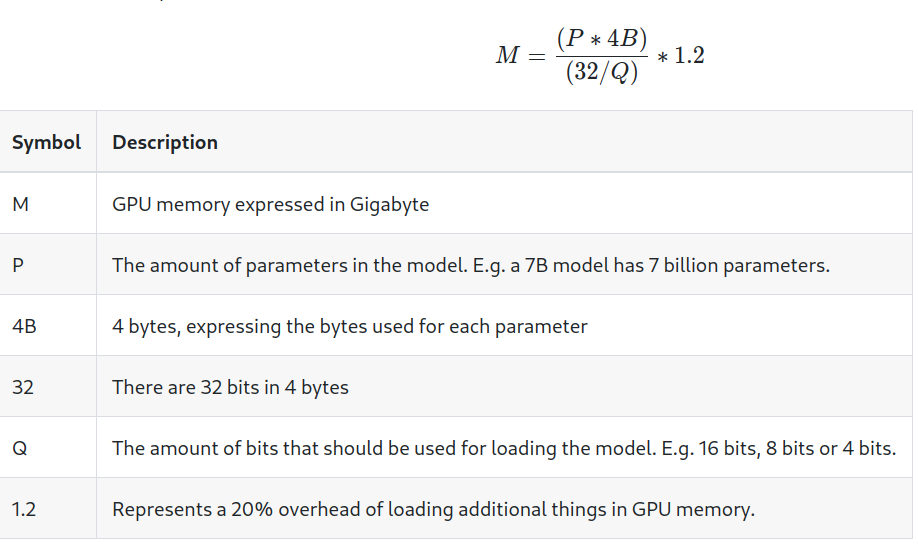
The following video provides a concise walkthrough of this more practical estimation formula.
GPU VRAM Calculation for LLM Inference and Training
The video "GPU VRAM Calculation for LLM Inference" explains and applies a rule-of-thumb formula that includes this overhead.
Watch the segment from the formula explanation to the example. The speaker derives a simple formula, incorporates the 20% overhead, and applies it to a 7B model, arriving at an estimate of 16.8 GB.
This simple 1.2x multiplier gives you a more realistic baseline for initial capacity planning before you run any actual benchmarks.
4. Putting It All Together: The Full Memory Picture
So far, we've focused only on the static memory cost of a model's weights. As we learned in the last lesson, the KV cache adds a dynamic memory cost that grows with the sequence length and batch size. There is also a third component: activation memory, which holds the intermediate results of computations as data flows through the model's layers.
The complete picture of memory usage can be summarized by this formula:
The Medium article Estimating LLM Inference Memory Requirements you read earlier provides a great summary of all three main components. If you're interested, feel free to revisit it and read the sections on "Activation Buffer Memory" and "KV Cache Memory."
For now, the key takeaway is that you've mastered the largest and most static part of this equation: Parameter Memory. We will dive deep into calculating the KV Cache and analyzing the impact of batching in the next module, as it's directly tied to GPU architecture and performance characteristics.
5. Practical Tools for Memory Estimation
While it's crucial to understand the math, in your day-to-day work, you'll often use specialized tools for more precise estimates. The Hugging Face ecosystem and other community projects provide calculators that account for model-specific architectures.
The same video from "AI Anytime" demonstrates a few of these useful online tools.
GPU VRAM Calculation for LLM Inference and Training
This part of the video introduces several online VRAM calculators that you can use for quick and detailed estimations.
Watch the segment that demonstrates various online tools. This will show you how to use a VRAM estimator to get a detailed breakdown of memory usage for specific models from Hugging Face, confirming the manual calculations we just performed.
Having these tools in your belt allows you to move quickly when evaluating new models or planning deployments.
Conclusion
In this lesson, we transitioned from the conceptual understanding of memory usage to the practical skill of calculating it. This is a foundational element of LLM Operations, directly influencing hardware provisioning, model selection, and cost analysis.
Here are the key takeaways:
- GPU memory for inference is primarily consumed by model parameters, the KV cache, and activations.
- The memory for model parameters is calculated with a simple formula: Number of Parameters × Bytes per Parameter.
- Numerical precision (e.g., FP16, INT8) determines the bytes per parameter and is a key lever for memory optimization via quantization.
- A quick, practical estimate should include a ~20% overhead on top of the parameter memory to account for the inference framework.
We now understand how much memory it takes to load a model's parameters. But how are these billions of parameters actually stored on disk and loaded efficiently? In our next lesson, we will explore model serialization formats like SafeTensors and GGUF, examining how they are designed for security, performance, and portability in production environments.