Recommended resources
The freely available resources this lesson will direct you to.
- Data structures: Introduction to Treeswww.youtube.com
- Trees In Data Structure | Introduction To Trees | Data Structures & Algorithms Tutorial |Simplilearnwww.youtube.com
- Introduction to Binary Treewww.geeksforgeeks.org
- 7.2. Binary Trees — CS3 Data Structures & Algorithms - OpenDSAopendsa-server.cs.vt.edu
Welcome to Module 12. In all our previous work with arrays, linked lists, stacks, and queues, we've focused on linear data structures—collections where elements follow one another in a sequence. We're now moving into the exciting world of non-linear structures, which allow for more complex, hierarchical relationships between elements.
This lesson introduces the most fundamental non-linear structure: the tree. We'll start by understanding why trees are so useful and then focus on learning the essential vocabulary used to describe them. Your goal for this lesson is to be able to explain the structure and terminology of a specific and widely-used variant, the binary tree, including terms like root, node, leaf, height, and depth. Mastering this vocabulary is the first critical step toward building and using these powerful structures.
1. From Linear to Hierarchical Data
Linear structures like arrays and linked lists are great for representing simple sequences. But what about data that has a natural hierarchy? Think about a company's organizational chart, the folder structure on your computer, or even the breakdown of a book into chapters, sections, and paragraphs. A simple list can't capture these parent-child relationships effectively. This is where trees come in.
To get a clear picture of what a tree data structure is and how it represents hierarchical information, let's watch a short introductory video.
Data structures: Introduction to Trees
This video from mycodeschool provides an excellent analogy to explain why tree structures are necessary and how they differ from the linear structures you've already mastered.
Watch the section from the introduction. Pay attention to how the organizational chart example visually demonstrates a hierarchical relationship that would be difficult to represent with a simple array.
As you saw, a tree is an intuitive way to model data that "branches out" from a single point.
2. The Vocabulary of Trees
To discuss trees, we need a shared vocabulary. Much like we have terms like head, tail, and node for linked lists, trees have their own set of fundamental terms. The next segment of the video will walk you through the most important ones.
Data structures: Introduction to Trees
This part of the video introduces the core terminology using a clear, numbered diagram.
Watch from the definitions. As you watch, make sure you can identify the following on the example tree: Node: A single entity in the tree containing data. Root: The single topmost node in the tree (the only node with no parent). Parent and Child: A node is a parent to the nodes directly below it, which are its children. Siblings: Nodes that share the same parent. Leaf Node: A node with no children. Internal Node: A node that has at least one child. Ancestor and Descendant: A node is an ancestor of all nodes in its subtrees.
3. Binary Trees: A Special Kind of Tree
The tree in the video is a general tree, where a node can have any number of children. In practice, one of the most common and useful types is the binary tree.
A binary tree is a tree where each node has at most two children. These children are typically referred to as the left child and the right child. This simple constraint makes them easier to implement and analyze.
This article from GeeksforGeeks gives a concise definition of a binary tree.
Read just the first section, under the main title "Introduction to Binary Tree". This will solidify the formal definition.
Representing a Binary Tree Node in C
So, how would we represent a binary tree node in C? Since a node needs to hold some data and have references to its two children, we can use a struct. You'll recognize this pattern from our work with linked lists, but instead of one next pointer, we now need two: one for the left child and one for the right.
This article provides a C struct definition that perfectly models the concept of a binary tree node.
Focus on two parts of the article: The diagram and explanation under the heading "Representation of Binary Tree". The C code block under the subheading "Create/Declare a Node of a Binary Tree". This struct is the fundamental building block for all the tree-based algorithms we will implement.
Here is the C code from the article for easy reference:
// Structure of each node of the tree.
struct Node {
    int data;
    struct Node* left;
*   struct Node* right;
};
Notice that if a node does not have a left or right child, the corresponding pointer would simply be NULL. A leaf node is therefore a node where both left and right pointers are NULL.
4. Measuring Trees: Depth and Height
Two of the most important properties we use to describe and analyze trees are depth and height. They are often confused, so it's important to understand the distinction.
- Depth of a node: The number of edges on the path from the root to that node. The depth of the root itself is 0.
- Height of a node: The number of edges on the longest path from that node down to a leaf. The height of a leaf node is 0.
- Height of the tree: The height of the root node.
Let's return to the mycodeschool video for a final, clear explanation of these two critical concepts.
Data structures: Introduction to Trees
The presenter does an excellent job of visually and verbally differentiating between height and depth.
Watch the final segment from depth and height. Try to calculate the height and depth of a few nodes yourself before the video reveals the answer.
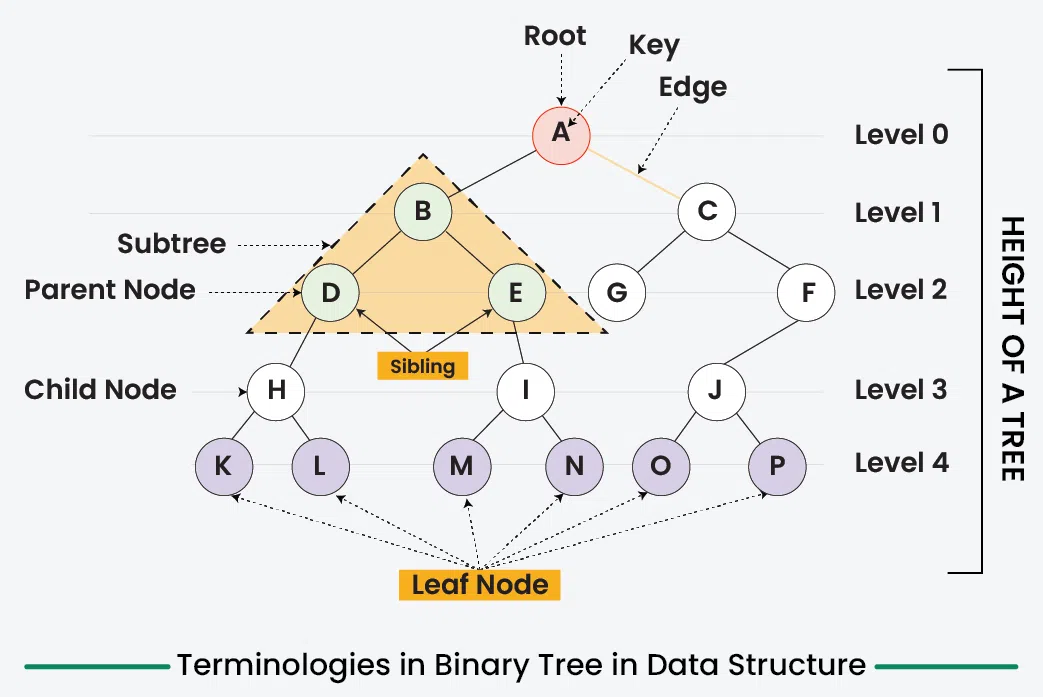
5. Visual Summary
The following diagram brings together all the terminology we have just discussed. Use it as a reference to solidify your understanding.
Conclusion
In this lesson, we made the conceptual leap from linear to non-linear data structures by introducing trees. You learned that trees are ideal for representing hierarchical data and became familiar with the essential vocabulary used to describe them, with a specific focus on binary trees.
Key Takeaways:
- Trees are non-linear data structures that model hierarchical relationships.
- A binary tree is a specific type of tree where each node has at most two children (left and right).
- The core terminology includes
node,root,edge,parent,child,sibling,leaf,internal node,ancestor, anddescendant. - Depth measures the distance from the root down to a node.
- Height measures the distance from a node down to its furthest leaf. The tree's height is the height of its root.
- In C, a binary tree node can be represented by a
structcontaining data and two pointers,leftandright.
Preview of the Next Lesson:
Now that you understand the structure and vocabulary of a binary tree, we can add a new rule to make it even more powerful for searching. In the next lesson, you will learn about the Binary Search Tree (BST), a type of binary tree that organizes its nodes in a specific order. This ordering property allows us to find elements with incredible efficiency, often much faster than searching through an array or a linked list.