Recommended resources
The freely available resources this lesson will direct you to.
Hello! Welcome back to our journey into smart contract development.
In our last lesson, we explored function modifiers, a powerful tool for writing clean, reusable code to control who can execute a function. Today, we'll shift our focus from "who" to "what," specifically, how a contract can receive value in the form of Ether (ETH). This is a fundamental step toward building any application on Ethereum that involves financial transactions, including the token sale contract that is a key part of our project.
Your goal for this lesson is to learn how to enable contracts to receive Ether using payable functions.
1. What is a payable Function?
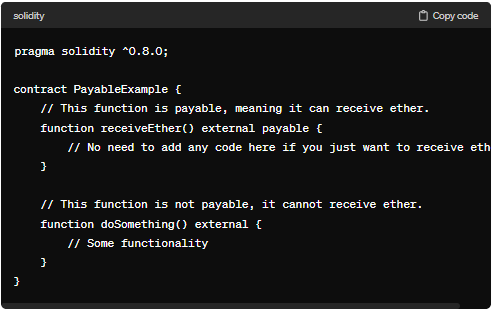
In Solidity, functions by default cannot accept Ether. If you try to send ETH when calling a regular function, the transaction will fail and revert. To explicitly allow a function to receive ETH, you must mark it with the payable keyword.
Think of it as a security feature. The payable keyword forces you, the developer, to acknowledge that a function is intended to handle money, preventing accidental or unwanted Ether transfers to your contract.
Let's watch a short video that introduces the payable keyword and demonstrates its basic usage.
This video from Smart Contract Programmer provides a concise introduction to the payable keyword.
Watch the following segments: Introduction to payable (00:00 - 00:38): See the basic syntax for making a function payable. Demonstration (01:07 - 02:14): Observe how to send ETH to a payable function and how to use address(this).balance to check the contract's balance. Non-payable Reversion (02:14 - 02:47): See what happens when you try to send ETH to a function that is not marked payable.
As the video showed, the core concept is simple: add the payable keyword to the function signature.
2. The Mechanics of Sending Ether
To understand how this works, it helps to look at the structure of an Ethereum transaction. As a backend developer, you're familiar with sending data payloads, often in JSON format. An Ethereum transaction is similar. It includes fields like to (the recipient address), data (the function to call and its arguments), and, crucially, a value field.
The value field specifies the amount of Ether (in its smallest denomination, wei) to send with the transaction.
What are Payable Functions in Solidity?
This article from Alchemy explains the role of the value field in a transaction and how the Ethereum Virtual Machine (EVM) processes it.
Read the section titled 'How to Send Ether to a Smart Contract'. Pay close attention to the example JSON transaction and the two outcomes depending on whether the target function is payable.
When the EVM processes a transaction where the to address is a smart contract and the value is greater than zero, it checks if the function specified in the data field is marked payable.
- If yes, the function executes, and the contract's balance is increased by
msg.value. - If no, the entire transaction reverts.
The global variable msg.value is available inside any function and holds the amount of Ether sent with that specific function call.
3. Practical Implementation and Logic
Simply receiving Ether is often not enough. In most real-world applications, you'll want to perform some logic based on the payment. For instance, in our future token sale contract, we'll need to record who paid and how much, so we can give them the correct number of tokens.
This is where you combine the payable keyword with state variables (like mappings) and validation logic (like require statements).
// SPDX-License-Identifier: MIT
pragma solidity ^0.8.19;

contract DonationBox {
    // Mapping to track donations from each address
    mapping(address => uint) public donations;
    address public owner;

    constructor() {
        owner = msg.sender;
    }

    // A payable function to accept donations
    function donate() public payable {
        // We require at least some Ether to be sent.
        require(msg.value > 0, "Donation must be greater than zero.");

        // Record the donation amount for the sender.
        donations[msg.sender] += msg.value;
    }

    // A function to check the contract's total balance
    function getBalance() public view returns (uint) {
        return address(this).balance;
    }

    // A function for the owner to withdraw the funds
    function withdraw() public {
        require(msg.sender == owner, "Only owner can withdraw.");

        uint balance = address(this).balance;
        (bool success, ) = owner.call{value: balance}("");
        require(success, "Withdrawal failed.");
    }
}
In the example above:
- The
donatefunction ispayable, so it can receive ETH. - It uses
require(msg.value > 0, ...)to ensure the call includes a payment. - It updates a
donationsmapping to keep a permanent record of each user's contribution. - The
withdrawfunction shows how the owner can later retrieve the collected funds (we'll cover sending Ether in detail in the next lesson).
Test your understanding!
You are creating a simple contract for users to buy "entry tickets". Each ticket costs exactly 0.1 ETH. A user can only buy one ticket.
Modify the buyTicket function below to enforce these rules.
// SPDX-License-Identifier: MIT
pragma solidity ^0.8.19;

contract TicketBooth {
    mapping(address => bool) public hasTicket;
    uint public constant TICKET_PRICE = 0.1 ether;

    function buyTicket() public /* Add keyword and logic */ {
        // Logic to check ticket price
        // Logic to check if user already has a ticket

        // Grant the ticket
        hasTicket[msg.sender] = true;
    }
}
Your Task:
- Make the
buyTicketfunction able to receive Ether. - Add
requirestatements to ensure the user pays exactlyTICKET_PRICE. - Add another
requirestatement to ensure the user has not already bought a ticket.
Show answer
// SPDX-License-Identifier: MIT
pragma solidity ^0.8.19;

contract TicketBooth {
    mapping(address => bool) public hasTicket;
    uint public constant TICKET_PRICE = 0.1 ether;

    function buyTicket() public payable {
        // 1. Check if the user has already bought a ticket
        require(!hasTicket[msg.sender], "You already have a ticket.");

        // 2. Check if the correct amount of Ether was sent
        require(msg.value == TICKET_PRICE, "Incorrect ticket price.");

        // Grant the ticket
        hasTicket[msg.sender] = true;
    }
}
This solution uses the payable keyword and two require statements to correctly enforce the business rules of the contract.
4. Receiving Ether Without a Function Call: receive and fallback
What happens if someone sends Ether directly to your contract's address from their wallet, without calling a specific function? This is a "plain Ether transfer."
Solidity has two special functions to handle these cases: receive() and fallback().
-
receive(): This function is executed if a transaction sends Ether to the contract but has no calldata (msg.datais empty). It is the modern, preferred way to handle plain Ether transfers. It must be declared asexternal payable.receive() external payable { // Logic to handle plain Ether transfer, e.g., emit an event } -
fallback(): This is a more general-purpose function. It is executed under two conditions:- A transaction is sent to the contract with calldata that does not match any existing function signature.
- A transaction sends Ether with no calldata, and a
receive()function does not exist.
fallback() external payable {
    // Logic to handle the call
}
The distinction is subtle but important. To see it in action, let's watch one more video.
This video clearly explains and demonstrates the difference between the receive and fallback functions.
Watch the full video. It covers: What fallback is and its primary use case. The introduction of receive and the key difference (msg.data being empty or not). A practical demonstration in Remix showing when each function gets called.
This table summarizes the key differences:

For a contract that is meant to receive funds, like our upcoming token sale contract, it is good practice to implement the receive() function to gracefully handle direct deposits.
Conclusion
You now understand how to make your smart contracts "payable," allowing them to receive and hold Ether. This is a critical capability that turns your contracts from simple data repositories into active participants in the Ethereum economy.
Key Takeaways:
- The
payablekeyword must be added to a function's signature to allow it to accept Ether. - Transactions that send Ether to non-payable functions will revert.
- The
msg.valueglobal variable holds the amount of Ether sent in a specific call. - You can use
requirestatements withmsg.valueto enforce payment rules. - The
address(this).balanceproperty tells you the total Ether balance held by the contract. - The special
receive()function is used to handle plain Ether transfers sent directly to the contract's address.
Preview of the Next Lesson:
We've learned how to get Ether into a contract. The next logical step is learning how to get it out. In the next lesson, we will cover how to send Ether from a contract securely using the call method. This is essential for implementing features like withdrawals, refunds, or distributing funds, all of which are vital for a complete financial application.