Recommended resources
The freely available resources this lesson will direct you to.
Hello! Welcome to the first lesson in our module on Advanced Solidity & Contract Logic.
In the previous module, we built a complete workflow: writing, compiling, and deploying a simple smart contract using Hardhat. However, those contracts were a bit too trusting—they assumed all inputs would be correct and everything would work as planned. As a backend developer, you know that robust applications must anticipate and handle errors gracefully.
Today, we'll address this by learning how to handle contract errors and revert transactions using require, assert, and revert. This is one of the most critical aspects of smart contract development. Unlike traditional backend systems where you might log an error and continue, errors in smart contracts have unique and powerful consequences, revolving around the core blockchain principles of atomicity and state reversion.
Atomicity and State Reversion: The Blockchain's Safety Net
Before we dive into the specific functions, we must understand what happens when a function call fails on the blockchain.
When a transaction encounters an error, the Ethereum Virtual Machine (EVM) performs a revert. This means:
- Execution Halts: The function immediately stops running.
- State Changes Are Undone: Any changes made to state variables during the transaction are completely rolled back, as if the transaction never happened.
- Gas is Consumed: The gas used up to the point of the error is consumed and paid to the validator. The remaining gas is returned to the caller.
This process ensures atomicity: a transaction either completes successfully and all its state changes are saved, or it fails and has no effect on the contract's state. This is a fundamental security feature that prevents contracts from being left in a corrupt or inconsistent state.
Solidity Tutorial: Error Handling (throw, revert, require, assert...)
To see this in action, this short video from EatTheBlocks provides a great visual explanation of what happens when an error occurs during a function's execution.
Please watch from the beginning until 02:00. Pay close attention to the three main consequences the video highlights: stopping execution, reverting state changes, and gas consumption.
Now, let's learn how to trigger these reverts intentionally to protect our contracts.
The Three Pillars of Error Handling in Solidity
Solidity provides three primary mechanisms for error handling: require, revert, and assert. We'll also look at a modern, gas-efficient feature called "custom errors".
This video from Smart Contract Programmer gives a concise and practical overview of require, revert, assert, and custom errors. It will serve as our main guide for this section.
We'll go through this video section by section. For now, watch the introduction (00:00 - 00:23) to get a high-level summary of the three functions.
1. require(): The Gatekeeper for Inputs and Permissions
The require function is your primary tool for validation. You should use it to enforce conditions on inputs from users and other contracts, or to check for required state conditions before a function runs.
Use require to validate:
- Inputs: Is an input value within an acceptable range?
- Permissions: Is
msg.senderthe owner of the contract? - State: Does the contract have enough funds to perform an action?
The syntax is require(condition, "Error message");. If the condition evaluates to false, the transaction reverts, and the optional error message string is returned to the caller.
Let's see a practical example of require used for input validation.
Watch the segment from 00:23 to 01:25. Notice how require is used at the very beginning of the function to act as a guard.
Here's a common example for access control:
address public owner;

constructor() {
    owner = msg.sender;
}

function withdraw() public {
    // Only the owner can call this function.
    require(msg.sender == owner, "Caller is not the owner");

    // ... logic to withdraw funds
}
2. revert(): For Complex Conditional Logic
The revert statement does the same thing as require: it stops execution and reverts state changes. However, it's used when the validation logic is more complex and doesn't fit neatly into a single require condition. You typically see it inside if/else blocks.
The revert statement offers more flexibility for complex logic. Let's see how it compares to require.
Watch from 01:12 to 02:06. The video shows how you can rewrite a require check using an if statement with revert, and explains why you might choose to do this.
Example of revert in an if block:
if (msg.sender != owner) {
    revert("Caller is not the owner");
}
Custom Errors: The Modern, Gas-Efficient Way
Since Solidity version 0.8.4, you can define custom errors. These are much more gas-efficient than using string messages, especially if the message is long or used frequently. This is now the recommended best practice.
- Declare the error:
error NotOwner(); - Use it with
revert:if (msg.sender != owner) { revert NotOwner(); }
You can also pass data into your custom errors, which is useful for debugging.error InsufficientBalance(uint currentBalance, uint required);revert InsufficientBalance(address(this).balance, amount);
Custom errors are a powerful feature. This last part of the video explains how to declare and use them.
Watch from 04:01 to 05:54 to learn how to implement these gas-saving errors.
3. assert(): The Bug Detector
The assert function is fundamentally different from require. It should only be used to test for internal errors and to check conditions that should never, ever be false. These are often called "invariants".
A failed assert indicates a bug in your contract logic.
Use assert to check for:
- Arithmetic overflow/underflow (though this is built-in since Solidity 0.8.0).
- Conditions that should be logically impossible.
- Invariants (e.g., ensuring a contract's balance didn't change unexpectedly).
If an assert fails, it reverts the transaction. In older Solidity versions, it consumed all remaining gas, but now it behaves more like require in that regard. The key difference is semantic: a failed require means the user did something wrong; a failed assert means the developer did something wrong.
Now, let's understand the specific use case for assert.
Watch from 02:06 to 03:28. Pay attention to the example of checking an invariant (a state variable that should not have changed).
Deeper Dive: Error vs. Panic
Modern Solidity makes the distinction between require and assert even clearer by having them generate different types of errors:
require(false, ...)generates anError(string)error.assert(false)generates aPanic(uint256)error.
This distinction is useful for off-chain tools and for contracts that might try/catch these errors (a more advanced topic). For now, the important thing to remember is the semantic difference:
Error(fromrequire): For runtime errors related to external inputs or conditions.Panic(fromassert): For internal, "impossible" errors indicating a bug.
Solidity Documentation: Error handling
The official Solidity documentation provides the definitive explanation of these concepts. This reading will solidify your understanding of when each function should be used and the types of errors they create.
Please read the section 'Error handling: Assert, Require, Revert and Exceptions' and the subsection 'Panic via assert and Error via require'. Don't worry about the try/catch parts for now. Focus on the distinction between the two functions and the list of situations that cause a Panic or an Error.
Summary: require vs. revert vs. assert
Let's consolidate what we've learned. The choice between these functions depends on why an error might occur.
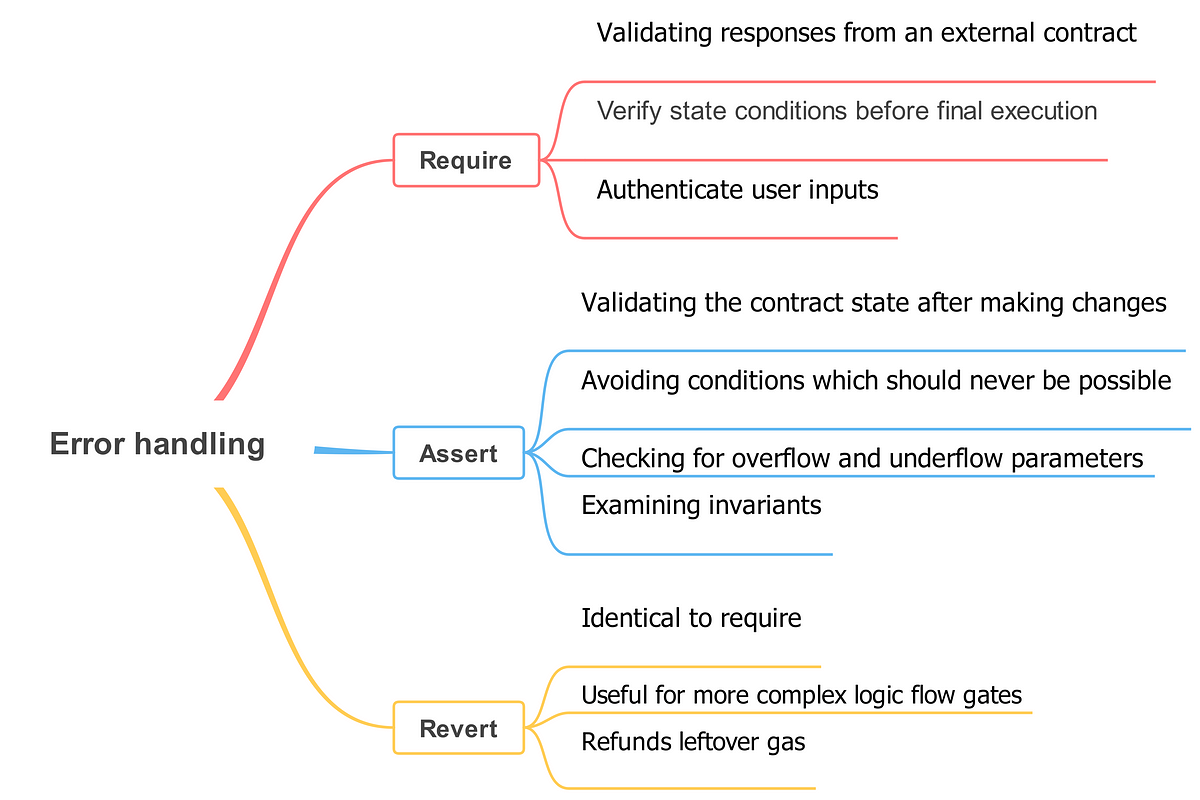
Here is a quick summary table:
| Function | Primary Use Case | When to Use It | Error Type (v0.8+) |
|---|---|---|---|
require |
Validating inputs and state conditions (external) | At the beginning of a function to check user inputs or permissions. | Error |
revert |
Triggering errors within complex logic | Inside if/else blocks when a simple require is not sufficient. |
Error/Custom |
assert |
Checking for internal bugs and invariants (internal) | After state changes to confirm the contract is in a consistent state. | Panic |
Test your understanding!
Imagine you are writing a simple VendingMachine contract that holds snack tokens. A user can call a function buySnacks(uint amount).
Where would you use require and where might you use assert in this function? Think of at least one check for each.
Show answer
Here's a possible implementation with explanations:
contract VendingMachine {
    mapping(address => uint) public snackBalances;
    uint public totalSnacksInMachine = 100;

    function buySnacks(uint amount) public {
        // 1. Use 'require' for input validation.
        // The user controls the 'amount', so we must validate it.
        require(amount > 0, "Cannot buy zero snacks.");
        require(amount <= totalSnacksInMachine, "Not enough snacks in the machine.");

        uint initialUserBalance = snackBalances[msg.sender];

        // Perform the state changes
        totalSnacksInMachine -= amount;
        snackBalances[msg.sender] += amount;

        // 2. Use 'assert' to check for an invariant.
        // This condition should be logically impossible to fail if the code above is correct.
        // A failure here indicates a bug (like an overflow/underflow in older Solidity versions).
        assert(snackBalances[msg.sender] == initialUserBalance + amount);
    }
}
Conclusion
You've now learned the fundamental techniques for building robust and secure smart contracts. By correctly using require, revert, and assert, you can protect your contract from invalid data and prevent it from ever entering an inconsistent state.
Key Takeaways:
- Errors in Solidity trigger a revert, which undoes all state changes in the transaction, ensuring atomicity.
requireis your primary tool for validating user inputs and permissions. Think of it as a gatekeeper.revert(often with custom errors) is a flexible way to trigger errors from within complex conditional logic.assertis a sanity check for your own code. It verifies invariants—conditions that should never be false. A failedassertpoints to a bug.
Preview of the Next Lesson:
In the exercise above, you saw a mapping. This is a powerful data structure we haven't formally covered yet. In our next lesson, we will dive into mappings, learning how to use them to create efficient key-value data structures. This is essential for tracking data like the token balances of different users in the cryptocurrency we are aiming to build.