Recommended resources
The freely available resources this lesson will direct you to.
- Control flow in Rust: If, Match, loop, while, for - Full Crash Rust Tutorial for Beginnerswww.youtube.com
- Intro to Rust Control Flow Statements & Conditional Expressions 🦀www.youtube.com
- Control Flow - The Rust Programming Languagedoc.rust-lang.org
- for and range - Rust By Example - Rust Documentationdoc.rust-lang.org
Hello! Last lesson, you wrote functions with typed inputs and return values. Now you’ll decide which code runs and how often it runs. Rust’s if is especially useful here because, like a function body, it can produce a value. You’ll also use loop, while, and for to repeat work. Allow about 40 minutes, including time to run the examples in your Cargo project.
Choose a path with if
An if checks a Boolean condition and runs one block when it is true. An optional else supplies the alternative. Only one of the two blocks runs; execution then continues after the if.
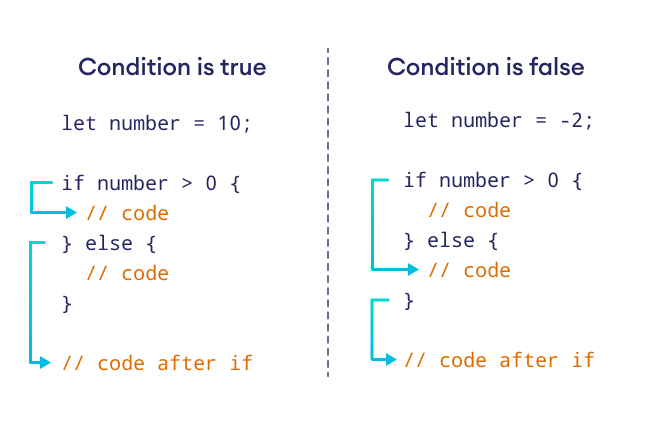
In Rust, the condition must actually have type bool. An integer is not treated as true merely because it is nonzero:
let number = 3;

if number != 0 {
    println!("nonzero");
}
Writing if number { ... } instead would be a type error. The braces around the body are required, but parentheses around the condition are not.
The opening of Francesco Ciulla’s Control flow in Rust shows a simple branch and then shows its result being assigned to a variable.
Control flow in Rust: If, Match, loop, while, for - Full Crash Rust Tutorial for Beginners
Watch Francesco Ciulla’s Control flow in Rust: If, Match, loop, while, for for a short demonstration of branching and value-producing conditionals.
Watch the basic branch as changing the number changes which block runs. Then watch an if value, focusing on why the entire conditional can initialize a binding. You can stop before the subsequent material on nested conditions.
For more than two possibilities, use else if. Conditions are checked in order, and only the first matching block runs. Order therefore matters when conditions overlap.
fn main() {
    let amount_cents = 750;

    if amount_cents <= 0 {
        println!("no positive amount");
    } else if amount_cents < 1_000 {
        println!("small amount");
    } else {
        println!("larger amount");
    }
}
Here, 750 prints small amount. The second condition is checked only because the first was false. If the amount were 1_200, the final else would run.
Read the official Rust Programming Language book’s explanation of the rules behind these examples. Its examples also show the compiler errors you get when a condition is not Boolean or branches produce incompatible types.
Control Flow - The Rust Programming Language
Read the if portion of the official Rust Programming Language book to connect branching with the expression rules from your previous lesson.
In “if Expressions,” find the example that attempts if number rather than a comparison. Read the Boolean rule immediately after its compiler error. In “Handling Multiple Conditions with else if,” find the divisibility example and read the execution explanation after its output. Finally, in “Using if in a let Statement,” start at the paragraph beginning “Remember that blocks of code evaluate” and read the type explanation through the end of that subsection. Focus on why both possible values must have the same type.
Use a branch as a function result
Because if is an expression, it can supply the final value of a function. The chosen branch’s tail expression supplies that value—there is no semicolon after it:
fn fee_cents(amount_cents: i32) -> i32 {
    if amount_cents <= 0 {
        0
    } else if amount_cents < 1_000 {
        25
    } else {
        0
    }
}
This is a deliberately small calculation: nonpositive amounts incur no fee, positive amounts below 1,000 cents incur 25 cents, and larger amounts incur none. Each branch yields an i32, as the function signature promises. Replacing one branch’s value with "free" would fail to compile: a single function call cannot return an i32 on one path and a string on another.
You can likewise bind the result locally:
let amount_cents = 750;
let fee = if amount_cents < 1_000 { 25 } else { 0 };
println!("fee: {fee} cents");
When you need a value from if, provide an else so there is a value regardless of the condition. By contrast, an if used only to print or perform another effect can omit else.
Conditions can combine Boolean tests with && (“and”) and || (“or”): amount_cents > 0 && amount_cents < 1_000 checks both requirements. Use ! to negate a Boolean. These operators keep the condition a bool; they do not make integers themselves usable as conditions.
Repeat until you explicitly stop: loop
loop runs its body repeatedly without a condition at the top. It needs an exit within the body—usually break—unless you genuinely intend it to run indefinitely.
The video now demonstrates all three loop forms. Skip the intervening match segment; enums and pattern matching come later in the course.
Control flow in Rust: If, Match, loop, while, for - Full Crash Rust Tutorial for Beginners
Return to Control flow in Rust for the demonstrations of loop, while, and for.
Watch loop and break, paying attention to mut and the value supplied by break. Then watch while for a condition-controlled countdown. Finally, watch for iteration, focusing on arrays and numeric ranges; the brief string example is optional for now.
A loop can itself produce a value. Put that value after break:
fn main() {
    let mut candidate = 1;

    let first_multiple = loop {
        if candidate % 7 == 0 {
            break candidate;
        }
        candidate += 1;
    };

    println!("first multiple found: {first_multiple}");
}
Copy this into src/main.rs and run cargo run; it prints 7. The candidate must be mutable because each unsuccessful pass changes it. break candidate exits the loop and supplies the value assigned to first_multiple. The semicolon after the closing brace completes the let statement.
continue has a different role: it skips the rest of the current iteration and starts the next one. If you use it in a manually controlled loop, make sure the state needed to reach break still changes; otherwise, it is easy to create an accidental infinite loop. return, which you met in the functions lesson, exits the whole function rather than merely a loop.
Repeat while a condition holds
A while loop makes the stopping test explicit at the top. It checks a Boolean before every iteration, so its body may run zero times.
fn main() {
    let mut remaining = 3;

    while remaining > 0 {
        println!("{remaining}");
        remaining -= 1;
    }

    println!("done");
}
Run this version to see 3, 2, 1, then done. The update to remaining is essential: without it, the condition would remain true. This form is useful when you know the condition for continuing but not necessarily the number of iterations in advance. Use loop instead when the natural stopping decision occurs inside the body and, particularly, when you want to obtain a value with break.
Visit items with for
When you already have a sequence of items, for expresses the intent more directly than managing an index with while:
let amounts = [500, 1_200, 800];

for amount in amounts {
    println!("{amount}");
}
The body runs once per array element. There is no index to initialize, increment, or accidentally take past the array’s end. These integer elements are simple copyable values; how iteration affects collections containing other kinds of values is a topic for the ownership module.
A numeric range gives for a sequence without an array. 1..4 produces 1, 2, 3: the end is excluded. 1..=4 includes 4. Rust’s for is built around visiting items from such sequences rather than the C-style combination of an initializer, condition, and increment.
The book contrasts indexed iteration with element-by-element iteration and shows why ranges are useful:
Control Flow - The Rust Programming Language
Read the book’s comparison of while and for over an array, followed by its introduction to ranges.
In “Looping Through a Collection with for,” locate the indexed-array example just before the paragraph beginning “Here, the code counts up.” Read the comparison from there through the explanation of a range’s excluded endpoint. Notice which bookkeeping disappears when the loop visits elements directly.
Here is a complete program combining a function, conditional branching, for, and continue. Replace src/main.rs with it and run cargo run:
fn fee_cents(amount_cents: i32) -> i32 {
    if amount_cents <= 0 {
        0
    } else if amount_cents < 1_000 {
        25
    } else {
        0
    }
}

fn main() {
    let amounts = [500, 1_200, 0, 800];
    let mut total_fee = 0;

    for amount in amounts {
        if amount <= 0 {
            continue;
        }
        total_fee += fee_cents(amount);
    }

    println!("total fee: {total_fee} cents");
}
The output is total fee: 50 cents. The zero amount is skipped; the two positive amounts below 1,000 each add 25 cents; the 1,200-cent amount adds none. The function’s nonpositive branch also defines its behavior if called separately, while continue controls what this particular loop processes.
If you need to repeat a known number of times rather than visit an existing array, a range fits the same for syntax:
for number in 1..=3 {
    println!("{number}");
}
What to carry forward
Use if and else if to choose a branch; use if as an expression when the chosen branch should provide a value. Choose loop for repetition with an explicit break, while for repetition governed by a changing condition, and for to visit array elements or numbers in a range. break ends a loop, while continue skips to its next iteration.
Next, you’ll define structs and methods to give related data and behavior a shared home. Those tools will then help you build the module’s command-line unit converter.