Recommended resources
The freely available resources this lesson will direct you to.

Hello! Welcome back to our course on architecting security products.
In our last lesson, we designed the findings pipeline for our Cloud Security Posture Management (CSPM) tool. We architected the system that ingests, classifies, routes, and even automatically remediates misconfigurations. This pipeline is essential for managing the sheer volume of alerts a large cloud environment can generate.
However, the most dangerous threats aren't usually single misconfigurations but chains of them that, when combined, create a complete "attack path" from an adversary to a critical asset. A public S3 bucket is bad; a public S3 bucket connected to a VM that has an internet-facing vulnerability and an overly permissive IAM role is a potential disaster.
To see these chains, our CSPM needs a data model that understands relationships. This is where our design work today begins.
Our learning outcome is to: Architect CSPM data storage using a graph-based model to represent resource relationships and enable attack path analysis.
We will explore why graph databases are uniquely suited for this task, design a schema to model a multi-cloud environment, and architect a scalable data storage and query system based on real-world implementations.
1. Why Graphs? The Power of Modeling Relationships
Cloud environments are not a simple list of assets; they are a complex, interconnected web. A virtual machine is in a subnet, which is in a VPC. It has a security group attached, which allows traffic from an IP range. It assumes an IAM role, which has policies granting access to a database.
Trying to model and query these relationships in a traditional relational database often leads to complex, slow, and brittle JOIN operations across many tables. This is where graph databases excel.
For a quick primer on the fundamentals of graph databases, let's watch a short video.
The video 'Neo4j in 100 Seconds' from Fireship provides a high-energy introduction to the core concepts of property graphs: nodes, relationships (edges), and properties. It also introduces the Cypher query language.
Please watch from the beginning to 01:42. Focus on how nodes and relationships intuitively model connected data, a stark contrast to tabular models.
As the video shows, the graph model—nodes representing entities and edges representing relationships—is a natural fit for cloud infrastructure. This approach unlocks capabilities that are difficult to achieve otherwise.
Graph Databases for Cloud Security Posture Management (CSPM)
The article 'Graph Databases for Cloud Security Posture Management (CSPM)' provides an excellent, concise explanation of why this model is so powerful for our specific use case.
Please read the first two sections, 'What is CSPM?' and 'Why Graphs for CSPM?'. Pay close attention to the use cases it enables, such as Attack Path Analysis and Visibility into Lateral Movement.
The core idea is that by storing relationships as first-class citizens, we can ask complex questions like, "Show me all possible paths from the public internet to any database tagged sensitive."
This isn't a new idea in security. The tool BloodHound pioneered this approach for Active Directory security, using a graph to find complex privilege escalation paths that were previously invisible. To appreciate the power of this model, it's worth seeing how BloodHound combines simple permissions (non-traversable edges) into a full-blown attack path (a traversable edge).
AD CS Attack Paths in BloodHound
This video from SpecterOps, the creators of BloodHound, demonstrates how they model Active Directory components and permissions in a graph. While the domain is AD, not the cloud, the principles of modeling entities, relationships, and composing them for attack path analysis are identical and foundational to our CSPM design.
Watch the segment from 16:37 to 22:23. The key concept to grasp is the distinction between 'non-traversable edges' (relationships that aren't abusable on their own) and 'traversable edges' (like 'DC Sync') which are composed from them. This is the essence of attack path analysis.
By applying this same thinking to cloud resources, our CSPM can produce powerful visualizations that show not just a single problem, but an entire attack narrative.
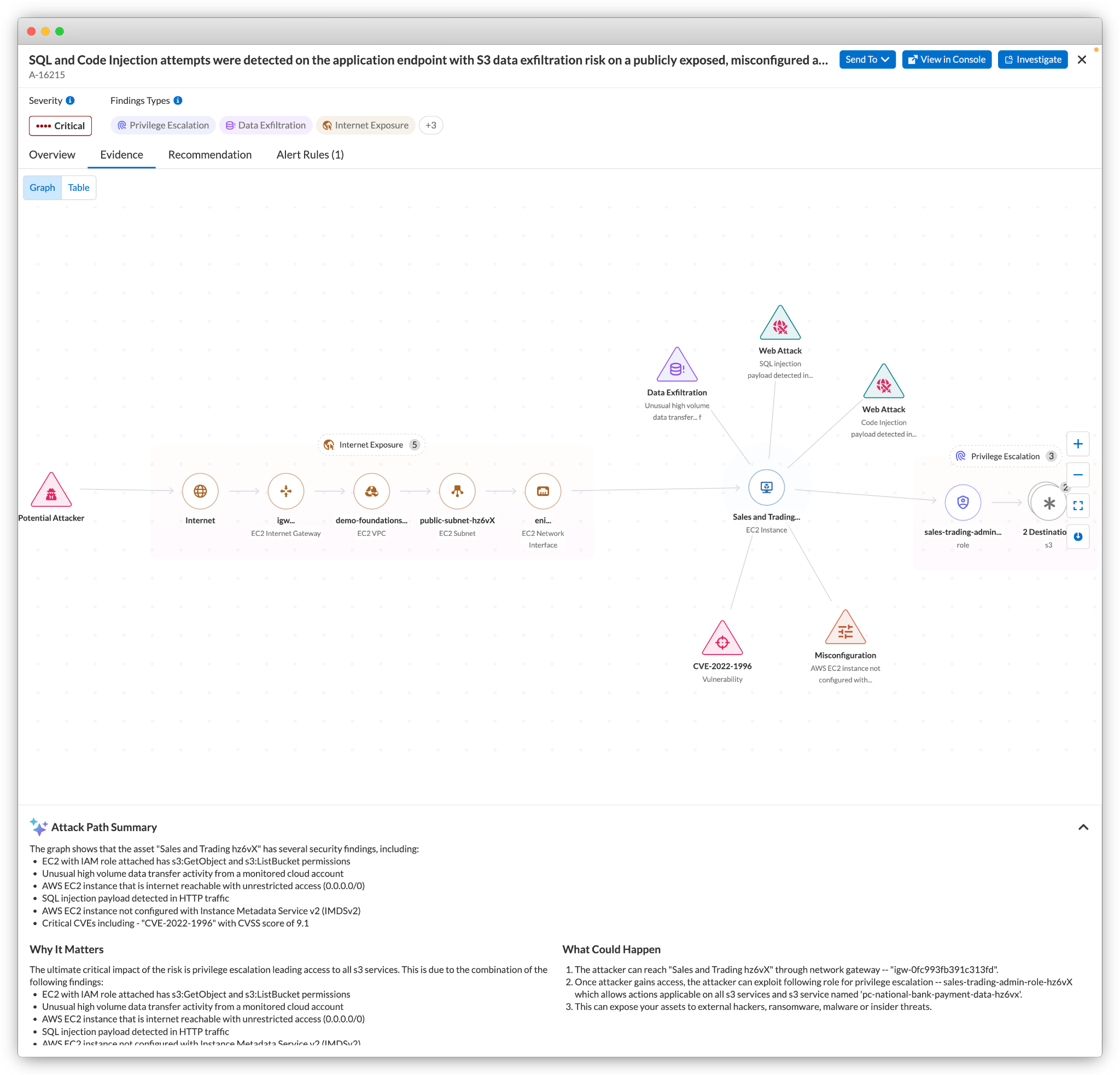
2. Designing the CSPM Graph Schema
Now that we understand the 'why', let's design the 'what'. A schema for a graph database defines the types of nodes and edges we will store. For a multi-cloud CSPM, our schema needs to be generic enough to accommodate resources from AWS, Azure, and GCP, while being specific enough to be useful.
The article "Graph Databases for Cloud Security Posture Management (CSPM)" gives us an excellent starting point.
Graph Databases for Cloud Security Posture Management (CSPM)
Let's return to the same article to borrow from its proposed schema.
Read the section 'Modeling Cloud Infrastructure in a Graph'. This provides a clear, simple schema that we can adopt and expand upon.
Based on that, let's define our core schema:
Node Labels (Entities)
- :CloudAccount: Represents an AWS Account, Azure Subscription, or GCP Project.
- :Identity: A user, group, or service principal.
- :Role: An IAM Role or equivalent.
- :Compute: An EC2 instance, Azure VM, or GCE instance.
- :DataStore: An S3 bucket, Azure Blob container, or RDS instance.
- :Network: A VPC, VNet, or Subnet.
- :SecurityGroup: An AWS Security Group or Azure Network Security Group.
- :IPRange: A representation of a CIDR block, like
0.0.0.0/0.
Each node will also have properties, which are key-value pairs containing its configuration details (e.g., id, name, tags, region).
Edge Types (Relationships)
(:Identity)-[:MEMBER_OF]->(:Identity)(e.g. user in a group)(:Identity)-[:CAN_ASSUME]->(:Role)(:Role)-[:HAS_POLICY]->(:Policy)(:Policy)-[:ALLOWS_ACTION]->(:Action)(:Compute)-[:ATTACHED_TO]->(:SecurityGroup)(:IPRange)-[:INGRESS_TO]->(:SecurityGroup)(:Compute)-[:IN_NETWORK]->(:Network)(:Network)-[:PEERED_WITH]->(:Network)
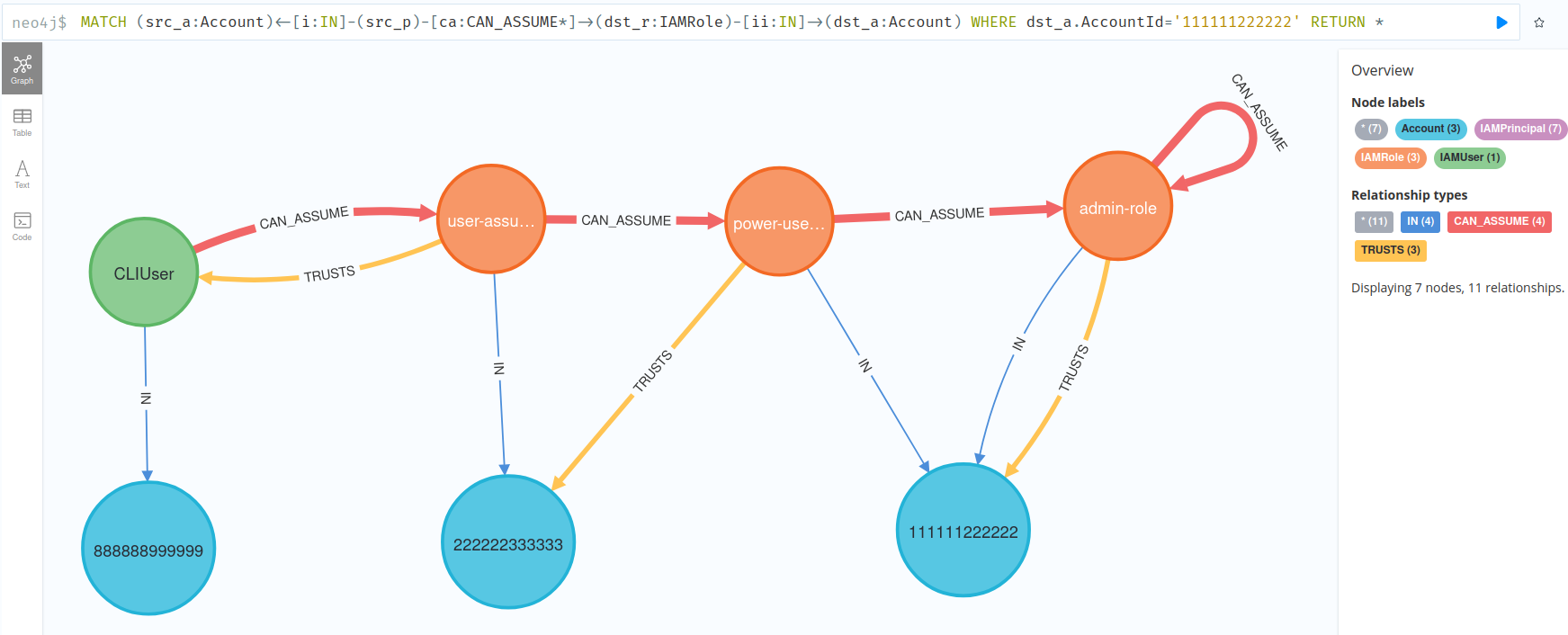
Querying the Graph: An Example
With this schema, we can write powerful queries using a language like Cypher. Let's find a classic attack path: a publicly exposed VM that can access a sensitive data store.
MATCH
  (internet:IPRange {cidr: '0.0.0.0/0'})
  -[:INGRESS_TO]->(sg:SecurityGroup)
  -[:ATTACHED_TO]->(vm:Compute {tags.environment: 'production'})
  -[:CAN_ASSUME]->(role:Role)
  -[:HAS_POLICY]->(policy:Policy)
WHERE
  policy.statement CONTAINS 's3:GetObject' AND
  policy.statement CONTAINS 'arn:aws:s3:::sensitive-financial-data'
RETURN
  vm.id, role.name
This single, readable query traverses multiple relationships to find a critical risk, demonstrating the power of our graph model.
3. Architecting the Graph Data Storage System
Now for the main engineering challenge: how do we build a system that can store and query this graph for millions of resources across thousands of accounts, handling tens of thousands of updates per second?
For this, we'll turn to a real-world case study from Palo Alto Networks on how they built the graph engine for their Prisma Cloud platform.
How Prisma Cloud built Infinity Graph using Amazon Neptune and ...
The AWS blog post 'How Prisma Cloud built Infinity Graph' is a masterclass in designing a large-scale graph system for security. It details the architectural trade-offs and components required to operate a system like this in production.
This is a detailed read, but crucial for your system design goals. Please focus on: Solution overview: Understand the scale and the core problem. Hybrid data store decision (section starting 'In building our Infinity Graph...'): Why they chose not to use a single graph database for everything. Data Hydration (section starting 'Stage 3: Hydration...'): How they load data into the system, including the use of bulk loaders and handling ephemeral assets. Query engine: How they built a federated query engine to query both data stores simultaneously.
The article reveals a critical architectural pattern: the hybrid data store. At scale, it's often inefficient to store everything in a single graph database.
- Graph databases are optimized for traversing relationships but can be less efficient at storing and searching massive amounts of attribute data on the nodes themselves.
- Search databases (like OpenSearch/Elasticsearch) are purpose-built for storing, filtering, and aggregating large volumes of document-based data (like resource configurations).
Therefore, we will design a hybrid system:
-
Graph Database (e.g., Amazon Neptune, Neo4j): This store holds the topology of our cloud environment—the nodes and the edges connecting them. The data stored here is minimal: just IDs and relationship types. It is optimized for one thing: fast traversal queries.
-
Search Database (e.g., Amazon OpenSearch): This store holds the full configuration and metadata for every resource, indexed by its unique ID. It handles all attribute-based filtering, full-text search, and aggregations.
Data Hydration Pipeline
To populate these two stores, we'll design an ETL (Extract, Transform, Load) pipeline:
- Extract: Our discovery service polls cloud provider APIs for resource configurations.
- Transform: A processing job (e.g., running on AWS Glue or Spark) takes each resource configuration.
- It extracts the topology information (e.g., "VM
i-123is attached to Security Groupsg-456"). - It formats this topology data for the graph database's bulk loader.
- The full resource JSON is sent to the search database for indexing.
- It extracts the topology information (e.g., "VM
- Load: The pipeline uses the Neptune Bulk Loader for initial massive data ingestions and a streaming approach for incremental updates, as described in the Prisma Cloud article. A key optimization is to use tombstoning for deletes—marking nodes as deleted in the search index and cleaning them from the graph database later during off-peak hours to avoid costly real-time delete operations.
Federated Query Engine
A user or an automated analysis job doesn't want to know about our complex backend. They need a single, unified way to query the data. We must build a federated query engine that acts as an abstraction layer.
This service is the brain of our data platform. Its workflow is as follows:
- Parse Query: It receives a complex query, such as "Find all publicly accessible production databases with unencrypted data."
- Create Plan: It acts like a database query optimizer. It breaks the query into sub-queries for each backend data store.
- "production databases with unencrypted data" -> This is an attribute filter. It sends this part of the query to OpenSearch. OpenSearch returns a list of resource IDs that match (e.g.,
['db-prod-1', 'db-prod-7']). - "publicly accessible" -> This is a relationship query.
- "production databases with unencrypted data" -> This is an attribute filter. It sends this part of the query to OpenSearch. OpenSearch returns a list of resource IDs that match (e.g.,
- Execute & Combine: The engine takes the list of IDs from OpenSearch and uses them to initiate a traversal query in the Graph Database:
MATCH (db) WHERE db.id IN ['db-prod-1', 'db-prod-7'] MATCH (internet:IPRange {cidr:'0.0.0.0/0'})-[:INGRESS_TO*1..5]->(db) RETURN db.id. The*1..5indicates a variable-length path traversal, the core strength of the graph. - Return Result: It joins the results from both queries and returns the final, consolidated answer to the user.
This architecture gives us the best of both worlds: the powerful traversal capabilities of a graph database and the fast, scalable filtering of a search database.
Conclusion
In today's lesson, we've designed the foundational data model that underpins a modern CSPM's most advanced capabilities. By moving beyond a simple list of resources to a rich graph of their relationships, we unlock the ability to perform sophisticated attack path analysis.
Key Takeaways:
- Graphs for Relationships: Graph databases are the natural choice for modeling highly interconnected cloud environments, making complex relationship queries simple and fast.
- Schema Design: A CSPM graph schema models cloud resources as nodes and the permissions, network connectivity, and attachments between them as edges.
- Hybrid Architecture at Scale: For large-scale systems, a hybrid architecture combining a graph database for topology and a search database for attributes provides optimal performance.
- Federated Querying: A custom, federated query engine is the key to abstracting the complexity of a hybrid data store and providing a unified API for analysis.
Preview of the Next Lesson
We have now designed the core components of a powerful CSPM, a tool focused on the security of the cloud control plane—the static configuration of your infrastructure.
In our next module, we will pivot to an entirely different domain: the application runtime. What happens when an attack bypasses all our infrastructure defenses and targets the application code itself? Our next lesson will be the first in the "Architecting Runtime Application Self-Protection (RASP)" module, where our learning outcome will be to: Architect RASP instrumentation approaches, comparing bytecode modification, language-level hooks, and library interposition. We will dive deep into how to gain visibility and control from inside a running application.