Recommended resources
The freely available resources this lesson will direct you to.
Hello! Last time, you decoded bytes as text using ASCII and UTF-8. The same bytes could instead represent a number—but not necessarily an integer. A program can interpret 32 bits as an IEEE 754 floating-point value, using some bits for its sign, some for its scale, and the rest for its significant digits.
In this lesson, you’ll decode simple floating-point bit patterns and see why a number such as may change slightly when stored. That distinction matters when inspecting program memory, handling numerical data, or deciding whether two computed values should compare equal.
A binary form of scientific notation
In decimal scientific notation, can be written as . Floating-point representation uses a similar idea with powers of two. For example,
The binary digits after the point have place values , and so on. Thus means ; multiplying by gives .
A 32-bit IEEE 754 value, often called binary32 or single precision, divides its bits into three fields:
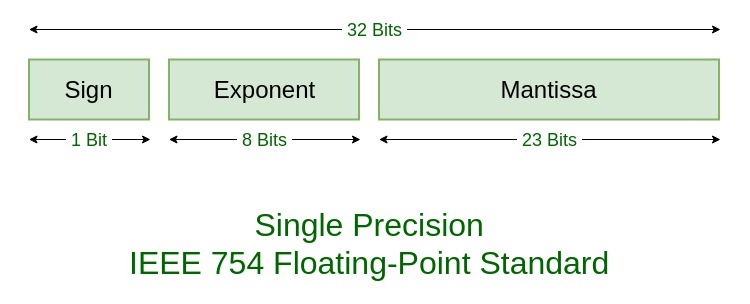
For an ordinary, nonzero value, the format stores the following information:
- Sign: means positive; means negative.
- Exponent: an eight-bit unsigned number . Its actual power of two is . The added is called the bias.
- Fraction: 23 bits placed after an implicit leading . A stored fraction of
011000…therefore supplies the significand , not .
That leading is predictable for a normalized binary number, so it need not occupy a stored bit. For exponent fields from through , the decoding rule is
where is the sign bit and is the value of the fraction bits after the binary point. The exponent fields and need separate rules, which we’ll examine shortly.
Watch the selected portions of Floating Point Numbers: IEEE 754 Standard by ALL ABOUT ELECTRONICS. The first establishes the fields and exponent bias; the second works through decoding examples. Keep the implicit leading in mind when the video refers to the “mantissa.”
Floating Point Numbers: IEEE 754 Standard | Single Precision and Double Precision Format
Watch the selected parts of Floating Point Numbers: IEEE 754 Standard by ALL ABOUT ELECTRONICS to connect the field layout to a numerical value.
Start with fields and bias, from the single-precision layout through the usable exponent range. Then watch decoding examples, where the sign, biased exponent, and fraction are combined. Focus on why the leading 1 contributes to the value even though it is absent from the fraction field.
Decode the fields before interpreting the bytes
Suppose a 32-bit pattern is displayed in hexadecimal as C0300000. Hexadecimal is only a compact way to write its bits. Expanding it and separating the IEEE 754 fields gives:
Hex:        C0 30 00 00
Bits:       1 | 10000000 | 01100000000000000000000
Field:    sign  exponent           fraction
The sign bit is , so the result is negative. The exponent bits 10000000 represent ; removing the bias gives . The fraction bits begin 011, so the significand is . Combining the three parts,
The essential habit is to classify the exponent field before applying the formula, then read the fraction as binary place values. For another small example, 3F000000 separates into sign 0, exponent 01111110 (), and an all-zero fraction. Its value is .
These patterns describe a 32-bit value, not a mandated order for placing its four bytes in memory. The previous lesson’s endianness rule still applies: C0 30 00 00 is the big-endian byte order for the pattern C0300000; a little-endian storage of that same pattern places the bytes in reverse order. First establish the 32-bit pattern from the bytes; then split it into floating-point fields.
What the reserved exponents mean
The ordinary decoding formula assumes an implicit leading . IEEE 754 reserves the two extreme exponent fields so it can represent other cases:
| Exponent field | Fraction field | Meaning in binary32 |
|---|---|---|
| through | Any | Normal value; use the implicit leading and exponent |
| All zero | Zero; the sign bit distinguishes from | |
| Nonzero | Subnormal value; no implicit leading | |
| All zero | Positive or negative infinity, according to the sign bit | |
| Nonzero | NaN (“not a number”) |
For a subnormal number, the significand begins with , not , and the power of two is fixed at :
This lets representable values extend closer to zero than the smallest normal value. For instance, 00000001 has just the final fraction bit set, whose place value is ; it represents . You need not memorize that magnitude, but you should recognize why applying the normal formula to an all-zero exponent would give the wrong answer.
Infinity and NaN are not ordinary large or fractional numbers. They are recognizable bit patterns reserved for outcomes such as overflow and invalid operations. In particular, an all-ones exponent does not always mean infinity: check whether the fraction is zero.
The same scheme extends to common 64-bit binary64 values: one sign bit, 11 exponent bits, 52 fraction bits, and a bias of . Python’s usual float and JavaScript’s ordinary Number use binary64, whereas a C float is commonly binary32.
Why a finite fraction must sometimes round
The fraction field cannot hold indefinitely many bits. Binary32 stores 23 fraction bits plus the implicit leading , giving 24 significant binary digits for a normal value. Binary64 gives 53. More bits improve precision, but neither format can represent every real number.
The obstacle is not limited to exceptionally complicated numbers. A finite binary fraction is a sum of powers such as and , so it can be expressed as a fraction with a power of two in its denominator. The decimal value cannot: its denominator has a factor of . Its binary expansion continues rather than ending, and storage must select a nearby representable value.
Read the short Floating Point Consequences discussion in Princeton’s Number Systems and Number Representation. It compares repeating fractions in decimal and binary, then connects inexact storage to roundoff.
[PDF] Number Systems and Number Representation
Read the “Floating Point Consequences” slides in Princeton’s Number Systems and Number Representation for the link between finite binary digits and roundoff.
Find the slides titled “Floating Point Consequences” and “Floating Point Consequences, cont” (around slides 50–51). On the first, read the precision comparison. On the following slide, read the roundoff discussion, including its comparison with repeating decimal fractions. Focus on significant precision, rather than treating the stated decimal-digit counts as a fixed number of digits after the decimal point.
For a concrete result, the nearest binary32 value stored for has the pattern 3DCCCCCD. Decoding that pattern gives
slightly above . The program did not necessarily perform arithmetic incorrectly: it had to choose among a finite set of available bit patterns when the value was stored.
The spacing between available values also changes with scale. Near , adjacent normal binary32 values are apart. Near , they are apart, so lies between representable values. Floating point offers a wide range of magnitudes, not a fixed number of reliable digits after the decimal point.
The binary64 illustration below shows the same changing spacing with JavaScript’s Number. Pay particular attention to the panels showing neighboring values near and near a large power of two.
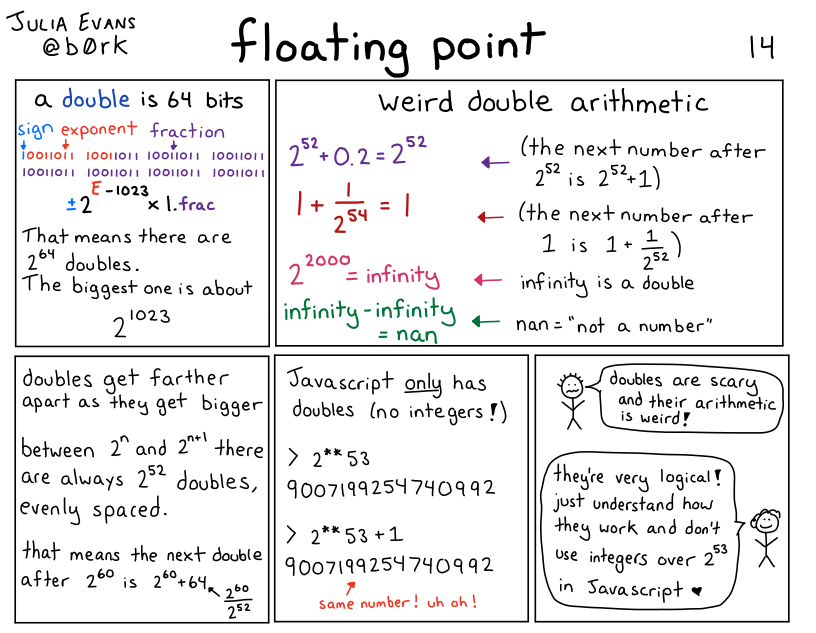
Rounding can occur again during arithmetic, not just initial storage. In typical binary64 arithmetic, the values used for , , and are approximations; adding the first two and rounding the result need not produce the same bit pattern as the stored approximation of . That is why exact equality deserves care when comparing results calculated through different floating-point operations. It does not mean every floating-point comparison is unreliable: values such as and have short, exact binary representations.
Verify a bit pattern in Python
Python’s standard-library struct module can make the distinction between a numerical value, its 32-bit pattern, and its byte order visible. Here >f requests a 32-bit float written in big-endian byte order, so the hex output reads naturally from the sign end of the pattern:
import struct

print(struct.unpack(">f", bytes.fromhex("c0 30 00 00"))[0])
# -2.75

print(struct.pack(">f", -2.75).hex(" "))
# c0 30 00 00

print(struct.pack(">f", 0.1).hex(" "))
# 3d cc cc cd

print(struct.unpack(">f", bytes.fromhex("3d cc cc cd"))[0])
# 0.10000000149011612
The final line decodes a binary32 pattern. The Python literal 0.1 normally begins as a binary64 approximation; packing with >f rounds it to binary32. This small boundary crossing is a practical way to see that the format—not merely the way a number is printed—determines its precision.
Key takeaways
To decode a binary32 pattern, separate its sign, eight-bit exponent, and 23-bit fraction. Check for a reserved exponent first. For a normal value, subtract the bias , restore the implicit leading , and apply the sign. An exponent of zero removes that leading ; an all-ones exponent identifies infinity or NaN according to the fraction.
Finite fraction fields force some values, including , to be rounded to nearby bit patterns. Precision is limited in significant digits, and the distance between representable values grows with magnitude. In the next lesson, you’ll use a hex-dump tool to inspect real bytes and connect patterns like these to integers, text, and file contents.