Recommended resources
The freely available resources this lesson will direct you to.
Welcome to the next module of our course! In the previous lessons, we dove deep into the mechanics of OSPF, culminating in troubleshooting broken neighbor adjacencies. We are now making a significant shift from dynamic routing protocols to a fundamental aspect of network security: Access Control Lists, or ACLs.
Today's lesson lays the critical groundwork for this new topic. Before you can configure, apply, or troubleshoot ACLs, you must first understand the logic a router uses to process them. Our focus will be to explain how routers process ACLs using top-down logic, including the implicit deny rule. Mastering this foundational concept is the most important step in using ACLs effectively; a misunderstanding here can lead to either creating security vulnerabilities or accidentally blocking critical traffic.
Let's begin by defining what an ACL is.
1. What is an Access Control List?
At its core, an Access Control List is a series of rules that a router or firewall uses to filter traffic. Think of it as a bouncer at a club with a strict guest list. Each person (packet) who wants to enter is checked against the list (ACL). The list has specific instructions: either permit entry or deny it.
ACLs are incredibly versatile. While their primary use is security—blocking unwanted traffic—they are also used for other network functions, such as identifying traffic for Network Address Translation (NAT) or Quality of Service (QoS), which we'll see later in the course.
For a concise introduction to the purpose of ACLs, please watch the following video.
Free CCNA | Standard ACLs | Day 34 | CCNA 200-301 Complete Course
This video from Jeremy's IT Lab introduces the fundamental purpose of ACLs.
Watch the section from 01:42 to 03:07, where the presenter explains what ACLs are and how they function as a packet filter, allowing us to override a router's default behavior of forwarding any packet for which it has a route.
2. The Core Logic: Top-Down Processing and First-Match
The most critical concept to understand about ACLs is the logic of how they are processed. A router doesn't look at all the rules in an ACL at once; it processes them sequentially.
Here's the breakdown of the process:
- Top-Down Order: The router checks the packet against the very first rule (or Access Control Entry, ACE) in the list.
- Match or No Match: If the packet's information (e.g., its source IP address) matches the criteria of that rule, the router immediately executes the action specified by that rule—either
permitordeny. - First-Match Logic: Once a match is found, the processing stops. The router does not look at any subsequent rules in the ACL. The fate of the packet is sealed by the first rule it matches.
- Continue if No Match: If the packet does not match the first rule, the router moves on to the second rule and repeats the process. It continues down the list, line by line, until it finds a match.
This flowchart provides a simple visual representation of the logic.
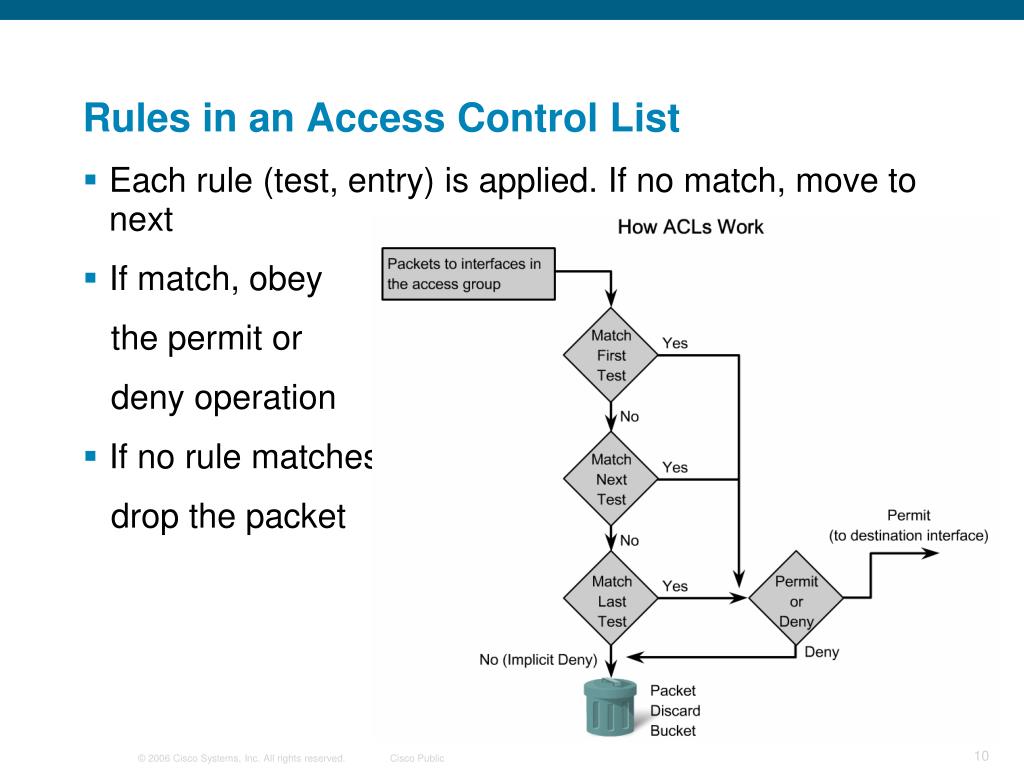
The order of the rules is therefore not just important; it is everything. A permit rule followed by a deny rule for the same traffic has a completely different effect than the other way around.
To see a practical demonstration of how statement order changes an ACL's behavior, watch this segment.
Free CCNA | Standard ACLs | Day 34 | CCNA 200-301 Complete Course
This clip demonstrates the critical importance of the order of entries in an ACL.
Watch from 12:29 to 14:36. Pay close attention to the two examples. In the first, a specific subnet is permitted because the permit rule comes before a broader deny rule. In the second, the same packet is denied because the rules are reversed.
3. The Implicit Deny Rule
So, what happens if a packet is checked against every single rule in an ACL and doesn't match any of them?
The answer lies in one of the most common "gotchas" for newcomers to networking: the implicit deny. At the end of every single ACL, there is an invisible, unwritten rule that denies all traffic. You can think of it as an automatic deny any at the bottom of your list.
This means that an ACL operates on a "guilty until proven innocent" principle. If you do not explicitly permit a packet, it will be denied, either by a specific deny rule you wrote or by the implicit deny at the end.
The following resource explains this concept clearly.
This article from NetworkAcademy.IO provides a clear, text-based explanation of the ACL matching logic, including a section dedicated to the implicit deny rule.
First, read the section "ACL matching logic." The diagram and step-by-step breakdown provide an excellent reinforcement of the top-down, first-match principle. Then, read the section titled "The Implicit Deny Any." This part focuses specifically on the invisible "deny all" rule and its consequences.
This implicit deny rule is a major reason why careful planning is required. If you create an ACL to deny one specific address but forget to permit all the other traffic you want to allow, the implicit deny rule will block everything else.
4. A Practical Scenario
Let's tie these concepts together with a more complex scenario. Understanding the logic is abstract, but seeing its impact on traffic flow makes it concrete. An ACL isn't active until it's applied to a router's interface in a specific direction:
- Inbound: The ACL filters traffic entering the interface.
- Outbound: The ACL filters traffic exiting the interface.
The choice of interface and direction, combined with the top-down processing logic, determines what the ACL actually accomplishes. The video below walks through a scenario demonstrating how applying the exact same ACL in different ways yields completely different network outcomes.
Free CCNA | Standard ACLs | Day 34 | CCNA 200-301 Complete Course
This detailed example shows how ACL logic plays out in a real network topology.
Watch the section from 06:06 to 11:57. The goal is to permit one network (192.168.1.0/24) and deny another (192.168.2.0/24) from reaching a server. Notice how: Applying the ACL outbound on the wrong interface fails to block the traffic. Applying it inbound on another interface works, but is overly restrictive, causing collateral damage by blocking too much. Applying it outbound on the interface closest to the destination works perfectly. This example brings together the top-down processing, first-match logic, and the impact of placement.
As you saw, a logically correct ACL placed incorrectly can either be useless or actively harmful to your network. This is why understanding the processing logic is so critical before you begin configuration.
Conclusion
In this lesson, we focused entirely on the "how" of ACL processing, leaving the "what" of configuration for our next session. You have learned the three pillars of ACL logic that govern all types of access lists.
Key Takeaways:
- Top-Down Processing: Routers evaluate ACL rules sequentially from the first to the last.
- First-Match Logic: As soon as a packet matches a rule, the router applies the
permitordenyaction and stops processing the ACL for that packet. - Implicit Deny: If a packet does not match any rule in the ACL, it is automatically dropped by an invisible
deny anyrule at the very end. - Order is Critical: The sequence of your rules directly determines the behavior of the ACL. A specific
permitrule must come before a generaldenyrule that would otherwise match the same traffic.
With this theoretical foundation firmly in place, you are ready to start building your own ACLs. In our next lesson, we will configure and apply standard ACLs to filter traffic based on source IP address. You will translate the logic we discussed today into actual Cisco IOS commands.