Recommended resources
The freely available resources this lesson will direct you to.
- How do Graphics Cards Work? Exploring GPU Architecturewww.youtube.com
- Stanford CS149 I Parallel Computing I 2023 I Lecture 1 - Why Parallelism? Why Efficiency?www.youtube.com
- [PDF] Modern GPU Architecturewww.dcce.ibilce.unesp.br
- [PDF] Lecture 9 Introduction to Graphics Processing Units (GPUs)dejazzer.com
Introduction
Welcome to your first lesson in Advanced Computer Architecture. This course is designed to bridge the gap between your expertise in high-level AI and ML modeling and the low-level hardware systems that make it all possible. Our journey begins with the most fundamental component: the processor.
In this lesson, you will learn to describe the fundamental architectural differences between Central Processing Units (CPUs) and Graphics Processing Units (GPUs). We will explore how their distinct design philosophies are physically realized through different allocations of transistors for control logic, cache memory, and arithmetic logic units (ALUs). Understanding this core trade-off is the first principle in grasping why GPUs have become the dominant force in AI and what it takes to design efficient, large-scale ML systems.
The End of the "Free Lunch"
For decades, software performance improved almost automatically. Programmers could simply wait for the next generation of CPUs, which would run their existing code faster. This "free lunch" was courtesy of two primary factors: increasing clock frequencies and increasingly sophisticated architectural techniques to extract more parallelism from a single instruction stream.
However, around the mid-2000s, this trend came to a halt. To understand why the industry pivoted towards massive parallelism and the GPU model, let's explore the physical and logical limits that CPU designers encountered.
To begin, please watch the following segment from a Stanford lecture on parallel computing. It provides the essential historical context on why single-core performance stopped scaling and why parallel programming became a necessity.
Stanford CS149 I Parallel Computing I 2023 I Lecture 1 - Why Parallelism? Why Efficiency?
This video, from a Stanford course on parallel computing, explains the historical trends in CPU performance and the walls—specifically the Power Wall and the Instruction-Level Parallelism (ILP) Wall—that halted the era of automatic performance gains.
Please watch from 40:57 to 59:17. Focus on understanding two key concepts: Why did increasing clock frequency become unsustainable? (The Power Wall) Why can't we just build CPUs with more and more internal execution units to find more parallelism automatically? (The limits of Instruction-Level Parallelism)
As the video explains, CPU architects hit two fundamental walls:
- The Power Wall: Clocking transistors faster requires more power, which generates more heat. Eventually, this became physically and economically unmanageable.
- The Instruction-Level Parallelism (ILP) Wall: CPUs use complex techniques (like out-of-order execution) to find and execute independent instructions from a single program in parallel. However, most sequential programs have inherent data dependencies that limit this "hidden" parallelism. Studies found that adding more than a handful of execution units yielded diminishing returns.
With the free lunch over, the path to greater performance was no longer about making a single core faster. Instead, it became about using more cores to perform more work in parallel. This shift set the stage for two very different architectural philosophies to emerge, embodied by the modern CPU and GPU.
A Tale of Two Philosophies: Latency vs. Throughput
CPUs and GPUs are both processors, but they are optimized for fundamentally different kinds of work. This difference can be summarized as a trade-off between latency and throughput.
- Latency is the time it takes to complete a single task.
- Throughput is the total number of tasks completed in a given amount of time.
A CPU is a latency-optimized device. It's designed to execute one or a few tasks (threads) as quickly as possible. It excels at complex, branching, and sequential logic, like running an operating system or a web browser.
A GPU is a throughput-optimized device. It's designed to execute thousands, or even millions, of simple, parallel tasks simultaneously. It might be slower than a CPU on any single task, but its massive parallelism gives it vastly higher total throughput for the right kind of workload.
This popular video provides a great analogy to build intuition for this difference.
How do Graphics Cards Work? Exploring GPU Architecture
This video from Branch Education uses the analogy of a jumbo jet (CPU) versus a cargo ship (GPU) to illustrate the different strengths of each processor.
Watch the segment from 02:11 to 04:50. Pay attention to how the analogy highlights the trade-offs between speed, capacity, and flexibility.
The key takeaway is that CPUs are generalists, while GPUs are specialists. A GPU's specialization in massive data parallelism is precisely what makes it so effective for deep learning, which heavily relies on large matrix and vector operations that can be easily broken down into thousands of independent calculations.
Transistor Allocation: The Architectural Blueprint
The different design philosophies of CPUs and GPUs are not just abstract concepts; they are physically embedded in the silicon. A processor chip has a finite "budget" of transistors. The way these transistors are allocated to different functions determines the processor's capabilities.
We can simplify a processor's architecture into three main components:
- Arithmetic Logic Units (ALUs): The "brawn" of the processor. These are the execution units that perform mathematical calculations like addition and multiplication. More ALUs mean more computational horsepower.
- Cache: Small, extremely fast on-chip memory. It stores frequently used data to avoid the long latency of fetching it from the main system memory (DRAM). Large caches are a primary tool for reducing latency.
- Control: The "brains" of the processor. This is complex logic that fetches and decodes instructions, predicts branches, reorders instructions for parallel execution (out-of-order execution), and manages the flow of data. Sophisticated control logic is essential for speeding up complex, single-threaded programs.
The fundamental architectural difference between CPUs and GPUs comes down to how they spend their transistor budget on these three components.
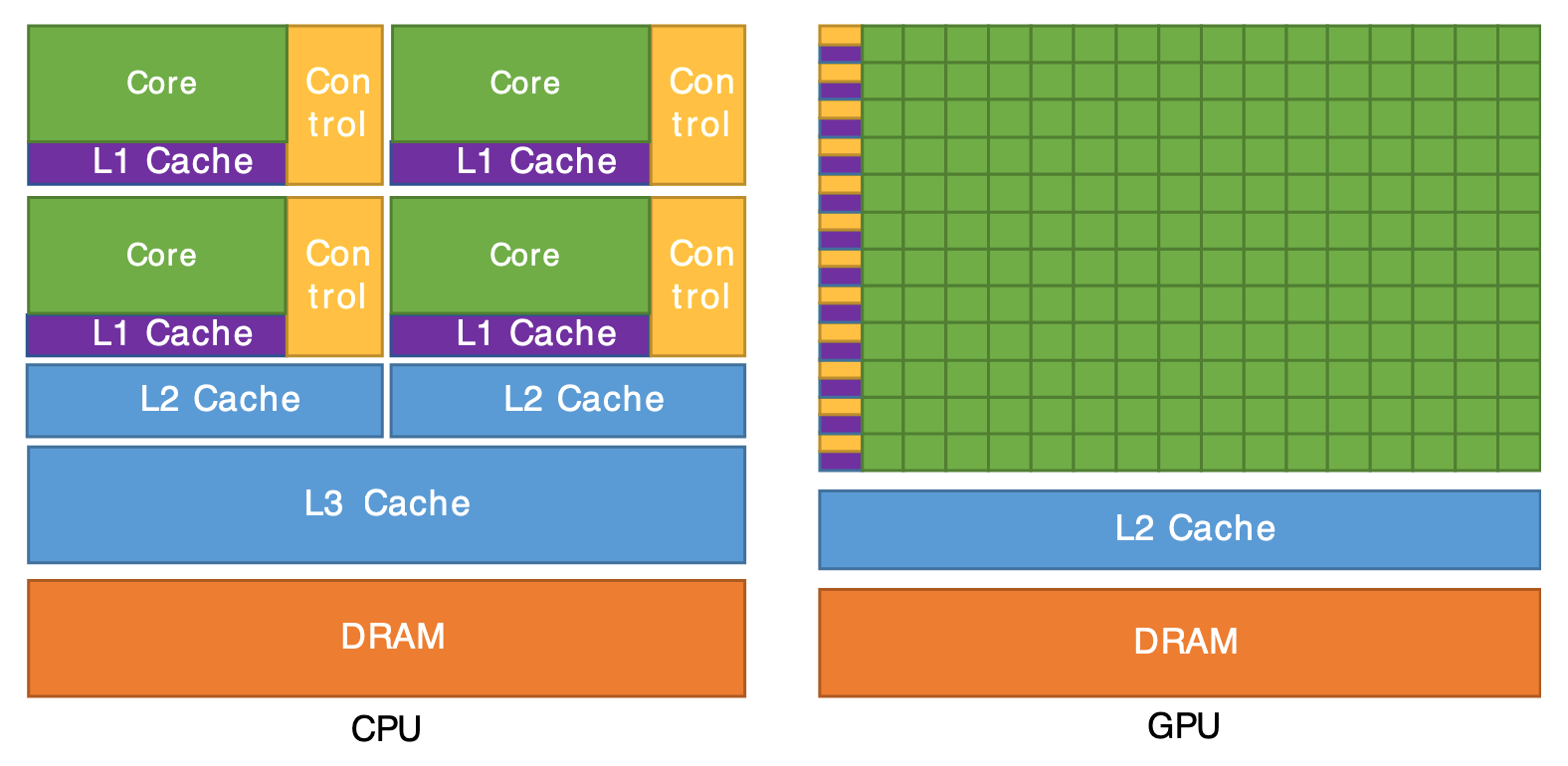
CPU Architecture: Optimized for Low Latency
- Large Control Units: A significant portion of a CPU's transistors are dedicated to complex control logic. This allows the CPU to perform sophisticated optimizations like branch prediction and out-of-order execution, which are crucial for minimizing the execution time of a single thread with complex, unpredictable control flow.
- Large, Multi-Level Caches: CPUs have deep cache hierarchies (L1, L2, L3) that consume a huge number of transistors. This is the primary strategy for fighting memory latency: keep as much data as possible close to the core to avoid slow trips to main memory.
- Fewer, Powerful ALUs: A CPU has a relatively small number of very powerful ALUs designed to handle a wide variety of instructions efficiently.
GPU Architecture: Optimized for High Throughput
- Many Simple ALUs: A GPU dedicates the overwhelming majority of its transistors to ALUs. Instead of a few powerful cores, it has thousands of simpler cores designed for parallel arithmetic. This is the source of its immense throughput for data-parallel tasks.
- Small Caches: GPUs have smaller caches. They don't try to reduce latency with large caches. Instead, their strategy is to hide latency. If one group of threads is stalled waiting for data from memory, the GPU's hardware scheduler instantly switches to another group of threads that is ready to compute. This requires thousands of active threads to ensure there's always work to be done, keeping the ALUs busy.
- Simple Control Units: The control logic is much simpler and is often shared across a large group of threads that execute the same instruction. This saves a massive number of transistors, which can be repurposed for more ALUs.
To solidify this concept, please read the following short text, which explicitly discusses this transistor allocation trade-off.
This excerpt from the document 'Modern GPU Architecture' directly addresses how the different design goals of CPUs and GPUs lead to different decisions about transistor allocation.
Read the section titled 'CPU versus GPU Transistor Allocation'. This short section clearly articulates the relationship between a CPU's need for a large cache and a GPU's ability to dedicate more area to ALUs.
The document Lecture 9 Introduction to Graphics Processing Units (GPUs) also contains a similar diagram and explanation under the "CPU vs. GPU" heading (slide 37), reinforcing this core concept.
Conclusion
In this lesson, we established the foundational difference between CPU and GPU architectures.
Key Takeaways:
- The end of single-core performance scaling (due to the Power Wall and ILP Wall) forced the industry to embrace explicit parallelism.
- CPUs and GPUs embody two different design philosophies: CPUs are latency-oriented generalists, while GPUs are throughput-oriented specialists.
- This philosophical difference is physically manifested in their transistor allocation. CPUs spend their transistor budget on large caches and complex control logic to make single threads run fast. GPUs spend their budget on a massive number of ALUs to execute many parallel threads simultaneously, prioritizing total throughput over single-thread speed.
This fundamental trade-off is the reason GPUs are so well-suited for the data-parallel workloads that dominate deep learning.
Preview of the Next Lesson:
Now that we understand the what (the architectural differences), our next lesson will focus on the how. We will explore the execution models that these architectures enable, specifically SIMD (Single Instruction, Multiple Data) and SIMT (Single Instruction, Multiple Threads), to understand how a GPU manages and executes thousands of threads efficiently.