Recommended resources
The freely available resources this lesson will direct you to.
Introduction
Welcome to your third lesson. In our first two lessons, we established the foundational principles of GPU architecture. We saw how GPUs allocate their transistor budget to a vast number of simple arithmetic logic units (ALUs), in stark contrast to CPUs which prioritize large caches and complex control logic. We then explored the SIMD and SIMT execution models, which GPUs use to efficiently manage instruction flow to these thousands of parallel units.
Today, we will synthesize these concepts to address the learning outcome: to compare latency-oriented (CPU) vs. throughput-oriented (GPU) design philosophies. This lesson will explain why CPUs and GPUs are built so differently by examining their fundamental design goals. Understanding this core trade-off is essential for reasoning about system performance and correctly mapping computational workloads to the appropriate hardware.
Defining Latency and Throughput
At a high level, the difference between CPUs and GPUs can be distilled into a single trade-off: latency versus throughput.
- Latency is the time it takes to complete a single task. A low-latency processor is optimized to execute a task from start to finish as quickly as possible.
- Throughput is the number of tasks that can be completed in a given amount of time. A high-throughput processor is optimized to maximize the total work done, even if each individual task takes longer.
To start, let's watch a brief video that introduces this core distinction.
This short video from TechPrep provides a clear, high-level summary of the emphasis on low latency for CPUs versus high throughput for GPUs.
Watch the clip from 2:30 to 3:05. Focus on the explicit contrast between the design 'emphasis' of each processor type.
This sets the stage for a deeper architectural analysis. Let's now explore the specific design choices that lead to these different philosophies.
The CPU: A Latency-Oriented "Jumbo Jet"
A CPU's primary goal is to minimize the execution time of a single thread or a small number of threads. Think of tasks like running your operating system, responding to user input, or executing control-heavy application logic. For these, a fast response is critical.
To achieve low latency, CPUs invest a significant portion of their silicon area and power budget into sophisticated features designed to speed up a single instruction stream.
[PDF] The First Complete GPU Computing Architecture
The following sections from an NVIDIA whitepaper on the Fermi architecture, while slightly dated, provide an excellent and timeless explanation of the techniques CPU designers use to optimize for single-threaded performance.
Read the sections titled 'CPU Computing—the Great Tradition' and 'Speculation' (pages 4-6). Focus on understanding how caches and speculative execution are fundamentally latency-reducing techniques.
As you read, note these key latency-optimizing techniques:
- Large Caches: CPUs have a deep, multi-level cache hierarchy (L1, L2, L3). Caches are fundamentally speculative, betting that recently accessed data will be needed again soon. By storing data closer to the core, they drastically reduce the long latency of fetching it from main memory (DRAM).
- Sophisticated Control Logic: A huge portion of a CPU core is dedicated to control logic that is invisible to the programmer but critical for performance. This includes:
- Branch Prediction: Guessing the outcome of
ifstatements to keep the instruction pipeline full. - Speculative Execution: Executing instructions before it's certain they will be needed.
- Out-of-Order Execution: Reordering instructions to find independent operations that can be executed while a prior instruction is stalled (e.g., waiting for data from the cache).
- Branch Prediction: Guessing the outcome of
These mechanisms are complex and power-hungry, but they are extremely effective at reducing the stalls within a single thread, thus minimizing its end-to-end latency.
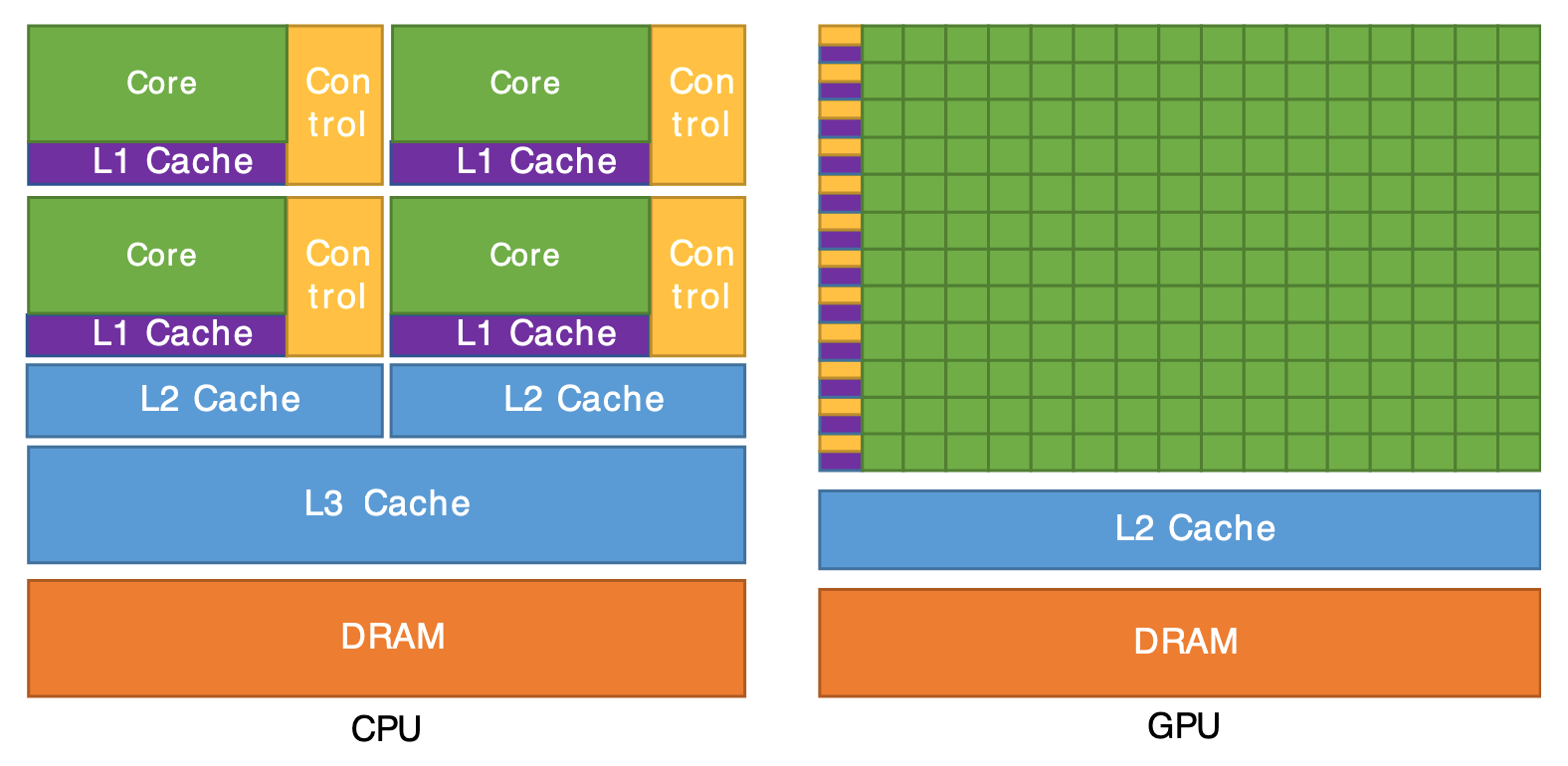
An excellent analogy, presented in the article "Inside the GPU," compares a CPU to a jumbo jet. It's designed to carry a few passengers (tasks) very, very quickly to their destination.
The GPU: A Throughput-Oriented "Cargo Ship"
A GPU's design philosophy is entirely different. It is built for throughput, aiming to process massive amounts of parallel data, which is characteristic of graphics and deep learning workloads.
Instead of trying to make each individual task fast, a GPU is designed to keep its thousands of ALUs busy at all times. It achieves this through a strategy called latency hiding.
A GPU architect accepts that memory latency is a given. When a group of threads (a warp) executes a memory instruction, it will inevitably stall for hundreds of clock cycles waiting for data to return from DRAM.
- A CPU would use its large caches and out-of-order logic to try to mitigate or work around this stall for that single thread.
- A GPU takes a different approach. It has a massive pool of warps ready to execute. When one warp stalls, the hardware scheduler instantly context-switches to another ready warp and issues its instructions to the ALUs.
This rapid context switching ensures that the computational units are always working on some task, even if many other tasks are stalled waiting for memory. The latency of each individual memory access isn't reduced, but its impact on overall throughput is hidden because useful work is being done in the meantime. This is why the SIMT model, which enables the management of tens of thousands of concurrent threads, is so crucial for the GPU's design.
The "Inside the GPU" article continues the analogy by comparing the GPU to a cargo ship. It might take a long time to load and unload (high latency per item), but the total volume of goods transported (throughput) is orders of magnitude greater than a plane.
Inside the GPU: A Guide to Modern Graphics Architecture
This article provides the excellent 'ship-and-plane' analogy and includes a table that succinctly summarizes the contrasting design philosophies.
Read the section 'CPU vs. GPU: Contrasting Design Philosophies' and examine the comparison table. This will help solidify the concepts we've discussed.
Looking back at the architectural diagram, you can see the GPU dedicates the vast majority of its transistors to ALUs (the green boxes), which are the engines of throughput. The control and cache units are much smaller and simpler compared to a CPU's.
Visualizing the Trade-off and its Consequences
The relationship between latency and throughput is often inverse. Optimizing heavily for one typically comes at the expense of the other.

The performance implications of these divergent designs are profound. In the previous lesson's resources, Prof. Onur Mutlu presented a quantitative example of vectorizing a simple loop. He demonstrated that by moving from a scalar, serial execution model (CPU-like) to a pipelined, parallel vector model (GPU-like), the execution time for 50 elements dropped from 1504 cycles to just 79 cycles—a 19x improvement in throughput. While the latency to get the first result might be similar, the rate at which subsequent results are produced is vastly higher. This is the power of throughput-oriented design.
Synthesis: A Summary of Design Philosophies
To conclude our comparison, let's revisit a key statement from the NVIDIA Fermi whitepaper, which perfectly encapsulates the distinction.
[PDF] The First Complete GPU Computing Architecture
This final excerpt clearly states the ideal workloads for each architecture.
Read the short concluding paragraph on page 26 beginning with 'Although it may sometimes appear that GPUs are becoming more CPU-like...'.
The core idea is that CPUs excel at dynamic, control-flow-heavy tasks, while GPUs excel at computationally-dominated tasks with simpler control flow. This table summarizes the key differences:
| Feature | CPU (Latency-Oriented) | GPU (Throughput-Oriented) |
|---|---|---|
| Primary Goal | Minimize time for a single task (low latency) | Maximize tasks per unit time (high throughput) |
| Core Strategy | Reduce stalls with caches and speculation | Hide stalls with massive multithreading (many warps) |
| Transistor Budget | Large caches, complex control logic (branch predictors, OoO) | Vast number of simple ALUs, large register files |
| Handling Memory Latency | Reduce latency with large, fast caches | Hide latency by switching to other threads |
| Core Count & Complexity | Few, powerful, complex ("fat") cores | Many, simple, efficient ("thin") cores |
| Ideal Workload | Sequential, complex branching, OS, general tasks | Data-parallel, high arithmetic intensity (ML, graphics) |
Conclusion
In this lesson, we have moved from what makes CPUs and GPUs different to why they are designed that way. By understanding their respective design philosophies, you can better appreciate their strengths and weaknesses.
Key Takeaways:
- CPUs are latency-oriented. They are optimized to execute single threads as quickly as possible using large caches and complex control logic like speculative and out-of-order execution.
- GPUs are throughput-oriented. They are optimized to complete the maximum number of parallel tasks over time. They achieve this not by making individual tasks faster, but by using a massive number of threads to hide memory latency.
- This fundamental difference in philosophy dictates how transistors are allocated on the chip: CPUs dedicate silicon to cache and control, while GPUs dedicate it to raw computation (ALUs).
- The result is two specialized processors: the CPU, a versatile "jumbo jet" for fast, complex tasks, and the GPU, a powerful "cargo ship" for bulk data processing.
Preview of the Next Lesson:
The GPU's strategy of latency hiding is entirely dependent on its ability to switch between warps (groups of threads) at virtually zero cost. But how does it manage tens of thousands of threads and decide which warp to run at any given moment? In the next lesson, we will delve into the mechanics of GPU thread scheduling, exploring how the hardware scheduler uses warps to keep the execution units fed and achieve high throughput.