Recommended resources
The freely available resources this lesson will direct you to.
Introduction
In our last lesson, we focused on crafting system prompts to give our LLM a specific persona and a set of high-level instructions. We even specified that the output should be in Markdown, which improves readability for humans. But what happens when your application needs to programmatically use the LLM's response? Parsing natural language, or even loosely structured Markdown, can be unreliable and error-prone.
This lesson directly addresses that challenge. Our goal is to implement structured output parsing from LLM responses, focusing on how to reliably get and use JSON. This is a critical skill for integrating LLMs into robust software systems, moving from simple chatbots to complex, automated workflows. We'll be replacing brittle prompt instructions with a new, powerful API feature that guarantees the output format.
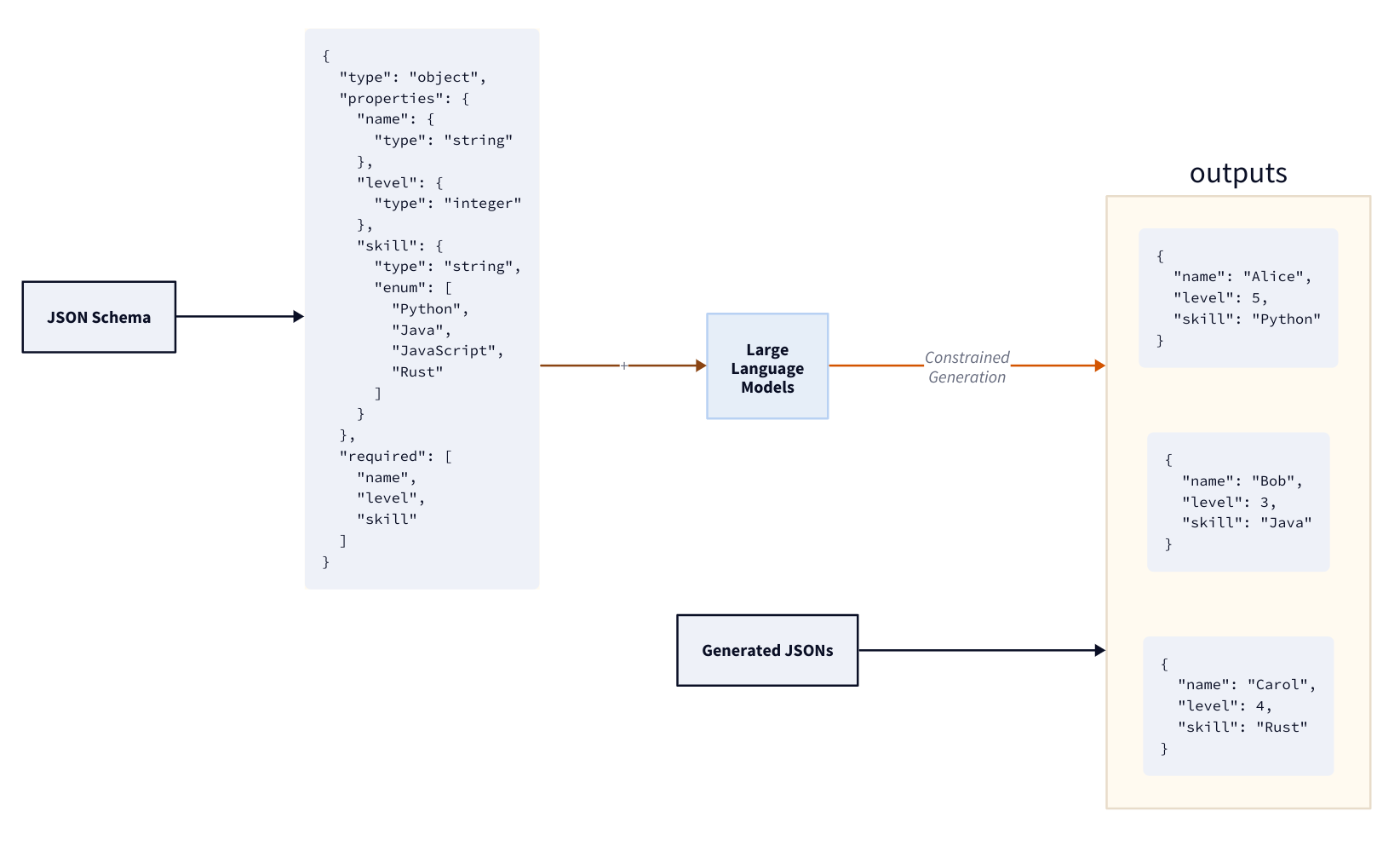
1. From Asking to Enforcing: The Evolution of Structured Outputs
For a long time, the primary method for getting JSON from an LLM was to include instructions in the prompt itself, like "Please respond only with a valid JSON object conforming to this schema...". This approach, while sometimes effective, is fragile. The model could still make mistakes, add conversational text, or fail to adhere to the schema, causing your parsing code to break.
Recently, OpenAI introduced a major API improvement to solve this problem: Structured Outputs. This feature moves the responsibility of format enforcement from the (unreliable) prompt to the (deterministic) API.
To understand the significance of this change, let's hear about the key benefits.
OpenAI Structured Output - All You Need to Know
The video 'OpenAI Structured Output - All You Need to Know' by Dave Ebbelaar provides a clear overview of this new feature and its advantages over previous methods.
Watch the first 5 minutes of the video (00:00 - 04:57). Pay attention to the distinction between the old 'JSON mode' and the new 'Structured Output' feature, and the three main benefits he highlights: reliable type safety, explicit refusals, and simpler prompting.
As the video explains, this isn't just a minor update. The guarantee of schema adherence is a game-changer for building production-grade applications. It drastically reduces the need for complex prompt engineering and fragile retry logic just to get a usable, machine-readable output.
2. Defining Schemas with Pydantic
The mechanism that enables structured output is JSON Schema, a standard for defining the structure of JSON data. You could write these schemas by hand, but for a software engineer using Python, there's a much more elegant and powerful way: the Pydantic library.
Pydantic allows you to define data structures using standard Python classes and type hints. The openai library can then automatically convert these Pydantic models into the required JSON Schema, handle the API call, and parse the JSON response back into a Pydantic object for you.
Let's see a demonstration of why Pydantic is the recommended approach.
Python + AI: Structured outputs
The video 'Python + AI: Structured outputs' from Microsoft Reactor clearly demonstrates how to define a schema using a Pydantic class and integrate it into an API call.
Watch the segment from 07:56 to 12:15. This part covers: How Pydantic simplifies schema definition compared to raw JSON. How to use the client.beta.chat.completions.parse method with a Pydantic model. The importance of checking for refusal (error handling). How the result is an already-parsed Pydantic object, ready to be used in your code.
The key takeaways are:
- Readability and Maintainability: Pydantic models are far cleaner than raw JSON Schemas.
- Convenience: You use the
client.beta.chat.completions.parse()method and simply pass your Pydantic class to theresponse_formatargument. - Type Safety: The response you get back is a fully-typed Pydantic object, so your IDE can provide autocompletion and static analysis.
3. Implementing Complex Structured Outputs
Now let's dive into a more comprehensive, practical example and explore how to build more complex schemas. We can define nested structures, constrain values to a specific set (like an enum), and provide descriptions to guide the model more effectively.
The Pydantic-First Approach
The following video provides an excellent walkthrough of building a non-trivial structured output for a customer care system. It demonstrates the recommended way to use Pydantic and highlights how easy it is to extend your data model.
OpenAI Structured Output - All You Need to Know
Let's return to Dave Ebbelaar's video, which now demonstrates the full implementation using Pydantic.
Watch the section from 14:36 to 21:01. The key things to focus on are: How a nested JSON structure is represented by nesting Pydantic classes. The simplicity of the API call when using response_format with a Pydantic model. How easily he adds a new confidence field to the model to extend the functionality.
A Complete Code Example
Let's synthesize these concepts into a complete example. Imagine we want to extract user information from an unstructured block of text.
First, we install the necessary libraries:
pip install -U openai pydantic
Next, we define our nested Pydantic models. Notice how UserInfo contains a list of Address objects. We also use Field from Pydantic to add descriptions, which act as micro-prompts to guide the LLM's generation for each specific field.
import os
import json
from openai import OpenAI
from pydantic import BaseModel, Field
from typing import List


# It's good practice to use environment variables for your API key
# client = OpenAI(api_key=os.environ.get("OPENAI_API_KEY"))
client = OpenAI()


# 1. Define the Pydantic models for the desired output structure
class Address(BaseModel):
    street: str = Field(..., description="The street name and number")
    city: str
    state: str = Field(..., description="The two-letter state abbreviation")
    zip_code: str

class UserInfo(BaseModel):
    name: str = Field(..., description="The user's full name")
    email: str
    phone: str
    addresses: List[Address] = Field(..., description="A list of the user's addresses")


# 2. Some unstructured text to extract information from
text_to_process = """
Meet Jane Smith. You can reach her at jane.smith@email.com or by phone at (555) 123-4567.
She has two listed addresses:
Primary: 456 Oak Avenue, Boulder, CO 80302
Secondary: 789 Pine Lane, Denver, CO 80202
"""


# 3. Make the API call using the .parse() method
try:
    completion = client.beta.chat.completions.parse(
        model="gpt-4o-2024-08-06",
        messages=[
            {"role": "system", "content": "You are an expert at extracting user information from text into a structured format."},
            {"role": "user", "content": f"Please extract the user information from the following text:\n\n{text_to_process}"},
        ],


        # Pass the Pydantic model directly to response_format
        response_format=UserInfo,
    )


    # 4. Handle the response
    message = completion.choices[0].message
    if message.refusal:


        # The model can refuse if the request is against the safety policy
        print("The model refused to process the request:", message.refusal)
    elif message.parsed:


        # Access the parsed Pydantic object directly
        parsed_data = message.parsed
        print("Successfully extracted user information:")
        print(f"- Name: {parsed_data.name}")
        print(f"- Email: {parsed_data.email}")


        # You can now work with the data as native Python objects
        for i, addr in enumerate(parsed_data.addresses):
            print(f"  Address {i+1}: {addr.street}, {addr.city}, {addr.state} {addr.zip_code}")


        # You can also get the raw JSON representation
        print("\n--- Raw JSON Output ---")
        print(json.dumps(json.loads(message.content), indent=2))

except Exception as e:
    print(f"An error occurred: {e}")
This example shows the end-to-end workflow: defining a complex schema with Python classes, making a single API call, and getting a fully parsed, type-safe object back that you can immediately use in your application logic.
4. Under the Hood and Best Practices
For you as a software engineer, it's interesting to know how this works. This isn't magic; it's a clever engineering solution.
Introducing Structured Outputs in the API
The official OpenAI blog post provides a fascinating look at the underlying technology.
Read the section titled 'Under the hood'. It explains the concept of constrained decoding using a context-free grammar (CFG). This will give you a solid mental model of how the API guarantees a valid JSON output.
In essence, the API converts your JSON Schema into a grammar. After the model generates each token, the API uses this grammar to create a mask, allowing the model to only pick from tokens that would keep the JSON valid. This happens with minimal performance overhead.
Finally, here are a few best practices to keep in mind:
- Always Prefer Pydantic: It's cleaner, more Pythonic, and provides validation.
- Use Field Descriptions: Add descriptions to your Pydantic fields. This is a powerful way to guide the model and improve the quality of the extracted data.
- Use Specific Types: Leverage Python's typing capabilities. Use
List,Literal(orEnum),Optional, and nested models to create precise schemas. - Check for Refusals: Always include logic to check for
message.refusal. This is your primary mechanism for handling cases where the model cannot fulfill the request due to safety policies.
Conclusion
You have now learned one of the most important techniques for building reliable LLM applications. By enforcing a structured output format, you bridge the gap between the probabilistic world of language models and the deterministic world of software.
Key Takeaways:
- Relying on prompting to get JSON is brittle; using the API's Structured Outputs feature is robust.
- Pydantic is the recommended way to define your desired output schema in Python.
- The
client.beta.chat.completions.parsemethod, combined with theresponse_formatparameter, makes implementation straightforward. - You can create complex, nested data structures and use field descriptions to improve model accuracy.
- The underlying mechanism is constrained decoding, which forces the model's output to conform to a grammar derived from your schema.
Preview of the Next Module:
So far in this course, we've focused on interacting with an LLM's existing knowledge. But the real power comes when you can connect the LLM to your own data. In our next module, we'll begin exploring the foundational concepts for this, starting with text embeddings. You will learn what they are, how they capture semantic meaning, and how they form the cornerstone of Retrieval-Augmented Generation (RAG)—a key topic in your learning goals.