Recommended resources
The freely available resources this lesson will direct you to.
- Zustand React State Management Course (Simple Redux Alternative)www.youtube.com
- Learn RxJS Angular, RxJS pipe, async pipe, RxJS observables, Behaviorsubject, Combinelatestwww.youtube.com
- Using rxjs with zustand ? · pmndrs zustand · Discussion #285github.com
- Get current value from Observable without subscribing (just ...stackoverflow.com
Hello! Welcome back to our course on RxJS.
In our last lesson, we focused on handling side effects triggered by the store. We built an epicMiddleware where Zustand actions would initiate RxJS streams, using switchMap to manage form submission race conditions. This was a pattern of actions in, results out.
Today, we're going to explore the other side of this powerful integration. Instead of using actions to start streams, we will turn the store's state itself into a reactive stream. This allows us to combine our application's state with other asynchronous data sources in a clean, declarative way.
Our learning outcome for this lesson is to create derived RxJS streams from Zustand selectors to combine store state with other asynchronous sources.
We'll start by understanding the fundamental bridge between Zustand and RxJS, then build a reusable utility to make this connection seamless, and finally, apply it to a practical example where we combine store state with an external data stream.
1. The Bridge: From Zustand State to an Observable
To create an RxJS stream from Zustand state, we need a way to be notified of state changes outside of a React component. While the useStore hook is perfect for components, Zustand provides a lower-level API for this exact purpose: store.subscribe.
The Imperative Approach with store.subscribe
The store.subscribe method allows you to register a listener function that runs whenever the state changes. You can also provide a selector to only be notified when a specific slice of the state changes.
This video from freeCodeCamp.org provides a clear demonstration of subscribe and the subscribeWithSelector middleware, which makes this even more powerful.
Zustand React State Management Course (Simple Redux Alternative)
Let's watch a segment from 'Zustand React State Management Course' that demonstrates how to react to state updates outside of React components using store.subscribe.
Watch the section from 1:10:36 to 1:14:20. Pay close attention to how subscribe is used, first with a manual check inside the callback, and then with a selector to listen for changes to a specific part of the state (tasks). This is the fundamental mechanism we will build upon.
As you can see, subscribe works, but it's an imperative pattern. We have to manually define what happens inside a callback, and if we were using it long-term, we'd need to manage the unsubscribe function that it returns to prevent memory leaks. This doesn't compose well with the declarative nature of RxJS.
Our goal is to move from this:store.subscribe(state => doSomething(state))
To this:const state$ = toStream(store, state => state);state$.pipe(...).subscribe(...)
This brings us to a core principle of good RxJS architecture. Instead of trying to pull values out of streams, we should aim to create new streams that transform our data.
The resource below, a Stack Overflow answer, has an excellent section titled "Good way" that champions this exact philosophy: create functions that return new Observables rather than trying to extract values into the current scope.
Get current value from Observable without subscribing (just ...
This highly-rated Stack Overflow answer, 'Get current value from Observable without subscribing', provides a masterclass in RxJS thinking. We'll focus on the part that contrasts a 'bad' imperative approach with a 'good' declarative one.
Read the sections titled 'Best approach', 'Bad way', and 'Good way'. Focus on the core message: instead of trying to access a value imperatively, create a function that returns a new, composed Observable. This is exactly what we want to do with our Zustand state.
2. Building a Declarative toStream Utility
Following the "Good way" principle, let's create a reusable utility that wraps the store.subscribe logic and returns a proper RxJS Observable.
Fortunately, RxJS provides the perfect operator for this: fromEventPattern. It's designed to convert any API that follows a subscribe/unsubscribe pattern (like addEventListener/removeEventListener, or in our case, Zustand's subscribe) into an Observable.
A developer in a GitHub discussion for Zustand explored this very idea. Let's examine their implementation.
Using rxjs with zustand ? #285
This GitHub discussion, 'Using rxjs with zustand ?', directly tackles our problem. A user proposes a toStream function that converts a Zustand selector into an RxJS Observable.
Read the first comment in the discussion. Focus on the implementation of the toStream function. Notice how it uses fromEventPattern and how the subscribe method from the Zustand store is passed as the 'add handler' logic.
Let's break down the proposed toStream function:
import { Observable, fromEventPattern } from 'rxjs';
import type { StoreApi, StateSelector } from 'zustand';

export const toStream = <S extends StoreApi<object>, T>(
  store: S,
  selector: StateSelector<S['getState'], T>
): Observable<T> => {
  return fromEventPattern(
    // The 'addHandler' function:
    // This is called when the Observable is subscribed to.
    // It subscribes to the Zustand store and calls the RxJS `handler`
    // with the new value.
    (handler) => store.subscribe(selector, handler),

    // The 'removeHandler' function:
    // This is called when the Observable is unsubscribed from.
    // `fromEventPattern` passes the return value of `addHandler`
    // (which is Zustand's `unsubscribe` function) to it.
    (unsubscribe) => unsubscribe()
  );
};
This elegant utility perfectly bridges the two libraries. It takes a store and a selector and gives us back a hot Observable that emits the selected state whenever it changes. It also handles the unsubscription automatically.
(Note: The discussion also mentions the zustand-rx package, which is a production-ready version of this concept. For our learning purposes, understanding the underlying implementation is more valuable.)
3. Practical Application: Combining Store State with an External Stream
Now for the main event. Let's use our toStream utility to solve a practical problem.
Scenario: We are building an e-commerce page. We have an external stream of product data coming from an API. Our Zustand store manages the user's preferred currency (e.g., 'USD', 'EUR', 'GBP'). We want to display the product prices in the currently selected currency.
Step 1: Set Up the Store and External Stream
First, a simple Zustand store for the currency preference.
// store.ts
import create from 'zustand';

interface SettingsState {
  currency: 'USD' | 'EUR' | 'GBP';
  setCurrency: (currency: SettingsState['currency']) => void;
}

export const useSettingsStore = create<SettingsState>((set) => ({
  currency: 'USD',
  setCurrency: (currency) => set({ currency }),
}));
Next, a mock external stream representing product data from an API.
// api.ts
import { of } from 'rxjs';

interface Product {
  id: number;
  name: string;
  priceUSD: number; // Base price in USD
}

// A mock stream of products
export const products$: Observable<Product[]> = of([
  { id: 1, name: 'Laptop', priceUSD: 1200 },
  { id: 2, name: 'Mouse', priceUSD: 25 },
  { id: 3, name: 'Keyboard', priceUSD: 75 },
]);
Step 2: Create the Derived Streams
Using our toStream utility, we can create an Observable of the current currency.
// streams.ts
import { toStream } from './toStream'; // Our utility from above
import { useSettingsStore } from './store';

// A hot observable that emits 'USD', 'EUR', etc., whenever it changes in the store.
const currency$ = toStream(useSettingsStore, (state) => state.currency);
Step 3: Combine Streams with combineLatest
We now have two streams: products$ and currency$. To create our final displayedProducts$ stream, we need the latest value from both. Whenever the products arrive OR the currency changes, we need to re-calculate the prices. This is the perfect use case for the combineLatest operator.
combineLatest takes an array of Observables and emits an array of their latest values whenever any of the input Observables emit.
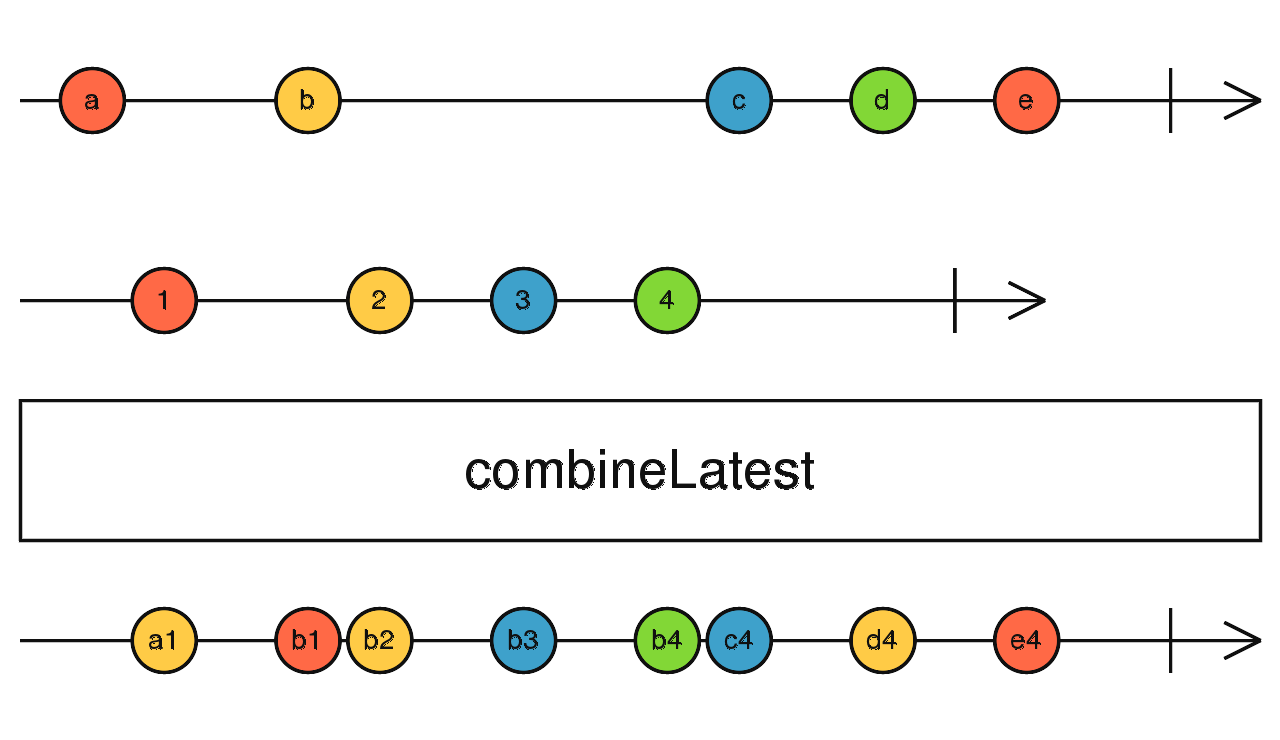
This video provides a great walkthrough of putting combineLatest into practice.
Learn RxJS Angular, RxJS pipe, async pipe, RxJS observables, Behaviorsubject, Combinelatest
The 'Learn RxJS' video by Monsterlessons Academy has a clear, practical example of using combineLatest to merge multiple streams into a single data object for a component.
Watch from 15:36 to 19:04. The example is in Angular, but the RxJS concepts are universal. Focus on how combineLatest is used to join several streams and pipe(map(...)) is used to transform the combined result into a structured object. This is exactly the pattern we will use.
Now, let's apply this pattern to our scenario.
// streams.ts (continued)
import { combineLatest, map } from 'rxjs';
import { products$ } from './api';

const exchangeRates = {
  USD: 1,
  EUR: 0.92,
  GBP: 0.79,
};

// Our final derived stream!
export const displayedProducts$ = combineLatest([
  products$,
  currency$,
]).pipe(
  map(([products, currency]) => {
    console.log(`Recalculating prices for currency: ${currency}`);
    const rate = exchangeRates[currency];
    return products.map(product => ({
      ...product,
      displayPrice: (product.priceUSD * rate).toFixed(2),
      displayCurrency: currency,
    }));
  })
);
And that's it! We have created a new stream, displayedProducts$, that reactively depends on both an external data source and our application's central state. If the user changes their currency preference in a settings panel, this stream will automatically emit a new list of products with updated prices.
To prove it works, we can subscribe and interact with the store:
// To test this in a non-React environment or a top-level file:
displayedProducts$.subscribe(products => {
  console.log('--- Displayed Products ---');
  products.forEach(p => console.log(`${p.name}: ${p.displayPrice} ${p.displayCurrency}`));
});

// Simulate a user changing the currency after 2 seconds
setTimeout(() => {
  console.log('\n*** User changes currency to EUR ***\n');
  useSettingsStore.getState().setCurrency('EUR');
}, 2000);

// Console Output:
// Recalculating prices for currency: USD
// --- Displayed Products ---
// Laptop: 1200.00 USD
// Mouse: 25.00 USD
// Keyboard: 75.00 USD
//
// *** User changes currency to EUR ***
//
// Recalculating prices for currency: EUR
// --- Displayed Products ---
// Laptop: 1104.00 EUR
// Mouse: 23.00 EUR
// Keyboard: 69.00 EUR
Conclusion
Today we've unlocked a powerful, declarative pattern for creating reactive data streams that are derived from our Zustand state.
Key Takeaways:
store.subscribeis the Bridge: It's the low-level mechanism that allows us to listen to Zustand state changes outside of React.toStreamis the Abstraction: By wrappingstore.subscribein a utility usingfromEventPattern, we can create a clean, declarative, and reusable way to turn any state selector into an Observable.combineLatestis the Glue: This operator is essential for merging state streams from our store with other asynchronous sources (like APIs, WebSockets, or events) to create new, derived data streams.- Separation of Concerns: This pattern creates a beautiful separation. Zustand remains the simple, minimal source of truth for our state. RxJS becomes the powerful engine for deriving complex, asynchronous data from that state.
Next Lesson Preview:
We've now seen how to use RxJS for side effects (epics) and for deriving state. In the next lesson, we will take this a step further. We will explore how to build a full Redux-like pattern within Zustand, using an action stream and the scan operator to manage all state transitions, creating a single, centralized state machine powered by RxJS.