Recommended resources
The freely available resources this lesson will direct you to.

Welcome back. In the previous lesson, you separated the main concerns of application development, platform engineering, SRE, and DevSecOps. That role model becomes more concrete when we follow one real request: a user opens a web page or calls an API, and the system must accept it safely, send it to a healthy application instance, reach any dependencies, and return a correct response.
This lesson builds a practical request-path map for a common AWS design: an internet-facing Application Load Balancer (ALB) distributes traffic to application instances in private subnets across multiple Availability Zones. You will use the map to identify two kinds of boundaries:
- Reliability boundaries: places where a failure, overload, or unavailable dependency can interrupt the user journey.
- Security boundaries: places where access must be constrained, authenticated, authorized, or monitored because the trust level changes.
By the end, you should be able to read a basic cloud architecture and explain both what happens to a request and what each layer is protecting.
Start with the network vocabulary
A cloud architecture diagram is easier to reason about when you know what its boundaries mean.
A Virtual Private Cloud (VPC) is an isolated virtual network in AWS. You choose its private IP address range and place resources, such as load balancers and EC2 virtual machines, inside it.
A subnet is a smaller IP range inside a VPC. Each subnet belongs to one Availability Zone (AZ), which is an isolated location within an AWS Region. Using more than one AZ is a foundational reliability choice: one AZ can have a problem without necessarily taking down the entire service.
The labels public and private describe routing, not whether a subnet is inherently safe or unsafe:
- A public subnet has a route that permits internet-bound traffic through an internet gateway. An internet-facing load balancer is normally associated with public subnets.
- A private subnet does not accept unsolicited traffic directly from the internet. Application servers are commonly placed here.
- A route table tells traffic where it may go. It is a connectivity rule, not an authentication or authorization system.
- A security group is a stateful virtual firewall applied to resources. It decides which connections are allowed, based on protocol, port, and source or destination.
A VPC begins as a private network. Internet connectivity is deliberately added through routing and gateway configuration, rather than assumed.
AWS VPC & Subnets For Beginners
Watch “AWS VPC & Subnets For Beginners” by Sam Meech-Ward for a compact visual introduction to VPCs, subnets, private addressing, and Availability Zones.
In the opening section, watch VPC basics. Focus on the distinction between the VPC-wide address space and individual subnets, and on the fact that subnets belong to individual Availability Zones.
One useful correction to a common beginner assumption: a private subnet does not mean “nothing can ever leave.” It means that inbound access from the internet is not directly available. A private workload may still make controlled outbound connections, for example through a NAT gateway, or reach AWS services through a VPC endpoint. We will return to that distinction shortly.
Follow one web request
Imagine a customer’s browser requests:
https://shop.example.com/orders/123
The architecture below represents a common AWS pattern. The two public subnets contain AWS-managed load-balancer capacity, while the EC2 application instances live in private subnets. The design spans two Availability Zones.

Here is the request journey in terms you can use during an operational review or incident investigation.
1. DNS identifies the public destination
Before the browser can send an HTTPS request, it resolves shop.example.com through DNS. The DNS record commonly points to the ALB’s DNS name, either directly or through another routing layer.
DNS is part of the user journey, even though it is not inside the VPC diagram. If DNS cannot resolve the name, users never reach the load balancer. If resolution is slow, users perceive a slow application before any application code runs.
Boundary: the client is outside your cloud network. Treat every incoming request as untrusted, regardless of its apparent IP address or hostname.
Reliability concern: DNS availability and lookup latency affect every request before application infrastructure is contacted.
2. The request enters at the public edge
The client connects to the public address exposed by the internet-facing ALB. Traffic reaches the VPC through the internet gateway and the route configured for the load balancer’s public subnets.
An internet gateway provides the VPC’s connection to the public internet. It is not a web application firewall, an authentication system, or a substitute for restrictive security groups. It enables the route; other controls decide what traffic is acceptable.
At this point, the ALB security group should normally permit only the public protocols you intentionally offer, such as HTTPS on port 443. Administrative ports such as SSH should not be exposed merely because a system has a public entry point.
3. The Application Load Balancer interprets the HTTP request
An ALB is an application-layer, or Layer 7, load balancer. It understands HTTP and HTTPS, so it can make routing decisions using information such as:
- The requested hostname, such as
api.example.comversusshop.example.com - The URL path, such as
/ordersversus/images - HTTP headers
- The listener port and protocol
In a common configuration, the ALB terminates TLS: it receives encrypted HTTPS from the client, validates the configured certificate, decrypts the request, and forwards it to an appropriate backend target group. The connection from ALB to application can be HTTP or HTTPS; the correct choice depends on the system’s security requirements and network design.
The ALB does not simply choose an arbitrary server. It uses listener rules to select a target group, then chooses a healthy registered target in that group. The target might be an EC2 instance, a container workload, an IP address, or a Lambda function. In this lesson, it is an EC2 application instance.
4. The request crosses from the public tier to the private application tier
The ALB forwards the request to an application instance using its private IP address. The route table provides local routing within the VPC, allowing communication between the public and private subnets.
This is a critical security boundary. The instance security group should allow inbound application traffic only from the load balancer’s security group, on the application’s intended port. For example, the application might accept traffic on port 8080, but only when its source is the ALB—not from every IP address on the internet and not from every workload in the VPC.
That single design choice prevents a direct request to the application from bypassing the load balancer’s intended controls, routing rules, logging, TLS configuration, and health-based target selection.
5. The application performs its work and contacts dependencies
The application instance now executes the request. It may authenticate the user, validate input, apply business logic, query a database, retrieve an object from storage, call another service, or place work on a queue.
The request has now crossed another important boundary: application code to data or downstream services. The fact that a request made it through the ALB does not mean it is authorized to read every record or perform every action.
For an order lookup, the application should still answer questions such as:
- Is the requester authenticated?
- Is the requester allowed to view this particular order?
- Does the application have only the minimum cloud and database permissions required?
- Can the dependency respond within an acceptable time?
The backend is where an apparently successful network request becomes a meaningful and authorized product action.
6. The response returns through the load balancer
Once the application produces a response, it returns to the ALB over the established connection. The ALB then sends the response through its public interface, the internet gateway, and back to the client.
From the user’s perspective, this is one request and one response. Operationally, it is a chain of systems and permissions. A failure at any required step can make the overall user journey fail.
The AWS guidance below is worth studying because it separates the inbound and return paths. It also makes an important detail visible: the Application Load Balancer capacity is managed by the Elastic Load Balancing service, rather than being EC2 instances you create and administer yourself.
Load balancer subnets and routing - AWS Prescriptive Guidance
Read AWS Prescriptive Guidance’s “Load balancer subnets and routing” to reinforce the complete round trip through public and private subnets.
In the “Inbound traffic path” section, read the inbound path. Notice that the ALB makes the target-selection decision, while the VPC route table provides local connectivity. Then move to “Return traffic path” and read the return path. Focus on why the application response returns through the load balancer rather than requiring a public address on the private EC2 instance.
A concise request map for this design is:
| Stage | Component | Main responsibility | Typical failure effect |
|---|---|---|---|
| Name resolution | DNS | Finds the public destination | Users cannot begin the request |
| Public ingress | Internet gateway, public ALB endpoint | Receives internet traffic | Connection cannot reach the service |
| Request routing | ALB listener and target group | Selects a healthy backend | Requests are rejected or misrouted |
| Application tier | EC2 instance in private subnet | Executes application logic | Errors, slow responses, or incorrect behavior |
| Dependency tier | Database, storage, service, queue | Provides data or performs work | Slow, failed, or incomplete application response |
| Return path | ALB and internet gateway | Delivers the response to client | User does not receive a usable response |
Public and private are routing decisions, not complete security models
A production private subnet frequently needs controlled outbound access. For example, an application instance may need to download a software update, contact an external payment provider, or reach an AWS API.
A NAT gateway supports outbound internet connections initiated by private resources. The workload sends traffic to the NAT gateway, which uses a public subnet and internet gateway for internet access. Crucially, a NAT gateway does not make the private instance directly reachable for new inbound internet connections.
For AWS services, a VPC endpoint can often provide a better path. A gateway endpoint for Amazon S3, for example, lets a private workload reach S3 without sending that S3 traffic through a NAT gateway or the public internet.
The AWS example below connects routing choices to security-group policy. It shows a useful least-privilege rule: the server security group allows the listener and health-check traffic from the load balancer security group, rather than broadly opening the server to the internet.
Example: VPC with servers in private subnets and NAT
Read the AWS VPC example to see how a multi-AZ public/private-subnet design combines load balancing, NAT for controlled outbound access, and restrictive server security groups.
Begin with the “Overview” and “Routing” sections. Read the private-subnet routing example, paying attention to the different destinations for local VPC traffic, general internet traffic, and S3 traffic. Then read the “Security” section’s security group example. Focus on the source being the load balancer security group, not a broad public CIDR range.
This leads to a practical rule:
A subnet can help express a security design, but the actual protection comes from several layers: route tables, security groups, identity and access controls, application authorization, encryption, logging, and monitoring.
For example, a private application instance is safer than a public one, but it is still at risk if its security group accepts traffic from everywhere, if its cloud role has excessive permissions, or if its application allows an unauthorized user to access data.
Reliability and security boundaries on the same path
The following generic cloud diagram emphasizes that a user, API layer, compute, storage, and identity systems do not all occupy the same trust context. The AWS architecture in this lesson is one concrete implementation of this broader model.
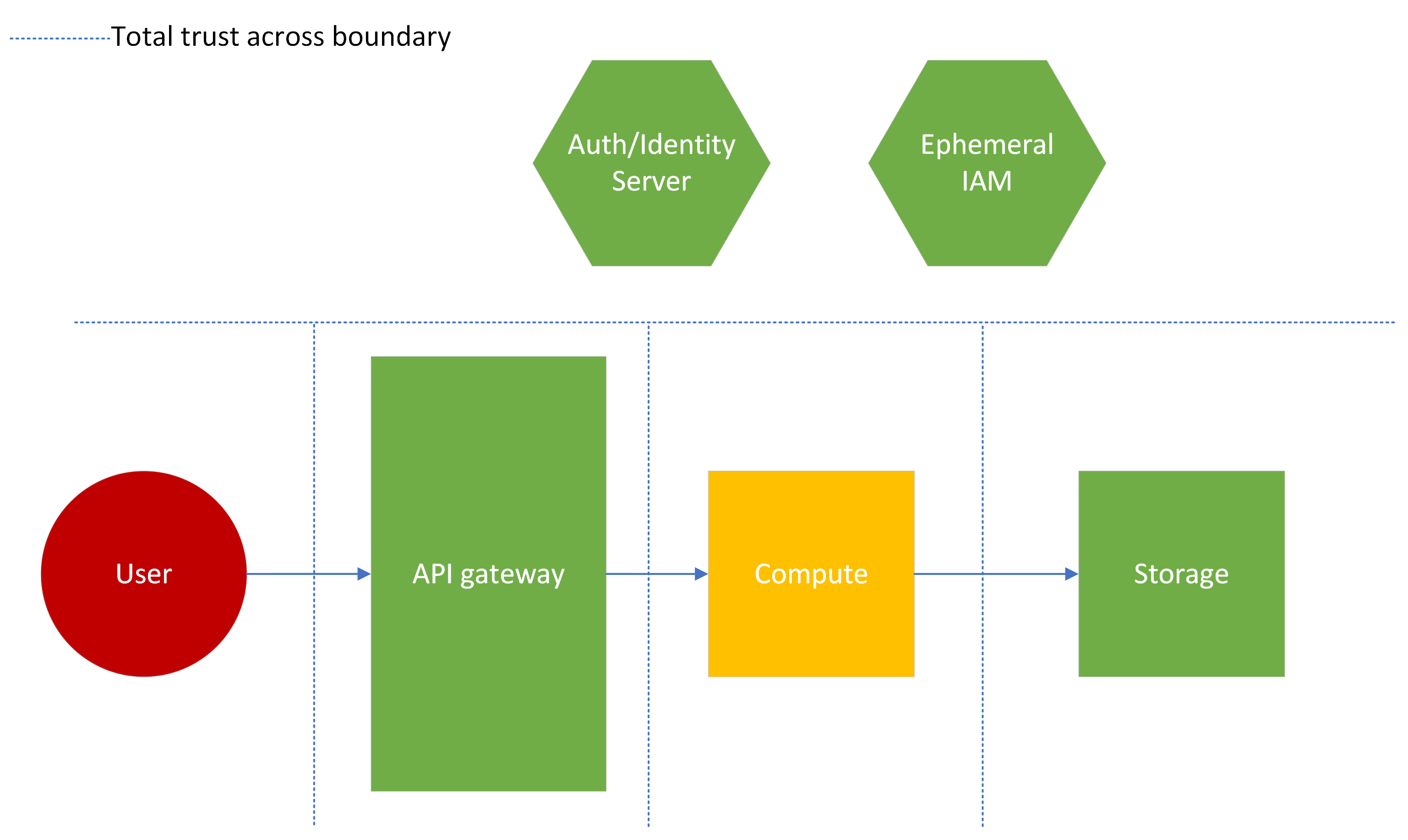
A boundary is a place where you must make an explicit decision about trust, allowed behavior, failure handling, or ownership. One component can sit at several boundaries at once.
Consider the ALB:
- It is a security boundary because it is the public entry point and can enforce HTTPS, routing rules, and integration with controls such as a web application firewall where configured.
- It is a reliability boundary because it distributes traffic, performs health checks, and avoids sending requests to targets it considers unhealthy.
- It is also an observability boundary because it can produce access logs and metrics that show request volume, response codes, latency, and target health.
Use this table as a way to inspect each boundary in a system design.
| Boundary | What should be allowed? | Reliability question | Security question |
|---|---|---|---|
| Internet to ALB | Public HTTPS requests to intended hostnames | Can the public endpoint tolerate expected traffic and remain available across AZs? | Are only intended ports exposed, and are abusive or malformed requests handled? |
| ALB to application | Requests from the ALB to healthy app targets | What happens if a target fails, becomes slow, or an AZ is impaired? | Does the app security group permit only the ALB on the required port? |
| Application to database | Narrow set of authenticated queries | Can a database outage or slow query exhaust application capacity? | Does the application use limited credentials and authorize access to each record? |
| Application to external service | Explicit, time-bounded outbound calls | What happens if the provider is slow or unavailable? | Is outbound access constrained, and are secrets protected? |
| Deployment/control plane to workload | Authorized operational changes | Can a bad rollout be detected and safely reversed? | Who may change network rules, roles, images, or service configuration? |
Notice the distinction between network reachability and authorization:
- A security group can allow the ALB to reach an application.
- The application must still determine whether the user may read order 123.
- A cloud role can allow the application to call an AWS service.
- The role should still be limited to the exact bucket, queue, secret, or table it needs.
Network location is useful context, but it is not proof of identity or permission.
What multi-AZ architecture improves—and what it does not
The two-AZ design in the AWS diagram is a reliability boundary at the infrastructure level. The ALB has capacity in multiple enabled AZs, and application instances can be placed in private subnets in those zones. If one application instance fails, the load balancer can route to another healthy target. If one AZ experiences a disruption, a correctly designed service may continue serving users from the other AZ.
However, two AZs do not automatically make an application highly available. Ask what remains shared:
- Is there only one database instance?
- Do both application instances depend on the same external payment provider?
- Is a required secret, configuration value, or deployment pipeline misconfigured globally?
- Is the application itself returning incorrect responses on every instance?
- Is the service overloaded because all healthy instances lack enough capacity?
This is the core SRE habit: do not stop at “there are two servers.” Follow the entire critical request path and identify dependencies that can fail together.
Security has a similar lesson: two AZs improve resilience, but they do not make permissions safer. If an overly broad workload role is attached to both instances, compromising either one may yield the same excessive access.
A repeatable method for mapping a request path
When you encounter a new service, create a simple written request map before attempting to configure or troubleshoot it. For each important user journey, record:
-
The entry point
Hostname, protocol, public endpoint, and where TLS terminates. -
The network path
VPC, public and private subnets, route tables, load balancers, and permitted ports. -
The workload that handles the request
Target group, compute service, scaling behavior, health-check endpoint, and deployment identity. -
The dependencies
Databases, caches, queues, object storage, external APIs, and identity providers. -
The trust decisions
Which source may connect to which destination; which user or workload identity is required; which actions are authorized. -
The failure behavior and evidence
What users see when the component fails, where its logs and metrics live, and how you would tell that the component is healthy.
For the GET /orders/123 example, a short map could say:
Browser resolves
shop.example.com; HTTPS reaches the public ALB; the ALB listener selects the orders target group; a healthy private EC2 instance handles the request; the application authenticates the user and queries the order database; the response returns through the ALB. The app accepts port 8080 only from the ALB security group, while the database accepts its database port only from the application security group.
That statement contains a network path, a trust model, and the beginnings of an incident-investigation plan.
Key takeaways
A web request is not just “browser to server.” In a typical AWS web architecture, it crosses DNS, public ingress, load-balancer routing, private application compute, and often data or external-service dependencies before the response returns.
The important boundaries are:
- Internet to public entry point: restrict exposure and treat all requests as untrusted.
- Public load balancer to private application: allow only the required port from the load balancer, and use health checks to support routing decisions.
- Application to data and downstream services: apply least privilege, authorization, timeouts, and controlled connectivity.
- Availability Zones and dependencies: design for component failure, but check for shared dependencies that can still fail together.
In the next lesson, you will use this request map to classify service failures by their primary user effect: availability, latency, correctness, or durability.