Recommended resources
The freely available resources this lesson will direct you to.

Hello! This module begins with the path data takes from a source to a useful output. Later, you’ll build that path with Python and test its individual parts. For now, the goal is to understand the whole journey: what happens during a batch run, and how ETL differs from ELT.
We’ll use a small sales-reporting example throughout. It could run with files, Python, and MySQL on your own computer; no cloud account is needed to understand the architecture.
A batch is a defined group of work
Suppose a sales application records individual orders, but someone needs a report of revenue by product for each month. A batch pipeline processes a defined set of records together—perhaps all orders from February—rather than updating the report separately for every new order. A scheduled run on March 1 might read February’s export and produce February’s totals.
Read the short “Batch data ingestion” subsection of What is Data Ingestion? from AWS. It establishes what makes this a batch and why interrupted runs matter.
What is Data Ingestion? - Data Ingestion Explained - AWS
Read the AWS explanation to distinguish a scheduled batch from continuously arriving data.
Under “Batch data ingestion,” start with the paragraph beginning “Batch ingestion tools collect data over a designated period.” Read the batch explanation through the sentence about historical analysis, just before the comparison with real-time ingestion. Notice both the scheduled interval and the warning that restarting after an error can be costly.
Batch describes when and how records are grouped for processing; it does not specify whether the pipeline is ETL or ELT. Either design can run once a day, once a month, or on another schedule. Nor does “batch” require holding every record in memory at once: a program can read and process a large batch in smaller chunks.
Follow one batch from source to report
The video What is ETL with a clear example by Chandoo follows sales data from detailed transactions to a recurring summary. Watch its example before we trace a smaller version.
What is ETL with a clear example - Data Engineering Concepts
Watch Chandoo’s “What is ETL with a clear example” for the business purpose of a pipeline and the difference between detailed source records and an analytical summary.
Watch the reporting need for why repeatedly assembling a report from source systems is inconvenient. Then watch ETL versus ELT for the basic ordering. In the sales example, focus on how individual transactions become totals for a month, product, and salesperson; you do not need to memorize the tools mentioned near the end.
Now imagine the February export is a CSV file containing these four rows:
order_id,order_date,product_id,amount
101,2026-02-03,tea,120.00
102,2026-02-05,tea,80.00
102,2026-02-05,tea,80.00
103,2026-02-06,tea,unknown
The file is the source for this run. Extracting means obtaining its records—here, reading the file. If the source were an application database, extraction might instead mean querying the relevant rows. The pipeline must also know which data belongs to this run: in this example, the February export.
The requested output is one row per month and product. To produce it, the pipeline must interpret amount as a number, avoid counting order 102 twice, and handle order 103, whose amount cannot be used as a number. Those are transformations: applying rules that make source data suitable for its intended use. Transformations can also include joining sources, changing formats, filtering, and aggregating. Here, a sensible policy is to set the invalid record aside for investigation rather than silently treating unknown as zero.
After those rules, the report row would be:
| Month | Product | Revenue | Orders |
|---|---|---|---|
| 2026-02 | tea | 200.00 | 2 |
The load makes data persistent in its destination—for example, writing that row to a MySQL monthly_sales table. A report can then query the table without rereading and cleaning the export each time. Notice the change in grain: the source has one row per recorded order, while the output has one row per month and product. Four extracted rows produced two accepted distinct orders, one duplicate, one invalid record, and one summary row. Keeping track of those counts makes the result easier to explain and check.
This describes data flow: the movement and changes of the records. A run also needs an order of operations—do not publish the summary until the relevant input has been read and the rules have succeeded. That is control flow. We will implement and test pieces of this workflow later in the module.
ETL and ELT: where does the main transformation happen?
The letters name the same three kinds of work: extract, transform, and load. The distinction is where the principal transformation runs relative to loading into the target system.
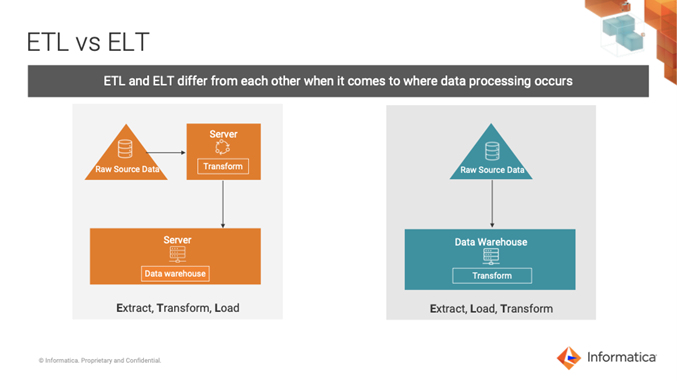
In an ETL design for our example, a Python program could read the February CSV, validate and deduplicate its rows, calculate the totals, and load the finished summary into MySQL. The main transformation takes place before loading into the destination. The program might keep rejected rows in a separate file or staging area so they can be investigated.
In an ELT design, the pipeline could first load all four source rows into a raw_sales table in MySQL. Queries running in that target system would then apply the validation, deduplication, and aggregation rules, producing a separate monthly_sales table. The main transformation takes place after raw data is loaded, using the target system’s processing capabilities. Reports should use the curated summary, not assume that the raw table is already clean.
Read Microsoft’s Extract, transform, load (ETL) guide for the precise distinction and its practical trade-offs.
Extract, transform, load (ETL) - Azure Architecture Center
Read the Microsoft Azure Architecture Center guide to connect the three operations with the place where transformation executes, then compare when each arrangement is useful.
In “Extract, transform, load (ETL) process,” read the ETL definition, ending with the list of common transformations. In “Extract, load, transform (ELT),” read the ELT explanation, ending at the qualification about target-system capacity. Finally, in “Choosing ETL or ELT,” read the choice criteria through the last ELT consideration; stop before “Data flow and control flow.”
The key question is not “Python or SQL?” You can transform data with either language in different arrangements. Ask instead: Has source data been loaded into the target before the main business transformations run, and does the target perform those transformations? A diagram or tool name alone may not answer that question; you need to know where the data and computation actually are.
ETL can be useful when a destination should receive only prepared data, or when substantial processing should happen outside a constrained target. ELT is useful when the target can efficiently process loaded raw data and retaining that raw data supports later reworking or exploration. These are design choices, not rankings: loading raw data also means deciding who may access it, how errors are identified, and which curated outputs reports should trust. Real pipelines can mix the approaches—for instance, checking that a file is readable before loading it, then performing most business transformations in the target.
What you should be able to trace
When someone describes a batch pipeline, locate five things: the source, the records included in a run, the transformations, the destination, and the consumer of the output. Then locate where raw data first lands and where the main transformation executes. That lets you explain both how data moves and whether the design is primarily ETL or ELT.
For the February example, batch processing defines the group of orders being handled. ETL would prepare the summary before loading it into MySQL; ELT would load raw orders into MySQL and prepare the summary there. In the next lesson, you’ll set up a local Linux-based Python workspace so you can begin building the processing path yourself.