Recommended resources
The freely available resources this lesson will direct you to.
- Python Tutorial: Using Try/Except Blocks for Error Handlingwww.youtube.com
- How to Validate User Inputs in Python | Input Validation in Pythonwww.youtube.com
- 8. Errors and Exceptionsdocs.python.org
- Messy CSV Interview Exercise: Encoding, Quoted Fields, and Reconciliation | PracHub Knowledge Hubprachub.com
Hello! In the previous lesson, your CSV pipeline converted rows as a generator consumed them. That kept memory use low, but it also meant one bad value could interrupt the writing loop. This lesson gives each input record a deliberate outcome: either it passes validation or it is set aside with a reason that someone can investigate.
You’ll keep using local files and Python’s standard library. Allow about 40 minutes for the short resource study, the code walkthrough, and running the example.
Decide what a valid order means
A conversion is not the same as validation. Python can convert "0" to an integer, but a quantity of zero may still violate an order feed’s rules. Conversely, a blank coupon might be perfectly valid. Before writing an exception handler, define the record contract:
- The CSV must have the expected columns, and each row must have the expected number of fields.
order_idandproductmust contain non-whitespace text.quantitymust be an integer greater than zero;amount_centsmust be a non-negative integer.paidmust be exactlytrueorfalse; a blankcoupon_codeis allowed.
These are rules for this example feed, not universal rules for every sales system. A source that permits returns, for instance, might need a different amount rule.
The image shows the two destinations we want for records whose boundaries are still recognizable: usable records continue to the output, while rejected records retain enough information for review.
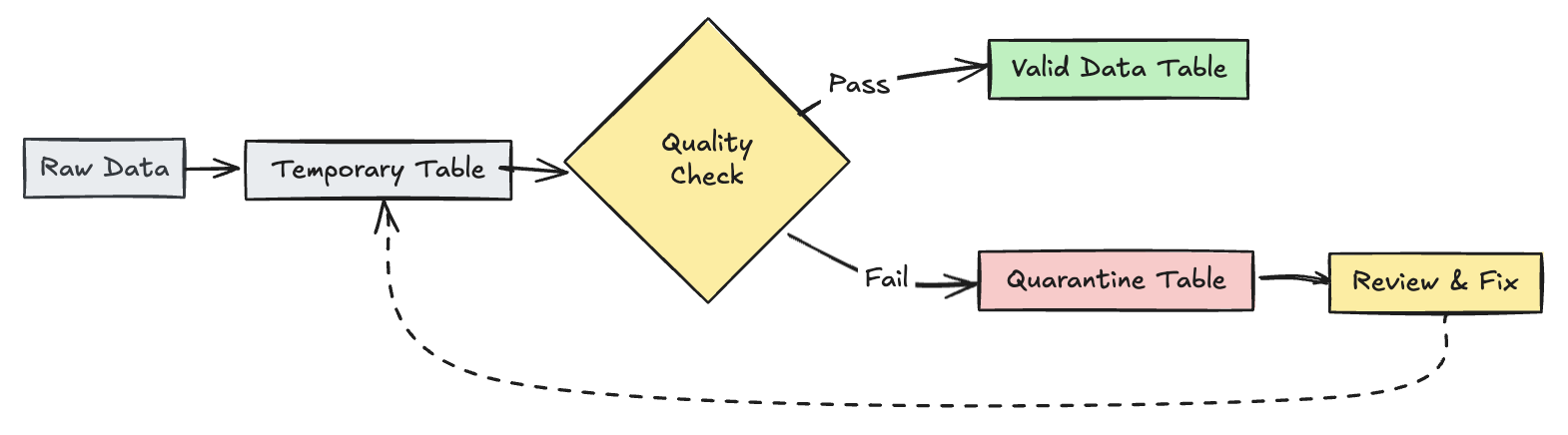
There is also a file-level question. If the header itself is wrong, the script cannot reliably interpret any row. We will stop the batch rather than pretend each row can be checked against the expected schema.
Raise a meaningful error, then catch it at the right boundary
Watch the focused portions of Corey Schafer’s Python Tutorial: Using Try/Except Blocks for Error Handling. The important distinction is between an anticipated bad input and an unexpected fault in your program.
Python Tutorial: Using Try/Except Blocks for Error Handling
Corey Schafer demonstrates why a handler should target the error you intend to handle, and how to raise an error when your own rule detects invalid input.
Watch specific handlers: notice how a broad handler can disguise a programming error as an expected input problem. Then watch raising errors for the mechanism we will use when a row breaks our contract.
The Python tutorial adds the precise behavior behind those examples. Read its explanation of which statements an except clause protects and its short descriptions of raise and user-defined exceptions.
Read the relevant parts of the official Python tutorial, Errors and Exceptions, to connect the video's examples to the validation boundary in our script.
In “8.3. Handling Exceptions,” begin where it says “It is possible to write programs that handle selected exceptions” and read how handling works through the explanation of an unhandled exception. Later in the same subsection, find the paragraph beginning “Exception can be used as a wildcard” and read the specificity advice through its final sentence. In “8.4. Raising Exceptions,” read the raise explanation from the opening paragraph through the explanation of an exception class argument. Finally, in “8.6. User-defined Exceptions,” read the class guidance from its first sentence through the naming guidance. Focus on why an expected record error deserves a recognizable type.
We’ll call that type RowValidationError. A validation function will raise it when a recognizable CSV row violates the contract. The outer loop will catch only that type, record the rejected row, and continue. It will not catch file-writing errors, a misspelled variable, or other surprises and label them “bad data.”
Build an accepted path and a quarantine path
Keep transforms.py from the previous lesson unchanged. This example reuses its paid_sale() function, but introduces a stricter conversion function in a new script. The earlier parse_order() checked only part of the contract; validate_order() below supersedes it for this batch.
First, from your project root in the same Linux shell you used previously, create a small fixture:
cat > data/orders_validation_demo.csv <<'CSV'
order_id,product,quantity,amount_cents,paid,coupon_code
0007,"Notebook, ruled",1,1599,true,
0008,Pencil,2,200,false,
0009,Eraser,-1,50,true,
0010,Pen,1,oops,true,
0011,Folder,1,250,true,,unexpected
0012,Ruler,1,100,unknown,
CSV
It has two valid orders, although only one is paid. Four other rows violate different rules. Notice that the quoted comma in "Notebook, ruled" is not an extra field: the CSV reader understands that quoting.
Create validated_orders.py:
import csv
import json
from pathlib import Path

from transforms import paid_sale


FIELDS = [
    "order_id",
    "product",
    "quantity",
    "amount_cents",
    "paid",
    "coupon_code",
]


class RowValidationError(ValueError):
    """An identifiable input row does not meet the order contract."""


def validate_order(row):
    """Return a typed order, or raise RowValidationError."""
    if set(row) != set(FIELDS) or any(
        row[field] is None for field in FIELDS
    ):
        raise RowValidationError("incorrect number of CSV fields")

    if not row["order_id"].strip():
        raise RowValidationError("order_id is blank")
    if not row["product"].strip():
        raise RowValidationError("product is blank")
    if row["paid"] not in ("true", "false"):
        raise RowValidationError("paid must be true or false")

    try:
        quantity = int(row["quantity"])
    except ValueError as exc:
        raise RowValidationError("quantity must be an integer") from exc

    try:
        amount_cents = int(row["amount_cents"])
    except ValueError as exc:
        raise RowValidationError("amount_cents must be an integer") from exc

    if quantity <= 0:
        raise RowValidationError("quantity must be positive")
    if amount_cents < 0:
        raise RowValidationError("amount_cents must be non-negative")

    return {
        "order_id": row["order_id"],
        "product": row["product"],
        "quantity": quantity,
        "amount_cents": amount_cents,
        "paid": row["paid"] == "true",
        "coupon_code": row["coupon_code"] or None,
    }


def main():
    source_path = Path("data/orders_validation_demo.csv")
    accepted_path = Path("data/paid_sales_validated.jsonl")
    quarantine_path = Path("data/quarantined_orders.jsonl")

    total = valid = bad = sales = 0

    with source_path.open(newline="", encoding="utf-8") as source:
        reader = csv.DictReader(
            source, restkey="_extra_fields", strict=True
        )
        if reader.fieldnames != FIELDS:
            raise ValueError("CSV header does not match the expected schema")

        with accepted_path.open("w", encoding="utf-8") as accepted:
            with quarantine_path.open("w", encoding="utf-8") as quarantined:
                for record_number, row in enumerate(reader, start=1):
                    total += 1
                    try:
                        order = validate_order(row)
                    except RowValidationError as exc:
                        bad += 1
                        rejected = {
                            "record_number": record_number,
                            "reason": str(exc),
                            "raw": row,
                        }
                        quarantined.write(json.dumps(rejected) + "\n")
                    else:
                        valid += 1
                        if order["paid"]:
                            sale = paid_sale(order)
                            accepted.write(json.dumps(sale) + "\n")
                            sales += 1

    print(
        f"read={total} valid={valid} "
        f"quarantined={bad} paid_sales={sales}"
    )


if __name__ == "__main__":
    main()
Run it:
python validated_orders.py
You should see:
read=6 valid=2 quarantined=4 paid_sales=1
data/paid_sales_validated.jsonl contains the paid sale for order 0007. data/quarantined_orders.jsonl contains four JSON objects, one per rejected row. For example, order 0010 retains its original oops value alongside the reason amount_cents must be an integer.
The placement of try is intentional. It encloses only validate_order(row). If converting a value or checking a business rule raises RowValidationError, the handler can safely treat that row as rejected. Writing a file or running paid_sale() is outside that handler: if either fails, continuing as though the source row were malformed would give a false diagnosis.
Read the results as a batch, not just as individual rows
The reader’s restkey="_extra_fields" preserves surplus CSV fields under that key, so order 0011 is rejected instead of silently losing unexpected. If a row has too few fields, DictReader supplies None for missing values; the same field-count check rejects it. A blank present coupon, by contrast, is the empty string and remains valid.
record_number counts data records produced by the CSV reader, starting at one. It is not necessarily a physical file-line number: a quoted CSV field can contain a newline. It is useful for locating a row in this small fixture, but it is not a byte offset or a permanent identifier.
The counts express two different facts:
Here, . The valid-but-unpaid order accounts for why paid sales is one, not two. Keeping these counts separate prevents a filtered record from being mistaken for a validation failure.
This boundary has limits. An invalid header stops the batch; so does a CSV parsing error that prevents the reader from establishing a record, or an I/O failure. This script does not safely publish partial output after such a failure: its output files may already contain some lines and need investigation before use. Nor does quarantine mean “automatically fixed.” It means the original interpreted fields and a reason have been retained for a decision about correction or reprocessing.
Conclusion
You have given malformed records a defined route: explicit checks raise RowValidationError, a narrowly placed handler writes the row and reason to quarantine, and valid paid orders continue to the sales output. Unexpected failures remain visible rather than being disguised as bad source data. The batch counts make it possible to explain where every recognizable input record went.
Next, you’ll add structured, contextual logging so a run can report these outcomes and failures without relying only on a final print() statement.