Recommended resources
The freely available resources this lesson will direct you to.
Hello! Welcome to the third lesson in our module on LLM Token Economics and Billing Systems.
In our last lesson, we focused on the "front-end" of token economics—calculating the cost of various API call patterns based on input/output token counts and model pricing. We saw how different use cases like summarization, few-shot prompting, and especially conversational chat have distinct cost profiles.
Today, we shift our focus to the "back-end" of this process. Knowing the cost is one thing; reliably tracking it at scale is another. Our learning outcome is to design the data model and API for reporting token usage from a single, non-streaming LLM response. This is a foundational task in building any production-grade service that consumes LLM APIs, as it's the source of truth for billing, analytics, and observability.
Given your background building high-throughput services like Rudi at AWS, this lesson will feel familiar—it's about designing a robust, internal microservice for metering. We'll apply standard backend engineering principles to the specific problem of LLM token tracking.
1. The Foundation: What Data Must We Capture?
Before designing an API, we must first define the data it will handle. A robust usage tracking system needs to answer more than just "how many tokens were used." It needs to answer questions like:
- Who used the tokens?
- Which model was used?
- When did the usage occur?
- For what purpose or feature was the model called?
The article "Tracking LLM Usage Like a Pro" provides an excellent starting point for defining a data model that can answer these questions.
Tracking LLM Usage Like a Pro: A Flexible, Scalable Logging ...
This article by Andrii Tkachuk outlines a pragmatic architecture for an LLM usage logging system. We'll focus on the core data fields it proposes for each usage event.
Please read the sections 'So, our goals' and 'Fields to Capture per LLM Call'. Pay close attention to the table of fields. This defines the schema for our usage event data model.
Based on the article and industry best practices, a comprehensive data model for a single usage event should include:
| Field | Type | Description | Source |
|---|---|---|---|
event_id |
UUID/String | A unique identifier for this specific usage event. | Generated by the client |
timestamp |
Datetime | UTC timestamp of when the LLM call was initiated. | Application clock |
user_id |
String | The identifier for the end-user on whose behalf the call was made. | Application session/auth context |
tenant_id |
String | The identifier for the organization or customer account (if applicable). | Application session/auth context |
model_id |
String | The specific model identifier (e.g., claude-3-opus-20240229). |
LLM API Response |
input_tokens |
Integer | The number of tokens in the prompt/input. | LLM API Response (usage object) |
output_tokens |
Integer | The number of tokens in the generated completion/output. | LLM API Response (usage object) |
The source of truth for the token counts themselves comes directly from the LLM provider's API response. Let's look at Anthropic's API as a concrete example.
Create a Message - Claude API Reference
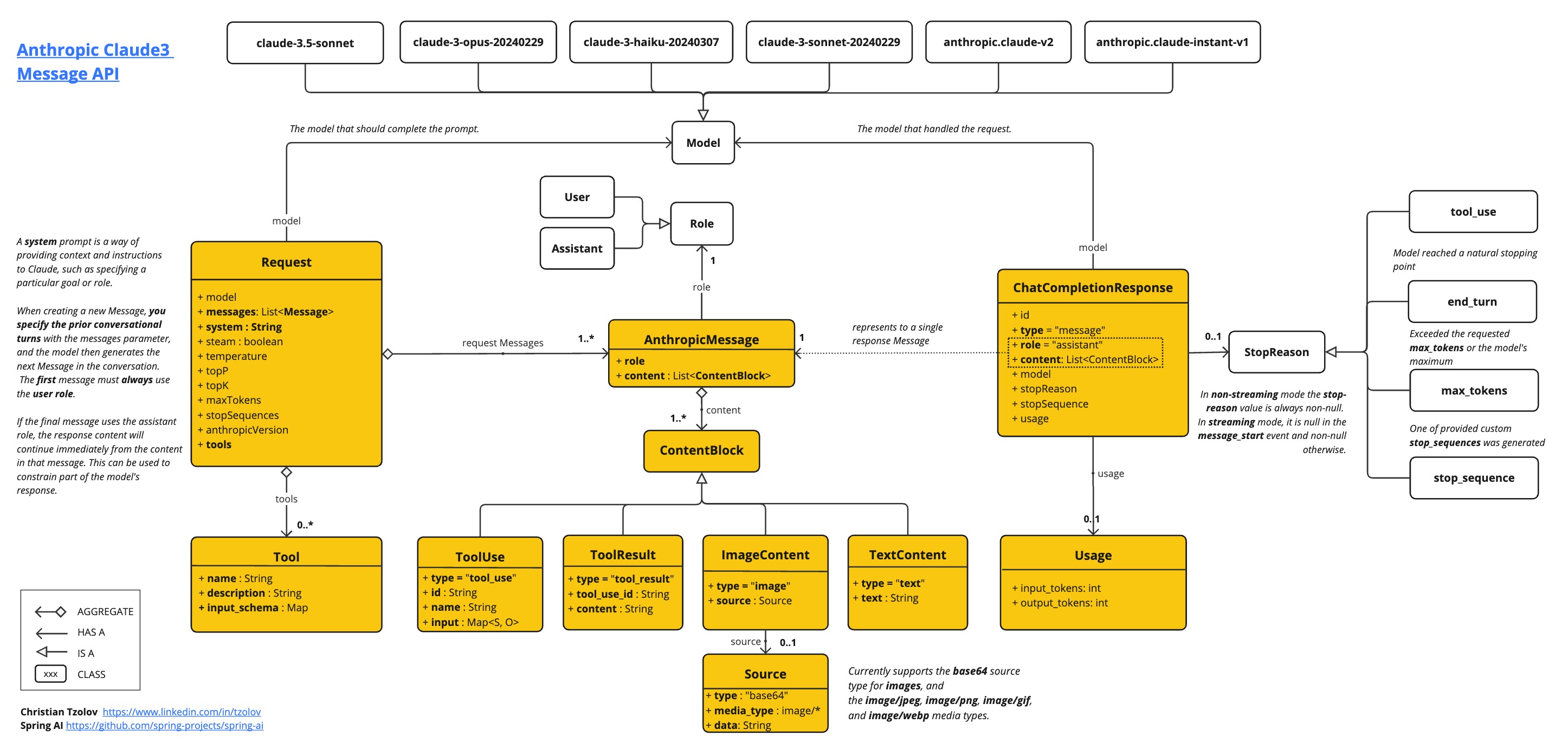
The official Anthropic API reference for creating a message shows exactly what the response payload looks like. We're interested in the usage object.
Skim the 'Returns' section to understand the overall response object. Then, focus on the sub-section for the usage object and read its description under 'Billing and rate-limit usage.' Finally, look at the 'Returns Examples' to see a complete JSON response and locate the usage object within it.
As you can see, the response from a call to Anthropic's /v1/messages endpoint contains a dedicated usage object.
"usage": {
  "input_tokens": 2095,
  "output_tokens": 503
}
This is where our application gets the input_tokens and output_tokens values to include in our usage event.
The following diagrams provide a clear visual summary of where the usage object fits into the overall data flow and response structure.

2. The Interface: How Do We Report This Data?
Now that we have a well-defined data model for a usage event, we need an API to receive and store it. This will be an internal API that our application services call after they complete an interaction with an LLM.
For this kind of "create a new record" action, a POST request to a RESTful endpoint is the standard and most appropriate choice. To understand the key components of a good API design, let's review some fundamentals.
API Design in System Design Interviews w/ Meta Staff Engineer
This video from 'Hello Interview' provides a concise and practical overview of API design principles for system design interviews. We'll use it to structure our usage reporting API.
Please watch the following segments: 03:59 - 08:41: This covers REST resources, plural nouns for endpoints, and the primary HTTP verbs (focus on POST). 08:41 - 11:12: This explains the different ways to provide input to an API, highlighting the use of the request body for POST requests. 11:12 - 12:41: This covers API responses, including status codes (like 2xx for success) and the response body.
Applying these principles, we can define our internal usage reporting API:
API Design: Usage Reporting Service
-
Endpoint:
POST /v1/usage-events- We use the verb
POSTbecause we are creating a new resource (a new usage event).
- The path
/usage-eventsuses a plural noun to represent the collection of resources, following REST conventions.
- We use the verb
-
Request Body: The body of the
POSTrequest will be a JSON object that matches the data model we defined in the previous section.{ "event_id": "f47ac10b-58cc-4372-a567-0e02b2c3d479", "timestamp": "2023-10-27T10:00:00Z", "user_id": "user-abc-123", "tenant_id": "tenant-xyz-789", "model_id": "claude-3-sonnet-20240229", "input_tokens": 1200, "output_tokens": 350 } -
Authentication: This endpoint should be protected and only accessible by trusted internal services. In an AWS environment, this would typically be handled using IAM roles and sigv4 signing, ensuring that only specific services (like your application backend) have permission to call it. The
user_idandtenant_idshould ideally be derived from a trusted source, like a JWT or session token processed by the calling service, not passed blindly. -
Successful Response:
- Status Code:
202 Accepted. - Why
202and not201 Created? This is a key trade-off for high-throughput systems. Returning201 Createdimplies that the data has been successfully persisted to the database. In a high-volume system, you might want to decouple the API endpoint from the database write. The endpoint could simply accept the request and place it onto a message queue (like SQS) for asynchronous processing.202 Acceptedtells the client "I've received your request and will process it," without making them wait for the database write to complete. This is crucial for maintaining low latency in the calling service. For a system handling 1000+ TPS like Rudi, this asynchronous pattern is almost a necessity.
- Status Code:
-
Error Response:
- Status Code:
400 Bad Requestif the request body is malformed or missing required fields. - Status Code:
401 Unauthorizedif the calling service is not properly authenticated. - Status Code:
5xxfor server-side errors within the usage reporting service itself.
- Status Code:
3. A Practical Implementation Sketch
Let's tie this together with a Python example. Your application code that calls the LLM can be wrapped in a function or decorator that handles reporting the usage.
Here's how you might define the data model using Python's dataclasses and then implement the reporting logic.
import requests
import uuid
from dataclasses import dataclass
from datetime import datetime, timezone


# Matches the data model we designed
@dataclass
class UsageEvent:
    event_id: str
    timestamp: str
    user_id: str
    tenant_id: str
    model_id: str
    input_tokens: int
    output_tokens: int


# This function would be called by your application after an LLM call
def report_token_usage(
    user_id: str,
    tenant_id: str,
    model_id: str,
    usage_data: dict # The 'usage' object from the Claude API response
):
    """Constructs a UsageEvent and POSTs it to the reporting service."""

    event = UsageEvent(
        event_id=str(uuid.uuid4()),
        timestamp=datetime.now(timezone.utc).isoformat(),
        user_id=user_id,
        tenant_id=tenant_id,
        model_id=model_id,
        input_tokens=usage_data.get("input_tokens", 0),
        output_tokens=usage_data.get("output_tokens", 0),
    )


    # In a real AWS environment, you would use a library like 'boto3' with
    # sigv4 authentication, not a simple requests.post with an API key.
    # The endpoint URL would point to your internal service.
    try:
        response = requests.post(
            "https://internal-api.my-company.com/v1/usage-events",
            json=event.__dict__,
            headers={"Authorization": "Bearer YOUR_INTERNAL_SERVICE_TOKEN"},
            timeout=2 # Use a short timeout
        )
        response.raise_for_status() # Raises an exception for 4xx/5xx status codes
        print(f"Successfully reported event {event.event_id}")

    except requests.exceptions.RequestException as e:


        # Crucial: What happens if the reporting service is down?
        # You should have a fallback, like logging to a file or a dead-letter queue.
        print(f"Error reporting usage event: {e}")


# --- Example Usage ---
# Simulate a response from the Anthropic API
mock_claude_response = {
    "id": "msg_013Zva2...",
    "model": "claude-3-sonnet-20240229",
    "role": "assistant",
    "content": [{"type": "text", "text": "Hi! My name is Claude."}],
    "usage": {"input_tokens": 10, "output_tokens": 8}
}


# Your service would extract this info after the API call
report_token_usage(
    user_id="user-abc-123",
    tenant_id="tenant-xyz-789",
    model_id=mock_claude_response["model"],
    usage_data=mock_claude_response["usage"]
)
This example shows the full lifecycle: defining the data structure, populating it from a simulated LLM response, and POSTing it to our newly designed API endpoint. It also includes a crucial consideration in the except block: designing for failure is paramount for a critical system like billing.
Conclusion
In this lesson, we designed the core components for a production-grade token usage reporting system. We started by defining a robust data model to capture not just token counts but also essential metadata for analytics. Then, we designed a RESTful API to receive this data, making deliberate choices about the endpoint, HTTP method, and response codes that favor scalability and resilience.
Key Takeaways:
- Data Model is Key: A usage event must capture the "who, what, when, and how many." Your data model should include
event_id,timestamp,user_id,model_id,input_tokens, andoutput_tokens. - Use REST for Simplicity: A
POST /v1/usage-eventsendpoint is a clear, conventional, and effective way to design an internal API for creating usage records. - Trust but Verify: The token counts (
input_tokens,output_tokens) are sourced directly from theusageobject in the LLM provider's API response. - Design for Scale: For high-throughput services, using an asynchronous pattern (e.g., API gateway -> SQS -> Lambda) and returning a
202 Acceptedstatus code prevents the reporting mechanism from becoming a performance bottleneck.
Next Lesson Preview
Our current design successfully reports usage for a single, successful API call. But what happens if a network glitch causes our application to call the reporting API twice for the same LLM interaction? This would result in double billing. To build a truly robust financial system, we must prevent this. In the next lesson, we will extend the usage reporting API with an idempotency mechanism to prevent duplicate billing.