Recommended resources
The freely available resources this lesson will direct you to.
- I´ve tested CLO3D to Unreal Engine 5.6 Workflow | Animate Fashion Garments with LiveSync + Metahumanwww.youtube.com
- Clo3d Crash Course - Learn in 1 hour - Beginners Tutorialwww.youtube.com
- 3D dynamic fashion design development using digital technology ...pmc.ncbi.nlm.nih.gov
- [PDF] exploring design processes integrating browzwear, clo, and unreal enrex.libraries.wsu.edu
Hello! Welcome to your next lesson in designing the cinematic world for your film.
In our last session, we explored how to make costume a central part of your narrative, transforming it from mere clothing into a "parallel story" that expresses character and theme. You created a costume concept page for a key character, laying the groundwork for how your design ideas will serve your directorial vision.
Today, we'll build directly on that foundation by exploring the powerful digital tools that can bring those concepts to life before you even touch a piece of fabric. As you've expressed an interest in CLO software, this lesson is tailored to that, aligning perfectly with our learning outcome: to investigate how digital tools like CLO can be used for pre-visualizing costume and character design.
This is where your extensive background in fashion and textile design converges with your new path in filmmaking. We'll explore how CLO acts as a virtual sewing room and then see how it integrates into a professional pipeline used for film, animation, and games.
1. The Digital Sewing Room: Understanding CLO
At its core, CLO (and similar software like Marvelous Designer) revolutionizes the traditional design process. Instead of moving linearly from a 2D sketch to a 2D pattern, and then to a physical 3D toile (mock-up), CLO creates a dynamic link between the 2D and 3D worlds.
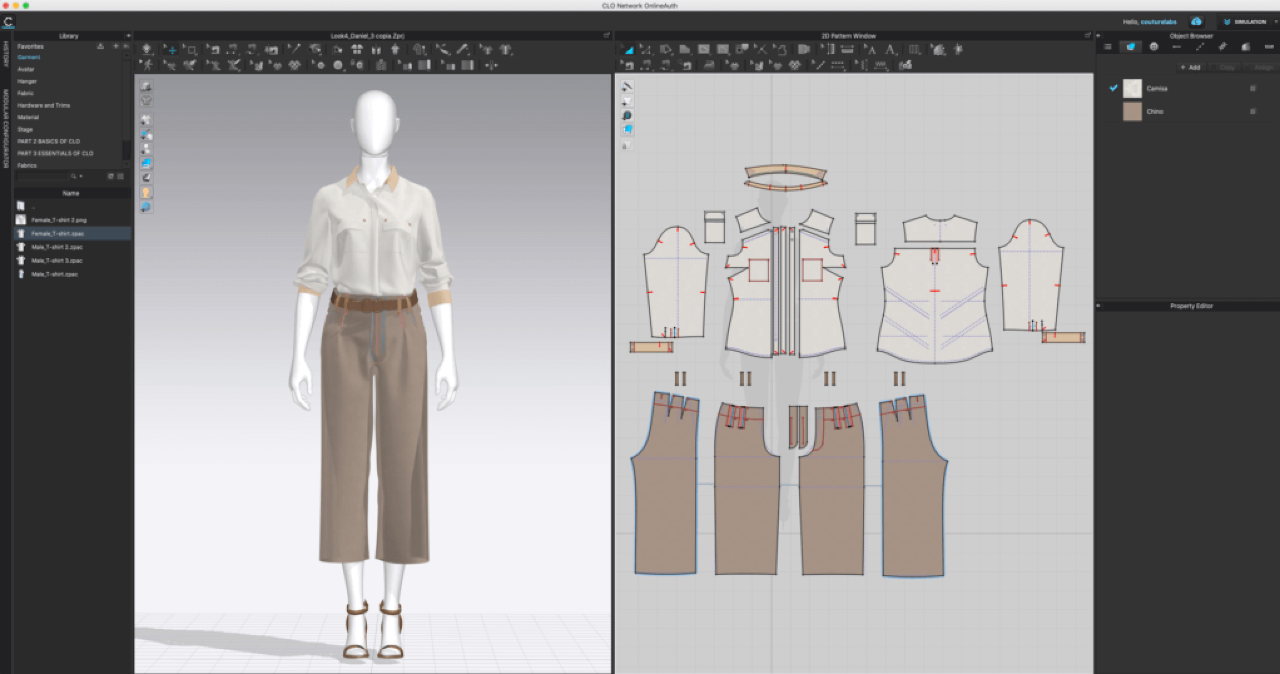
This immediate feedback loop is incredibly powerful. It allows you to iterate on a design with a speed and freedom that physical prototyping cannot match. As one study on the topic explains, this digital workflow can transform the traditional process by allowing for constant interplay between 2D patterns and 3D simulations in a more sustainable way (you can find this idea in the paper "3D dynamic fashion design development using digital technology...").
To understand how this works in practice, let's watch a few key segments from a beginner's tutorial on CLO.
Clo3d Crash Course - Learn in 1 hour - Beginners Tutorial
The 'Clo3d Crash Course' by Stephy Fung provides an excellent introduction to the software's core functions. We'll focus on three key stages: pattern creation, sewing/simulation, and adjusting fabric properties.
Please watch the following three segments: Creating a Basic Pattern (08:35 - 12:57): Watch how the creator uses tools to draw rectangles, add points, and create curves to form a basic t-shirt pattern. Notice how every change in the 2D window is reflected on the 3D avatar. Sewing and Simulation (15:01 - 17:17): Here, you'll see the 'magic' of CLO. The creator uses sewing tools to connect the pattern edges and then hits 'simulate' (spacebar) to watch the fabric drape onto the avatar. Adjusting Fabric Properties (17:17 - 19:33): This is crucial for pre-visualization. Observe how changing the 'particle distance' affects mesh density (and smoothness) and how applying different fabric presets (like leather or silk) instantly changes the garment's drape and stiffness.
For a director-designer like you, this capability is a game-changer. You can:
- Test silhouettes and fit for any character shape or size.
- Visualize drape and movement of different fabrics (e.g., how would a silk dress flow versus a heavy wool coat?).
- Experiment with complex designs that would be time-consuming and costly to prototype physically.
2. The Pre-Visualization Pipeline: From CLO to Unreal Engine
Designing a garment in CLO is just the first step. To truly pre-visualize it for a film, you need to see it in a dynamic environment with realistic lighting, animated characters, and virtual cameras. This is achieved by integrating CLO with a real-time 3D creation tool like Unreal Engine.
This workflow is at the cutting edge of digital production in film, fashion, and gaming. A recent study exploring this exact process notes that it involves several key stages: creating a digital model (like a MetaHuman), designing the garments (in CLO or Browzwear), and then transferring the garment into Unreal Engine for final simulation and rendering (this process is detailed in the paper "exploring design processes integrating browzwear, clo, and unreal en").

Let's watch a demonstration of this pipeline in action. This video is quite technical, but I want you to focus on the conceptual process and the incredible potential it offers for pre-visualization.
I´ve tested CLO3D to Unreal Engine 5.6 Workflow | Animate Fashion Garments with LiveSync + Metahuman
The video 'I´ve tested CLO3D to Unreal Engine 5.6 Workflow' by aschno - unreal fashion demonstrates the end-to-end process of bringing a custom garment to life on a digital character.
Don't worry about memorizing every technical step. Focus on the overall workflow by watching these key moments: Fitting the Garment (07:37 - 11:48): The creator sends character poses from Unreal Engine to CLO to ensure the garment fits correctly in different positions (e.g., a base pose and the first frame of a walk cycle). This is like a virtual fitting session. Simulating Animation (11:48 - 13:57): Back in CLO, the creator records a simulation of the garment's fabric reacting to the character's animated movement. This captures the physics of the cloth. The Final Result in Unreal Engine (13:57 - 17:00): The animated garment is sent back to Unreal Engine. Now, the fully dressed MetaHuman can be animated within a 3D environment. This is where you, as a director, could start placing cameras and planning your shots.
The result is your own virtual actor, wearing your original costume design, ready to be directed and filmed in a digital space. This allows you to test how fabric moves during a specific action, how light reflects off a certain texture, and how the costume looks from any conceivable camera angle—all before production begins.
3. Practical Exercise: Planning Your Digital Pre-visualization
While you may not have the software installed yet, you can start thinking like a digital designer-director. Revisit the "Costume Concept Page" you created in the last lesson and consider how you would use this digital workflow to develop and test your design.
Your Task (10 minutes):
Answer the following questions about the costume you designed.
-
Fabric Simulation: Your design includes specific materials and textures. What fabric properties would be most critical to simulate correctly in CLO to capture the essence of your design? For example, would you need to test the stiffness of a leather collar, the flow of a silk skirt, or the transparency of a lace panel?
-
Animation Test: Your costume needs to work with your character's performance. What specific movement, gesture, or action would you want to test in an animation to see how the costume performs? (e.g., "I need to test a scene where the character raises their arms to see if my sculptural sleeve design restricts movement or creates the silhouette I want.")
-
Directorial Goal: Imagine you have the final, animated digital character in Unreal Engine. As a director, what would you specifically look for? How would this pre-visualization help you plan your shots or story? (e.g., "I would experiment with a slow-motion tracking shot during a dance sequence to see the detailed ripples in the fabric. This would help me decide on the final camera path and lens choice.")
Conclusion
Today we've bridged the gap between your design expertise and your directorial ambitions, exploring how digital tools can serve both roles simultaneously.
Key Takeaways:
- CLO as a Virtual Prototyping Tool: CLO's linked 2D/3D interface allows for rapid, waste-free iteration on garment design, fit, and fabric drape.
- The Power of the Pipeline: Integrating CLO with Unreal Engine enables high-fidelity pre-visualization where you can "film" an animated digital actor wearing your original costume.
- Informed Directing: This workflow empowers you to make critical creative decisions about performance, cinematography, and lighting based on how your costume designs behave in a dynamic, realistic setting.
What's Next?
Now that we've seen how to pre-visualize costumes on digital characters, our next lesson will focus on another critical element of your film's world: planning music selection or original composition to complement and deepen visual storytelling. Just as costume tells a parallel story, music and sound design shape the emotional landscape of your film.