Recommended resources
The freely available resources this lesson will direct you to.
Hello! Welcome back to our course on architecting security products.
In our last lesson, we designed a high-performance, modular port scanning engine. Its output is a list of open ports on target hosts—the digital doorways into a system. But simply knowing a door is open isn't enough; to assess for vulnerabilities, we need to know what lies behind it.
This lesson tackles that exact problem, directly addressing the learning outcome: Design a service detection and version identification engine using banner grabbing and probe-response matching. We will architect the crucial second stage of our scanner, which interrogates open ports to determine precisely what software is running and what version it is. This information is the key that unlocks vulnerability correlation, which we'll cover in the next lesson.
1. From Open Port to Service Fingerprint
Our goal is to take an input like {host: 192.0.2.1, port: 22} and produce an output like {service: "openssh", version: "8.2p1", os: "ubuntu"}.
We will explore two primary techniques to achieve this:
- Banner Grabbing (Passive Identification): Listening for a service to introduce itself.
- Probe-Response Matching (Active Identification): Actively querying a service to provoke a revealing response.
The flowchart below gives a high-level overview of these two paths.

2. The Simple Path: Banner Grabbing with a NULL Probe
Many network protocols are "talkative." As soon as you connect to them, they send a "banner" to identify themselves. Think of it as a server answering the phone with "Hello, this is the SMTP service." The process of connecting and capturing this initial message is called banner grabbing.
In the context of a systematic scanning engine like Nmap, this is implemented as a NULL probe. The engine connects to an open TCP port and simply listens for a set amount of time without sending any data of its own.
Let's look at the official Nmap documentation to understand how this works.
Technique Described | Nmap Network Scanning
This section from the official Nmap book, 'Nmap Network Scanning', describes the initial steps of version scanning. It details the NULL probe technique, which is the formal implementation of banner grabbing.
Read section 3, which starts with 'Once the TCP connection is made...'. Focus on how Nmap listens for a banner, compares it against a signature database (nmap-service-probes), and can achieve a 'full match' or a 'soft match'. This is the core logic of passive service identification.
Architecting the Banner Grabbing Component
Based on this, the architecture for our passive identification module is straightforward:
- Input: A list of open TCP ports from the port scanning engine.
- Worker Logic: For each port:
- Establish a TCP connection.
- Start a timer (e.g., 5 seconds, as Nmap does).
- Listen for any incoming data and buffer it.
- Signature Matching:
- The received data (the banner) is compared against a database of signatures. These are typically regular expressions designed to parse the service name and version number.
- For example, a signature like
^220 .* ESMTP Postfix$identifies the Postfix SMTP server. A more complex one like^SSH-2\.0-OpenSSH_([.\d]+p\d+)can capture the exact version of OpenSSH.
This image shows what a part of this signature database might look like for the NULL probe.
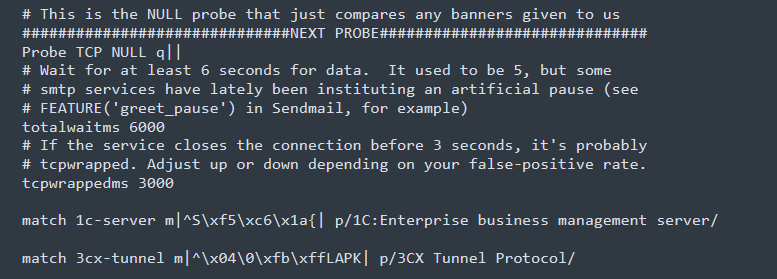
This approach is fast and efficient. When it works, we can identify a service with a single connection and no additional traffic. However, its major limitation is obvious: what if the service is silent and doesn't send a banner? For this, we need a more active approach.
3. The Active Path: Probe-Response Matching
When a service doesn't volunteer information, we must coax it out. Probe-response matching is a systematic way of doing this. The engine sends a specifically crafted message (a probe) and analyzes the response.
The intelligence of the system lies in its database of probes and expected responses. This isn't just a list of strings; it's a structured knowledge base designed for efficiency and accuracy.
Let's go back to the Nmap documentation, which details this process perfectly.
Technique Described | Nmap Network Scanning
These sections of the Nmap book are the blueprint for a sophisticated service identification engine. They describe the logic, the data structures, and the optimizations that make Nmap's version scanning so powerful.
Read the following sections carefully: Section 4: This explains the core probe-response loop, including the concept of 'probable ports' for optimization. Section 5 & 'Cheats and Fallbacks': This details how Nmap speeds up scans using generic probes, softmatch directives, and the clever 'fallback' mechanism (including the 'NULL probe cheat'). 'Probe Selection and Rarity': This describes the algorithm Nmap uses to decide which probes to send and in what order, based on the rarity metric and the user-defined intensity level. This is key to managing the trade-off between speed and comprehensiveness.
Designing the Active Identification Engine
Distilling the information from the Nmap documentation, we can design the architecture for our engine.
1. The Probe Database (nmap-service-probes)
This is the brain of our engine. It's a file containing entries, each describing a probe. A typical entry includes:
- Probe Name: A unique identifier (e.g.,
GetRequest). - Probe String: The data to send, e.g.,
Probe TCP GetRequest q|GET / HTTP/1.0\r\n\r\n|. - Probable Ports: A list of ports where this probe is most likely to succeed (e.g.,
ports 80,81,443,...). This is a critical optimization. - Match Directives: A set of
matchrules (regular expressions) to run against the response. They extractservice,version,info, etc. E.g.,match http m|^HTTP/1\.[01] \d\d\d (.*)\r\n|. - Rarity: A number from 1 to 9 indicating how likely the probe is to succeed.
- Fallback: Which other probes'
matchdirectives to try if this probe's own directives fail.
2. The Engine's Algorithm
For each open port, the engine executes the following state machine:
- NULL Probe: Always try the banner grab first. If a match is found, report it and terminate for this port.
- Probable Port Probes: If the NULL probe fails, look up the port number in the database. Sequentially send all probes that list this port in their
portsdirective. For each response, check for a match. If found, report and terminate. - Intensity-Based Probes: If still no match, begin iterating through the rest of the probes in the database, from lowest rarity to highest.
- The engine only tries probes with a
rarityless than or equal to the scan's configuredintensitylevel (e.g., Nmap's--version-intensityflag). - For each response, first check against the probe's own
matchrules. - If that fails, check against the
matchrules of any probes listed in itsfallbackdirective. This is how the "NULL probe cheat" works—a response to a later probe is checked against the NULL probe's banner rules.
- The engine only tries probes with a
- Special Handlers:
- SSL/TLS: If a probe identifies an SSL/TLS handshake, the engine re-establishes the connection through an SSL/TLS layer and restarts the entire probing process from step 1, sending the probes inside the encrypted tunnel.
- RPC/SMB: If an RPC or SMB service is identified, the engine can hand off the connection to a specialized post-processor to enumerate more detailed information.
- No Match: If all applicable probes are tried and none produce a match, the service remains
unknown. The raw response might be saved as a "fingerprint" for manual analysis.
This multi-step, optimized, and fallback-tolerant algorithm is what makes a service detection engine both fast and accurate.
4. Advanced Architecture: Dynamic Protocol Analysis
The Nmap model is highly effective, but we can abstract it to a more general and extensible software architecture. For this, we turn to concepts from the world of Network Intrusion Detection Systems (NIDS), which face the exact same problem.
A key paper in this area proposes a dynamic framework that is a perfect fit for a robust, modern system.
Dynamic Application-Layer Protocol Analysis for Network Intrusion ...
This paper, 'Dynamic Application-Layer Protocol Analysis for Network Intrusion Detection', presents a flexible architecture for protocol identification. While its context is NIDS, the design principles are directly applicable to our scanner and represent a more formalized version of the probe-response model.
Please read these sections: 4.1 Design: Focus on the five design requirements and the concept of a per-connection 'analyzer tree'. Understand the role of the 'Protocol Identification Analyzer' (PIA). 4.2 Implementation: See how this design is implemented in the Bro NIDS, using signatures as a primary heuristic to activate specific analyzers. 4.3 Trade-Offs: This is a crucial section that discusses the real-world engineering challenges: choosing good signatures (probes), handling false positives, and preventing evasion. This directly relates to your goal of understanding design trade-offs.
The core idea is to move away from a rigid, sequential probing algorithm to a dynamic, event-driven one.
The Analyzer Tree Architecture:
- Initial State: For a new connection, the system creates a simple "analyzer tree," perhaps just
IP -> TCP. - Protocol Identification Analyzer (PIA): At the end of the chain, a generic
PIAis attached. This component's job is to buffer the initial bytes of a connection and run multiple detection heuristics against it (our probe-response signatures are one such heuristic). - Dynamic Activation: When the
PIAgets a potential match (e.g., the response to aGetRequestprobe looks like HTTP), it doesn't just report the result. It instantiates and attaches an actual HTTP analyzer to the tree. The data stream is then fed to this new analyzer. - Verification and Deactivation: The specialized HTTP analyzer's job is not just to parse HTTP, but also to verify it. If it receives data that is definitively not valid HTTP, it recognizes that the initial
PIAmatch was a false positive. It can then signal to be removed from the tree, allowing thePIAto continue looking for other protocol matches.
This architecture, which you can conceptualize as a plug-in system, is more robust and extensible than a hardcoded algorithm. It cleanly separates the logic of detection (the PIA's job) from analysis and verification (the specific analyzer's job).
Conclusion
In this lesson, we designed the engine that turns a list of open ports into a rich inventory of running services. We moved from simple banner grabbing to a sophisticated, multi-stage, active probing system, using the architecture of Nmap as our blueprint.
Key Takeaways:
- Service identification is a two-pronged approach: Passive banner grabbing (NULL probe) for fast identification of "talkative" services, and active probe-response matching for silent ones.
- A professional-grade engine relies on a rich probe database that includes not just probe strings and match patterns, but also metadata for optimization, such as probable ports, rarity, and fallback logic.
- The scanning process is an intelligent algorithm: It prioritizes probes to balance speed and comprehensiveness, and includes special handling for encrypted protocols like SSL/TLS.
- A more advanced, robust architecture uses a dynamic "analyzer tree," where a generic identifier (PIA) activates specific protocol analyzers, which then verify the match, creating a feedback loop that is resilient to false positives.
Preview of the Next Lesson:
We now have an engine that can produce a detailed list of services and versions running on a network: {host, port, service, version}. The final step in building a vulnerability scanner is to use this information. In our next lesson, "Architect a vulnerability matching engine that correlates discovered services and versions against the knowledge base," we will design the system that takes this output and compares it against vulnerability databases like the NVD to find known security flaws.