Recommended resources
The freely available resources this lesson will direct you to.
Welcome back. In our previous lesson, we took a critical step toward building a flexible agentic system by separating prompt logic from application code through dynamic composition. This allows our agents' "minds" to be configurable and context-aware. We're now going to apply that same principle of separation and central management to their "bodies"—the tools they use.
This lesson marks the beginning of our work on the core infrastructure. We will tackle the first major component of your desired system: the Tool Store. Our goal is to design a robust and scalable database schema that can store, version, and manage tool definitions and their associated metadata. This moves us away from hardcoding tools in our application and toward a dynamic system where agents can discover and be equipped with capabilities at runtime—a foundational requirement for the multi-tenant architecture you aim to build.
1. The Anatomy of a Tool
Before we can design a schema, we must first define what a "tool" is in the context of our agentic system. At its core, a tool is a capability that an agent can execute. For a database to store it, we need to break it down into its fundamental properties.
A great starting point is to think of a tool as an interface. The blog post "AI Agent Tools: MCP, OpenAPI, and Tool Management" provides a clear TypeScript interface that captures the essentials.
AI Agent Tools: MCP, OpenAPI, and Tool Management That Actually ...
This article from Chanl.ai introduces a foundational Tool interface.
Focus on the initial code block showing the Tool interface. The key fields to note are the core properties: name, description, and inputSchema.
From this, we can extract the non-negotiable fields for any tool:
name: A unique, machine-readable identifier for the tool (e.g.,getCryptoPrice). The LLM uses this name to signal its intent to use the tool.description: A detailed, human-readable explanation of what the tool does, its parameters, and when it should be used. This is arguably the most critical field, as it's the primary information the LLM uses to make its tool-selection decision.input_schema: A formal definition of the arguments the tool accepts. Using a standard like JSON Schema (which Zod can generate) allows for automatic validation and provides a structured format that the LLM can understand and use to construct its function calls.
With your experience in API design, you can think of this as analogous to an OpenAPI/Swagger definition for a single endpoint. It's a contract that defines how to interact with a specific capability.
2. Designing the Core tools Table
Based on this core anatomy, we can design our first table. We'll call it tools. Given your familiarity with PostgreSQL from your RAG projects, we'll use PostgreSQL data types.
| Column | Data Type | Description & Constraints |
|---|---|---|
id |
UUID |
Primary Key. A universally unique identifier. |
name |
VARCHAR(255) |
The unique name of the tool. Should be indexed. |
description |
TEXT |
The detailed description for the LLM. |
input_schema |
JSONB |
The JSON Schema defining the tool's input arguments. |
created_at |
TIMESTAMPTZ |
Timestamp of creation. |
updated_at |
TIMESTAMPTZ |
Timestamp of the last update. |
This simple structure already provides a solid foundation. However, a production system requires more nuance to handle different tool types, versioning, and performance considerations.
3. Expanding the Schema for Production Use
A real-world agentic system will employ various kinds of tools. Some might call external REST APIs, others might execute a snippet of code, and some might be internal functions. Our schema needs to accommodate this diversity without becoming rigid.
Handling Different Tool Types
The "AI Agent Tools" article discusses four common tool types: HTTP, JavaScript, System, and Code. An HTTP tool needs a URL, method, and headers. A JavaScript tool needs the actual code to run. A rigid schema with columns like http_url, http_method, javascript_code would be inefficient and hard to extend.
A more flexible and scalable approach is to use a combination of a type discriminator column and a generic configuration column.
type: AnENUMorVARCHARto specify the tool's execution engine (e.g.,'HTTP','JAVASCRIPT').configuration: AJSONBcolumn to store the specific configuration for that type.- For an
HTTPtool, this JSON object could contain{ "url": "...", "method": "GET", "headers": {...} }. - For a
JAVASCRIPTtool, it might be{ "code": "...", "dependencies": [...] }.
- For an
This design is extensible: adding a new tool type in the future doesn't require a database migration, only a new convention for the structure of the configuration JSON.
Adding Rich Metadata
For better management, versioning, and runtime decision-making, we need more metadata. The "Conceptual AI Agents Universe" system design document provides an excellent, production-grade example of what this metadata looks like, which it calls a "Plugin Interface Contract". Though it uses the term "plugin," the concept is identical to our "tool."
Conceptual AI Agents Universe — System Design Document
This document offers a detailed breakdown of what metadata to store for a tool (or "plugin").
Focus on the two tables under the heading Plugin Interface Contract. These lists of fields for "Identity & Manifest" and "Configuration" are a blueprint for the columns we should add to our tools table.
Inspired by this, let's add some crucial metadata fields to our tools table:
version:VARCHAR(255). To support semantic versioning (e.g., "1.2.0"). This is vital for managing updates and ensuring stability.category:VARCHAR(255). A tag for grouping tools (e.g., "financial", "communication").required_secret_names:TEXT[](an array of strings). A list of secret keys (e.g., API keys) this tool needs to execute. The orchestrator will be responsible for securely fetching these secrets and injecting them at runtime.is_public:BOOLEAN. A flag to indicate if the tool is globally available or specific to a workspace/tenant.
Our tools table now looks much more robust:
| Column | Data Type | Description & Constraints |
|---|---|---|
id |
UUID |
Primary Key |
name |
VARCHAR(255) |
Tool's unique name |
description |
TEXT |
Description for the LLM |
version |
VARCHAR(255) |
Semantic version (e.g., "1.0.0") |
category |
VARCHAR(255) |
Organizational category (e.g., "data-analysis") |
type |
VARCHAR(50) |
Tool type (e.g., 'HTTP', 'JAVASCRIPT') |
configuration |
JSONB |
Type-specific configuration (URL, code, etc.) |
input_schema |
JSONB |
JSON Schema for input validation |
required_secret_names |
TEXT[] |
List of secret keys required for execution |
is_public |
BOOLEAN |
True if available to all tenants |
created_at |
TIMESTAMPTZ |
|
updated_at |
TIMESTAMPTZ |
4. Organizing Tools with Toolsets
Giving an agent dozens of individual tools can surprisingly degrade its performance. The LLM's context window gets cluttered, and its ability to choose the right tool diminishes. The solution is better organization. Instead of giving an agent 50 tools, we can give it 3-4 "toolsets." A toolset is simply a named, versioned collection of related tools.
AI Agent Tools: MCP, OpenAPI, and Tool Management That Actually ...
This section of the article explains the rationale and structure for toolsets.
Read the section from The Tool Count Problem to the end of the Toolset interface. This will clarify why organizing tools into collections is essential for performance and manageability.
To model this, we need two more tables: one for the toolsets themselves, and a join table to handle the many-to-many relationship between toolsets and tools.
toolsets table:
| Column | Data Type | Description & Constraints |
|---|---|---|
id |
UUID |
Primary Key |
name |
VARCHAR(255) |
Name of the toolset (e.g., "Stripe Payments") |
description |
TEXT |
Description of the toolset's purpose |
version |
VARCHAR(255) |
Semantic version of the toolset |
created_at |
TIMESTAMPTZ |
|
updated_at |
TIMESTAMPTZ |
toolset_tools join table:
| Column | Data Type | Description & Constraints |
|---|---|---|
toolset_id |
UUID |
Foreign Key to toolsets.id |
tool_id |
UUID |
Foreign Key to tools.id |
Composite Primary Key (toolset_id, tool_id) |
This structure allows a single tool to belong to multiple toolsets, and a toolset to contain multiple tools—a flexible and powerful way to compose agent capabilities.
5. Designing for Multi-Tenancy
Finally, we must explicitly design for your primary goal: a multi-tenant infrastructure. Each tenant will have access to a specific set of agents, prompts, and tools. The database schema is where this separation begins.
The video "Think Multi-Tenancy Is Easy? Think Again..." provides an excellent overview of different database isolation strategies.
Think Multi-Tenancy Is Easy? Think Again...
This video by Software Developer Diaries explains different architectural patterns for multi-tenancy at the database level.
Watch the segment from Shared Database. This covers the most common strategy, which involves adding a tenant_id to your tables to logically separate data.
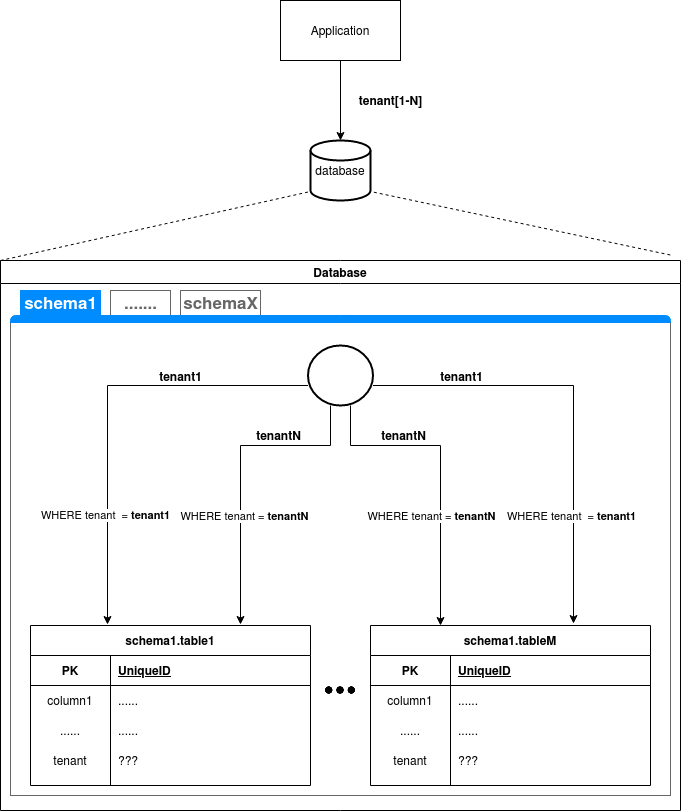
We will adopt this shared database, shared schema approach. It offers a good balance of isolation and operational simplicity. To implement it, we'll add a workspace_id column to our tables. We'll use workspace_id instead of tenant_id for generality; it could represent a tenant, a team, or a user project.
toolstable: We will add aworkspace_id(nullableUUID). Ifworkspace_idisNULL, the tool is considered "public" or global (this serves a similar purpose to theis_publicflag, which we can now remove). If it has a value, the tool is private to that workspace.toolsetstable: We will add aworkspace_id(UUID, not nullable). Toolsets are always owned by a specific workspace. A workspace can be equipped with its own private toolsets and any public tools.
This simple addition is the cornerstone of our multi-tenant security model. Every API query for tools or toolsets will be required to filter by workspace_id, ensuring one tenant can never see or use another's private tools.
The Final Schema
Here is the complete schema design incorporating all the principles we've discussed. This is the blueprint for the Tool Store you will build.
tools table
| Column | Data Type | Description |
|---|---|---|
id |
UUID |
Primary Key |
workspace_id |
UUID |
Foreign Key to a workspaces table (to be created later). NULLABLE (NULL means public). |
name |
VARCHAR(255) |
Tool's unique name within a workspace. |
description |
TEXT |
Description for the LLM. |
version |
VARCHAR(255) |
Semantic version (e.g., "1.0.0"). |
category |
VARCHAR(255) |
Organizational category. |
type |
VARCHAR(50) |
e.g., 'HTTP', 'JAVASCRIPT'. |
configuration |
JSONB |
Type-specific configuration. |
input_schema |
JSONB |
JSON Schema for arguments. |
required_secret_names |
TEXT[] |
Required secret keys. |
created_at |
TIMESTAMPTZ |
|
updated_at |
TIMESTAMPTZ |
toolsets table
| Column | Data Type | Description |
|---|---|---|
id |
UUID |
Primary Key |
workspace_id |
UUID |
Foreign Key to workspaces. NOT NULL. |
name |
VARCHAR(255) |
Name of the toolset. |
description |
TEXT |
Purpose of the toolset. |
version |
VARCHAR(255) |
Semantic version. |
created_at |
TIMESTAMPTZ |
|
updated_at |
TIMESTAMPTZ |
toolset_tools join table
| Column | Data Type | Description |
|---|---|---|
toolset_id |
UUID |
Foreign Key to toolsets.id. |
tool_id |
UUID |
Foreign Key to tools.id. |
Composite Primary Key (toolset_id, tool_id). |
Conclusion
In this lesson, you have designed a complete, production-ready database schema for a Tool Store. This design is not just a list of columns; it's a strategic plan that embodies key architectural principles.
Key Takeaways:
- A
toolstable forms the core, storing not just the name and description but also rich metadata for versioning, typing, and configuration via a flexibleJSONBfield. toolsetsand a join table provide an essential layer of organization, solving the "tool count problem" and allowing you to bundle capabilities logically.- The inclusion of a
workspace_idcolumn is the critical first step in building a secure, multi-tenant system, ensuring data is logically isolated from the very foundation.
You now have a solid data model. The next logical step is to bring it to life. In our next lesson, we will implement the API endpoints (Create, Read, Update, Delete) for registering, modifying, and retrieving tools and toolsets from the store you've just designed.