Recommended resources
The freely available resources this lesson will direct you to.
Welcome back to our course on building a production-grade agentic infrastructure. In the last lesson, we successfully implemented a system for dynamically loading an agent's tools from our Tool Store, decoupling its capabilities from its compiled code. This was a crucial step towards creating flexible and manageable agents.
Today, we will apply the same powerful principle of dynamic resolution to system prompts. Instead of embedding static, hardcoded instructions within your agent's code, you will build a mechanism to fetch and compose versioned prompts from your Prompt Store at runtime. This will be driven by the agent's role and the specific task it needs to perform, laying the groundwork for the specialized agents we'll build in our upcoming hierarchical system.
1. From Static Strings to Structured, Dynamic Instructions
As your system grows, managing prompts as simple strings scattered across your codebase becomes a significant liability. This approach leads to redundancy, a lack of version control, and difficulty in maintaining consistency.
To understand these challenges and the spectrum of solutions, let's begin with an overview of prompt management.
Prompt Management 101 - Full Guide for AI Engineers
This video from Dave Ebbelaar provides an excellent introduction to the discipline of prompt management.
Watch the first section from the beginning until the end of the overview. As you watch, pay close attention to the six common mistakes he outlines, such as scattered prompts and a lack of standardization. Then, consider the five levels of prompt management he presents. Our goal is to implement a solution that embodies the principles of "Structured Centralized Storage" (Level 3) but with the dynamic retrieval capabilities of an external system (Level 4/5).
The video highlights a key evolution: moving from simple, inline prompts to structured, template-driven systems. For the sophisticated agents we're building, a simple string isn't enough. We need a more formal structure.
A highly effective way to structure prompts for agents is to break them down into distinct components that define the agent's persona, goals, and constraints.
Prompt Engineering for AI Agents (FULL GUIDE)
This video by Brennan Wells offers a practical framework for structuring prompts specifically for AI agents.
Please watch the segment explaining the six key components of a long structured prompt. These components—Role/Persona, Objective, Context, Instructions/Rules, Examples, and Variables—provide a robust blueprint for the templates we will store in our Prompt Store.
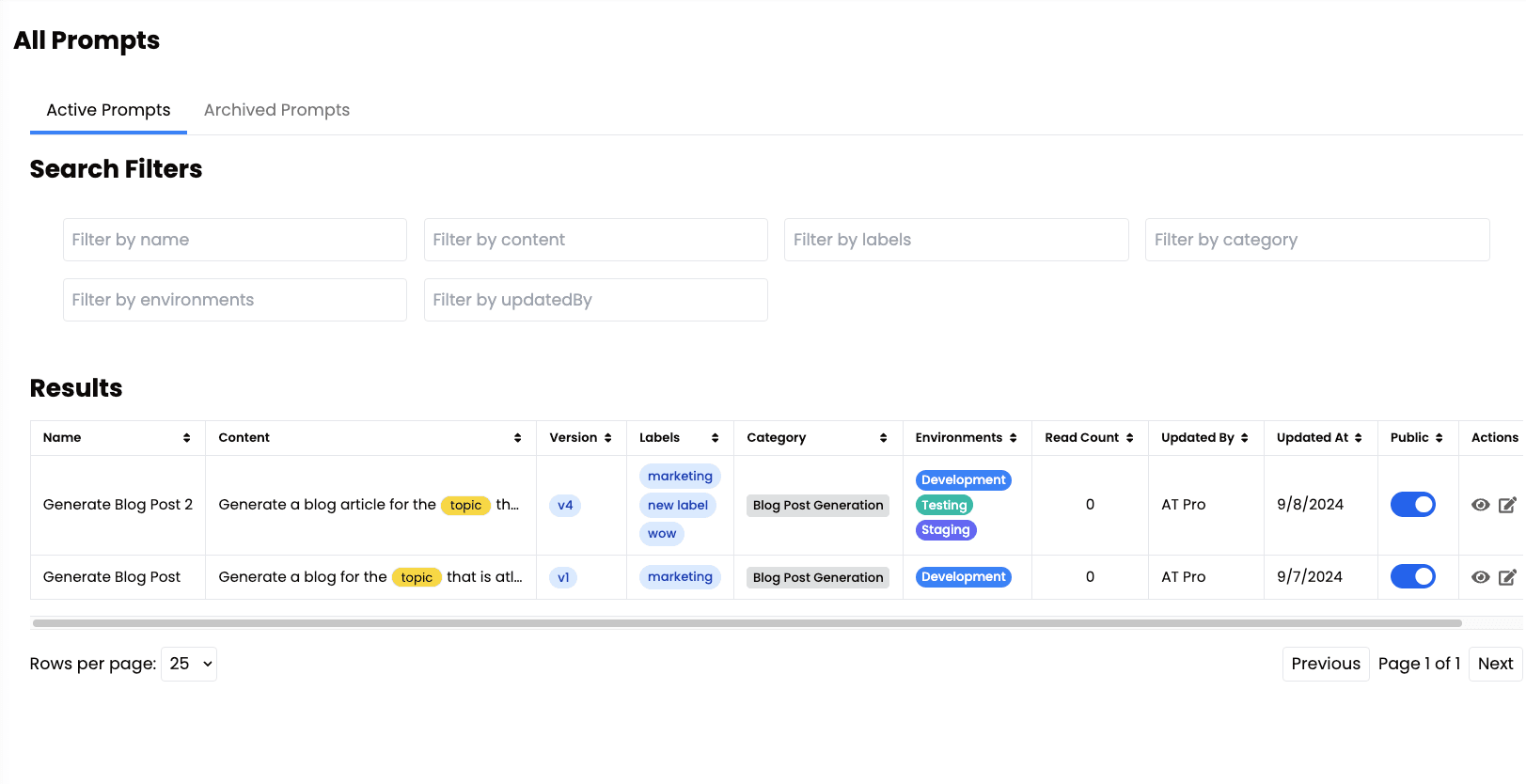
By adopting this structured format, our Prompt Store won't just be a repository of text strings; it will be a version-controlled database of detailed, multi-faceted agent instructions.
2. The Prompt Engine: A Centralized Resolver
Just as we did with tools, we'll create a dedicated module—a "Prompt Engine"—responsible for resolving the correct prompt at runtime. This engine will take context, such as an agent's role and the task's intent, and use it to construct the final system prompt.
A blog post on dev.to by Bobby Hall Jr. provides a fantastic, real-world example of this pattern. While it uses a simple switch statement for demonstration, we will adapt its architecture to query the Prompt Store API you've already built.
Building a Dynamic Prompt Engine for an AI SaaS (Next.js + Vercel ...
This article details the architecture of a dynamic prompt engine, which is precisely what we aim to build.
First, read the sections covering The Problem and The Solution to solidify your understanding of the core concept. Then, study the code in the "Implementation Details" section, specifically focusing on how parameters are defined and how the generatePrompt function is used to inject the system prompt into the Vercel AI SDK call.
Adapting the Pattern for Our Prompt Store
The article provides the blueprint. Now, let's integrate it with our existing infrastructure. Instead of a hardcoded switch statement, our generatePrompt function will call our Prompt Store API.
Let's assume you have defined the Role and Intent types as suggested in the article. Our implementation would look something like this:
// /lib/prompt-engine/index.ts

import { nunjucks } from 'nunjucks'; // A popular templating engine for JS, similar to Jinja

export type Role = 'research_analyst' | 'code_generator' | 'supervisor';
export type Intent = 'summarize_text' | 'generate_code' | 'delegate_task';

interface GeneratePromptParams {
  role: Role;
  intent: Intent;
  version?: string; // Optional: specify a version, or fetch 'latest'
  templateVariables?: Record<string, any>; // For dynamic content
}

export async function generatePrompt({
  role,
  intent,
  version = 'latest',
  templateVariables = {},
}: GeneratePromptParams): Promise<string> {
  // 1. Construct the prompt name from role and intent
  const promptName = `${role}-${intent}`;

  // 2. Fetch the prompt template from our API
  // This endpoint was created in a previous lesson.
  const response = await fetch(
    `http://localhost:3001/prompts/${promptName}/${version}`
  );

  if (!response.ok) {
    console.error(`Failed to fetch prompt: ${promptName}`);
    // Return a generic fallback prompt
    return "You are a helpful AI assistant.";
  }

  const promptData = await response.json();
  const template = promptData.template; // Assuming the API returns { ..., template: "..." }

  // 3. (Advanced) Render the template with variables
  const renderedPrompt = nunjucks.renderString(template, templateVariables);

  return renderedPrompt;
}
This implementation connects our abstract design to concrete code. It fetches a specific, versioned prompt template from our central store and prepares it for the agent.
3. Advanced Prompts: Conditional Logic with Templating
The true power of this system is unlocked when we move beyond simple variable substitution. By storing prompt templates that use a templating language, we can embed conditional logic directly into our prompts. This allows a single prompt template to adapt to different scenarios, drastically reducing redundancy.
The Prompt Management 101 video you watched earlier demonstrates this beautifully using Jinja.
Prompt Management 101 - Full Guide for AI Engineers
Let's revisit the Prompt Management 101 video to see how a templating engine enables conditional logic.
Watch the segment from "Our Approach". Pay close attention to the example of the ticket_analysis.jinja file around the conditional logic. The presenter shows how an if statement within the template can render different text based on the pipeline variable (helpdesk vs. customer_support).
Imagine a prompt template stored in our database for a research_analyst agent:
You are a world-class research analyst. Your goal is to provide a concise summary of the provided text.

The user you are responding to is a {{ user_type }}.

{% if user_type == 'technical' %}
Please include technical jargon and focus on implementation details.
{% else %}
Please use simple, easy-to-understand language and avoid jargon.
{% endif %}

The text to summarize is:
{{ text_to_summarize }}
By passing { user_type: 'technical' } as templateVariables to our generatePrompt function, we can dynamically change the agent's behavior using a single, managed prompt template. This is far more scalable than creating research_analyst-technical and research_analyst-non-technical prompt entries.
4. A More Elegant Integration: Vercel AI SDK Middleware
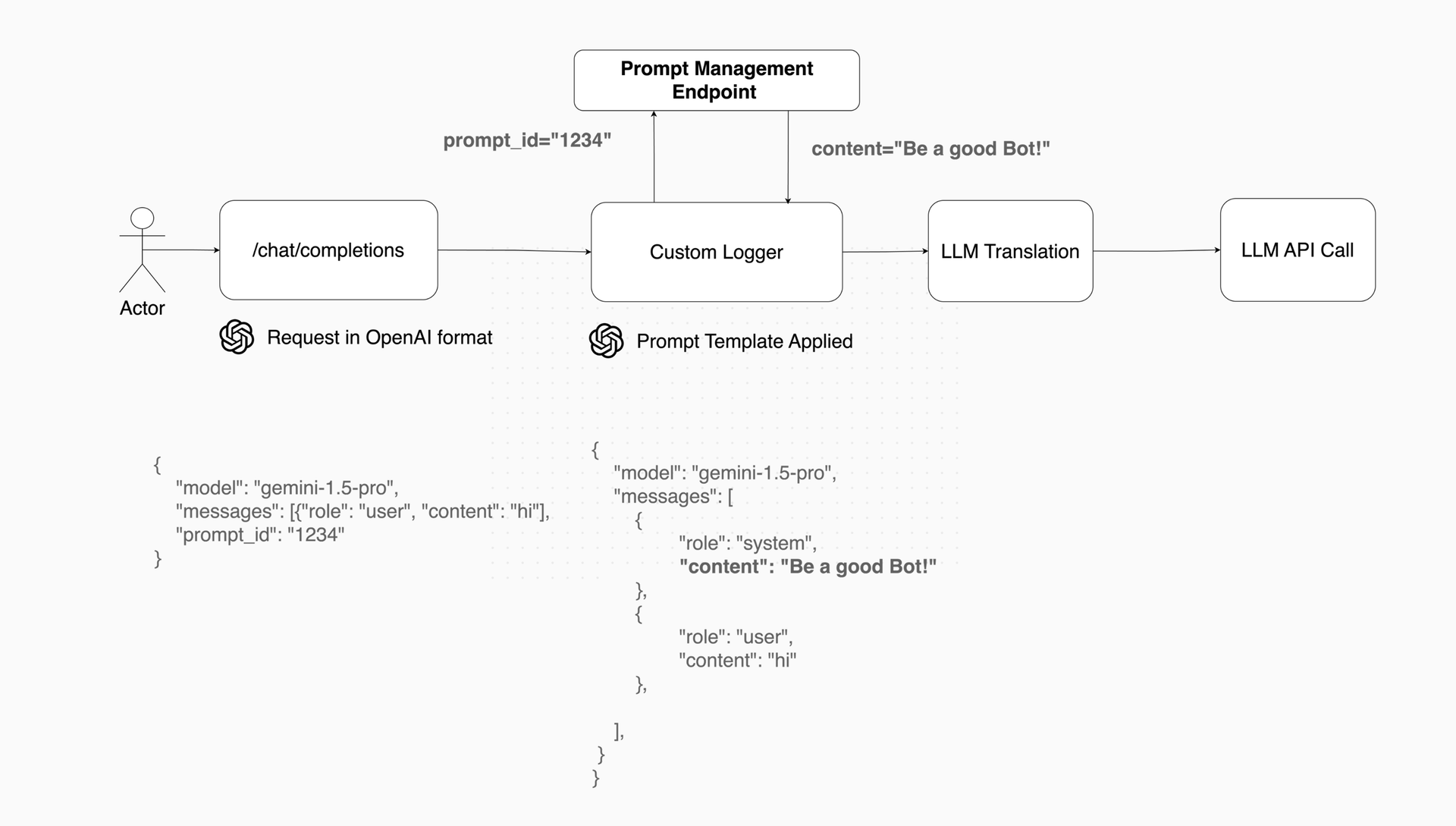
While calling our generatePrompt function before every streamText call works, the Vercel AI SDK offers a more modular and elegant solution: Language Model Middleware.
Middleware allows you to intercept and modify language model calls, making it the perfect place to inject our dynamic system prompts. This keeps your core application logic clean and separates the concern of prompt resolution.
This Vercel blog post introduces the middleware feature and its powerful transformParams method.
Read the section on Language model middleware to understand the concept. Then, carefully examine the pseudo-code example for implementing RAG. Although the example is for RAG, the pattern is identical for our use case. Finally, see how to apply it in the <span data-type="resource_reading_textrange" data-resource-subitem-id="5de10017" data-range-start="Using middleware with your language model" data-range-end="prompt: 'What is founder mode?', });">"Using middleware" section.
Here is how we can adapt our generatePrompt logic into a middleware module. This is a production-ready pattern that leverages the latest features of the AI SDK.
// /lib/middleware/prompt-resolver-middleware.ts

import { Experimental_LanguageModelV1Middleware as LanguageModelV1Middleware } from "ai";
import { generatePrompt, Role, Intent } from '@/lib/prompt-engine'; // Our engine from before

// This middleware factory takes the role and intent
export const createPromptResolver = ({ role, intent }: { role: Role; intent: Intent }): LanguageModelV1Middleware => {
  return {
    transformParams: async ({ params }) => {
      // 1. Generate the system prompt using our engine
      const systemPrompt = await generatePrompt({ role, intent });

      // 2. Return a new params object with our dynamic prompt injected
      return {
        ...params,
        system: systemPrompt,
      };
    },
  };
};
And here's how you'd use it in your application code:
// /app/api/chat/route.ts
import { streamText, experimental_wrapLanguageModel as wrapLanguageModel } from 'ai';
import { openai } from '@ai-sdk/openai';
import { createPromptResolver } from '@/lib/middleware/prompt-resolver-middleware';

// ... inside your POST handler
const { messages, agentRole, taskIntent } = await req.json();

// Dynamically create the middleware for this specific request
const promptResolverMiddleware = createPromptResolver({
  role: agentRole, // e.g., 'research_analyst'
  intent: taskIntent, // e.g., 'summarize_text'
});

const result = await streamText({
  model: wrapLanguageModel({
    model: openai('gpt-4o'),
    middleware: promptResolverMiddleware,
  }),
  messages: messages, // Note: We no longer pass 'system' here. The middleware handles it.
});
This approach is exceptionally clean. The API route is only concerned with determining the role and intent, while the middleware encapsulates the entire logic of fetching, templating, and injecting the prompt.
Conclusion
In this lesson, you have designed and implemented a system for dynamically resolving system prompts based on runtime context. By combining a centralized Prompt Store, a templating engine, and the Vercel AI SDK's middleware, you have built a scalable and maintainable foundation for instructing your agents.
Key Takeaways:
- Structured Prompting is Key: Designing prompts with clear sections (Role, Objective, Context, etc.) makes them more effective and easier to manage.
- The Prompt Engine Pattern: A dedicated service for resolving prompts based on
roleandintentcentralizes logic and decouples it from your application code. - Templating Enables Dynamic Behavior: Using a templating language like Nunjucks allows you to embed conditional logic within prompts, making them adaptable without code changes.
- Middleware Provides Elegant Integration: Vercel AI SDK's middleware is the ideal mechanism for injecting dynamic data like system prompts, leading to cleaner, more modular code.
With agents that can now be dynamically equipped with both tools and prompts, we are ready to assemble them into a functional hierarchy. In the next lesson, you will implement your first supervisor agent, which will use these dynamic prompts to delegate tasks to specialized worker agents.