Recommended resources
The freely available resources this lesson will direct you to.
- Jupyter Notebooks vs Python Scripts | When to Use Which?www.youtube.com
- Reproducible Data Analysis in Jupyter, Part 5/10: Creating a Python Packagewww.youtube.com
- Opinions - Cookiecutter Data Sciencecookiecutter-data-science.drivendata.org
- Using the template - Cookiecutter Data Sciencecookiecutter-data-science.drivendata.org
Hello. In the previous lesson, you made session timing explicit: timestamps must be interpreted in Asia/Kolkata, daily labels must correspond to exchange sessions, and a feature may only use information available at its decision time.
Those rules now need a dependable home. A notebook cell that happens to calculate the correct session date is useful during exploration, but it is not yet a reliable component of an algo-trading system. In this lesson, you will learn to use notebooks for investigation while moving repeatable market-data and strategy logic into importable Python modules that both research and production jobs can use.
Study time: about 40 minutes.
Give notebooks and modules different jobs
A Jupyter notebook is an excellent research surface. It lets you inspect a new dataset, try alternative filters, view an indicator beside a price chart, and write down why a result looks suspicious. This is valuable work: strategy research is not a linear process.
A Python module has a different purpose. It holds behavior that must mean the same thing every time it is called: timestamp normalization, session filtering, feature computation, signal rules, position sizing, and later order validation.
The practical division is:
| Location | Primary purpose | Typical contents |
|---|---|---|
notebooks/exploratory/ |
Ask questions and inspect evidence | Data samples, plots, temporary comparisons, research notes |
src/algo_trader/ |
Reusable business and research logic | Data transformations, indicators, signal rules, validations |
src/algo_trader/jobs/ |
Repeatable workflows | Load data, call reusable functions, write outputs, report failures |
tests/ |
Verify deterministic behavior | Small fixtures and expected results |
notebooks/reports/ |
Communicate a finished analysis | Clear narrative, selected charts, imported calculations |
The key distinction is not whether code is “short” or “long.” It is whether its behavior must remain consistent across uses.
For example:
- Plotting the distribution of returns for a newly downloaded stock universe is notebook work.
- Calculating a return column in the same way for every stock and every backtest belongs in a module.
- Reading a configured dataset, applying those calculations, and writing a versioned output is a job.
- Checking that a known price series produces the expected returns belongs in a test.
This separation matters especially in trading. If one notebook filters bars using the regular NSE session while another accidentally includes a closing-session observation, the two analyses may appear comparable while actually using different data definitions.
Jupyter Notebooks vs Python Scripts | When to Use Which?
Watch “Jupyter Notebooks vs Python Scripts | When to Use Which?” by ArjanCodes for a concrete view of both the strengths and hazards of notebook-based work.
Begin with notebook exploration to see why incremental execution, inspection, and plotting are useful during analysis. Then watch hidden state, which demonstrates how out-of-order execution and global variables can produce misleading results. Finish with moving logic out for the case for importing reusable Python code back into a notebook.
The aim is therefore not “stop using notebooks.” It is:
Use notebooks to discover and explain. Use modules to define and repeat.
The notebook-state problem
A notebook kernel is a running Python process. Every variable, import, function definition, and mutated DataFrame can remain alive long after the cell that created it has disappeared from view.
Suppose you run a cell that creates bars, later overwrite bars after filtering for regular-session observations, and then rerun an earlier charting cell. The chart may use the filtered version even though the earlier cell appears to use raw data. Similarly, a function can appear to work only because an import or global variable was executed hours earlier.
That is dangerous in market research because an incorrect result often does not cause an error. A notebook can generate a plausible equity curve while silently using:
- stale intermediate data;
- a function definition different from the one visible in the notebook;
- parameters altered in another cell;
- an import that a clean environment would not have;
- data retrieved on a different day.
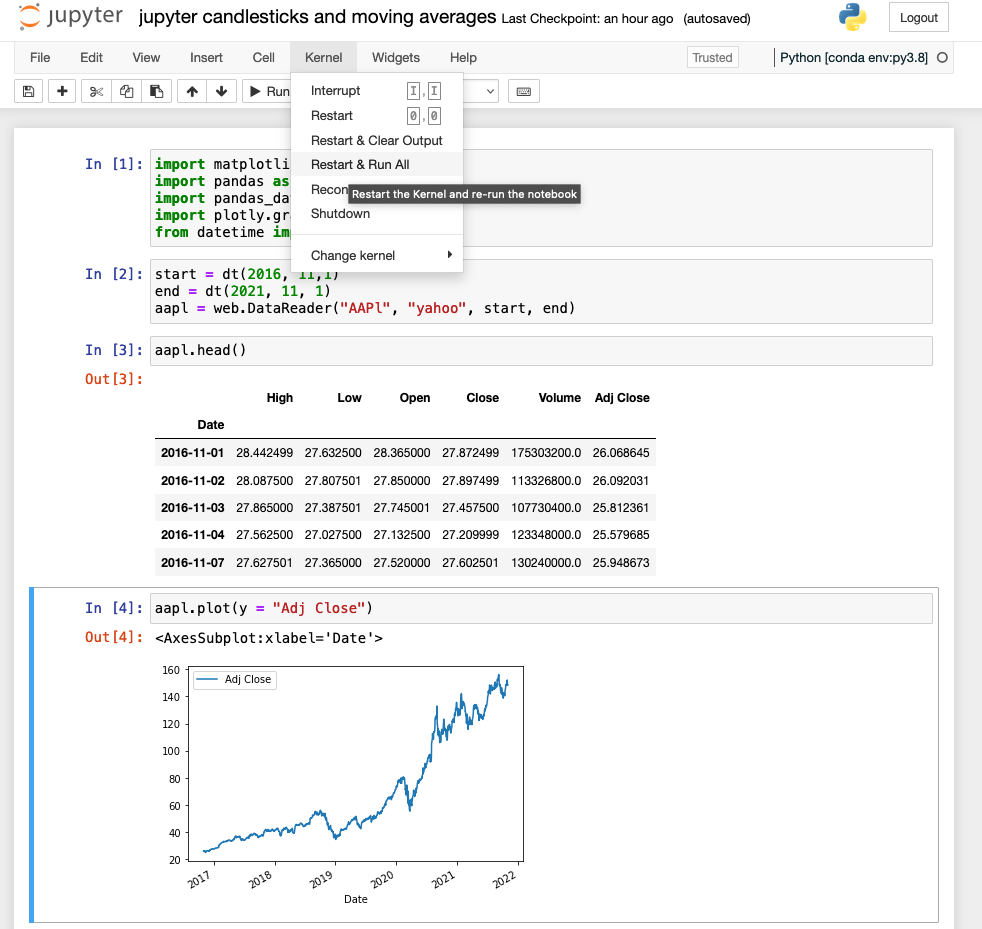
Use Restart & Run All as a basic notebook integrity check. It answers a limited but important question: can this notebook reproduce its displayed result from a clean kernel in top-to-bottom order?
It does not prove the research is correct. It cannot detect look-ahead bias, a mistaken session boundary, or an incorrect formula. But if a notebook fails this check, its outputs are not yet dependable enough to interpret.
A few habits reduce state-related confusion:
- Prefer descriptive, stage-specific names such as
raw_bars,session_bars, anddaily_pricesrather than repeatedly overwritingdforbars. - Keep setup cells near the top: imports, project-module imports, and explicitly stated research parameters.
- Avoid global variables that silently change the behavior of functions.
- Treat a notebook output as provisional until the notebook runs cleanly from restart.
- Do not import code from a notebook into production code. The dependency direction should always be from notebooks and jobs into the source package.
The Cookiecutter Data Science guidance makes the same distinction between exploratory notebooks and portable, reviewable source code.
Opinions - Cookiecutter Data Science
Read this guidance from Cookiecutter Data Science by DrivenData to establish a professional rationale for keeping exploratory work in notebooks while putting repeatable logic in source files.
In the section “Notebooks are for exploration and communication, source files are for repetition,” read the comparison between notebooks and source code. Then continue to “Refactor the good parts into source code.” Read the reuse rule, focusing on the warning signs that code has outgrown a single notebook.
Extract reusable trading logic into a module
Consider the timestamp logic from the last lesson. You may initially have written it directly in a notebook while inspecting intraday bars. Once you want the exact same treatment in multiple notebooks, a downloader validation step, and a backtest, it should move into a source module.
A compact project structure could look like this:
algo-trader/
├── pyproject.toml
├── notebooks/
│   ├── exploratory/
│   │   └── 0.03-session-bar-audit.ipynb
│   └── reports/
├── src/
│   └── algo_trader/
│       ├── __init__.py
│       ├── market_time.py
│       ├── features.py
│       ├── signals.py
│       └── jobs/
│           └── build_daily_dataset.py
└── tests/
    ├── test_market_time.py
    └── test_features.py
The exact names are flexible. The important point is that algo_trader is an importable package, and notebooks do not become the place where your system’s rules are defined.
Here is a suitable first version of src/algo_trader/market_time.py:
from __future__ import annotations

import pandas as pd

MARKET_TZ = "Asia/Kolkata"


def add_session_date(
    bars: pd.DataFrame,
    timestamp_col: str = "timestamp_ist",
) -> pd.DataFrame:
    """Return a copy with session_date derived in Indian market time."""

    if timestamp_col not in bars.columns:
        raise KeyError(f"Missing required column: {timestamp_col}")

    timestamps = bars[timestamp_col]

    if timestamps.dt.tz is None:
        raise ValueError(
            "Expected timezone-aware timestamps before assigning session dates."
        )

    result = bars.copy()

    result["session_date"] = (
        timestamps.dt.tz_convert(MARKET_TZ)
        .dt.tz_localize(None)
        .dt.normalize()
    )

    return result


def regular_session_mask(timestamps: pd.Series) -> pd.Series:
    """Return a mask for start-labelled bars in the regular NSE equity session."""

    if timestamps.dt.tz is None:
        raise ValueError("Expected timezone-aware timestamps.")

    local = timestamps.dt.tz_convert(MARKET_TZ)
    midnight = local.dt.normalize()

    session_open = midnight + pd.Timedelta(hours=9, minutes=15)
    session_close = midnight + pd.Timedelta(hours=15, minutes=30)

    return local.ge(session_open) & local.lt(session_close)
Notice what this module does not do:
- It does not read a file.
- It does not call a broker API.
- It does not display a chart.
- It does not assume a notebook variable exists.
- It does not mutate the caller’s DataFrame in place.
- It does not decide whether a date is an NSE holiday; that remains a separate calendar responsibility.
Its functions accept explicit inputs and return explicit outputs. That makes them usable in research and production, and it makes their behavior straightforward to verify in the next lesson.
A notebook can now focus on the research question:
%load_ext autoreload
%autoreload 2

import pandas as pd
import matplotlib.pyplot as plt

from algo_trader.market_time import (
    add_session_date,
    regular_session_mask,
)

raw_bars = pd.read_parquet("data/raw/infy_5min.parquet")

bars_with_session = add_session_date(raw_bars)

regular_bars = bars_with_session.loc[
    regular_session_mask(bars_with_session["timestamp_ist"])
].copy()

regular_bars.plot(
    x="timestamp_ist",
    y="close",
    title="INFY regular-session bars",
)
plt.show()
The notebook still reads data and makes a chart, which is appropriate. But its session-boundary policy is no longer a copied block of code that might drift across notebooks.
%autoreload 2 is convenient while developing: it refreshes imported modules after you edit their source files. It is not a substitute for restarting the kernel, committing changes, or testing code. A scheduled production process normally starts in a clean Python process and should never depend on notebook reload behavior.
If your project uses the standard src/ layout, install it in editable mode within the isolated environment so that imports work consistently:
python -m pip install -e .
Avoid modifying sys.path inside notebooks to make imports work. That workaround ties code to one machine and one launch directory, precisely the kind of hidden dependency a reproducible project should eliminate.
Reproducible Data Analysis in Jupyter, Part 5/10: Creating a Python Package
Watch “Reproducible Data Analysis in Jupyter, Part 5/10: Creating a Python Package” by Jake VanderPlas for a short demonstration of turning notebook code into an importable package.
Watch the motivation for importing shared functions rather than copying them. Continue through package extraction, noting how a function and its documentation move into a module. Finish with notebook import, where the notebook replaces a local function definition with an imported one and is rerun cleanly.
Research modules versus production jobs
“Put it in a module” does not mean that every file should contain the same kind of code. A trading application becomes easier to audit when it separates calculations from side effects.
A useful three-layer distinction is:
| Layer | Responsibility | Example |
|---|---|---|
| Research logic | Transform inputs into outputs deterministically | Calculate lagged returns or a moving average |
| Data and execution adapters | Interact with the outside world | Read Parquet, retrieve broker data, submit an order |
| Jobs | Coordinate a complete workflow | Load bars, validate them, calculate features, save a dataset |
For instance, the reusable regular_session_mask function belongs to research logic. A future job may use it like this:
from pathlib import Path

import pandas as pd

from algo_trader.market_time import add_session_date, regular_session_mask


def build_regular_session_dataset(
    input_path: Path,
    output_path: Path,
) -> None:
    raw_bars = pd.read_parquet(input_path)

    bars = add_session_date(raw_bars)
    regular_bars = bars.loc[
        regular_session_mask(bars["timestamp_ist"])
    ].copy()

    regular_bars.to_parquet(output_path, index=False)
The job performs file input and output. The market-time module implements the rule. That distinction pays off when you later switch from a local Parquet file to a Kite historical-data response: the session-rule implementation remains the same.
The same pattern will apply to the strategy:
features.pywill calculate returns, moving averages, and volatility from supplied price data.signals.pywill turn feature data into a deterministic signal.- A research notebook will inspect signals and charts.
- A backtest job will apply signals to historical data.
- A daily production job will compute the same signals on newly validated data.
No production job should duplicate a notebook cell. No notebook should need to reimplement a production rule merely to make a chart.
When should code leave the notebook?
Refactor when a piece of code has a stable purpose, even if the overall strategy is still being investigated.
Common triggers are:
- You copied it. If a function or transformation appears in two notebooks, create one module version.
- You need to trust it. Session assignment, returns, rolling volatility, and signal eligibility all affect backtest validity.
- You need to change it safely. A module gives one place to update a rule and one interface for all callers.
- It needs clear inputs and outputs. If you can describe a function’s contract, it is ready to extract.
- It needs verification. Deterministic logic belongs somewhere that can be tested without opening a notebook.
- A job will eventually use it. Production workflows should import the same calculation used in research.
Do not rush to extract every exploratory line. A one-off diagnostic plot, a temporary comparison of two vendor columns, or an abandoned hypothesis may reasonably stay in the notebook. Refactoring too early can turn uncertain research into a large, premature codebase.
A useful workflow is:
- Explore data and formulate the question in a notebook.
- Identify a calculation that you will reuse or rely on.
- Move that calculation into a small function with a meaningful name, parameters, return value, and docstring.
- Import the function into the notebook and remove the duplicated cell definition.
- Restart the kernel and run the notebook from top to bottom.
- Commit the module and notebook change together.
- Add a focused automated test once the behavior is decided.
A module should be small enough that its name tells you its role. market_time.py is better than utils.py; compute_lagged_features is better than process_data. Generic “utility” files tend to become unreviewable collections of unrelated logic.
A practical standard for this course
From this point forward, treat the following as the default architecture:
- Notebooks contain questions, visualizations, narrative notes, and calls to package functions.
- Modules contain calculations and domain rules that must remain identical across research, backtests, and production.
- Jobs compose modules with file, network, and later broker interactions.
- Tests protect functions whose wrong output could produce a misleading trading result.
- Git commits record a coherent change: a modified rule, the notebook evidence that motivated it, and eventually the test that enforces it.
This is not bureaucracy. It is a defense against a particularly expensive failure mode in algorithmic trading: having a strategy whose apparent result cannot be reproduced, explained, or safely deployed.
Key takeaways
Notebooks and Python modules are complementary, not competing tools.
- Use notebooks for rapid exploration, visualization, and communication.
- Use importable source modules for reusable calculations and business rules.
- Notebook kernels preserve hidden state, so restart and run all before trusting a result.
- Keep reusable functions explicit: defined inputs, defined outputs, minimal side effects, and no reliance on notebook variables.
- Let notebooks and production jobs import from your package; never make production code depend on a notebook.
- Separate deterministic research logic from I/O and workflow orchestration.
- Refactor when code is copied, trusted, reused, or ready to be tested.
Next, you will write unit tests for deterministic market-data transformations and indicator calculations. The timestamp functions extracted here provide an ideal first target: you will verify that known timestamps produce the intended session dates and regular-session inclusion decisions.