Hello! In our last lesson, you successfully launched your first automatic-targeting ad campaign. That was a huge step! Your campaign is now live, gathering data from real Amazon shoppers. Think of it as deploying a reconnaissance drone; its job is to map the territory and report back.
Today, we'll learn how to interpret that intelligence. This lesson focuses on analyzing your campaign's initial performance. You will learn how to read your ad dashboard, understand the key metrics that tell you what's working and what isn't, and make your first simple budget adjustments to steer your campaign toward profitability. This is the core skill of managing Amazon Ads and turning them into a source of passive income.
1. The Right Mindset: Your "Learning Budget"
Before we look at any numbers, it's crucial to adopt the right mindset. Your first ad campaign is not about immediate profit; it's about education. You are spending a small amount of money to buy invaluable data about your specific book and audience.
This is a concept many successful authors call a "learning budget." It's a pre-determined amount you're willing to invest to learn what works. To explore this powerful idea, let's look at a case study from an author who went through this exact process.
Learning Amazon Ads for Authors with the Help of AI
The article 'Learning Amazon Ads for Authors with the Help of AI' shares an author's real-world experience. We'll focus on how they framed their initial ad spend as an educational investment.
Please read the short sections titled 'The Learning Budget Strategy', 'The Accidental Experiment', and 'The Patience Lesson'. Notice how setting aside a budget specifically for learning removed the panic and allowed the author to gather data effectively.
By thinking of your initial $5-$10 daily budget as tuition for your advertising education, you can analyze the data objectively without the pressure of being profitable from day one.
2. Decoding the Ad Dashboard: Your Key Metrics
When you open your Amazon Ads dashboard, you'll see a table of data with several columns. Let's focus on the most critical metrics for your initial analysis.
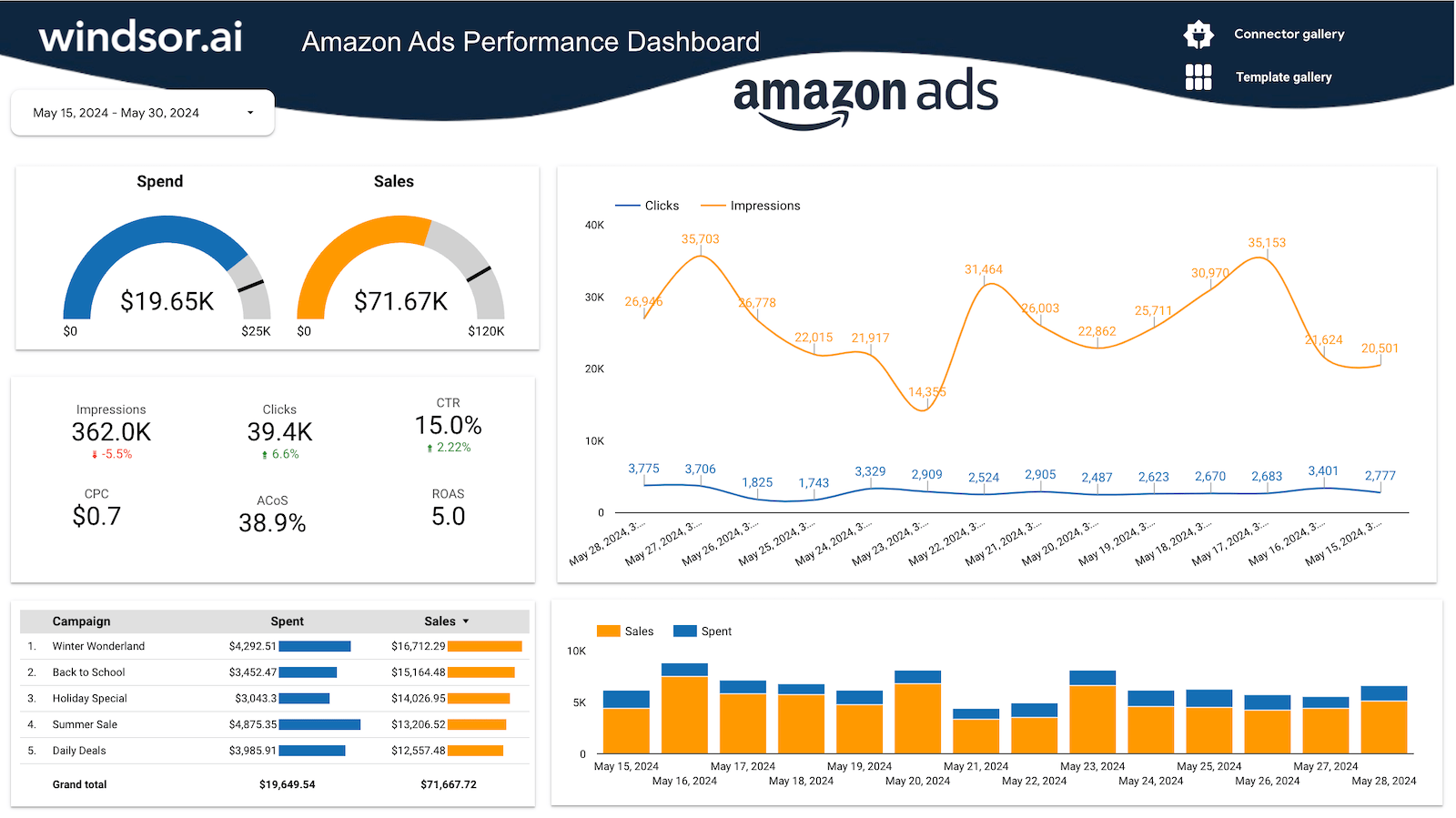
Here’s what they mean:
- Impressions: The number of times your ad was displayed on a page.
- Clicks: The number of times a shopper clicked on your ad.
- Spend: The total amount you have paid for those clicks.
- Sales: The total retail value of your books sold to shoppers who clicked your ad.
- ACOS (Advertising Cost of Sales): The percentage of your sales revenue that you spent on advertising. This is the primary metric for profitability.
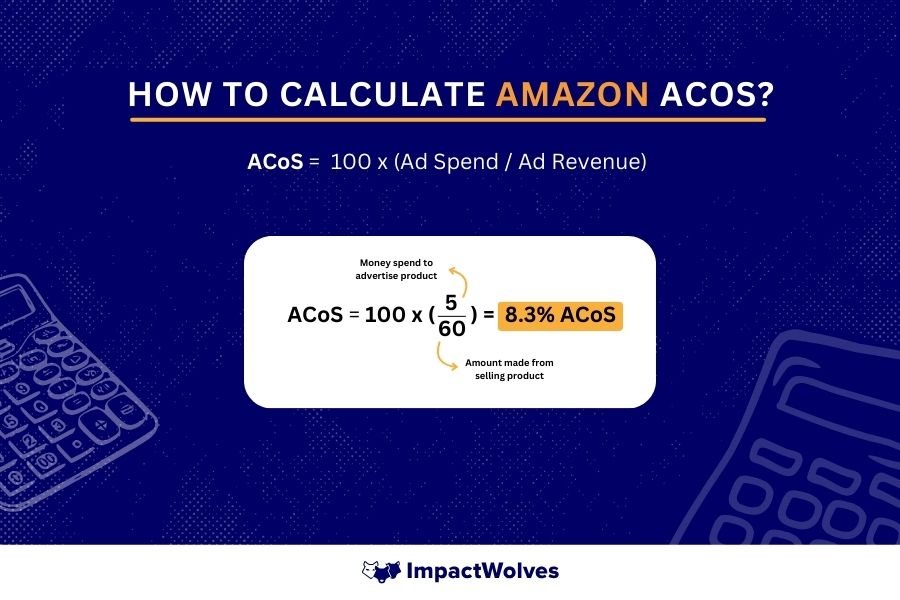
To get a clear video explanation of these essential metrics, please watch the following segment.
My SIMPLE & Profitable Amazon Ads Strategy | Beginner Amazon Ads Tutorial for KDP Authors
The video 'My SIMPLE & Profitable Amazon Ads Strategy' by Ken Fornari provides a clear, concise overview of the most important metrics you need to track.
Watch from 02:48 to 04:18. The presenter gives a great breakdown of Click-Through Rate (CTR), Cost Per Click (CPC), and especially ACOS, which he calls 'the most important' metric for profitability.
As a general rule, an ACOS between 20% and 35% is considered healthy and profitable for most books. Anything significantly higher means you're spending too much to get a sale.
3. A 3-Step Analysis for Your First Adjustments
After your campaign has been running for about 7-14 days, you'll have enough data to perform your first analysis. Don't make adjustments too early; the algorithm needs time.
Your automatic campaign generates a crucial report called the Search Terms Report. This shows you the exact search terms customers used before clicking your ad. This is where you'll find your optimization gold.
To find it:
- Click on your campaign name in the dashboard.
- Click on the ad group name.
- On the left-hand menu, click Search terms.
Now, let's analyze this data using a three-step thought process.
Step 1: Are my ads being seen at all? (Check Impressions)
If you have very low or zero impressions after a week, it means your bid is likely too low to win any ad auctions. Shoppers can't click what they can't see.
- Diagnosis: Bid is too low.
- Action: Increase your bids in small increments (e.g., by $0.10) for the four automatic targeting groups we set up in the last lesson (Close match, Loose match, etc.).
This video explains the logic behind this first critical adjustment.
How to ACTUALLY optimize your KDP ads for maximum profit | Amazon KDP Q&A January 2025
In 'How to ACTUALLY optimize your KDP ads,' Barry KDP explains exactly why you need to increase bids when you see low or no impressions.
Watch from 01:14 to 02:30. Focus on the principle: if you have no impressions, your bid isn't high enough to compete. You need to increase it to start gathering data.
Step 2: Are the right people clicking? (Check Clicks & CTR)
Once you have impressions, the next question is whether the ads are relevant enough to earn clicks. We measure this with Click-Through Rate (CTR), which is Clicks ÷ Impressions.
A high CTR suggests your book cover and title are compelling and relevant to the search term. A very low CTR suggests an irrelevance problem. For example, if your book on "Tech Startups" gets an impression for the search term "free fantasy novels," the CTR will be near zero.
- Diagnosis: The search term is irrelevant and wasting impressions.
- Action: Add the irrelevant search term as a negative keyword. This tells Amazon to stop showing your ad for that specific term.
The following resource explains how to do this and provides a clear rule for when to act.
Amazon Ads Optimization For Authors - 5 Tips to Decrease ...
The article 'Amazon Ads Optimization For Authors' from BookBrush provides actionable tips. We'll focus on how to use negative keywords to stop wasting money.
Read 'Optimization Tip #1: Eliminate Irrelevant Search Terms and ASINs' to see the step-by-step process of adding a negative keyword. Then, read 'Optimization Tip #3' for a useful rule of thumb: consider negating any search term with a CTR below 0.10%.
Step 3: Are the clicks making money? (Check ACOS & Sales)
This is the final and most important question. You need to know which search terms are leading to sales and at what cost. In your Search Terms report, sort the table by Orders to bring the converting terms to the top.
You'll find three main scenarios:
-
Scenario A: The Winner. The search term has 2+ orders and a profitable ACOS (e.g., under 35%).
- Diagnosis: This is a "winning keyword"! It's highly relevant and profitable.
- Action: For now, just make a note of it. In a future lesson, we'll use these winners to build a highly profitable manual campaign.
-
Scenario B: The Over-Spender. The search term has sales, but the ACOS is very high (e.g., 80% or more).
- Diagnosis: The keyword is relevant enough to get sales, but you're paying too much per click to be profitable.
- Action: Reduce your bid for this target. In an automatic campaign, you can't reduce the bid for a single search term, but you can lower the bid on the targeting group it came from (e.g., 'Close match').
-
Scenario C: The Money Pit. The search term has many clicks (e.g., 10-15+) but zero sales.
- Diagnosis: The term seems relevant enough to get clicks, but shoppers are not buying. It's a waste of your budget.
- Action: Add this search term as a negative keyword to stop spending money on it. The BookBrush article you just read covers this in 'Optimization Tip #2'.
This video demonstrates exactly how to find these winning and losing terms in your dashboard.
My SIMPLE & Profitable Amazon Ads Strategy | Beginner Amazon Ads Tutorial for KDP Authors
Let's return to Ken Fornari's video, where he shows how to analyze the search term report and identify winners.
Watch from 14:27 to 17:50. Pay close attention to how he navigates to the 'Search terms' tab and filters by 'Orders'. He explains the criteria for a winning keyword (2+ sales, <30% ACOS) and what to do with keywords that have a high ACOS (lower the bid).
Test your understanding!
You are analyzing your automatic campaign for a book about "Passive Income with AI". After 10 days, you check your Search Terms report and see the following three lines:
-
Search Term: "how to make money with ai"
- Impressions: 2,500
- Clicks: 30
- Spend: $21.00
- Orders: 3
- Sales: $45.00
- ACOS: ?
-
Search Term: "business ideas for 2024"
- Impressions: 500
- Clicks: 12
- Spend: $9.60
- Orders: 0
- Sales: $0.00
- ACOS: -
-
Search Term: "chatgpt prompts"
- Impressions: 4,000
- Clicks: 25
- Spend: $20.00
- Orders: 1
- Sales: $15.00
- ACOS: ?
What is your analysis and what simple action would you take for each?
Show answer
-
Search Term 1 ("how to make money with ai"):
- First, calculate the ACOS: ($21 Spend / $45 Sales) * 100 = 46.7%.
- Analysis: This is a great keyword! It has multiple sales, proving its relevance. However, the ACOS is a bit high. It's an "Over-Spender."
- Action: Don't turn it off. Find which targeting group it belongs to and slightly lower the bid for that group to try and bring the ACOS down into the profitable range.
-
Search Term 2 ("business ideas for 2024"):
- Analysis: This is a "Money Pit." It has received 12 clicks (which is in the 10-15 click threshold) but has resulted in zero sales. You've spent nearly $10 with no return.
- Action: Add "business ideas for 2024" as a negative exact match keyword to stop spending money on it.
-
Search Term 3 ("chatgpt prompts"):
- First, calculate the ACOS: ($20 Spend / $15 Sales) * 100 = 133%.
- Analysis: This keyword has an extremely high ACOS. While it did generate one sale, you spent more than the book's price to get it. This is a clear "Over-Spender."
- Action: Similar to #1, find its targeting group and lower the bid significantly. If it continues to perform poorly after the adjustment, you would consider adding it as a negative keyword in the future.
Conclusion
Congratulations on completing your first advertising analysis! This data-driven process of monitoring and tweaking is the engine of a successful passive income strategy on KDP. You've moved from simply launching an ad to actively managing it for better results.
Key Takeaways:
- Adopt a "Learning Budget" Mindset: Your initial ad spend is an investment in data.
- Analyze After 7-14 Days: Give the algorithm time to work before making changes.
- The Search Terms Report is Key: This is where you find what customers are actually searching for.
- A 3-Step Process: Check for Impressions (visibility), then CTR (relevance), and finally ACOS/Sales (profitability).
- Your Main Actions: Your primary tools for simple adjustments are changing bids and adding negative keywords.
Preview of the Next Lesson:
This process of launching, analyzing, and optimizing ads is a core component of your overall author business. In our next and final module, we'll zoom out to integrate these specific skills into a larger framework. You will learn how to design a repeatable workflow map for creating your books, from the initial idea all the way to a published manuscript, creating a systematic process for your entire author journey.