Recommended resources
The freely available resources this lesson will direct you to.
- How to Prepare for an ERP Implementation Go-Live [Digital Transformation Readiness]www.youtube.com
- How to Implement Enterprise Technology [7 Steps to Implement ERP, HCM, CRM or supply chain software]www.youtube.com
- The Complete Guide to Customer Lifecycle Management: Key CS ...www.planhat.com
- Customer onboarding: The cross-team coordination challengefront.com
Hello, and welcome. This course is a guide to the work around an enterprise deployment: understanding what was promised, coordinating the customer and internal teams, getting data and access working, validating the result, and leaving it supportable after launch. We will develop the detailed playbooks later. First, you need a model for what the whole job is trying to accomplish.
You already have substantial experience with integrations and data work. The less familiar part of this role is that technically correct work can still produce an unsuccessful onboarding. In this lesson, you will distinguish implementation from onboarding and see why the journey from signed contract to useful, sustained operation needs an operating system: a repeatable way to align goals, owners, decisions, evidence, and follow-through.
A working integration is not necessarily an onboarded customer
Imagine that a customer’s files arrive on schedule, records load successfully, and single sign-on lets test users enter the application. Each technical task can be marked complete. Yet the intended analysts may not have permission to see the right records, the customer may dispute the meaning of a mapped field, or nobody may have agreed how sensitive records should be reviewed. The deployment exists; the customer cannot confidently use it for its intended work.
This is the distinction between implementation and customer onboarding. Implementation encompasses the technical and operational work of putting a solution in place. Onboarding includes that work, but asks a wider question: Can this customer begin using the solution for an agreed purpose, with the right people and support in place? Individual user onboarding—helping someone learn the product—is one part of that account-level journey.
The Complete Guide to Customer Lifecycle Management: Key CS ...
Read Planhat’s guide for its distinction between customer onboarding, user onboarding, and implementation. Those distinctions establish what a technical completion checklist can—and cannot—tell you.
Under “What Is Customer Onboarding?”, read “Customer onboarding vs user onboarding,” beginning with the account journey. Then read “Customer onboarding vs implementation,” from the key distinction. Focus on how a working system and a useful customer outcome can come apart.
The guide uses first value to mean an initial result the customer cares about, not merely a completed setup step. In an operational-risk analytics deployment, an appropriate early result might be that authorized users can examine an agreed dataset through a validated workflow. That would show that data, access, interpretation, and usage are coming together. It would not, by itself, prove that the customer has reduced operational risk or that an analytic finding is correct. Those are different claims requiring their own evidence.
Why does the distinction matter so much in enterprise work? Because the outcome depends on decisions and actions distributed across organizations. You may build an ingestion job, but a customer data owner must confirm what the source fields mean. You may configure identity federation, but the customer’s identity team must supply and test its side. You may show a useful result, but an authorized stakeholder must decide whether it meets the agreed purpose. A list of your own engineering tasks cannot represent all those conditions.
Two kinds of progress must meet
A deployment has a technical side and a people side. The technical side includes designing and delivering integrations, mappings, access, and a working environment. The people side includes securing decisions, preparing users, agreeing how workflows will change, and ensuring someone can operate and support the result. Neither side substitutes for the other.
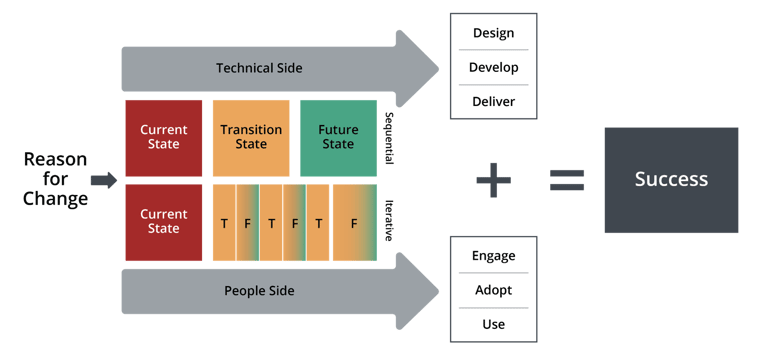
The diagram makes an important point: people do not simply appear at the end to receive a finished system. They help determine what should be built and whether it is usable. A discussion with a data owner may change a mapping; a privacy review may change which fields should be ingested; an early user review may reveal that a technically valid output cannot support the intended workflow.
The image draws the technical side as sequential and the people side as iterative. Treat that as a teaching contrast, not a rigid rule. Engineering also involves revision and retesting. The practical lesson is that delivery is not a handoff from technical work to people work. Both need attention throughout the onboarding.
How to Implement Enterprise Technology [7 Steps to Implement ERP, HCM, CRM or supply chain software]
Watch “How to Implement Enterprise Technology” from Digital Transformation with Eric Kimberling for a broader enterprise-deployment perspective. Although the examples concern enterprise software generally, the distinction between a technical plan and a whole-organization plan applies here.
Watch planning beyond software for the factors that must be considered before configuration begins. Then watch parallel responsibilities for governance, risk management, and organizational change running throughout a rollout. Notice that these are continuing functions, not extra tasks reserved for launch week.
This explains a common source of schedule surprises. A plan may estimate integration work accurately while omitting the time required for the customer to authorize data access, settle an ambiguous definition, or approve a privacy approach. The engineering estimate was not necessarily wrong; the model of delivery was incomplete.
What makes onboarding an operating system?
Here, “operating system” does not mean software or a large bureaucracy. It means a dependable set of rules for how a customer deployment is run. A task list records work to do. An operating system also determines why that work matters, who can decide, what happens when a dependency fails, and how everyone knows the result is ready.
A useful operating system connects five elements:
- An outcome. The customer and delivery team share a clear description of the initial useful result. “Integration configured” names an activity; “authorized users can examine the agreed data through the agreed workflow” describes a condition to verify.
- Accountable ownership. Each important decision and dependency has someone responsible for carrying it through. The onboarding engineer can own the overall delivery without personally owning the customer’s identity system, approving its privacy policy, or deciding its operational definitions.
- A shared picture of reality. Both sides can see what has been confirmed, what remains uncertain, which work is blocked, and which commitments have changed. Private notes and scattered email threads are insufficient if they leave decision-makers with different versions of the project.
- A decision and escalation path. When a field’s meaning is disputed or an approval is delayed, the team knows who can resolve it and when the matter must be raised. Otherwise, unresolved questions quietly become schedule delays or untested assumptions.
- Checks and feedback. Progress is assessed against evidence, not just completed activities. A file arriving is not the same as complete and correctly interpreted data; a successful test login is not the same as appropriate access for intended users. Findings from validation and early use inform what must be corrected.
These elements reinforce one another. An outcome tells you what evidence matters. Evidence reveals gaps. Clear ownership gets those gaps addressed. A decision path prevents them from sitting indefinitely. Shared visibility lets the customer and internal team adjust the plan before a missed milestone becomes a surprise.
This does not require a particular project-management application. A small, well-maintained set of records and a reliable communication rhythm can do the job. Conversely, a sophisticated tool cannot compensate for an undefined goal or an owner who lacks decision authority.
Managing the journey, not just the build
The journey is easier to understand when viewed end to end. It begins before anyone writes an integration: the delivery team must learn what the customer bought and expects. It continues through discovery and implementation, where assumptions are tested and dependencies become concrete. Validation establishes whether the result works for its agreed purpose. Launch introduces real users and real operating conditions. Early support and handoff ensure that the customer is not left with an unexplained system—or with issues known only to its implementer.
Read the following as a map of the whole journey, rather than a template to memorize. Later lessons will examine its stages and control documents in detail.
The Complete Guide to Customer Lifecycle Management: Key CS ...
Return to Planhat’s guide to see how the wider outcome changes the shape of the work. Its process and document examples are useful as a conceptual map; your eventual team may use different names or combine some steps.
In “The customer onboarding and implementation process: 8 steps,” scan the phase table, then read from “Step 1: The sales-to-services handoff,” beginning the eight steps through “Step 8: The services-to-customer-success handover.” Track where customer decisions, approvals, enablement, and post-launch support enter alongside technical delivery. Then, in “What to define before the checklist is useful,” read the prerequisite definitions. Under “Core onboarding deliverables: success plans, playbooks and checklists,” read the document roles. Focus on the different jobs these records perform, rather than on reproducing every document.
Notice the distinction between a playbook and a plan. A playbook is the reusable way of approaching an onboarding: which questions to ask, which conditions to verify, and which transitions need an explicit decision. A plan is the current customer’s version, with its actual scope, owners, dependencies, and dates. Neither is merely a checklist, though both may contain checklists.
For an onboarding engineer, this distinction is especially useful before day one. You can learn a general method without pretending to know a future customer’s systems or your team’s exact processes. The method tells you what must be made visible; discovery supplies the facts.
It also clarifies what end-to-end ownership means. You are responsible for maintaining the coherence of the journey: noticing when a missing approval blocks the data path, when a technical decision changes the customer’s workflow, or when an unresolved defect affects launch readiness. Ownership does not mean silently absorbing every request or making decisions reserved for security, product, or the customer. It means ensuring that the right decision reaches the right owner and that its consequence is reflected in the shared plan.
The test: can the system detect and respond to drift?
A task list tends to answer, “What have we finished?” An operating system must also answer, “Are we still on a credible path to the agreed outcome?”
Suppose the integration is complete, but the customer has not confirmed whether two source codes represent the same type of event. A task-only view may report excellent technical progress. An end-to-end view treats the unconfirmed meaning as a threat to valid results: it identifies the decision owner, keeps the affected mapping provisional, and shows what cannot yet be accepted. The point is not to predict every problem. It is to make new information actionable.
Several signals help reveal whether the operating system is functioning:
- The finish line is intelligible: customer and internal stakeholders can describe what initial useful operation will look like, not just a target launch date.
- Dependencies are visible: work waiting on customer access, decisions, approvals, or internal engineering is distinguishable from work actively in progress.
- Uncertainty is named: an assumption about data meaning or permissions is not presented as a confirmed fact.
- Evidence matches the claim: successful transmission supports a connectivity claim; it does not alone support claims about completeness, correct interpretation, or usefulness.
- The relationship survives surprises: material changes are raised while options still exist, rather than revealed at the deadline.
- Support has continuity: after launch, someone other than the original implementer can understand what was delivered, what remains open, and where issues should go.
Not every onboarding will require the same process weight. A familiar file format and a limited rollout may need lighter coordination than a large migration with sensitive data and several approval groups. The principle stays the same: use enough structure to keep outcomes, dependencies, decisions, and evidence connected. More paperwork is not the objective; fewer hidden gaps are.
Key takeaways
Enterprise onboarding is not a list of technical tasks because its success depends on several connected conditions: a working solution, agreed data meaning, appropriate access, customer decisions, usable workflows, and a supportable transition. Technical implementation is indispensable, but it is only part of the journey to first value.
Think of the onboarding operating system as the repeatable method that keeps those conditions connected. It defines the outcome, makes ownership and uncertainty visible, provides routes for decisions and escalation, and checks progress against evidence. That is how an onboarding engineer can own delivery end to end without pretending to control every team or customer decision.
Next, we will distinguish the responsibilities of the teams involved. That will make the ownership model here more precise: what you should do yourself, what you should coordinate, and what must be decided elsewhere.