Recommended resources
The freely available resources this lesson will direct you to.
Hello! Welcome to the final lessons in our module on Operational Security.
In our last session, we explored browser fingerprinting, a subtle method for tracking you online by creating a unique identifier from your browser's configuration. We saw that even with an anonymized connection via Tor, your browser itself can leak data that compromises your privacy. This highlighted a core OpSec principle: data can be leaked from unexpected places.
Today, we extend that principle from the browser to the files you handle. Every document, image, and video you create, download, or share contains a hidden layer of information called metadata. This data can reveal who you are, where you've been, and what tools you've used, creating a significant risk to your anonymity.
This lesson addresses the security risks of file metadata. We will define what it is, examine the threats it poses, and then demonstrate how to view and, most importantly, strip this information from common file types using tools you'll have available in your Qubes OS environment.
1. What is File Metadata and Why is it a Risk?
File metadata is, quite simply, "data about data." It's the information that a computer, camera, or software application automatically embeds within a file to describe its properties, history, and origin. While often useful for organizing files (e.g., sorting photos by date), it can be a catastrophic OpSec failure if not properly managed.
To see just how severe the consequences can be, let's start with a video that uses a famous real-world example to illustrate the danger.
Scrub your Metadata with THESE Tools
This segment from a video by Naomi Brockwell provides an excellent, non-technical overview of metadata and its risks. It begins with the story of John McAfee's capture, a direct result of a metadata leak.
Please watch the video from the beginning until 04:25. Pay close attention to: The John McAfee story and how location data embedded in a photo led to his capture. The definition of metadata as the 'who, what, when, where, how' of a file. The various scenarios discussed, from journalists protecting sources to the long-term data implications for individuals at protests.
As the video explains, metadata can include a startling amount of sensitive information:
- Images (EXIF data): GPS coordinates, the exact date and time a photo was taken, and the make and model of the camera or phone.
- Documents (PDF, Office): The author's name, company/organization, the software used to create the file, edit history, and creation/modification timestamps.
- Audio/Video: Details about the recording device, software codecs, and project information.
For your goal of maintaining anonymity, the threat is clear. A document you write or a photo you share could be used to link your anonymous persona directly back to your real identity, your location, or the specific computer you used.
2. Inspecting Metadata in a Linux Environment
Before you can remove metadata, you need to be able to see it. Since your secure x230 will be running Qubes OS, which uses Linux-based virtual machines, we will focus on powerful command-line tools.
The "Swiss Army knife" for viewing and editing metadata is a tool called exiftool. It can read and write metadata for an incredible variety of file formats.
Let's look at how to use it. The following images show what exiftool reveals for two different files.
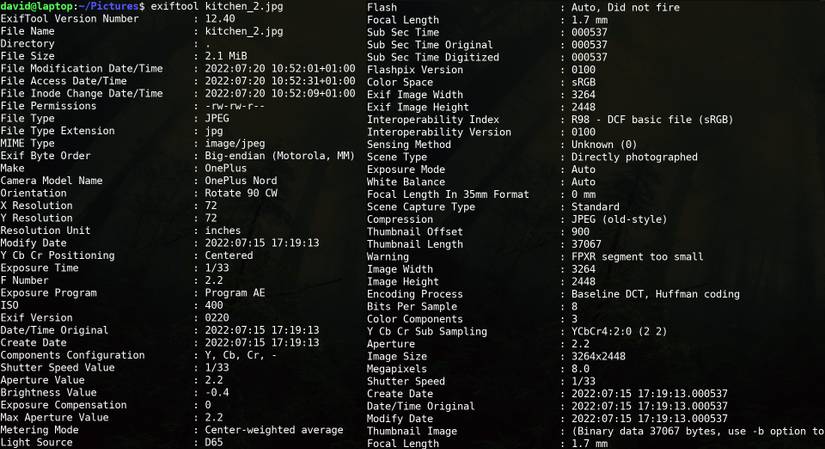
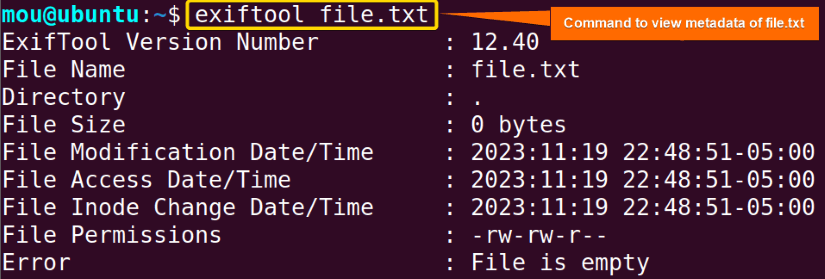
The basic command to view all metadata for a file is straightforward:
exiftool [file_name]
This simple command arms you with the ability to audit any file before you share it, allowing you to see the hidden data it carries.
3. Stripping Metadata from Files
Now for the crucial step: removal. There are several excellent tools for this, each with its own strengths.
A Simple and Effective General-Purpose Tool: mat2
A great starting point is the Metadata Anonymisation Toolkit (mat2). It's designed specifically for this task and supports a wide range of file types, including images, documents, and audio files. It works by creating a new, "clean" copy of the file with the metadata removed.
This short video provides a perfect demonstration of installing and using it on a Debian-based system (like the templates used in Qubes OS).
How to clean metadata from files in Linux
The 'Metadata Anonymisation Toolkit' is a straightforward and effective tool for cleaning files on Linux. The following video from the N-O-D-E channel demonstrates its installation and usage.
Watch the entire video (it's very short). Focus on the simple commands used to check (mat2 -c) and clean (mat2) files and folders.
The basic syntax is simple:
# To install on Debian/Ubuntu-based systems
sudo apt-get install mat2


# To clean a single file (creates a 'cleaned' copy)
mat2 [file_name]
Advanced and Specialized Tools
While mat2 is an excellent first choice, your background in computer science and statistics suggests you'll appreciate knowing the more granular, powerful tools that operate "under the hood." They offer more control, especially for complex file types.
The following article from Baeldung provides a practical guide to using these tools.
Deleting Metadata From Files in Linux - Baeldung
This article, 'Deleting Metadata From Files in Linux,' goes into detail on using specialized command-line tools to strip metadata. It covers the powerful exiftool for general use, exiv2 for images, and ffmpeg for multimedia.
Please read the following sections: All of Section 2, 'Using exiftool', including the crucial subsection 2.1 on the necessity of qpdf for PDFs. Section 3, 'Using exiv2'. Section 4, 'Using ffmpeg'. Focus on understanding the command syntax for removing metadata and, most importantly, the special procedure required to make PDF metadata removal irreversible.
Here is a summary of the key commands for removal:
-
Images, Audio, etc. (using
exiftool):# This command attempts to remove all metadata tags. It overwrites the original file. exiftool -all= [file_name] -
PDFs (a special case): As the article notes,
exiftool's changes to PDFs are reversible. To make the removal permanent, you must perform a two-step process to "flatten" the file. This is a perfect example of the kind of technical nuance vital to good OpSec.# Step 1: Remove the metadata with exiftool exiftool -all= document.pdf # Step 2: Linearize the PDF with qpdf to make the removal irreversible qpdf --linearize document.pdf document.cleaned.pdf -
Video/Audio (using
ffmpeg):ffmpegis a ubiquitous multimedia tool. You can use it to copy the audio and video streams into a new container without the metadata.
# This copies video (-c:v copy) and audio (-c:a copy) streams without re-encoding
# and removes the metadata stream (-map_metadata -1).
ffmpeg -i input.mp4 -c:v copy -c:a copy -map_metadata -1 output.mp4
```
4. Beyond Digital: Physical Metadata
It's important to remember that metadata isn't just a digital problem. As a final point on the pervasiveness of this issue, consider the case of physical documents. The Naomi Brockwell video you watched earlier also touches on the Reality Winner case and the use of nearly invisible tracking dots printed by laser printers.
This serves as a powerful reminder that a robust OpSec model considers the entire lifecycle of information, from its digital creation to its potential physical manifestations.
Conclusion
In this lesson, we have exposed the hidden data within your files and demonstrated how to remove it. This is a fundamental and non-negotiable practice for anyone serious about anonymity and security.
Key Takeaways:
- Files contain hidden metadata that can reveal sensitive information about their origin, author, and history (the "who, what, when, where").
- This metadata poses a significant risk to operational security, as it can be used to de-anonymize you.
- In a Linux environment,
exiftoolis the standard for viewing metadata. - For removal,
mat2is a simple and effective tool. For more control,exiftool(combined withqpdffor PDFs) andffmpegare powerful options. - The core practice: Always scrub metadata from files before sharing them in any context where maintaining your anonymity is a goal.
We have now examined two major sources of data leakage: the browser and the files themselves. In our next and final lesson of this module, we will synthesize these concepts and others to articulate a set of personal OpSec rules to guide your behavior and ensure the technical security of your x230 is not undermined by simple mistakes.