Recommended resources
The freely available resources this lesson will direct you to.
Hello! Last lesson, you used a runtime type check to avoid claiming that a value has a type you cannot verify. This lesson looks at a different kind of claim: when Kotlin code says two values are “the same,” does it mean equal contents or the same object? And can those contents change after you compare them?
These distinctions matter in Android code that passes lists between components or holds them in UI state. By the end, you should be able to predict equality results, identify mutation through an apparently read-only collection, and choose safer designs for state and lookup keys.
Two questions that look similar
Kotlin provides two equality operators:
a == basks whether the values are structurally equal. It is a null-safe check based onequals().a === basks whether both references designate the same object.
The distinction depends partly on the class involved. A regular class inherits an equals() implementation that, by default, treats only the same instance as equal. A data class generates an equals() implementation based on properties in its primary constructor.
class PlainRow(val id: Int)

data class Row(val id: Int, val title: String)

val plainA = PlainRow(1)
val plainB = PlainRow(1)
println(plainA == plainB) // false: PlainRow has no value-based equals()

val rowA = Row(1, "Ready")
val rowB = Row(1, "Ready")
println(rowA == rowB)  // true: equal constructor properties
println(rowA === rowB) // false: different instances

val rowC = rowA
println(rowA === rowC) // true: two references to one instance
Notice that == does not mean “compare every field” for every class. It delegates to that class’s equality behavior. Nor does === tell you whether two independently created objects happen to contain the same data.
Read Kotlin’s Equality documentation for the operator rules. In particular, note why an ordinary class and a data class can give different answers to the same-looking == expression.
Equality | Kotlin Documentation
Kotlin's Equality documentation defines both operators and explains where a class's equals behavior comes from. Read it to establish the rule behind the examples, rather than memorizing their outputs.
In "Structural equality," read the operator rules, from the definition through the discussion of data and non-data classes. Then, in "Referential equality," read the identity explanation and its example, stopping before the note about primitive values. Focus on which operator invokes equals() and which tests object identity.
There is a further data-class boundary worth checking in code review: generated equality uses primary-constructor properties, not arbitrary properties declared in the class body.
data class RowSelection(val id: Int) {
    var selected: Boolean = false
}

val first = RowSelection(1)
val second = RowSelection(1).apply { selected = true }

println(first == second) // true
If selected is part of the value your application needs to compare, this class does not model that requirement correctly. Put it in the primary constructor, or model selection separately. Data classes generate useful equality; they cannot decide which state is meaningful for your feature.
Collection equality compares contents—but contents can move
Collections have their own structural-equality rules. Lists compare equal when they have the same number of structurally equal elements in the same positions. Sets compare equal when they contain equal elements, regardless of iteration order. Maps compare equal when they contain equal key-value pairs, regardless of entry order.
println(listOf(1, 2) == listOf(2, 1)) // false
println(setOf(1, 2) == setOf(2, 1))   // true
println(mapOf("a" to 1, "b" to 2) ==
        mapOf("b" to 2, "a" to 1))     // true
The official Collections overview also shows a particularly revealing list example: changing a person already held in a list changes what a later list comparison observes. Read that example as a comparison at two different times, not as a contradiction in the equality rule.
Collections overview | Kotlin Documentation
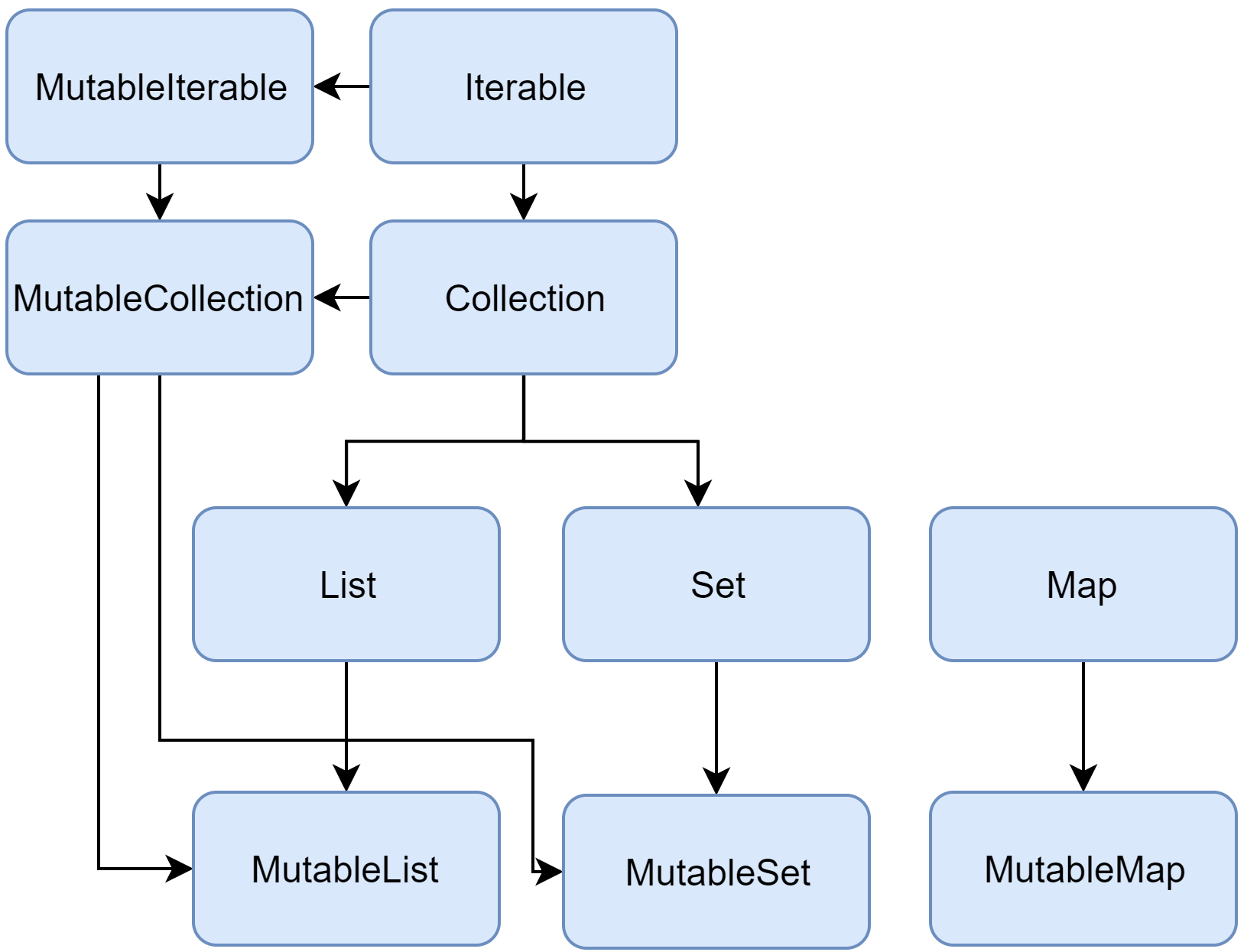
Kotlin's Collections overview connects collection equality to the distinction between read-only and mutable interfaces. Its list example shows why equality results can change when an element changes.
Start in "Collection types": read read-only and mutable interfaces, including the explanation of a mutable collection held in a val. In "List," read list equality and the Person example; continue through the example's second println, just before the "MutableList" paragraph. Finally, in "Set," read set equality, and in "Map," read map equality. Focus on which comparisons depend on order and which do not.
The interface diagram makes one important relationship visible: a MutableList is also a List. Calling something a List restricts the operations available through that reference; it does not prove that nobody else can change the object.
Read-only is not a frozen snapshot
Suppose a screen receives results as List<Row>. The signature prevents the screen from calling add() on that reference. It does not prevent another holder of the underlying MutableList from calling add().
val backing = mutableListOf(Row(1, "Ready"))
val visible: List<Row> = backing

backing.add(Row(2, "Loading"))

println(visible.size) // 2
Likewise, val backing would prevent reassignment of the variable, not mutation of the list it refers to. This is an aliasing problem: multiple references provide access to the same changing object.
Dave Leeds’s Immutable and Persistent Lists clip demonstrates why a read-only parameter alone cannot guarantee unchanged contents, then shows a defensive copy used while another part of a program changes the original list. The clip uses coroutines to make the timing visible; you do not need coroutine details yet to understand the shared-list bug.
Immutable and Persistent Lists - TypeAlias Show Clip
Watch Dave Leeds's "Immutable and Persistent Lists" for the distinction between a read-only interface and a stable collection, followed by a concrete defensive-copy example.
Watch the interface distinction: a function accepting a read-only list has no guarantee that another holder will leave it unchanged. Then skip to the mutation example: observe what happens when a list changes during iteration and why iterating a separate copy avoids that particular interference. Focus on ownership of the original and the copy, rather than the coroutine syntax.
For a container-level snapshot, you can copy an incoming mutable list before storing it:
val received: MutableList<Row> = mutableListOf(Row(1, "Ready"))
val snapshot: List<Row> = received.toList()

received.add(Row(2, "Loading"))
println(snapshot.size) // 1
That copy is shallow. It separates the list containers, but it does not clone their elements. Here Row has read-only Int and String properties, so the example has no mutable element state to worry about. If a row instead contains a mutable object or list, both containers can still observe changes to that shared element. A reliable snapshot needs value-like elements, or deliberate copying of mutable nested data as well.
Why a data-class copy() may not fix shared state
A common Android state model is a data class containing a list. Its generated copy() creates a new state object, but retains references to properties you did not replace:
data class SearchUiState(val results: List<Row>)

val backing = mutableListOf(Row(1, "Ready"))
val oldState = SearchUiState(backing)
val nextState = oldState.copy()

backing.add(Row(2, "New"))

println(oldState.results === nextState.results) // true
println(oldState.results.size)            // 2
println(oldState == nextState)            // true
Despite the names, oldState no longer represents the old results. Both states refer to the same list, and comparing them after the mutation finds equal contents. A UI mechanism that relies on distinct state values cannot treat this mutation as a dependable state update.
For state that represents successive values, keep mutable builders private and publish separate snapshots or new lists:
val initial = SearchUiState(listOf(Row(1, "Ready")))
val updated = initial.copy(
    results = initial.results + Row(2, "New")
)

println(initial.results.size) // 1
println(updated.results.size) // 2
println(initial == updated)    // false
The important guarantee is not merely “call copy().” It is that earlier state remains unchanged and later state contains the intended new value. For large or frequently updated collections, copying cost also becomes a design consideration; the correctness requirement comes first.
When mutation breaks lookups, not just comparisons
Maps and sets introduce another consequence of equality. Hash-based collections use hashCode() as well as equals() to locate keys or elements. A data class generates both from its primary-constructor properties. If you mutate one of those properties after using the object as a key, you can change where a lookup expects to find it.
data class ItemKey(var id: Int)

val key = ItemKey(7)
val cache = mutableMapOf(key to "cached")

key.id = 8
println(cache[ItemKey(8)]) // Lookup may fail, despite an equal-looking key
The map placed the entry using the key’s earlier hash. Changing id does not relocate that entry. The same hazard applies to a mutable object stored in a hash-based set. Prefer keys whose equality-relevant properties cannot change while they are stored:
data class ItemKey(val id: Int)
This is more serious than getting an unexpected == result: a lookup can fail even though inspecting the stored object makes the key appear correct.
One final comparison trap is an array. Unlike lists, two separately created arrays are not compared element-by-element with ==; use contentEquals() when that is the intended question:
val left = arrayOf(1, 2)
val right = arrayOf(1, 2)

println(left == right)               // false
println(left.contentEquals(right))   // true
When diagnosing an equality bug, identify the type and its equality implementation before assuming that visually identical contents imply ==.
Key takeaways
Use == to ask for the type’s defined value equality and === to ask whether two references designate one object. A data class’s generated equality considers its primary-constructor properties; collection equality considers elements or entries according to the collection type. Neither a List reference, a val, nor a data-class copy() guarantees that shared mutable data stays unchanged. Keep published state stable, and avoid mutable equality-relevant map keys and set elements.
This completes the Kotlin equality and mutation foundation. Next, you’ll move into Gradle configuration, where shared dependency versions become an explicit part of a maintainable Android build.