Recommended resources
The freely available resources this lesson will direct you to.
Hello! Last time, we gave a Reel a clear target viewer, one message the footage can support, and a desired viewer action. That brief tells your future AI-assisted editor what the video should accomplish. Today we’ll look at how a short video can accomplish it: by moving from a hook through setup and useful material to a payoff, with an optional loop at the end.
These are jobs that moments in the video perform, not five effects to add in DaVinci Resolve. Learning to tell them apart will help you judge an AI-generated edit plan before it becomes a timeline.
A hook promises; a payoff delivers
Imagine the product-demo Reel from the previous lesson. Its intended viewer wants to film with a phone while keeping both hands free. An opening shot of someone struggling to hold the phone and handle the product could give that viewer a reason to stop scrolling. But stopping is only the beginning: the Reel must then show the promised solution.
Watch Logan Smith’s explanation of the relationship between an opening and its resolution. The examples are from different kinds of Shorts; focus on the function of each moment rather than copying their style.
How to get retention SO HIGH your shorts always go viral
Watch “How to get retention SO HIGH your shorts always go viral” by Logan Smith for its account of how a hook creates an expectation and a payoff satisfies it. Treat the title’s claim about virality as promotion, not a guaranteed outcome.
In hook and payoff, notice that a premise can be conveyed through images and on-screen text, not only speech. Then watch the middle for what keeps a viewer interested between those points. In the resolution, focus on the risk of building an expectation that the ending does not meet.
A hook is the opening reason to keep watching. It may pose a question, show a problem, reveal an intriguing result, or begin in the middle of an action. It should point toward the Reel’s actual message. “Watch this incredible transformation!” would be a poor hook for footage that shows only an ordinary setup; it promises more than the source can deliver.
A payoff is the moment that fulfils the hook’s central promise. If the opening asks, “How can I keep my phone in place while using both hands?”, the payoff might be a clear view of the demonstrated stand holding the phone upright during the task. The payoff is not necessarily a spoken conclusion. It can be a visible result, the answer to a question, or the outcome of a small story.
The relationship matters more than a prescribed number of seconds between them. You can even show a glimpse of the result in the hook and still have a payoff later: the viewer may now be watching to understand how that result was achieved. What you cannot do is promise a result, withhold all useful information, and finish without showing it.
Setup and value beats do different work
There is usually a gap between attracting attention and delivering the final result. Two kinds of material can fill it, but they should not be confused.
The setup supplies the minimum context needed to understand what follows. It might identify the problem, the people involved, or a constraint that makes the result meaningful. In our product example, “I need both hands to demonstrate this” is setup. A long account of where the stand was purchased probably is not. Sometimes the opening image already supplies enough context, and a separate setup line is unnecessary.
A value beat gives the viewer something useful or meaningful during the Reel. In a tutorial, it might show a step. In a product demonstration, it might show how the stand is positioned. In an interview excerpt, it could be a specific insight or revealing example. In a story, it could be a development that changes our understanding of what is happening. A value beat does more than say “wait for the end”: it advances the message.
Read the short framework in Stratboost AI’s YouTube Shorts Script Template. It names the middle “value” and distinguishes it from both setup and the final payoff.
YouTube Shorts Script Template: 30-Second Hooks & Examples
Read Stratboost AI’s simple framework to compare the jobs of setup, value, and payoff. Use it as a way to diagnose a draft, not a script that every Reel must follow word for word.
Under “The Simple YouTube Shorts Script Framework,” start with the sentence introducing a clear, useful Short. Read the framework and explanation, stopping before “Best YouTube Shorts Hook Formulas.” Notice that the value portion can be a step, lesson, example, demonstration, or transformation.
Here is one possible reading of our hypothetical stand footage. These are story functions, not verified descriptions of recordings you have supplied:
| Moment in the proposed Reel | Its job |
|---|---|
| Someone tries to hold the phone while using both hands | Hook: makes the problem immediately recognizable |
| A brief view establishes that they are filming a product demonstration | Setup: explains why the problem matters |
| They position the stand and put the phone in it | Value beat: shows a useful part of the solution |
| The demonstration proceeds with both hands free and the phone upright | Payoff: shows the promised result |
Notice how close the value beat and payoff can be. The value beat answers “What useful progress am I seeing?” The payoff answers “Did the opening’s promise come true?” One shot might perform both jobs, especially in a very short Reel. The labels help you understand the edit; they do not require an AI system to insert five separate clips.
This framework also travels beyond product footage. For a Reel cut from a longer interview, the hook might be a speaker saying, “We nearly lost the whole project because of one folder.” The setup identifies which project they mean. A value beat explains the file-handling mistake; the payoff reveals the simple change they made. If the extracted interview never contains that change, the proposed hook needs revising. Captions and fast cuts cannot supply a missing answer.
A loop is a closing choice, not a substitute for an ending
The word loop is used in two related ways that are easy to mix up.
An open loop is the unanswered question or expectation a hook creates: “How did they solve that?” A closing loop, as we’ll use the term here, is an ending that connects back to the opening. It may explicitly answer the first question or make the final image flow naturally into the first, encouraging a replay. The essential requirement is closure. Seamless replay is optional.
Read Kineclip’s discussion of the close and its compact four-part structure. Its “context” corresponds roughly to our setup; its broad “payoff” section includes useful material that we are separating into value beats and a final payoff.
How to Write Viral Short-Form Video Scripts (2026)
Read Kineclip’s explanation of a loop to see why an ending can refer back to an opening without adding a new topic. Its proposed structure is one model, not a requirement that every Reel loop or become “viral.”
In “The close: loop it, then ask softly,” begin where the author discusses how an ending feels complete. Read the close and structure, continuing through the numbered list in “A repeatable structure: hook, context, payoff, loop.” Pay particular attention to the difference between answering the opening question and inviting a viewer action.
Suppose the stand Reel opens with the phone wobbling in someone’s hand. After the demonstration delivers its payoff, it could end on a steady phone shot that visually contrasts with that opening. That reference back is a loop. An alternative might end as soon as the result is clear, with no special loop at all. Either can make a complete Reel.
A call to action (CTA) is different: it asks the viewer to do something, such as save the setup for a future shoot. It communicates the desired action from your brief; it does not answer the hook. You might include a fitting CTA after or alongside the payoff, omit it, or combine it with a natural closing line. Do not let “save this” replace the promised demonstration.
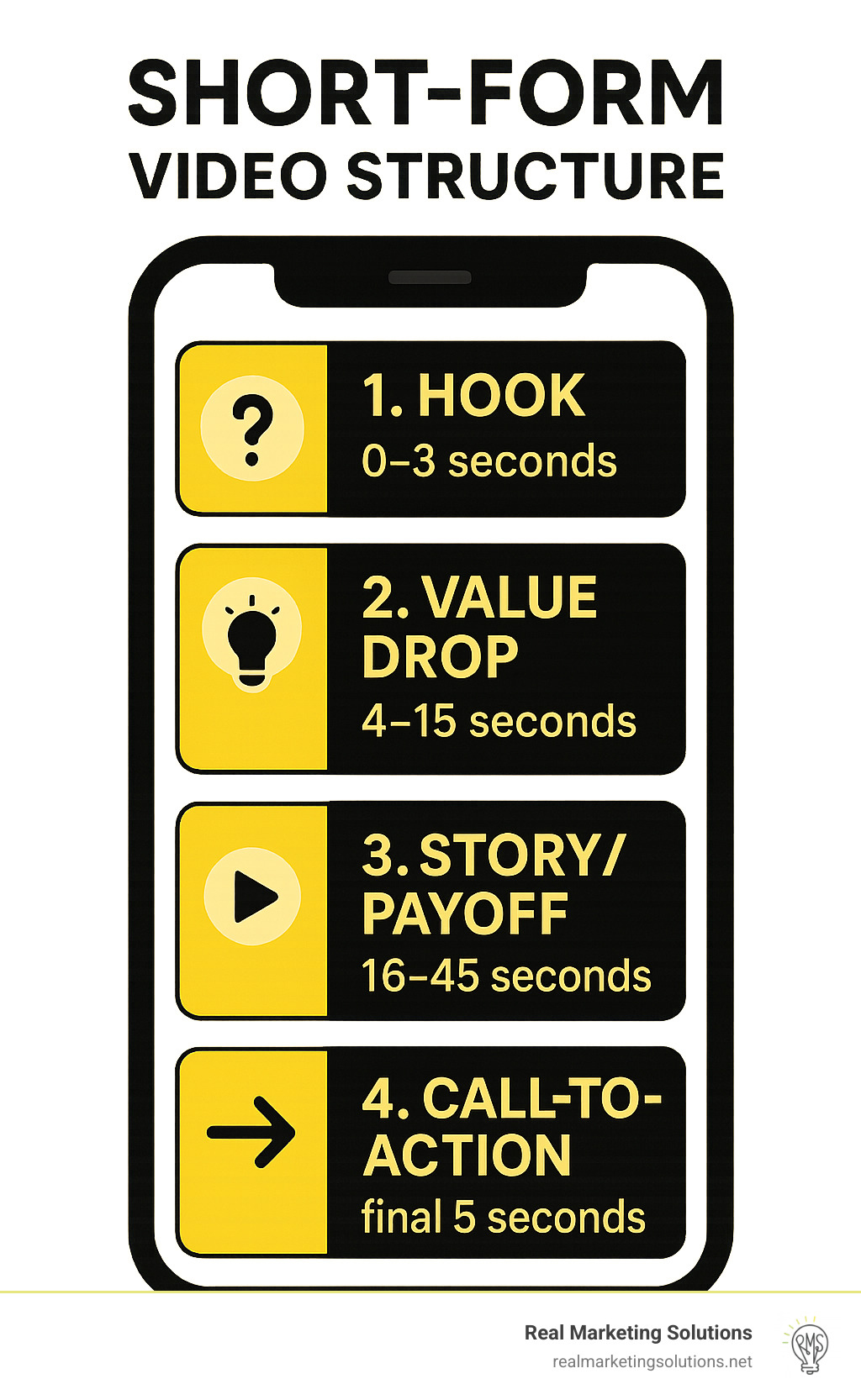
The provided short-form structure image is useful for seeing another common model, but its time ranges are suggestions rather than universal rules. It groups the material into a hook, a “value drop,” a story/payoff, and a CTA; it does not show setup or a loop as separate parts.
What this means for an AI-assisted edit
When your system eventually proposes a Reel, these labels can make its plan easier to inspect. Instead of accepting “here is an engaging 30-second video,” you can ask what each selected source moment contributes: Does the opening promise something the footage supports? Is there just enough setup? Does the middle provide value rather than stall? Does the payoff actually arrive? Does the ending close the idea?
The system should be allowed to say “no suitable payoff found.” That is more useful than inventing a claim, adding unrelated stock footage, or using a dramatic hook that the available material cannot justify. Equally, it need not force a separate setup, a loop, or a CTA into footage that works better without them. The viewer, single message, and desired action from your brief remain the criteria for those decisions.
Takeaways
A hook earns initial attention by creating a relevant expectation. Setup supplies necessary context; value beats give the viewer meaningful progress; and the payoff fulfils the opening promise. A loop can connect the ending back to the beginning, but a complete Reel does not require seamless repetition. A CTA asks for an action and should never stand in for the payoff.
Next, we’ll examine a reference Reel beat by beat—looking at its visuals, audio, captions, and pacing—to see how these story functions appear in an actual edit.