Recommended resources
The freely available resources this lesson will direct you to.
Hello. In the previous lesson, you separated permission to deploy an agent from permission to use its remote-access features. You also drafted boundaries for user notice, session consent, and privacy. Now those decisions need pass-or-fail tests. A policy that says “remote access is audited,” for example, is not yet a test: you must specify which action to perform, what record to expect, and where someone will check it.
This lesson defines acceptance criteria for four parts of your planned Windows RMM deployment: enrollment, remote access, auditing, and agent removal. The examples use a 100-PC target and a 10-day rollout goal. Treat the numbers and time limits below as proposed criteria to approve before the pilot—not as claims that MeshCentral already meets them. Allow about 40 minutes, including the short video segments and time to adapt the criteria to your policy record.
Make every criterion observable
An acceptance criterion is a statement that an independent tester can mark pass, fail, or not yet tested. It needs four elements:
- Scope: Which approved devices, users, and actions are covered?
- Test: What will the tester do, and under what conditions?
- Threshold: What result counts as a pass, and by when?
- Evidence: What record will show the result?
Consider “all computers have the agent.” Does “have” mean the installer ran, the Windows service exists, or the device connected to the correct server? An installer can report success while an agent cannot connect. A device can appear in a console even though its service has since stopped. For acceptance, enrolled should mean an approved device has the expected agent installed, is assigned to the intended device group, has connected to the approved server, and can reconnect after a restart.
Keep the denominator explicit. If the approved target is 100 PCs, the day-10 enrollment measure is verified enrolled PCs out of those 100 approved PCs. A powered-off PC is not silently removed from the target. It is recorded as an exception with an owner and a follow-up date. That makes progress visible without presenting an incomplete rollout as complete.
Use a small acceptance register with columns for the criterion, test device or role, expected result, evidence location, tester, date, and status. Your earlier policy record determines what is permitted; this register determines whether the planned setup enforces and demonstrates it.
Enrollment: verify identity and persistence, not just an installer message
For a pilot, choose five approved PCs representing the Windows endpoint groups you intend to manage. Five is a practical proposed sample, not a substitute for checking the full rollout. Record each PC’s approved asset identity, intended MeshCentral device group, expected server name, and agent package identity. Later lessons will cover generating and deploying that package; here you are deciding what the pilot must prove.
The historical Mesh Agent installer image shows a useful limitation of visual checks:

A proposed pilot enrollment pass is: all five PCs show the expected Windows agent service, appear exactly once in the intended console group, connect to the approved internal server, and reconnect within 15 minutes after a planned PC restart. Check the server identity and group in the console and agent information available in the pilot; do not infer them solely from the installer window. Record the service state, console observation, and restart times for each PC. If 15 minutes is unsuitable for your environment, agree on another limit before testing.
For the rollout, a clear day-10 target is 100 verified enrolled PCs out of 100 approved PCs. Report the separate counts of verified, failed, offline or unavailable, and not yet targeted PCs; they must add up to the approved target. If one PC is unavailable, the target has not passed, even if its exception is properly documented. Approval to extend the deadline is a separate decision, not a change to the historical result.
A quiet installation can pass these checks while still failing the earlier user-notification policy. Include evidence that the approved advance notice was issued, and verify that the agent is identifiable as an installed Windows service. “Silent” should describe the installation interaction, not conceal management from users or administrators.
Remote access: test allowed and denied behavior
An online agent makes several capabilities possible, but it does not tell you which ones an operator may use. MeshCentral Assistant provides a helpful comparison: the video distinguishes its user-requested support workflow from the standard background agent. Assistant behavior is not evidence that a standard agent has the same consent defaults.
Watch “MeshCentral - Assistant” from the MeshCentral channel to distinguish persistent agent access, local session visibility, and consent. Use it to design tests, not to assume your eventual agent configuration behaves identically.
Start with agent versus Assistant for the difference in purpose. In session visibility, notice what the local user can see about terminal and file sessions. Then watch Assistant consent: this is the Assistant’s always-connected tray mode, not a test of consent on the standard agent.
Turn your previous policy’s attended desktop default into a test on an occupied pilot PC. With a permitted support operator and an explained support reason, attempt a desktop session. A proposed pass requires the user to receive the configured request, identify that access is being requested, and accept before the operator can view or control the desktop. Repeat the attempt with the user declining: no desktop access should begin. Record both outcomes, including what the user saw and what the operator saw. Test notification of an active session and its end separately from the acceptance prompt; they are different behaviors.
Next, test a limited operator account against an approved pilot PC and one outside its permitted group. It should be able to perform only the capabilities approved for its role and device group. An attempted disallowed session must be blocked. “The operator knows not to click it” is not a permission control.
Desktop, terminal, and files need separate checks. A desktop prompt does not prove that terminal commands or file transfers require the same approval. For each permitted capability, specify whether your policy requires a user prompt, an active-session notification, a documented support reason, or a separate approval. Then attempt the capability with the appropriate test account and observe the result. If unattended access remains marked needs decision in your policy record, do not count a successful unattended connection as a pass; leave that criterion unapproved until its scope and safeguards are decided.
This gives remote-access acceptance two sides: authorized support works as approved, and unauthorized access is prevented. Both are necessary.
Auditing: compare actions with records
An audit criterion should start with a small list of known actions and ask whether each produces the record you need. The historical MeshCentral events image illustrates device, user, and broader event views, including details opened from an event:
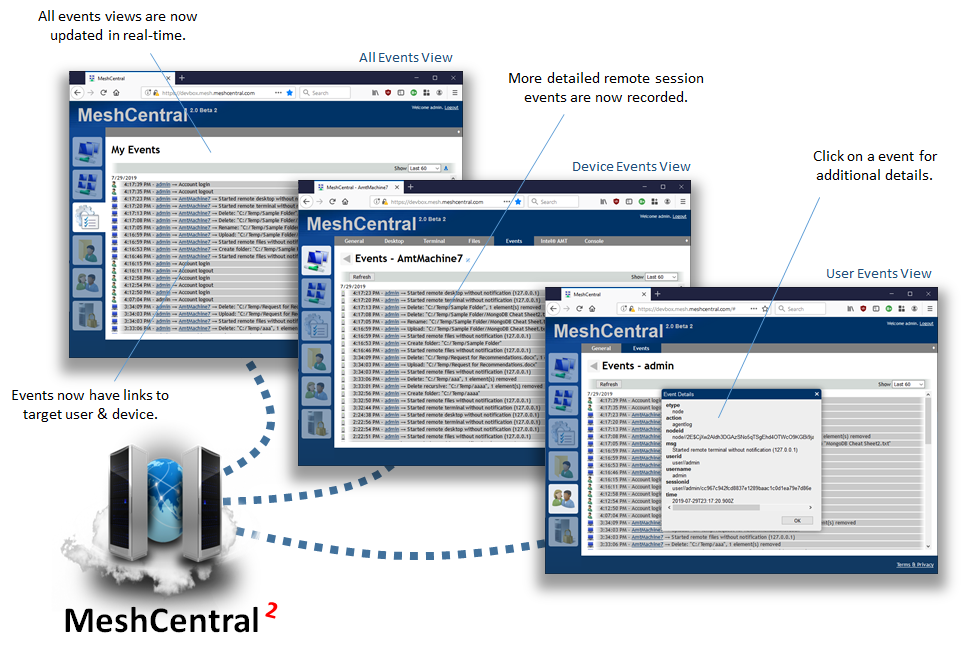
The Assistant video also demonstrates an events view with connection, disconnection, and file-transfer activity. Check your own server rather than assuming the same records or detail in every version and configuration.
Return to “MeshCentral - Assistant” from MeshCentral for its brief demonstration of the events view. It suggests actions worth testing, rather than guaranteeing a complete audit trail for a standard-agent deployment.
Watch event viewing. Note the connection and file-transfer events the presenter describes, then distinguish those event types from details the video does not demonstrate, such as the contents of a command or file.
For the pilot, arrange a permitted desktop session, a permitted terminal session, and a test-file transfer only if your approved policy allows each action. After each action, look for a server-side event tied to the correct operator, device, action or session type, and time. Check that session start and end are distinguishable where required by your policy. A practical proposed threshold is that every deliberately performed pilot action has its required event available for review within five minutes. Agree on how you will compare timestamps if the endpoint, server, and reviewer display different time zones.
Also check an attempted action by a limited account. If your policy requires denied attempts to be recorded, make that an explicit test; do not assume the events view contains them. Compare audit entries with support-request records so an authorized reviewer can establish why access occurred. MeshCentral event entries should not be treated as a transcript of every command, screen interaction, or file’s contents. Where the policy needs information the product does not record, document an approved supplementary record or change the requirement before declaring a pass.
Preserve pilot evidence long enough for the acceptance review, with access limited to authorized reviewers. The longer-term retention period belongs to the policy decision identified last lesson.
Removal: prove that management access actually ends
Agent removal is more than deleting a device from a console list. A deleted entry does not prove the Windows service stopped, and a removed service may be reinstalled by an active deployment policy at the next startup. Design the removal test around both risks.
Use an authorized pilot PC that you can restart. Before removal, confirm the approved deployment mechanism will not immediately reinstall the agent on that PC; record how the pilot exception was applied. Follow the approved uninstall process, then check that:
- The Windows agent service and installed agent are absent, rather than merely stopped.
- The PC no longer establishes an agent connection to the MeshCentral server.
- A restart does not bring the agent back.
- The console reflects that the endpoint is no longer managed; any remaining offline or historical entry is identified as such.
- Server-side audit records needed for the review remain available under the approved retention rule.
A proposed pass is that these checks succeed within 15 minutes of removal and again after one restart, while the PC is powered on and can reach the server. Keep the uninstall result and service and console observations as evidence. A PC that is offline cannot pass a no-reconnection check merely because it appears disconnected; test it when network access is available.
Make removal part of acceptance from the beginning. It protects the organization’s ability to end support for a PC, correct an enrollment error, or decommission the service without leaving an unexpected remote-access agent behind.
An acceptance record you can carry into the pilot
The following compact version brings the proposed thresholds together. Each “pass” still needs dated evidence and an identified tester.
| Area | Proposed pass condition | Evidence to retain |
|---|---|---|
| Pilot enrollment | Five approved PCs have the expected service, server connection, and group assignment; each reconnects within 15 minutes of restart. | Asset-to-console comparison, service check, connection and restart times. |
| Day-10 enrollment | 100 of 100 approved PCs meet the verified-enrollment definition; any shortfall is reported as a shortfall. | Approved target list and reconciled status counts. |
| Remote access | Permitted sessions follow the approved consent and notification rules; a declined desktop request and out-of-scope role attempts grant no access. | Tester observations from the user and operator sides, role and device-group test results. |
| Auditing | Every required pilot action has a reviewable record with the policy-required details within five minutes, or a specifically approved supplementary record. | Action list, event details, timestamps, linked support reasons. |
| Removal | Service and connection end, restart does not restore the agent, and retained audit evidence remains available. | Uninstall result, post-removal and post-restart checks, console observation. |
These are proposals for approval, not automatic product guarantees. If a pilot fails, keep the failed result and decide whether to correct the setup, revise an impractical threshold with approval, or stop the rollout. Do not quietly redefine “pass” after seeing the outcome.
Key takeaways
A measurable RMM acceptance criterion names the approved scope, a repeatable test, a threshold, and evidence. Enrollment requires correct identity and reconnection, not just installer success. Remote access must work for permitted roles and fail for prohibited attempts. Auditing must be checked against actions actually performed, without assuming that events capture every detail. Removal must end the agent’s connection and survive a restart without redeployment.
Keep the proposed register alongside your policy record, marking decisions that still need approval. Next, you will inventory the server, directory, network, DNS, and Windows endpoint groups that these tests will depend on.