Recommended resources
The freely available resources this lesson will direct you to.
Hello. Last lesson identified possible server machines and the 100 approved PCs they would manage. Now you need to choose one Windows host for MeshCentral. The decision is not just whether MeshCentral can run on it; it is whether the machine’s existing role makes it a sensible place for a service that administrators and endpoint agents will rely on.
By the end of this lesson, you should have either a selected host with a recorded reason, or a clear request for a dedicated Windows VM or machine. Allow about 35–40 minutes, including the read-only checks below. Do not install MeshCentral or change server settings yet.
Choose a host, not an endpoint
MeshCentral’s documentation describes the management server as a PC or virtual machine with sufficient computing, storage, and reliable network components. That gives you flexibility, but it does not mean an ordinary staff PC is a good production server.
MeshCentral Guide - MeshCentral Documentation
Read the MeshCentral documentation’s description of what can serve as a management server. It establishes the basic host requirement without prescribing a particular Windows machine.
In Introduction, begin with the sentence about setting up a management server on a local network. Read the server description, stopping before the sentence beginning “Whilst there are many configurations available.” Focus on the distinction between can host the software and can support reliable management.
The diagram makes the host’s role concrete: the browser console and managed devices depend on the server between them. For your deployment, those connections must work across the approved local network ranges identified in the inventory; the diagram does not imply that the server needs internet exposure.
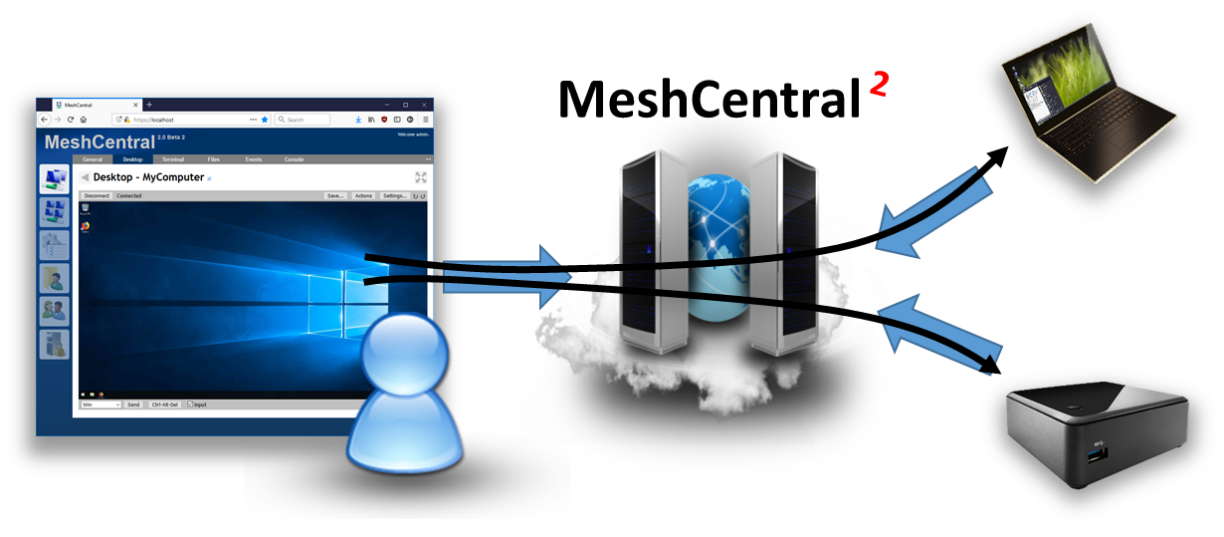
Here, dedicated means that the Windows installation—physical machine or VM—is assigned to MeshCentral rather than also carrying an unrelated critical workload. A dedicated VM can share physical hardware with other VMs; its guest operating system should have a clear purpose, owner, and maintenance plan.
For this approximately 100-PC rollout, prefer an always-on, supported Windows Server guest or physical server. A Windows workstation might run a test installation, but a staff workstation subject to sign-out, sleep, relocation, or routine replacement is a poor choice for the production service.
Check what each candidate already does
Use the candidate list from the previous lesson. Before choosing, confirm both the Windows role and the operational role of each machine. They are not always the same: Windows may identify a machine as a member server while its owner knows it runs a critical business application.
On each candidate where you have permission to run read-only checks, open PowerShell and collect:
Get-CimInstance Win32_OperatingSystem |
  Select-Object Caption, Version, LastBootUpTime

Get-CimInstance Win32_ComputerSystem |
  Select-Object Name, Domain, PartOfDomain, DomainRole, Manufacturer, Model
Caption identifies the Windows edition; LastBootUpTime is a useful observation, not proof of reliable availability. DomainRole helps identify the machine’s directory role:
4or5: domain controller. Do not select it for this deployment. Keep remote-management service administration and maintenance separate from Active Directory.2or3: Windows server, standalone or domain member respectively. Continue checking its other duties.0or1: workstation, standalone or domain member respectively. Treat it as a test candidate rather than the preferred production host.
On Windows Server, this additional command can show installed server roles:
Get-WindowsFeature |
  Where-Object { $_.Installed -and $_.FeatureType -eq 'Role' } |
  Select-Object DisplayName, Name
If Get-WindowsFeature is unavailable, do not treat that as evidence that no roles exist; it is a Windows Server management command. In all cases, ask the machine’s responsible administrator what applications, scheduled jobs, shared storage, and infrastructure services it provides. Command output alone will not reveal every dependency.
Reject or defer a candidate if it is a domain controller, a physical virtualization host you would have to install MeshCentral directly onto, or a server whose existing critical workload has no approved capacity or maintenance allowance. Also be cautious about adding MeshCentral to an existing file, database, backup, or application server. The issue is not that these combinations can never work; it is that an RMM outage, update, or security incident would then be coupled to another important service.
Verify that the candidate can stay available
MeshCentral is relatively lightweight, but “lightweight” is not a workload guarantee for a particular Windows host. The official quickstart gives a small-platform example for managing hundreds of devices; it does not certify that every small or already-busy Windows machine will handle your mix of agents and remote sessions.
Quickstart - MeshCentral Documentation
Read the quickstart’s scaling note to calibrate the decision: raw machine size is only one consideration when selecting a dependable host.
In Database and Scaling Notes, read the database and hardware notes, starting at the Database bullet and ending with the Hardware bullet’s small-server example. The example concerns a Linux platform, so do not turn it into a Windows sizing requirement. Leave the detailed capacity and database decisions for later lessons.
For each remaining candidate, verify these practical conditions with its owner:
- Availability: Will it remain powered on during the hours when support is needed? If it is a VM, is its guest kept running rather than routinely paused or decommissioned?
- Control: Can an authorized administrator install, update, restart, and troubleshoot MeshCentral without disrupting a different critical service?
- Network placement: Can the host use a stable internal address and name reachable from the approved endpoint and administrator ranges? Record uncertainty; you will configure and test connectivity later.
- Workload headroom: Is the machine already under obvious CPU, memory, or disk pressure? Record what you observe, but postpone numerical capacity and backup estimates until the next lesson.
- Ownership: Who approves maintenance and responds if the host is unavailable? A technically suitable machine without an operational owner is not deployment-ready.
These are selection checks, not configuration instructions. In particular, do not open firewall ports, change DNS, or join or remove a machine from the domain to make a candidate appear suitable.
Make a decision you can defend
A short decision record prevents the team from rediscovering the same constraints midway through the 10-day rollout. Use one row per candidate:
| Candidate | Existing role and evidence | Availability and owner | Decision |
|---|---|---|---|
| Dedicated Windows VM | Windows edition and domain role checked; no other assigned service confirmed | Always-on plan and maintenance owner confirmed | Select, subject to capacity check |
| Domain controller | Domain role confirmed | Critical directory service | Reject |
| Shared application server | Application owner reports an existing critical workload | Maintenance conflict unresolved | Defer |
Replace the example rows with your actual observations, and label anything still proposed or unverified. Your selected host should be a dedicated Windows installation, have an identified owner, be capable of remaining available, and have a plausible path to the approved local networks. If no candidate meets those conditions, the correct outcome is “request a dedicated Windows VM or machine”—not silently repurpose a domain controller or busy workstation to meet the deadline.
You are ready to move on when another authorized administrator can identify the chosen machine, explain why its current role is appropriate, and see any remaining capacity or network checks that must be resolved before installation.
Key takeaways
MeshCentral can run on different kinds of computers, but your production choice should be a dedicated, reliably available Windows host with clear administrative ownership. Check its actual Windows and operational roles; exclude domain controllers and avoid coupling RMM to unrelated critical services. Record the decision and its unresolved assumptions rather than installing first and investigating later.
Next, you will turn this role-based choice into a capacity estimate for roughly 100 endpoints, including processing, memory, storage, and backups.