Recommended resources
The freely available resources this lesson will direct you to.
Welcome to the first lesson. This course will build toward an asynchronous native media player, but the first step is architectural: setting up a Rust package so the reusable player logic is separate from the executable that launches it.
In this lesson, you will create one Cargo package with two targets: a library crate for the player’s reusable code and a binary crate for the application entry point. This separation will make later async code easier to test, reuse, and evolve without turning main.rs into the entire program.
One package, two crates
Rust uses several related terms that are easy to blur together:
- A package is the unit managed by Cargo. It has a
Cargo.tomlmanifest. - A crate is a compilation unit. A crate is either a library or an executable binary.
- A target is Cargo’s term for a source entry point that it can compile into a crate.
- A module organizes code inside a crate.
- A workspace groups multiple related packages under a shared top-level configuration.
For this player, begin with one package, not a workspace. That package will contain:
- One library crate, rooted at
src/lib.rs, containing player-facing types and behavior. - One binary crate, rooted at
src/main.rs, containingfn main()and later the application runtime setup.
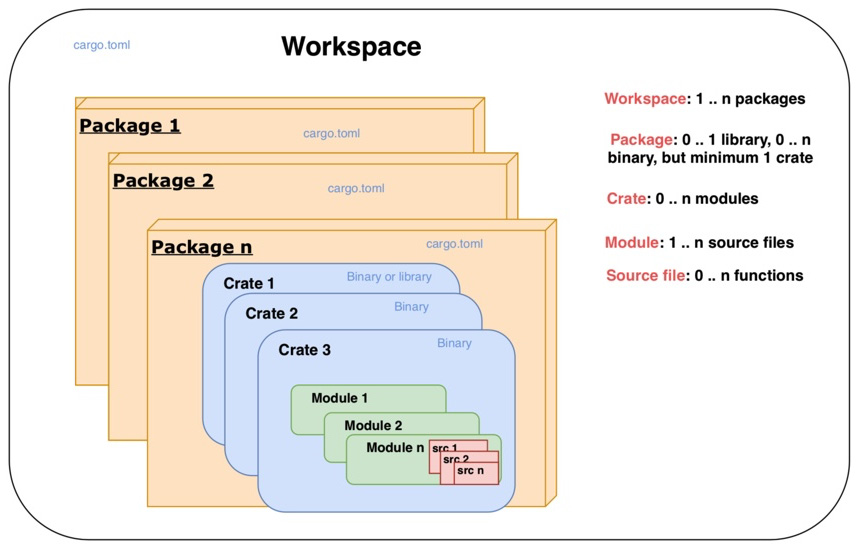
The distinction matters because src/lib.rs and src/main.rs are compiled as separate crates, even though they live in the same package. The binary can use the library’s public API, but it cannot reach into the library’s private implementation details.
This is the boundary we want:
Library crate: src/lib.rs |
Binary crate: src/main.rs |
|---|---|
| Player domain types and reusable operations | Starts the program |
| Eventually, asynchronous player APIs and task coordination | Eventually, configures Tokio, logging, CLI/UI integration |
| Unit tests for core behavior | Thin composition layer |
No required main function |
Must contain fn main() |
A useful rule is: put behavior you may want to test or reuse in the library; keep process startup in the binary.
Package Layout - The Cargo Book
Read Cargo’s official “Package Layout” page to see how directory names conventionally become targets, examples, tests, and benchmarks.
Read the full “Package Layout” section, beginning with its directory tree. Focus especially on the conventional roles of src/lib.rs, src/main.rs, and src/bin/. Near the end, read the multi-file target convention; it will be useful once the player grows beyond a few source files.
Let Cargo infer the two targets
Cargo strongly favors convention over configuration. The standard layout already tells Cargo what to build:
media-player/
├── Cargo.toml
├── Cargo.lock
└── src/
    ├── lib.rs
    └── main.rs
With these files present:
src/lib.rsbecomes the package’s library target.src/main.rsbecomes its default binary target.- Cargo derives the binary name from the package name.
- Cargo derives the library crate name from the package name, replacing hyphens with underscores.
That last point is worth noticing. If your package is named media-player, the library is imported in Rust code as media_player.
You normally do not need to add [lib] or [[bin]] entries to Cargo.toml for this standard layout. Creating the correctly named files is the configuration.
Cargo Targets - The Cargo Book
Read the official target reference to connect the file layout to Cargo’s compilation model, especially the fact that a package’s binary can use its own library’s public API.
In “Cargo Targets,” read the introductory discussion and then the “Library” and “Binaries” subsections in full. Keep the distinction made in the binary definition in mind: a binary runs, while a library exposes code for another crate to call. Then read “Target auto-discovery,” focusing on why Cargo infers targets from the standard filesystem layout and on the caution about disabling it. For this project, leave auto-discovery enabled.
Create the player package
In a terminal, create a binary package:
cargo new media-player --bin
cd media-player
Cargo creates a project resembling this:
media-player/
├── Cargo.toml
└── src/
    └── main.rs
The generated Cargo.toml identifies the package and records its Rust edition. At this stage, leave it as Cargo generated it. The package name, media-player, will be the default executable name.
Now add the library root file, src/lib.rs. Create it in your editor and give it one deliberately small public function:
// src/lib.rs

/// Returns a small status string from the reusable player library.
pub fn player_banner() -> &'static str {
    "media player core ready"
}
The keyword pub is essential. It makes this function part of the library crate’s public API. Without pub, code in main.rs could not call it, because main.rs is a different crate.
Now replace the generated contents of src/main.rs:
// src/main.rs

fn main() {
    println!("{}", media_player::player_banner());
}
Your package now has the intended structure:
media-player/
├── Cargo.toml
└── src/
    ├── lib.rs       # library crate root: reusable player code
    └── main.rs      # binary crate root: executable entry point
Run it:
cargo run
Cargo compiles the library, compiles the binary that depends on it, and runs the resulting executable. You should see:
media player core ready
Also run:
cargo check
cargo test
cargo check verifies that the code type-checks without producing a final executable. It is typically a fast feedback command during development. cargo test builds and runs tests; it will become more meaningful once the library acquires player behavior and unit tests.
What the binary is allowed to see
The important design fact is not merely that main.rs can call library code. It can call only the library API that you intentionally expose.
For example, imagine a later library layout:
src/
├── lib.rs
├── player.rs
├── manifest.rs
└── network.rs
lib.rs may declare internal modules and decide which types or functions are public:
// src/lib.rs

mod player;

pub use player::Player;
The binary would then be able to write:
use media_player::Player;
It would not automatically gain access to every helper in player.rs. That limitation is useful: it prevents the executable layer from becoming tightly coupled to internal details that may change when you later introduce HTTP fetching, DASH parsing, decoders, and Tokio tasks.
For now, do not create placeholder modules just to mirror future subsystems. Keep the library root small until there is real behavior to organize. The central decision today is the crate boundary, not the final module tree.
When explicit target configuration is appropriate
Cargo also supports explicit target declarations in Cargo.toml:
[lib]configures the single permitted library target.[[bin]]configures a binary target.- The double brackets indicate that a package may have multiple binary target declarations.
You need this only when you depart from the conventional paths, want special target settings, or add executables whose locations do not follow Cargo’s normal layout.
For example, Cargo automatically discovers a second executable placed here:
src/bin/inspect_manifest.rs
You could run it with:
cargo run --bin inspect_manifest
Such a utility can still import media_player and exercise the same library code. Later in the project, a small inspection or debugging tool may be useful, but it does not justify a second package now.
Avoid manually configuring targets merely to restate the standard src/lib.rs and src/main.rs layout. Convention is clearer, requires less manifest maintenance, and is what most Rust developers expect when they open a package.
A design decision that pays off during async work
It may be tempting later to place #[tokio::main] on the only main function and implement the whole player underneath it. That structure makes it difficult to test player logic independently of process startup and encourages unrelated concerns to accumulate in one crate root.
Instead, retain this division:
- The binary crate owns application startup. In later modules, it can initialize the Tokio runtime, read configuration, and invoke the library.
- The library crate owns the player’s APIs, state, asynchronous operations, and internal modules.
- Both targets use the dependencies declared once in the package’s
Cargo.toml.
This does not mean that every library function must be asynchronous. The library will contain both ordinary Rust code and async APIs. The boundary is about responsibility, not whether a function happens to use async.
Before moving on, verify these concrete facts in your project:
- Both
src/lib.rsandsrc/main.rsexist. cargo runsucceeds.main.rscalls apubitem through themedia_playerlibrary crate name.- No
[lib]or[[bin]]configuration was necessary for the conventional layout.
You now have a clean Cargo foundation: one package, one reusable library crate, and one executable binary crate. Cargo discovers both targets from the filesystem, and the binary talks to the library only through its public API.
Next, we will examine ownership transfers and drop points—the rules that determine when values move, when resources are released, and why those details become especially important once futures and tasks begin to own player state.