Recommended resources
The freely available resources this lesson will direct you to.
Hello! This course begins with the C++ tools you will use to express interview solutions, then moves into problem-solving patterns and broader software-engineering topics. In this first module, the aim is to write code whose behavior you can explain and whose boundaries you can trust.
Today you will work with std::vector and std::string: creating them, accessing and changing elements, traversing them, and removing elements safely. The central question is simple but important: which positions still exist after an operation changes the sequence?
A vector has elements, not just storage
A std::vector<int> is an ordered sequence of integers that can grow or shrink. Its size is the number of elements currently in the sequence. Its capacity is how many elements its allocated storage can accommodate before it needs more space. Capacity is an implementation detail you may inspect, but it does not give you extra elements to access.
Start with this short demonstration. You do not need to know how C++ templates are implemented; for now, the type inside std::vector<...> tells the vector what kind of elements it holds.
Dynamic Arrays in C++ (std::vector)
Watch “Dynamic Arrays in C++ (std::vector)” by The Cherno for a concrete introduction to creating, growing, accessing, and erasing a vector.
Watch the basic model for why a vector differs from a fixed-size array. Then watch its declaration and common operations, focusing on push_back, size(), indexing, and loops. Finally, clear and erase shows why erase needs a position represented by an iterator rather than an integer index.
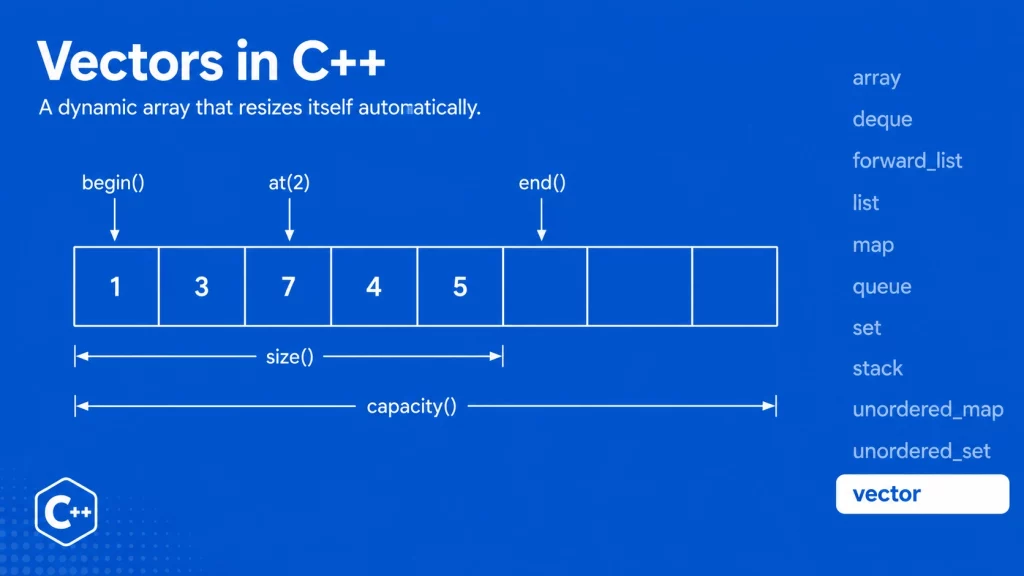
In the diagram, valid element indices are 0 through 4. Index 5 is not made valid by the extra capacity. Likewise, end() is a useful boundary for a traversal, not an element to dereference. If the vector is empty, begin() and end() are equal.
For a compact reference, use the following portions of cppreference rather than trying to read its entire function directory.
std::vector - cppreference.com
Read cppreference’s “std::vector” page to connect the visual model to the operations available in C++.
In the opening description, read contiguous storage. Then, under “Member functions,” scan “Element access” from the at entry through back: access methods. Continue through “Iterators,” “Capacity,” and “Modifiers,” concentrating on begin, end, empty, size, capacity, clear, erase, push_back, and pop_back: size and changes. Use the directory to locate operations, not to memorize every entry.
Writing within the boundaries
Here is a small, complete C++17 program. The comments describe the state after each operation.
#include <cstddef>
#include <iostream>
#include <vector>

int main() {
    std::vector<int> values{8, 4, 5};

    values.push_back(9);       // {8, 4, 5, 9}
    values[1] = 7;             // {8, 7, 5, 9}

    for (std::size_t i = 0; i < values.size(); ++i) {
        std::cout << values[i] << ' ';
    }
    std::cout << '\n';

    if (!values.empty()) {
        std::cout << values.front() << ' ' << values.back() << '\n';
        values.pop_back();     // {8, 7, 5}
    }

    const std::size_t k = 1;
    if (k < values.size()) {
        values.erase(values.begin() + k);  // {8, 5}
    }
}
The indexed loop uses i < values.size(), not i <= values.size(): when i equals the size, it has passed the last element. If you do not need the index, a range-based loop is shorter and avoids that particular mistake:
for (int value : values) {
    std::cout << value << ' ';
}
Use values[i] only when you have established that i is a valid index. values.at(i) performs a bounds check and throws std::out_of_range for an invalid index; values[i] does not perform that check, and out-of-range access has undefined behavior. Neither front(), back(), nor pop_back() should be used on an empty vector. The empty() guard above handles all three.
The erase call illustrates a different kind of boundary. values.erase(values.begin() + k) removes the element at index k, so the guard must establish that k is less than values.size(). To remove a range, values.erase(values.begin() + first, values.begin() + last) uses a half-open interval: it removes first but not last. That form is valid when first is no greater than last, and last is no greater than the size.
One easy-to-miss distinction is that std::vector<int> values(5) creates five integers, whereas values.reserve(5) on an empty vector only sets aside storage; its size remains zero. Reserving space does not authorize values[0].
A string is a sequence of characters
std::string supports many of the same habits: check size() or empty(), use an index only for an existing character, and guard front(), back(), and pop_back() when the string might be empty. String-specific tasks also commonly involve appending text, finding a character or substring, and extracting a portion.
The cppreference page calls the underlying type std::basic_string; std::string is its familiar character-string form. Focus on the everyday operations rather than the full list of variants.
std::basic_string - cppreference.com
Read the relevant parts of cppreference’s “std::basic_string” page as a reference for ordinary std::string operations.
Under “Member functions,” scan “Element access” from at through back: character access. Then use the subsections “Capacity,” “Modifiers,” “Search,” and “Operations” to locate empty, size, push_back, pop_back, append or operator+=, erase, find, and substr: string operations. Pay particular attention to the distinct purposes of find and substr.
Suppose a prompt gives you a label such as "role:engineer" and asks for the text after the colon. find supplies a position if it succeeds; if it fails, it returns std::string::npos. Check that result before using it as an index or adding one to it:
#include <string>

std::string label = "role:engineer";
std::string role;

const auto colon = label.find(':');
if (colon != std::string::npos) {
    role = label.substr(colon + 1);  // "engineer"
}
substr(start, count) returns up to count characters beginning at start; with no count, it returns the remainder. If the colon is the final character, substr(colon + 1) correctly returns an empty string. If there is no colon, the if prevents an invalid assumption about the result of find.
These modifications affect the string itself:
std::string word = "code";
word.push_back('r');  // "coder"
word += "s";           // "coders"
word.erase(4, 1);      // "codes": remove one character at index 4

if (!word.empty()) {
    word.pop_back();   // "code"
}
Notice the different arguments: word.erase(4, 1) takes a starting index and character count, while the vector example’s erase takes an iterator. The similarly named operations are not interchangeable. For ordinary character traversal, for (char ch : word) avoids manual indexing; use an indexed loop when you need to know or change a character’s position.
When a position stops being valid
An index is meaningful relative to the sequence’s current size and contents. An iterator represents a position in a particular state of a container. After insertion or removal, an iterator you saved earlier may no longer identify a valid position—even if the program appears to run normally in a quick test.
Watch the vector reallocation illustration, then compare it with cppreference’s more precise rules.
STL C++ Iterators - Iterator Invalidation | Modern Cpp Series Ep. 140
Watch the opening illustration in Mike Shah’s “STL C++ Iterators - Iterator Invalidation” to see why keeping an iterator across vector growth is risky.
From the vector illustration, follow what happens to a saved iterator and saved end() when push_back requires new storage. Focus on the old positions becoming unusable after reallocation. The precise rules depend on the operation, so use the reference table next rather than assuming every change has identical effects.
std::vector - cppreference.com
Return to cppreference’s “std::vector” page for the exact invalidation rules behind safe vector edits.
Find the “Iterator invalidation” table, just below “Specializations.” Scan the operation table, concentrating on push_back, erase, and pop_back. For push_back, distinguish the case where capacity changes from the case where it does not; for erase, note that the erased position and positions after it, including the old end(), are invalidated.
The practical rule for interview code is: do not keep using an old iterator, reference, or saved end() without checking what a modification invalidates. push_back can invalidate every vector iterator if it reallocates. erase invalidates iterators at and after the erased position. Even without reallocation, appending changes which position is end().
When removing selected elements during an iterator loop, use the new iterator returned by erase. This example removes negative integers:
std::vector<int> values{3, -1, 4, -2};

for (auto it = values.begin(); it != values.end(); ) {
    if (*it < 0) {
        it = values.erase(it);  // Next surviving element, or end()
    } else {
        ++it;
    }
}
// values is {3, 4}
There is deliberately no ++it in the loop header. After an erasure, incrementing the old iterator would use an invalid position and might also skip the element shifted into its place. In the other branch, no erasure occurred, so incrementing is appropriate. The loop checks the current values.end() each time rather than retaining an end iterator from before the edits.
Strings deserve the same caution when their length changes. A saved pointer, reference, or iterator into a string may be invalidated by operations such as appending or erasing. For straightforward string edits, it is often clearer to work with indices, check them against the current size, and search again after a change if the intended position may have moved.
Takeaways
For both vectors and strings, treat size() as the boundary of actual elements, check for emptiness before accessing or removing the last element, and use range-based loops when you do not need positions. Prefer at() when bounds checking is useful; use [] only with a valid element index. When you modify a sequence, reconsider every position you saved—particularly iterators and end()—and use erase’s returned iterator when removing vector elements inside a loop.
Next, you will apply standard algorithms such as sort, reverse, and lower_bound to vectors, building on the same understanding of valid iterator ranges.